


惯性聚合 高效追踪和阅读你感兴趣的博客、新闻、科技资讯
阅读原文 在惯性聚合中打开

推荐订阅源

小众软件
小众软件
IT之家
IT之家
钛媒体:引领未来商业与生活新知
钛媒体:引领未来商业与生活新知
Security Archives - TechRepublic
P
Proofpoint News Feed
C
CERT Recently Published Vulnerability Notes
阮一峰的网络日志
阮一峰的网络日志
OSCHINA 社区最新新闻
OSCHINA 社区最新新闻
The Cloudflare Blog
P
Palo Alto Networks Blog
Know Your Adversary
Know Your Adversary
D
Darknet – Hacking Tools, Hacker News & Cyber Security
Cisco Talos Blog
Cisco Talos Blog
L
Lohrmann on Cybersecurity
AWS News Blog
AWS News Blog
J
Java Code Geeks
博客园_首页
Scott Helme
Scott Helme
WordPress大学
WordPress大学
有赞技术团队
有赞技术团队
T
The Exploit Database - CXSecurity.com
Security Latest
Security Latest
V
Visual Studio Blog
Cloudbric
Cloudbric
Jina AI
Jina AI
K
KPMG report finds enterprise disconnect between AI and its ROI | CIO
博客园 - 叶小钗
Apple Machine Learning Research
博客园 - 聂微东
人人都是产品经理
人人都是产品经理
A
Arctic Wolf
C
Cybersecurity and Infrastructure Security Agency CISA
S
SegmentFault 最新的问题
The Last Watchdog
The Last Watchdog
SecWiki News
SecWiki News
cs.CV updates on arXiv.org
W
WeLiveSecurity
K
Kaspersky official blog
让小产品的独立变现更简单 - ezindie.com
Hacker News: Ask HN
Hacker News: Ask HN
cs.CL updates on arXiv.org
freeCodeCamp Programming Tutorials: Python, JavaScript, Git & More
宝玉的分享
宝玉的分享
Hugging Face - Blog
Hugging Face - Blog
量子位
Google Online Security Blog
博客园 - Franky
Simon Willison's Weblog
博客园 - 三生石上(FineUI控件)
Recent Commits to openclaw:main

Hacker News - Newest: "AI"

AI can't read an investor deck AI as an attorney? Student uses ChatGPT, Gemini to sue UW over alleged racial discrimination Hacking MCP Servers in AI Systems – The Rug Pull: Tool Changes After Approval GitHub - MeepCastana/KubeezCut: Free Web based video editor GitHub - GenAI-Gurus/awesome-eu-ai-act: Curated tools, official sources, OSS, templates, and guides for EU AI Act compliance. Can AI judge journalism? A Thiel-backed startup says yes, even if it risks chilling whistleblowers Coming soon: 10 Things That Matter in AI Right Now DARPA built an AI to fact-check enemy weapons claims What explains heterogeneity in AI adoption? When AI Meets Muscle: Context-Aware Electrical Stimulation Promises a New Way to Guide Human Movements - Department of Computer Science AI Changed How We Build. It Did Not Change What Matters. Linux rules on using AI-generated code - Copilot is OK, but humans must take 'full responsibility for the… Meta spins up AI version of Mark Zuckerberg to engage with employees Code Mode: Let Your AI Write Programs, Not Just Call Tools | TanStack Blog GitHub - Delavalom/graft: Go framework for building AI agents. Type-safe tools, multi-provider (OpenAI, Anthropic, Gemini, Bedrock), zero vendor SDKs. India's TCS tops estimates, says new AI models did not dent services demand Gen Z's fading AI hype Strong feeling: we are in a folded AI reality GitHub - machinarii/total-recall-catalog: A reference catalog of latest knowledge retrieval, memory & RAG systems GitHub - mensfeld/code-on-incus: Give each AI agent its own isolated machine with root, Docker, and systemd. Active defense detects and stops threats automatically.. Quantization, LoRA, and the 8% Problem: Benchmarking Local LLMs for Production AI Iran war: We spoke to the man making Lego-style AI videos that experts say are powerful propaganda Powell, Bessent discussed Anthropic's Mythos AI cyber threat with major U.S. banks GitHub - immartian/bellamem: Persistent belief-graph memory for AI agents. Retrieves decisive context by importance — not recency, not RAG, not /compact. recursive-mode: The Repo-Native Operating System for AI Engineering After the attack on Sam Altman's home, will AI CEO's go on the offensive? The biggest advance in AI since the LLM Opus 4.6 vs GPT 5.4 One Prompt Unity World Generation Test “AI polls” are fake polls Client Challenge Can AI be a 'child of God'? Inside Anthropic's meeting with Christian leaders How to Switch AI Chatbots and Why You Might Want To GitHub - MattMessinger1/agentic_refund_guardrail: Safe refund policy layer for AI agents — Python + TypeScript. Same behavior, shared tests. Adam/papers/emergent_values_whitepaper.md at master · strangeadvancedmarketing/Adam Ask HN: How do you stop playing 20 questions with your AI coding tools How far can automation and AI support psychotherapy? - @theU GitHub - stagas/rtdiff: realtime git diff gui and AI-assisted commits A Mac Studio for Local AI — 6 Months Later A History of the Early Years of AI at the University of Edinburgh Why AI Coding Tools Still Feel Stuck on Localhost MSN AI Datacenters Are Becoming Strategic Targets twitter.com Penn Researchers Use AI to Surface Unreported GLP-1 Side Effects in Reddit Posts Show HN: MoodSense AI (ML and FastAPI and Gradio, Deployed on Hugging Face) Moodsense Ai - a Hugging Face Space by aman179102 AI models are terrible at betting on soccer—especially xAI Grok GitHub - xialeistudio/echoic GitHub - HimashaHerath/github-dev-wrapped: AI-powered weekly GitHub activity reports deployed to GitHub Pages GitHub - alejandrobalderas/claude-code-from-source: Architecture, patterns & internals of Anthropic's AI coding agent — reverse-engineered from source maps AI and Tech brief: Ireland ascendant GitHub - Titovilal/context0: Context0 - Never Surrender Training for a Marathon with an AI Coach: What Worked and What Didn't Cyber Pulse: Agentic Intel - Apps on Google Play I Built an AI PR Reviewer That Catches Bugs by Not Looking for Bugs Gen Z workers are so fearful AI will take their job they’re intentionally sabotaging their company’s AI rollout | Fortune How AI Is Reimagining the Game of Golf–For Both Players and Courses GitHub - nattergabriel/reseed: A CLI tool for managing and distributing agent skills across projects Is SVG the final frontier? My AI workflow evolved from prompts to a near-autonomous workflow MLSharp Help - 3DGS Viewer & Generator I put my cognitive field based AI's runtime on GitHub Is Numble the first AI-proof game? A3: Kubernetes for autonomous AI agent fleets | Emergent Principles Deepali Vyas ("The Elite Recruiter") GitHub - msmarkgu/RelayFreeLLM: A restful API designed to route user prompts to various AI model providers. Unionized ProPublica staff are on strike over AI, layoffs, and wages Unleashing the Advantage of Quantum AI We're heading for an AI-fueled 'dementia crisis,' brain scientist warns The AI-Assisted Breach of Mexico's Government Infrastructure [pdf] GitHub - stef41/lmscan: 🔍 Detect AI-generated text and fingerprint which LLM wrote it. Open-source GPTZero alternative. Zero dependencies, works offline. MSN GitHub - visionscaper/collabmem: Enabling long-term collaboration with Agentic AI - building up episodic and world model memory over time with in-context awareness We gave an AI a 3 year retail lease in SF and asked it to make a profit | Andon Labs AI Code is Hollowing Out Open Source, and Maintainers are Looking the Other Way What leaked "SteamGPT" files could mean for the PC gaming platform's use of AI AI is the boss at this retail store. What could go wrong? GitHub - Wuzu11517/agentic-proxy: Local proxy meant to help reduce With Drones, Geophysics and ArtificiaI Intelligence, Researchers Prepare to Do Battle Against Land Mines A Single Operator, Two AI Platforms, Nine Government Agencies: The Full Technical Report 在 Steam 上购买 FriedrichAI: Offline AI 立省 10% GitHub - inevolin/resume-cli: Hit Claude usage limits? Resume any AI coding session elsewhere. Switch tools at zero friction. GitHub - atripati/ark: AI Runtime Kernel — a context operating system for AI agents. Eliminates tool bloat, loads only what’s needed, and gives LLMs their reasoning space back. How to Build a Secure AI PR Reviewer with Claude, GitHub Actions, and JavaScript This Startup Wants You to Pay Up to Talk With AI Versions of Human Experts Intel Arc Pro B70 Brings 32GB VRAM to Local AI for $949 WordPress 7.0: The Good, the AI, and the Still Missing AI on the couch: Anthropic gives Claude 20 hours of psychiatry IatroBench: Pre-Registered Evidence of Iatrogenic Harm from AI Safety Measures AI Agents Know About Supabase. They Don't Always Use It Right. The history and future of AI at Google, with Sundar Pichai Inside an AI‑enabled device code phishing campaign How Meta Used AI to Map Tribal Knowledge in Large-Scale Data Pipelines AI for Systems: Using LLMs to Optimize Database Query Execution Forecasting the Economic Effects of AI Introducing Tinker: Play with AI, bring your ideas to life AI sheds light on an ancient gaming mystery People really hate AI but not as much as Iran—or Democrats | Fortune What is an AI Product Engineer? Phoebe Gates wants her $185 million AI startup to succeed with 'no ties to my privilege or my last name': 'I have a chip on my shoulder' | Fortune
CodeBurn - See where your AI coding tokens go
AgentSeal · 2026-05-30 · via Hacker News - Newest: "AI"

A real-data breakdown of where the money actually goes — measured, not estimated.

Over the last 30 days I spent $7,890 across 105,718 AI coding API calls. I assumed most of that was the models writing code. It was not. Only 47.9% of my spend went to actually producing code. The rest went to exploring codebases, debugging, delegating to subagents, and plain back-and-forth conversation.

I only know this because I built a tool to measure it. CodeBurn is a CLI that reads your AI coding session data directly from disk and classifies every API call into one of 13 task categories. No API keys, no wrappers, no data leaving your machine. The classification is fully deterministic — based on tool-usage patterns and message content, not an LLM — so the numbers are reproducible.

Here is where the money actually went:

Task categoryCost% of spend
Coding$3,78147.9%
Exploration$87611.1%
Delegation$7659.7%
Debugging$6958.8%
Feature Dev$6548.3%
Conversation$4625.9%
Brainstorming$2943.7%
Testing$1682.1%
Refactoring$1321.7%
Git Ops$340.4%
Build/Deploy$210.3%
Planning$4<0.1%
General$4<0.1%
Total$7,890100%

Coding is the single largest bucket, but it is still less than half. If you group everything that produces code — Coding, Feature Dev, Refactoring, and Testing — you get about 60%. Which means roughly 40% of my spend was the model thinking, not typing: reading files, reasoning about the problem, talking through approaches, and chasing bugs.

That is not waste. Exploration and debugging are real work. But it reframes what I am paying for. I was not buying a code generator. I was buying a collaborator that spends most of its budget understanding the problem before it writes a line.

npx codeburn@latest

The rest of this post walks through how CodeBurn produces numbers like these, using real screenshots from the same workflow.

The Dashboard

Run codeburn with no arguments and you get an interactive TUI dashboard. It loads the last 7 days by default. Arrow keys switch between Today, 7 Days, 30 Days, This Month, and 6 Months.
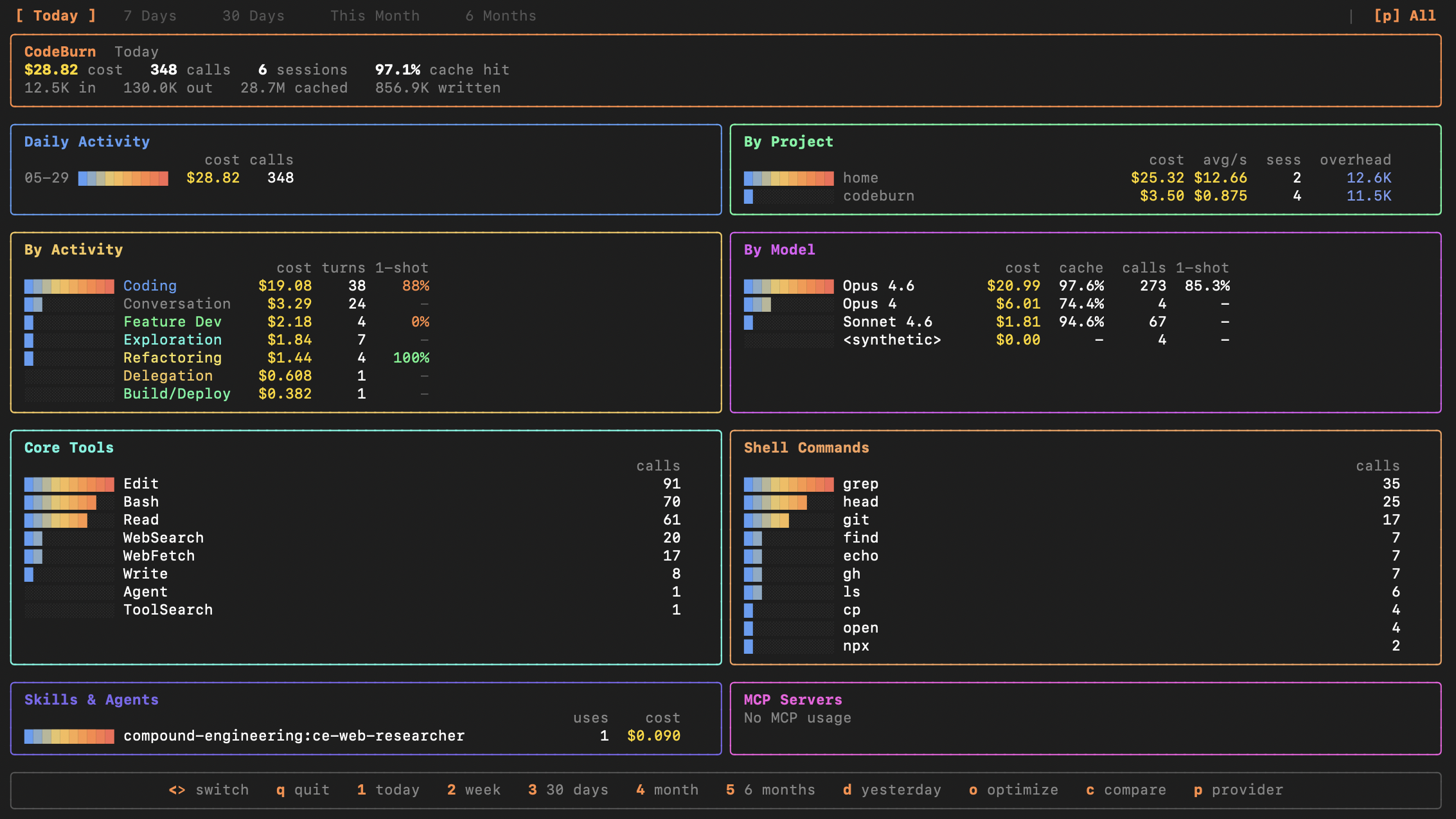
CodeBurn interactive dashboard showing daily cost, projects, models, activity breakdown, core tools, and shell commands

Everything is on one screen. Top row: total cost, number of API calls, sessions, and cache hit rate. Below that: daily cost chart, per-project breakdown with average cost-per-session, activity categories with one-shot rates, model usage, core tool distribution, and the exact shell commands your AI ran.

The activity panel is where it gets interesting. CodeBurn classifies every API call into 13 task categories based on tool usage patterns and message keywords. Coding, Conversation, Feature Dev, Exploration, Debugging, Refactoring, Testing, Delegation, Git Ops, Build/Deploy, Brainstorming, Planning, and General. The classification is fully deterministic. No LLM calls.

In the screenshot above, Coding accounts for $19.08 across 38 turns with an 88% one-shot rate. Conversation is $3.29 across 24 turns. That ratio matters. If Conversation consistently dominates your spend, you are paying for chat, not output.

Model Breakdown by Task

The models command gives you a per-model cost table. Add --by-task and it explodes each model into rows for every task type it was used for.

codeburn models --by-task
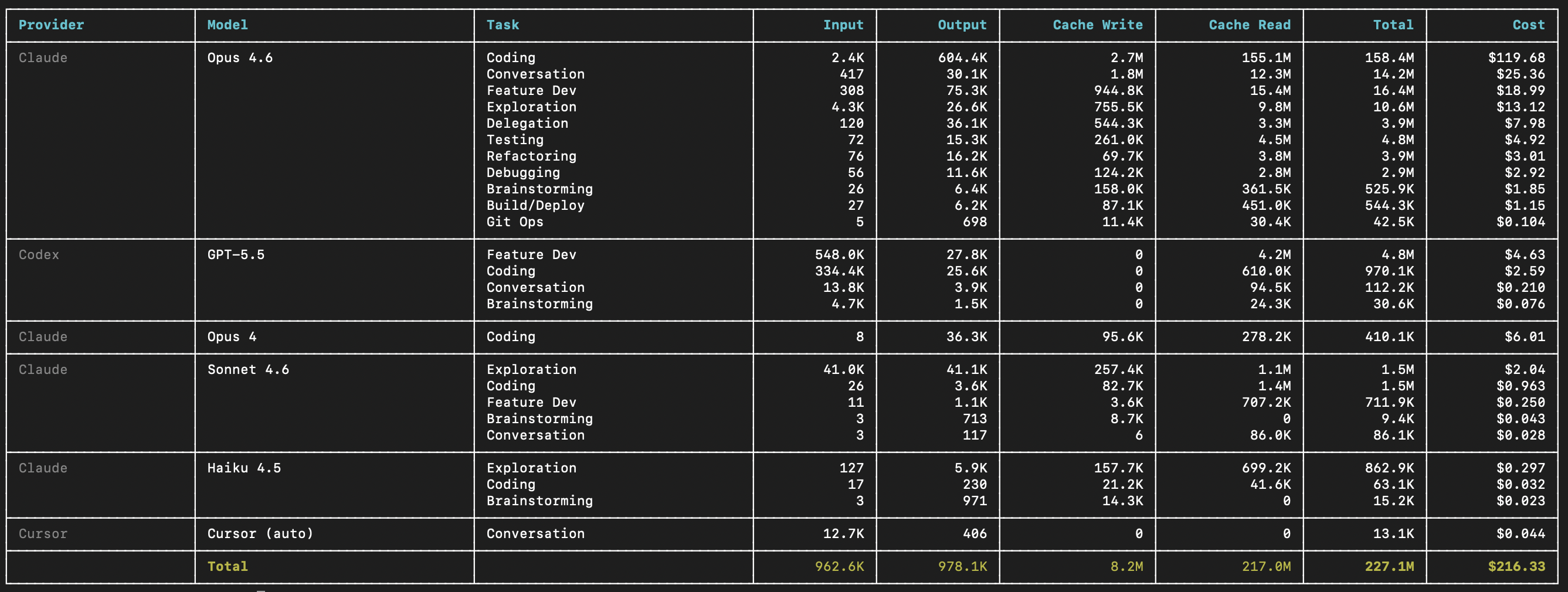
Per-model, per-task token and cost breakdown across Claude Opus 4.6, GPT-5.5, Sonnet 4.6, Haiku 4.5, and Cursor

This is real data from a 30-day window. Opus 4.6 spent $119.68 on Coding alone, with 604.4K output tokens and 155.1M cache reads. GPT-5.5 on Codex did $4.63 on Feature Dev and $2.59 on Coding. Sonnet 4.6 handled Exploration for $2.04 with 1.1M cache reads. Haiku 4.5 did lightweight Exploration at $0.297.

The table shows Input, Output, Cache Write, Cache Read, Total tokens, and Cost for every combination. You can see exactly where each model earns its keep and where it might be overkill.

codeburn models --task debugging --provider claude
codeburn models --top 5
codeburn models --format markdown

Filter by task, provider, or limit to top N. The markdown format is useful for pasting into PRs or team docs.

Waste Detection

The optimize command scans your session history and your local config for specific, fixable waste patterns. Every finding includes the estimated token and dollar savings, and a ready-to-paste fix.

codeburn optimize
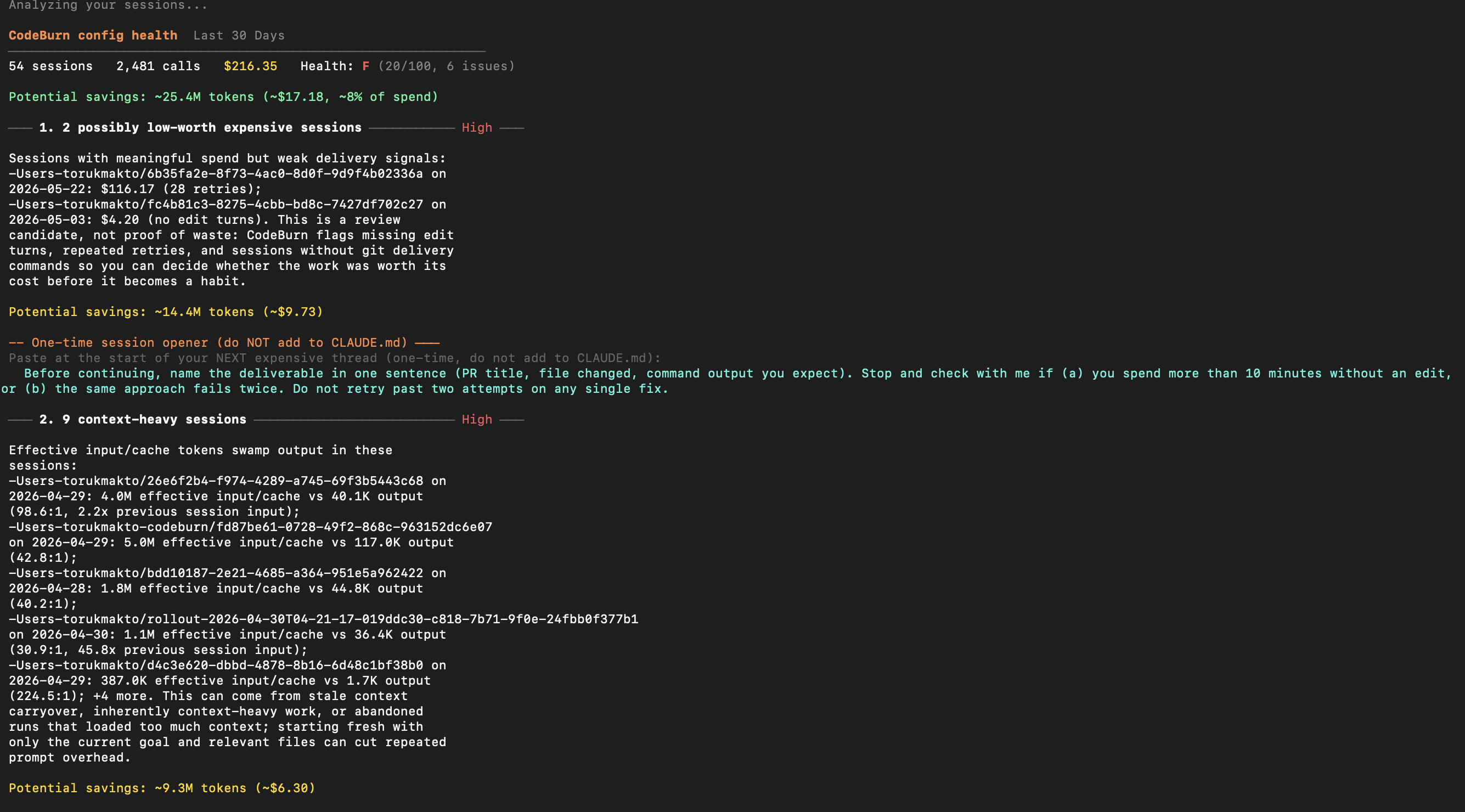
CodeBurn optimize output showing Health: F (20/100), 6 issues found, with potential savings of ~25.4M tokens (~$17.18)

This scan found 6 issues across 54 sessions and $216.35 of spend. Total potential savings: ~25.4M tokens, roughly $17.18 or 8% of the total. The setup health grade is F (20/100).

The first finding flags 2 expensive sessions with weak delivery signals. One session cost $116.17 with 28 retries. Another cost $4.20 with no edit turns at all. These are review candidates, not proof of waste. CodeBurn flags them so you can decide whether the work was worth its cost before it becomes a habit.

The second finding identifies 9 context-heavy sessions where input/cache tokens swamp output. One session had 4.0M effective input vs 40.1K output (98.6:1 ratio). That usually means stale context carryover or abandoned runs that loaded too much.

Things optimize catches:

  • Duplicate file reads across sessions. Fix: add to CLAUDE.md context.
  • Uncapped bash output. Fix: export BASH_MAX_OUTPUT_LENGTH=4096
  • Unused MCP servers. Each adds tool-schema overhead to every message.
  • Ghost agents, skills, and slash commands. Defined but never invoked.
  • Bloated CLAUDE.md files. Counted with @-import expansion.
  • Low-worth expensive sessions. High cost, no edits, no delivery.
  • Context-heavy sessions. Input:output ratio above 25:1.
  • Session outliers. Sessions costing 2x+ the project average.

Run it again after making changes. It tracks state over a 48-hour window and classifies each finding as new, improving, or resolved.

Model Comparison

The compare command puts two models side by side with performance and efficiency metrics drawn from your own usage data.

codeburn compare
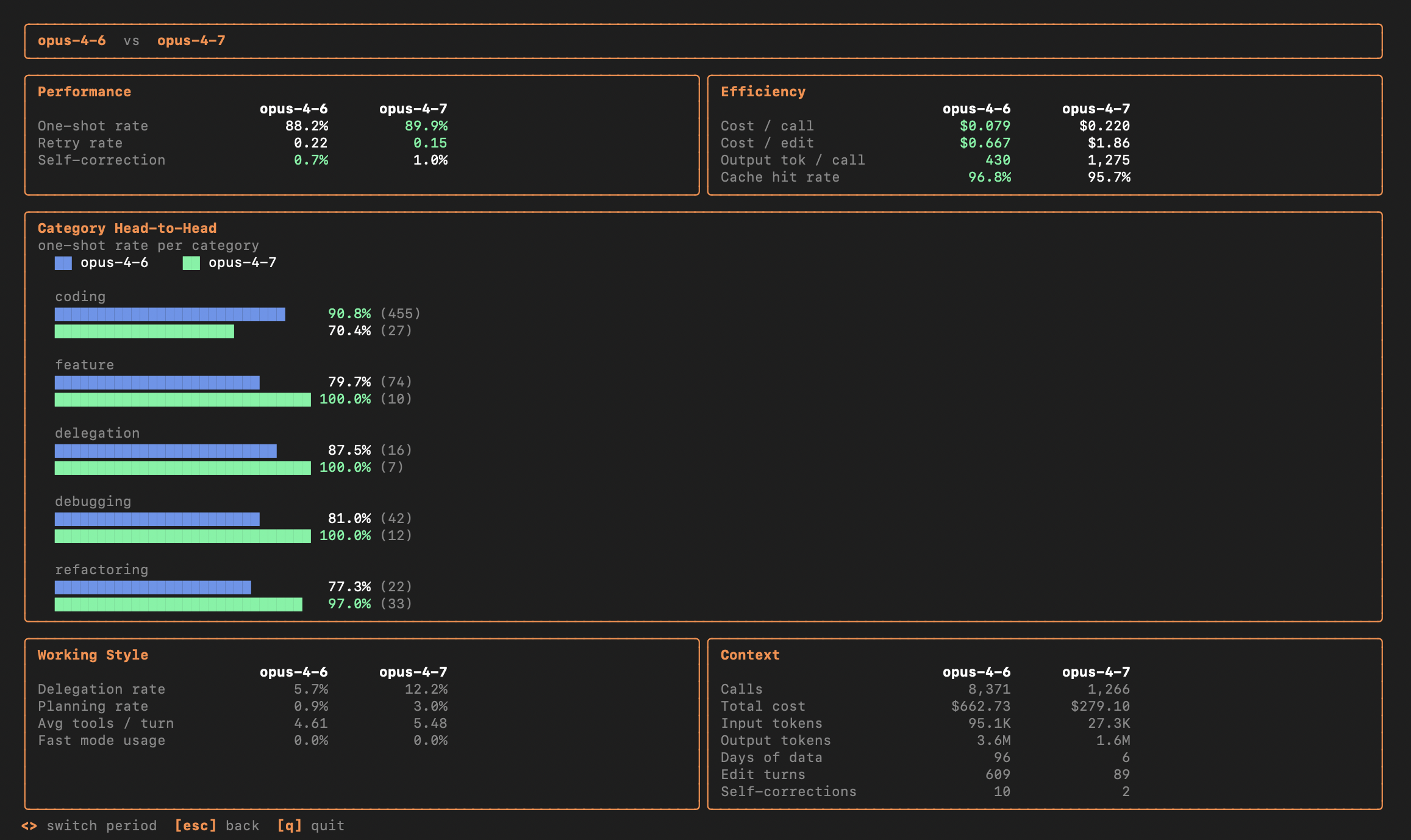
CodeBurn compare: Opus 4.6 vs Opus 4.7 showing one-shot rates, cost per edit, cache hit rates, and category head-to-head bars

This comparison shows Opus 4.6 vs Opus 4.7 from real sessions. Opus 4.6 has an 88.2% one-shot rate across 8,371 calls and $662.73 total cost. Opus 4.7 has 89.9% across 1,266 calls and $279.10.

The Category Head-to-Head breaks it down further. On coding tasks, Opus 4.6 gets 90.8% one-shot (455 turns) while Opus 4.7 gets 70.4% (27 turns). On debugging, Opus 4.7 hits 100% across 12 turns. The numbers tell a nuanced story: one model is not universally better. It depends on the task.

Working Style panel shows delegation rate, planning rate, average tools per turn, and fast mode usage. Context panel shows total calls, cost, input/output tokens, edit turns, and self-corrections.

Yield Tracking

The yield command answers the question most cost trackers ignore: did any of this code actually ship?

codeburn yield
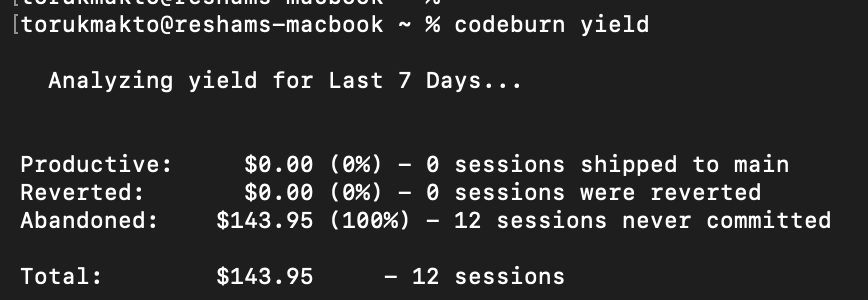
CodeBurn yield output: $0.00 Productive (0 sessions shipped to main), $143.95 Abandoned (12 sessions never committed)

It cross-references AI session timestamps with git commit history. Each session gets classified:

  • Productive: commits from this session landed in main.
  • Reverted: commits were later reverted.
  • Abandoned: no commits near the session, or commits never merged.

In this example, $143.95 across 12 sessions was classified as Abandoned. That does not mean the work was wasted. Research, prototyping, and exploration often do not produce commits. But if you see this pattern consistently, it is worth asking whether those sessions produced value or just burned tokens.

Subscription Plans

Track whether your subscription is worth the price.

codeburn plan set claude-max     # $200/month
codeburn plan set cursor-pro     # $20/month
codeburn plan set custom --monthly-usd 200 --provider codex

The dashboard shows overage tracking per provider. If you are on Claude Max at $200/month but only using $80 of API-equivalent value, you might be better off on Pro. If you are consistently hitting $300+, the subscription is saving you money.

23 Providers, Zero Config

CodeBurn auto-detects which AI coding tools you use by reading session data from their default locations on disk. No setup required.

Supported tools: Claude Code, Claude Desktop, Codex, Cursor, Gemini CLI, GitHub Copilot, Goose, Windsurf (Antigravity), Cline, Roo Code, KiloCode, OpenCode, Kiro, Kimi Code CLI, Mistral Vibe, IBM Bob, Droid, OpenClaw, Pi, OMP, Qwen, and Crush.

If you use multiple tools, press p in the dashboard to toggle between them, or use the --provider flag on any command:

codeburn today --provider claude
codeburn models --provider codex
codeburn optimize --provider cursor

Menu Bar and GNOME Extension

On macOS, codeburn menubarinstalls a native Swift app that sits in your menu bar. It shows today's spend at a glance. Click to open a popover with agent tabs, period switcher, trend and forecast data, activity breakdown, and export options. Auto-refreshes every 30 seconds.

On Linux, a GNOME Shell extension provides the same functionality in the top panel.

Export and Automation

Every view has a machine-readable output format.

codeburn report --format json          # full dashboard as JSON
codeburn status --format json          # compact today + month
codeburn export                        # CSV
codeburn export -f json                # JSON export
codeburn report --format json | jq '.projects'

The JSON output includes every panel from the dashboard: overview, daily breakdown, projects, models with token counts, activities with one-shot rates, core tools, MCP servers, and shell commands. Pipe to jq, feed into a dashboard, or build automations on top of it.

Get Started

One command. No account. No data leaves your machine.

npx codeburn@latest

Or install globally:

npm install -g codeburn
brew install codeburn

GitHub / Docs / Discord