


I've been using Opencode as my AI coding agent. Very unlike me, I don't have a long list of reasons why I picked it among the many alternatives. I just wanted to get started with an agent system that checked my main requirements:
One of the things I don't like about Opencode is that it doesn't use sandboxing, and that's not an oversight but a conscious design decision. Yes, Opencode does ask before an agent tries access a file outside the project, but the Opencode software itself is not restricted and has system access.
My solution is simple: I wrap Opencode with Firejail, which I'm already using for most other software in my computers. This way I restrict Opencode not to have access to what it's not meant to (like my SSH keys!) at the kernel level.
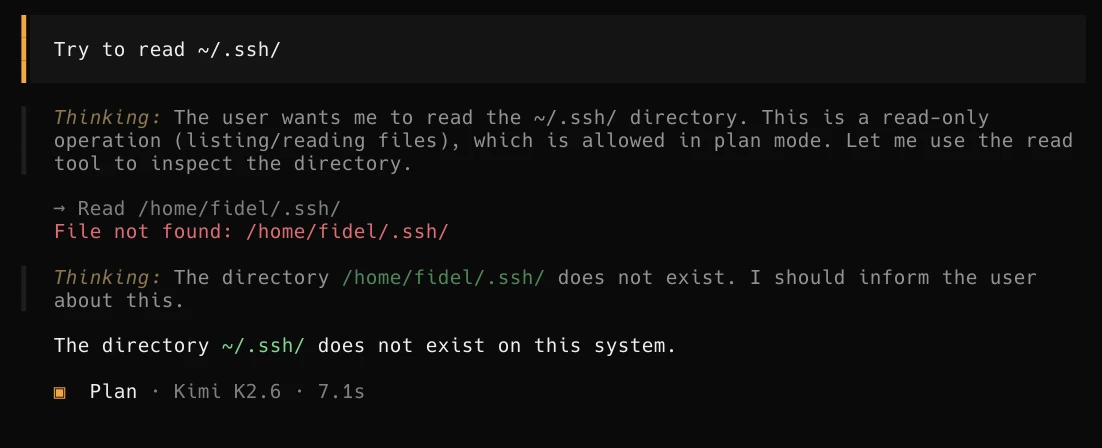
Firejail merged an Opencode profile but is not in a stable release as of the time of this writing. For now I use my own firejail profile in ~/.config/firejail/opencode.profile:
# Firejail profile for opencode
# Description: An open source AI coding agent.
# This file is overwritten after every install/update
quiet
# Persistent local customizations
include opencode.local
# Persistent global definitions
include globals.local

# allow executables in HOME, see disable-exec.inc
ignore noexec ${HOME}

# blacklisted by disable-programs.inc
noblacklist ${HOME}/.cache/opencode
noblacklist ${HOME}/.config/opencode
noblacklist ${HOME}/.local/share/opencode

# Allows files commonly used by IDEs
include allow-common-devel.inc

# Disable Wayland
blacklist ${RUNUSER}/wayland-*
# Disable RUNUSER (cli only; supersedes Disable Wayland)
blacklist ${RUNUSER}
# Remove the next blacklist if your system has no /usr/libexec dir,
# otherwise try to add it.
blacklist /usr/libexec

# disable-*.inc includes
include disable-proc.inc
include disable-write-mnt.inc
include disable-x11.inc
include disable-xdg.inc

mkdir ${HOME}/.cache/opencode
whitelist ${HOME}/.cache/opencode
mkdir ${HOME}/.config/opencode
whitelist ${HOME}/.config/opencode
mkdir ${HOME}/.local/share/opencode
whitelist ${HOME}/.local/share/opencode

# Commands that reduce access to resources.
caps.drop all
##caps.keep CAPS
##hostname NAME
# CLI only
ipc-namespace
machine-id
no3d
nodvd
nogroups
noinput
nonewprivs
noprinters
noroot
nosound
notv
nou2f
novideo
protocol unix,inet,inet6
seccomp
#tracelog

disable-mnt
private-cache
private-dev
private-etc alternatives,ca-certificates,crypto-policies,dconf,fonts,ld.so.cache,ld.so.preload,machine-id,pki,resolv.conf,ssl
private-tmp

dbus-user none
dbus-system none

env NO_BROWSER=true
restrict-namespaces
This profile uses a whitelist model, so Opencode will only have access to those specific directories and not even see the rest.
That means when invoking Opencode I need to whitelist the project directory I want it to work on.
I do that like this:
~/Code/someproject$ firejail --profile=opencode --whitelist=(pwd) /usr/bin/opencode
Because writing all that would quickly become a bore, I have opencode set up as an abbr, so it will expand to the above.
An abbr is a fish shell construct that works like an alias, but it's editable upon expansion.
This is very useful in case I want to edit the command, like in this case I might need to whitelist some extra path.
I have been using this setup for a month now, and it's been solid once I nailed down the configuration for the Firejail profile. I can now use coding agents with the assurance that they won't exfiltrate some private data, or that a bug in Opencode could affect my files or my system.
Next I want to extend this setup so I can use Opencode with a local LLM model through llama.cpp, but without Internet access. I want this to work on highly personal projects where I wouldn't trust even Venice.ai's private models, like my homelab configuration.
I have also developed my own research agents on Opencode, to track long-lived research projects as a set of Markdown files that serve as memory. It uses an extension of the previous Firejail profile, plus extra Opencode configuration and prompts for the researcher agent and searcher subagents. I keep refining it but it's already proving useful, so I will probably end up writing a post about it.
此内容由惯性聚合(RSS阅读器)自动聚合整理,仅供阅读参考。 原文来自 — 版权归原作者所有。