






The Privacy-First, Infinitely Extensible Agentic AI Platform for Mobile & Desktop
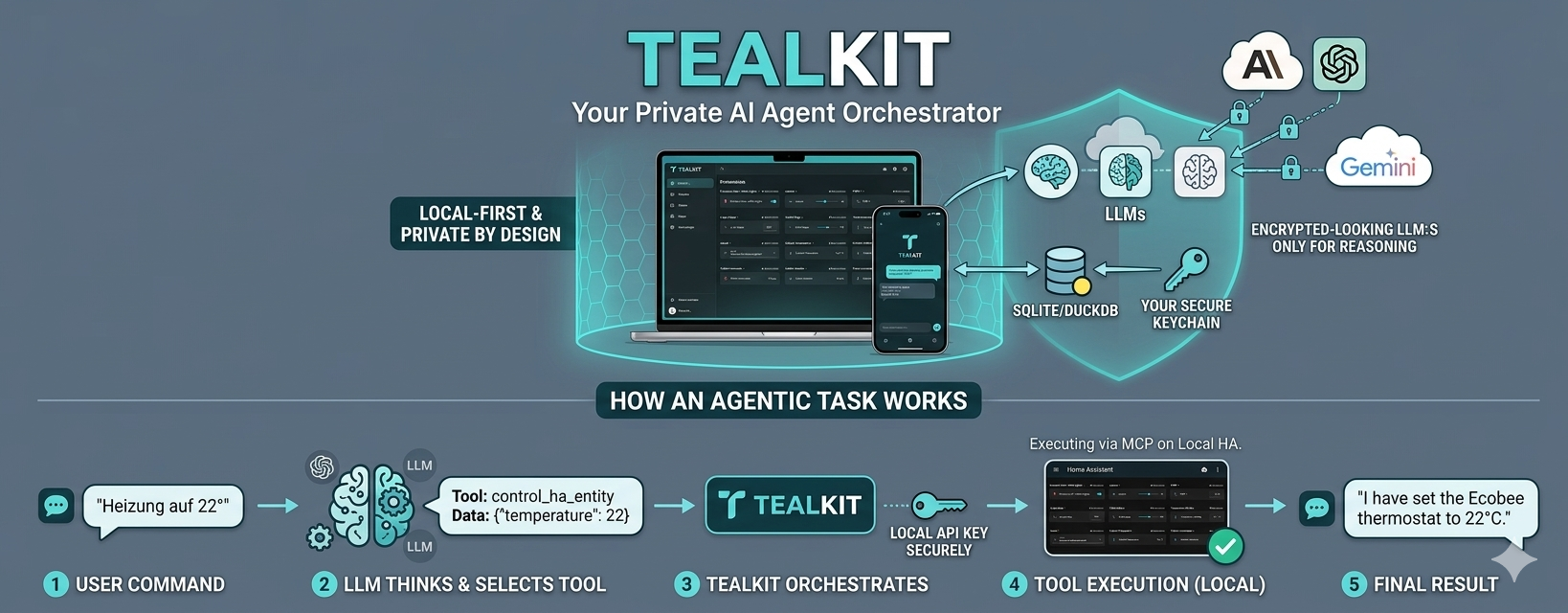
TealKit turns your phone and computer into a powerful agentic AI platform with autonomous agents, built-in tools, and unlimited extensibility. Write your own tools in JavaScript, Python, PowerShell, or Bash — or connect any MCP server — and let the AI use them autonomously. Provider-independent, fully customizable, and designed for privacy.
English User Guide | Deutsches Handbuch | Privacy Policy
🆕 What's New
- Server Mode — run the TealKit Server as a headless daemon on any always-on Linux device: an NVIDIA Jetson Nano Super, a Mac Mini M4 Pro, a Raspberry Pi, a home-lab VM, or a cheap VPS. Your phone or desktop app connects remotely via a secure API key while all scheduled tasks, automations, and pipelines run 24/7 without the app being open. The server talks to any LLM on a separate GPU-capable machine over the local network — keeps your data home and your compute yours. Ideal for Home Assistant control, server monitoring, daily report generation, or any long-running headless pipeline. A ready-to-deploy, security-hardened Docker image and a one-command setup script will be available to download and install directly on your local device — no registry login required, just download,
docker load, and run. - Embedded (on-device) models — download and run GGUF models directly on your device with zero cloud dependency, and now also fully supported inside the TealKit Server app. Browse the HuggingFace catalog or add any GGUF URL, select CPU / Partial GPU / Full GPU offloading per model, and run inference without an API key or internet connection. Best suited for formatting, translation, and summarisation in Chat Mode; tool calling requires a model trained for function calling and sufficient GPU VRAM to load it fully. Go to Settings → Embedded Models to get started.
- Advanced LLM Parameters — Top-k, top-p, repeat penalty and seed are now configurable in the global LLM Settings dialog (both LLM 1 and LLM 2 tabs) and in the per-task editor. Leave any field blank to use the provider's built-in default. Useful for fine-tuning output diversity and reproducibility — especially with local Ollama models where these parameters have a direct impact on generation quality.
- Chat Mode — A new toggle in Playground and agent settings (Basic tab) that bypasses the system prompt and all tools, forwarding your message directly to the LLM. Perfect for SLMs doing pure text work — translations, formatting, summarisation — where tool overhead adds latency without benefit.
- Agent Chaining (conditional & unconditional) — Chain agents with or without an LLM-evaluated condition. Unconditional chaining always passes the result to the next agent. Conditional chaining evaluates an expression and routes to different follow-up agents depending on the outcome. The triggering agent's output is injected at the
[task_result]placeholder in the chained agent's prompt. - Stop After Tool Call — New option in agent and Playground settings. When enabled the agent runs exactly one tool call, then stops — handing the raw tool output directly as
[task_result]to the next chained agent without any further LLM processing. Ideal for data-extraction pipelines where you want unmodified tool output to flow into a downstream agent.
🚀 Core Capabilities
🤖 AI Playground & Flexibility
- Provider Independent: Use leading providers like Google Gemini, OpenAI GPT-5, Anthropic, and Mistral.
- 🇪🇺 European Privacy & GDPR: Data sovereignty matters. TealKit works fully with Mistral AI — a European provider headquartered in France that processes all data within the EU. Ideal for users and organisations where GDPR compliance is non-negotiable. Just enter your Mistral API key and your prompts never leave European infrastructure.
- Small Language Models (SLM): Not every task needs a powerful cloud model. Run lightweight SLMs on your own hardware with Ollama, LM Studio, or any OpenAI-compatible local endpoint — zero cloud costs, zero data sharing. Or use Embedded (on-device) models to download GGUF models directly inside TealKit and run them with no external server at all (Settings → Embedded Models). Mark a model as SLM in LLM Settings to get a compact, action-focused system prompt that forces the model to call tools immediately instead of explaining its plan. For pure text tasks (translation, formatting, summarisation) enable Chat Mode to skip all tools and system prompt overhead entirely — the fastest path from prompt to response for SLMs and embedded models alike. Important: Embedded models are most practical for text tasks; agentic tool calling requires a model explicitly trained for function calling and enough GPU VRAM (dedicated GPU such as Apple Silicon, Snapdragon 8 Elite, or a discrete GPU) to load the full model — without GPU acceleration, inference on a 3 B+ model can take minutes per response.
- Dual-LLM Setup: Configure a secondary LLM (LLM 2) — for example a fast SLM for code tasks — and switch between them directly in the Playground with the LLM 1 / LLM 2 selector. Every model behaves differently; use the Playground to compare prompts across models and find the best fit for each task before automating it.
- Local Intelligence: Support for Ollama models for 100% offline processing.
- Full Customization: Tweak model parameters per task and keep token costs predictable.
- Chat-to-Task: Test ideas in the chat interface before promoting them to automated tasks.
- Auto System Prompt: Select tools and TealKit automatically generates a tailored system prompt via AI — editable before you start.
🛠 Built-in AI Skills
- Document Intelligence: Local RAG using DuckDB. Index PDFs, Word, and Excel files for instant semantic search across your device.
- Digital Office: Deep integration with Gmail and Google Calendar (free) + Google Drive (Pro) + universal IMAP/SMTP support.
- Content & Visualization: Generate files (TXT, PDF, Excel) and create Mermaid diagrams/flowcharts from any data.
- Web Search & Indexing: Perform live searches via SerpApi or DuckDuckGo, and crawl websites for local indexing.
- Remote Management: Manage servers via SSH on all platforms. On Desktop, generate and execute Bash scripts locally (Linux/macOS) or PowerShell scripts (Windows).
⚙️ Agentic Workflows & Automation
- Autonomous Execution: Schedule cron-based tasks that run in the background, even when the app is closed.
- Agent Chaining: Build multi-agent pipelines — with or without conditions. Chain agents unconditionally to always pass results forward, or add an LLM-evaluated condition (e.g., "If X is found, escalate, otherwise archive"). The triggering agent's output is available as
[task_result]in the chained agent's prompt. Combine with Stop After Tool Call to pass raw tool output (e.g., SSH command result, web scrape) directly to the next agent without LLM reformatting. - Multi-Channel Output: Save results to local storage, or send them via Email, Slack, or WhatsApp (with attachments).
💡 Real-World Examples
📱 All Platforms (Mobile + Desktop)
| Scenario | Tools | Overview |
|---|---|---|
| The Disk Guardian | SSH + Email | Two chained agents monitor your server autonomously. Agent 1 runs a remote shell script to check disk usage on /dev/sda1; if usage exceeds the threshold, it triggers Agent 2 — which generates a styled HTML "Disk Warning" email and sends it automatically. ▶ Watch demo |
| The Document Oracle | RAG / DuckDB | Index local technical documentation folders into an on-device DuckDB vector store. Ask a semantic question to find documents about a specific sensor — results returned as an HTML table with document name, line, and excerpt. Then extract detailed information from any result as structured Markdown. ▶ Watch demo |
| The File Monitor | SSH + Ollama | The SLM generates a shell script on the fly to check for newly uploaded files in a target folder within the last N hours. The script is validated in the playground, packaged into a scheduled agent, and runs automatically against a remote Linux server. ▶ Watch demo |
| The Assistant | Gmail + Calendar | Searches Gmail for mobile provider invoices from the current year, summarizes the costs, and automatically creates a Google Calendar entry if the total exceeds a set threshold. ▶ Watch demo |
| The Travel Planner | Weather + Web Search | Checks the 2-day weather forecast for a destination. If the average temperature exceeds 12°C, the agent searches for cheap flight and train tickets — combining forecast data with live web results in one prompt. ▶ Watch demo |
| The Smart Home Assistant | Weather + Home Assistant MCP | Fetches the 12-hour weather forecast for your location. If the average temperature is above 14°C, sets the Ecobee target range to 18–22°C; otherwise 21–23°C. Runs hourly to keep your thermostat automatically in sync with outdoor conditions. ▶ Watch demo |
| The Cost Analyst | IMAP + Excel | Searches email for this year's invoices from a mobile provider, extracts invoice line items automatically, and stores structured results in an Excel file. Runs once per month on schedule — then sends the current Excel balance by email. ▶ Watch demo |
| The Fare Scout | SerpAPI + Email | Uses web search tools via SerpAPI to find train tickets to Trieste for next weekend. Extracts and compares relevant price options, then generates a clean formatted HTML summary report. Applies a threshold rule — sends the email only if the price is below your configured budget. ▶ Watch demo |
| The News Briefing | Server Mode + MCP Registry + Email | An Android phone connects to a headless server on a cloud Linux VM (also works on Raspberry Pi, Jetson, Mac mini, or any local device). From the mobile UI, browse the GitHub MCP tool registry, download a Python website-fetcher tool, and register it into the server — no SSH, no terminal. Create an agent that fetches today's top headlines from orf.at, parses them, and delivers the result by email. Full daily news briefing, controlled from your phone. ▶ Watch demo |
| The CPU Reporter | SSH + Embedded + SFTP | Three chained agents running on embedded (phi-4-instruct Q6 on Android) and a local SLM (Ministral-3b via Ollama on Mac Mini M4 Pro) build a live server report with no cloud AI. Agent 1 runs a remote cpu_usage shell script over SSH for 20 seconds, collecting timestamped CPU samples. Agent 2 formats the raw output as a structured JSON list. Agent 3 generates an HTML line chart from the dataset and uploads the files to the Linux server via SFTP. ▶ Watch demo |
| Tealkit Headless Mode: Mobile UI + Private Cloud Server + Remote MCP Automation | Server Mode + Remote MCP + SFTP | TealKit Server runs in a private Linux mini-cloud behind a proxy while the Android app acts as the UI. A third-party remote MCP server provides weather sensor and battery data; a mobile-configured agent collects daily battery levels and uploads reports to SFTP. This demonstrates private, self-hosted automation with distributed MCP integration and a mobile-first control flow. ▶ Watch demo |
🖥 Desktop Only
🐙 GitHub Integration
| Scenario | Tools | The Workflow |
|---|---|---|
| The GitHub Reporter | GitHub MCP + FTP | Install the Node.js GitHub MCP server from GitHub in TealKit with your access token. Create a task: "Scan this repository for changes since yesterday, write a formatted summary to a text file, and upload it to an FTP server", scheduled daily at 08:00. |
🪟 Windows Administration
| Scenario | Tools | The Workflow |
|---|---|---|
| The Downloads Janitor | PowerShell + Email | Step 1 — Script: In the PowerShell Script Library, generate a script named old_files with prompt "Accept a parameter DaysOld. Scan the current user's Downloads folder for files older than DaysOld days. Output each file as: path | modified date | size in KB. Sort ascending by modified date." Step 2 — Following agent: Create an agent named old_files_alert with Following agent mode enabled and prompt "You receive a list of old files. Send an email with subject 'Old files in Downloads' and the list formatted as an HTML table." Step 3 — Main agent: Create a task using the PowerShell tool, prompt "Call old_files 30. Format the output as a Markdown list.", enable Agent Chaining with condition "list count > 10", link to following agent old_files_alert, scheduled daily at 07:00. |
🔌 Extensibility — Add Any Skill, Connect Any Service
TealKit is an open agentic platform: every capability not built-in can be added as a custom AI skill or by connecting a third-party MCP server — no boilerplate, no backend required.
Your Own AI Skills
| Skill Type | Platform | What You Can Do |
|---|---|---|
| JavaScript | All (Mobile + Desktop) | Write sandboxed custom skills directly in the app — no server, no install needed. |
| Bash / Shell Script | Desktop — Linux & macOS | Generate and run shell scripts locally; stdout/stderr feed straight back into the agent. |
| PowerShell Script | Desktop — Windows | Generate and execute PowerShell scripts for full Windows automation from a single prompt. |
| Python MCP Server | Desktop — all OS | Build complete MCP servers with the built-in editor, instant reload, and full library access. |
Syntax-highlighted code editor: All script libraries (JS, Bash, Python, PowerShell) include a full-screen code editor with syntax highlighting and one-tap expand — making it easy to review, tweak, or copy generated scripts before saving.
Connect to Existing MCP Servers
| Method | Platform | How It Works |
|---|---|---|
| Import from GitHub | Desktop | One-click install of any Node.js or Python MCP server straight from a GitHub repository URL. |
| Glama | All | Browse the Glama registry inside TealKit and connect any listed server with a single tap. |
| Smithery | All | Search the Smithery catalog directly from the app and register cloud-hosted MCP servers instantly. |
| PulseMCP | All | Discover servers from the PulseMCP directory and add them to your agent's toolset in one step. |
| Custom URL | All | Paste any MCP server URL (SSE or HTTP) to connect private or self-hosted servers. |
🆓 Free Forever vs Pro (After Trial)
TealKit includes a full trial. After the trial expires without Pro, core local/manual functionality remains free forever. Pro unlocks automation, remote integrations, advanced outputs, and premium tools.
| Feature | Free forever (after trial) | Pro |
|---|---|---|
| AI Playground chat | ✅ | ✅ |
| Manual agents with local file output | ✅ | ✅ |
| Basic local tools: File, Toolbox, JS bridge, Python bridge, PowerShell bridge | ✅ | ✅ |
| Global LLM configuration | ✅ LLM 1 only | ✅ |
| SSH server configuration | ✅ | ✅ |
| Remote MCP servers (Smithery / Glama / PulseMCP / custom URL) | — | ✅ |
| Scheduled agents & recurring background runs | — | ✅ |
| Website auto-index schedules | — | ✅ |
| Document auto-index schedules | — | ✅ |
| Email, Slack, WhatsApp and SFTP outputs | — | ✅ |
| PDF writer & generation | — | ✅ |
| Mermaid diagram PNG generator | — | ✅ |
| Excel export tool | — | ✅ |
| SFTP explorer | — | ✅ |
| Home Assistant integration | — | ✅ |
| Backup & restore vault | — | ✅ |
| Agent chaining and follow-up agents | — | ✅ |
| Save playground chat as task | — | ✅ |
No TealKit Cloud. Your private data, files, settings, and credentials remain in your device's secure storage. You choose the third-party providers you trust.
💻 Platforms
| Platform | |
|---|---|
| Android |  |
| Windows |  |
| iOS | Coming soon |
| Linux / Mac | Coming soon |
Pro Tip: Unlocking Pro on Mobile also unlocks Pro features for one linked desktop version!
✅ Now Available — Fully Offline with Embedded Models
Run TealKit without any internet connection by loading a GGUF model directly on your device — no API key required. Browse the built-in HuggingFace catalog, paste any direct GGUF download URL, choose CPU / Partial GPU / Full GPU offloading per model, and chat entirely on-device.
Go to Settings → On-device models to download and activate a model. See the Embedded Models section in the User Guide for hardware requirements and recommended models.
📖 Best Practices
See the Best Practices section in the User Guide for tips on reducing token costs, using the script wizards effectively, and choosing the right model for each task.
🖥 Multiple Server Instances for Mixed-Frequency Agents
If you run agents on very different schedules — for example a monitoring agent that fires every few minutes alongside agents that run once a day or weekly — operate them on separate TealKit Server instances (separate Docker containers).
Why this matters:
- Each server instance owns its own DuckDB database. A high-frequency agent writing metrics every few minutes will fragment and lock the database in ways that disrupt low-frequency agents that need long, consistent read windows.
- A short-cycle agent (interval < 10 min) keeps the inference engine and tool runtime warm continuously. Sharing those resources with a heavy daily pipeline causes unpredictable latency spikes and potential queue saturation.
- Isolating instances ensures a crashed or stuck high-frequency agent cannot block a critical daily report or scheduled summary.
Recommended split:
| Instance | Typical agents | Suggested schedule |
|---|---|---|
| Server A — high-frequency | System monitor, uptime checker, alert watchdog, live dashboard feed | Every 1 – 9 minutes |
| Server B — low-frequency | Daily digest, weekly report, scheduled backup, data sync | Hourly, daily, or weekly |
Each Docker container is fully independent — its own data volume, its own DuckDB state, and its own API key registered in the TealKit UI app. Upcoming in the next UI release: a built-in screen to configure and switch between multiple server instances directly from the app — each instance identified by its own API key.
Tip: Both instances can share the same Ollama / LM Studio / embedded-model endpoint if your compute host is separate. Only the TealKit Server process and its storage volume need to be duplicated — not the LLM itself.
Developed by L. Schaffer