


Terradev CLI v4.0.11
Cross-Cloud Compute Optimization Platform with Migration & Evaluation
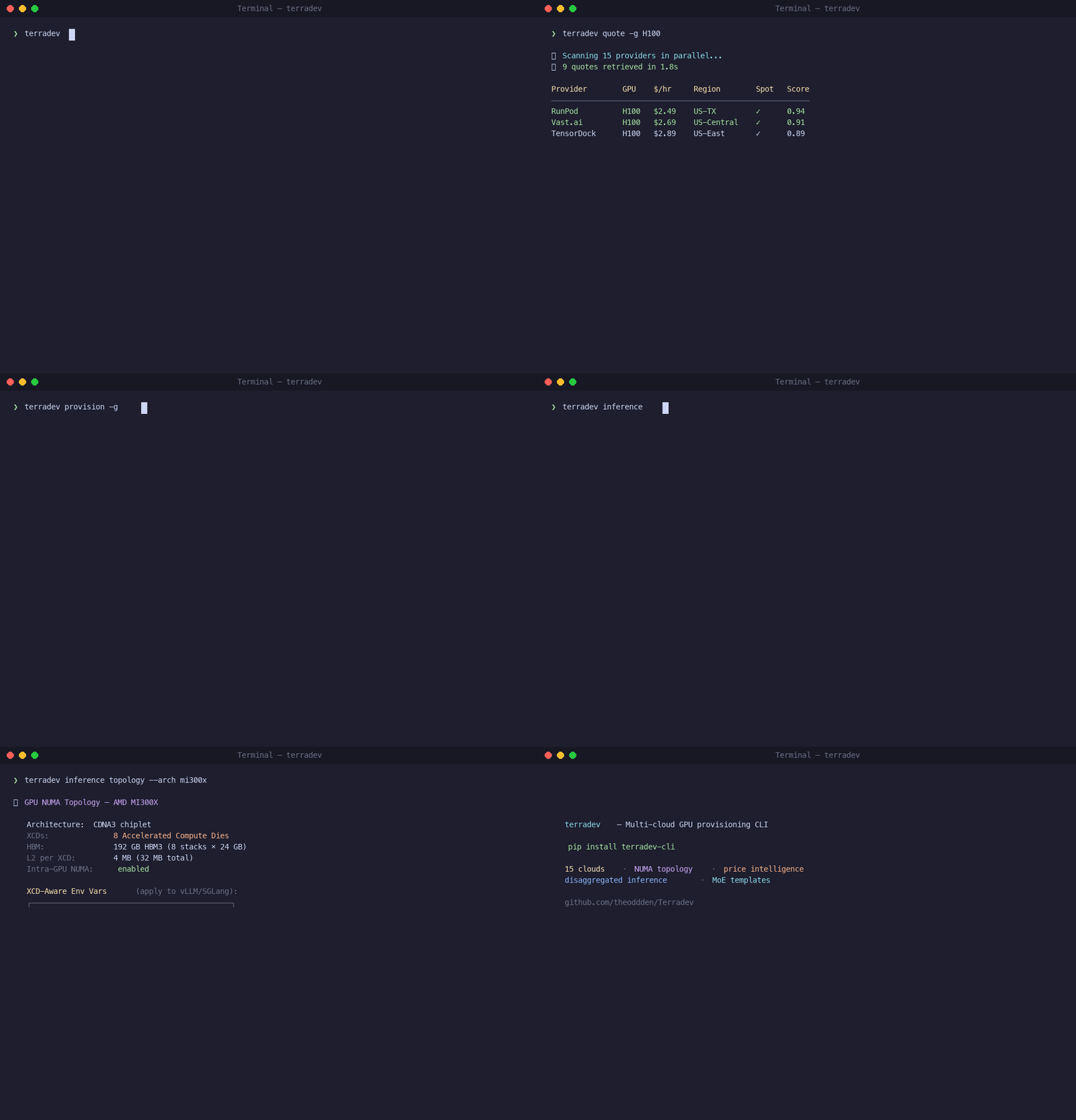
Terradev is a cross-cloud compute-provisioning CLI that compresses + stages datasets, provisions optimal instances + nodes, and deploys 3-5x faster than sequential provisioning.
What's New in v4.0.11
🎯 Production-Grade Automation: Triggers, Environments & Lineage
The three critical missing pillars that transform Terradev from a CLI tool into an enterprise-grade ML platform:
🔄 Event-Driven Triggers (terradev triggers)
- Zero-touch automation: Dataset lands → auto-train, Model drifts → auto-retrain
- Schedule-based: Cron jobs for weekly evaluations and maintenance
- Condition-based: Drift scores, performance thresholds, cost limits
- 19-Provider Support: Works across all cloud providers
- Manual override: Full control when needed
🏗️ Environment Promotion (terradev environments)
- Dev → Staging → Prod: Proper lifecycle management
- Approval workflow: Request → Approve → Execute with audit trail
- Environment isolation: Separate artifacts and configurations
- Promotion history: Complete audit trail for compliance
- Automatic lineage: Links artifacts across environments
🔍 Auto Lineage System (terradev lineage)
- Zero manual tagging: Automatic artifact tracking on every execution
- Complete provenance: Data → Model → Deployment chain
- Execution diffing: Compare any two pipeline runs
- Compliance export: JSON/CSV for auditors and regulators
- Checkpoint tracing: Work backwards from any artifact
💰 Intelligent Spot/On-Demand Selection
- Smart auto-selection: Training → on-demand, Inference → spot
- Cost transparency: Real-time savings calculations (60-80%)
- Manual override:
--spotand--on-demandflags - Safety features: Automatic state checkpointing and recovery
🔍 Model & Endpoint Evaluation (terradev eval)
- Model Evaluation:
terradev eval --model model.pth --dataset test.json - Endpoint Testing:
terradev eval --endpoint http://localhost:8000 --metrics latency - Baseline Comparison: Automatic improvement/regression detection
- A/B Model Testing: Side-by-side comparison with winner determination
- Multiple Metrics: Accuracy, perplexity, latency, throughput, cost
🎯 Complete ML Lifecycle
- Train → Eval → Deploy: Full workflow now supported
- Risk Assessment: Confidence scoring and migration warnings
- Cost Optimization: Multi-hop data transfer routing
- Production Planning: Detailed downtime and cost estimates
Previous Features (v4.0.9)
Critical Provider Bug Fixes
Fixed 6 critical bugs across 20 cloud providers:
- 🔴 Alibaba - Fixed missing
returninget_instance_quotes(prevented quotes) - 🔴 RunPod - Fixed dead code +
volume_idNameError in provisioning - 🔴 TensorDock - Fixed
info["model"]KeyError (should beinfo["v0Name"]) - 🔴 Hetzner - Fixed
quote["server_id"]KeyError (should bequote["instance_type"]) - 🔴 GCP - Fixed lambda closure bug in zone availability checking
- 🔴 CoreWeave - Fixed
$0.00pricing when no API key configured
Complete SGLang Optimization Stack (v4.0.8)
Revolutionary workload-specific auto-optimization for SGLang serving with 7 workload types:
🚀 SGLang Workload Optimizations
- Agentic/Multi-turn Chat: LPM + RadixAttention + cache-aware routing (75-90% cache hit rate)
- High-Throughput Batch: FCFS + CUDA graphs + FP8 quantization (maximum tokens/sec)
- Low-Latency/Real-Time: EAGLE3 + Spec V2 + capped concurrency (30-50% TTFT improvement)
- MoE Models: DeepEP auto + TBO/SBO + EPLB + redundant experts (up to 2x throughput)
- PD Disaggregated: Separate prefill/decode configurations with production optimizations
- Structured Output/RAG: xGrammar + FSM optimization (10x faster structured output)
- Hardware-Specific: H100/H200, H20, GB200, AMD MI300X optimizations
🎯 Auto-Apply Decision Tree
# Auto-optimize any model for workload type
terradev sglang optimize deepseek-ai/DeepSeek-V3

# Detect workload from description
terradev sglang detect meta-llama/Llama-2-7b-hf --user-description "Real-time API"

# Multi-replica cache-aware routing
terradev sglang router meta-llama/Llama-2-7b-hf --dp-size 8
📊 Performance Gains
- Agentic Chat: 1.9x throughput with multi-replica, 95-98% GPU utilization
- Batch Inference: Maximum tokens/second with pre-compiled CUDA graphs
- Low Latency: 30-50% TTFT improvement, 20-40% TPOT improvement
- MoE Models: Up to 2x throughput with Two-Batch Overlap
- Cache-Aware Routing: 3.8x higher cache hit rate
🔧 Hardware Optimization
- H100/H200: FlashInfer + FP8 KV cache optimization
- H20: FA3 + MoE→QKV→FP8 stacking + swapAB runner
- GB200 NVL72: Rack-scale TP + NUMA-aware placement
- AMD MI300X: Triton backend + ROCm EPLB tuning
What's New in v3.7.3
Performance and scalability improvements for enterprise deployments.
CUDA Graph Optimization with NUMA Awareness
Revolutionary passive CUDA Graph optimization that automatically analyzes and optimizes GPU topology for maximum graph performance:
# Automatic CUDA Graph optimization - no configuration needed
terradev provision -g H100 -n 4

# NUMA-aware endpoint selection happens automatically
# CUDA Graph compatibility is detected passively
# Warm pool prioritizes graph-compatible models
Performance Gains:
- 2-5x speedup for CUDA Graph workloads with optimal NUMA topology
- 30-50% bandwidth penalty eliminated through automatic GPU/NIC alignment
- Zero configuration - everything runs passively in the background
- Model-aware optimization - different strategies for transformers vs MoE models
NUMA Topology Intelligence
- PIX (Same PCIe Switch): Optimal for CUDA Graphs (1.0 score)
- PXB (Same Root Complex): Very good (0.8 score)
- PHB (Same NUMA Node): Good (0.6 score)
- SYS (Cross-Socket): Poor for graphs (0.3 score)
Model-Specific Optimization
- Transformers: Highest priority (0.9 base score) - benefit most from graphs
- CNNs: Moderate priority (0.7 base score) - benefit moderately
- MoE Models: Lower priority (0.4 base score) - dynamic routing challenges
- Auto-detection: Model types identified automatically from model IDs
Background Optimization
- Passive Analysis: Runs automatically every 5 minutes
- Warm Pool Enhancement: CUDA Graph models get higher priority
- Endpoint Selection: Routes to NUMA-optimal endpoints automatically
- Performance Tracking: Monitors graph capture time and replay speedup
Complete Tutorial
Step 1: Install Terradev
pip install terradev-cli
For all cloud provider SDKs and ML integrations:
pip install terradev-cli[all]
Verify and list commands:
terradev --help
Step 2: Configure Your First Cloud Provider
Terradev supports 19 GPU cloud providers. Start with one, RunPod is the fastest to set up:
terradev setup runpod --quick
This shows you where to get your API key. Then configure it:
terradev configure --provider runpod
Paste your API key when prompted. It's stored locally at ~/.terradev/credentials.json, never sent to a Terradev server. Add more providers later:
terradev configure --provider vastai
terradev configure --provider lambda_labs
terradev configure --provider aws
The more providers you configure, the better your price coverage.
Step 3: Get Real-Time GPU Prices
Check pricing across every provider you've configured:
terradev quote -g A100
Output is a table sorted cheapest-first: price/hour, provider, region, spot vs. on-demand. Try different GPUs:
terradev quote -g H100
terradev quote -g L40S
terradev quote -g RTX4090
Step 4: Provision
Most clouds hand you GPUs with suboptimal topology by default. Your GPU and NIC end up on different NUMA nodes, RDMA is disabled, and the kubelet Topology Manager is set to none. That's a 30-50% bandwidth penalty on every distributed operation and you'll never see it in nvidia-smi.
When you provision through Terradev, topology optimization is automatic:
terradev provision -g H100 -n 4 --parallel 6
What happens behind the scenes:
- NUMA alignment — GPU and NIC forced to the same NUMA node
- GPUDirect RDMA — nvidia_peermem loaded, zero-copy GPU-to-GPU transfers
- CPU pinning — static CPU manager policy, no core migration
- SR-IOV — virtual functions created per GPU for isolated RDMA paths
- NCCL tuning — InfiniBand enabled, GDR_LEVEL=PIX, GDR_READ=1
You don't configure any of this. It's applied automatically.
To preview the plan without launching:
terradev provision -g A100 -n 2 --dry-run
To set a price ceiling:
terradev provision -g A100 --max-price 2.50
Step 5: Run a Workload
Option A — Run a command on your provisioned instance:
terradev execute -i <instance-id> -c "nvidia-smi"
terradev execute -i <instance-id> -c "python train.py"
Option B — One command that provisions, deploys a container, and runs:
terradev run --gpu A100 --image pytorch/pytorch:latest -c "python train.py"Option C — Keep an inference server alive:
terradev run --gpu H100 --image vllm/vllm-openai:latest --keep-alive --port 8000
Step 6: Manage Your Instances
# See all running instances and current cost
terradev status --live

# Stop (keeps allocation)
terradev manage -i <instance-id> -a stop

# Restart
terradev manage -i <instance-id> -a start

# Terminate and release
terradev manage -i <instance-id> -a terminate
Step 7: Track Costs and Find Savings
# View spend over the last 30 days
terradev analytics --days 30

# Find cheaper alternatives for running instances
terradev optimize
Step 8: Distributed Training Pipeline
Now that your nodes have correct topology, distributed training actually runs at full bandwidth:
# Validate GPUs, NCCL, RDMA, and drivers before launching
terradev preflight

# Launch training on the nodes you just provisioned
terradev train --script train.py --from-provision latest

# Watch GPU utilization and cost in real time
terradev monitor --job my-job

# Check status
terradev train-status

# 6. List checkpoints when done
terradev checkpoint list --job my-job
The --from-provision latest flag auto-resolves IPs from your last provision command. Supports torchrun, DeepSpeed, Accelerate, and Megatron.
Step 9: Optimize vLLM Inference (The 6 Knobs)
If you're serving a model with vLLM, there are 6 settings most teams leave at defaults — each one costs throughput:
| Knob | Default | Optimized | Impact |
|---|---|---|---|
| max-num-batched-tokens | 2048 | 16384 | 8x throughput |
| gpu-memory-utilization | 0.90 | 0.95 | 5% more VRAM |
| max-num-seqs | 256/1024 | 512-2048 | Prevent queuing |
| enable-prefix-caching | OFF | ON | Free throughput win |
| enable-chunked-prefill | OFF | ON | Better prefill |
| CPU Cores | 2 + #GPUs | Optimized | Prevent starvation |
Auto-tune all six from your workload profile:
terradev vllm auto-optimize -s workload.json -m meta-llama/Llama-2-7b-hf -g 4
Or analyze a running server:
terradev vllm analyze -e http://localhost:8000
Benchmark:
terradev vllm benchmark -e http://localhost:8000 -c 10
Step 10: Deploy a MoE Model with Auto-Applied Optimizations
For large Mixture-of-Experts models (GLM-5, Qwen 3.5, DeepSeek V4), Terradev's MoE templates include every optimization auto-applied — KV cache offloading, speculative decoding, sleep mode, expert load balancing:
terradev provision --task clusters/moe-template/task.yaml \
  --set model_id=Qwen/Qwen3.5-397B-A17B
Or a smaller model:
terradev provision --task clusters/moe-template/task.yaml \
  --set model_id=Qwen/Qwen3.5-122B-A10B --set tp_size=4 --set gpu_count=4
What's auto-applied (no flags needed):
- KV cache offloading — spills to CPU DRAM, up to 9x throughput
- MTP speculative decoding — up to 2.8x faster generation
- Sleep mode — idle models hibernate to CPU RAM, 18-200x faster than cold restart
- Expert load balancing — rebalances routing at runtime
- LMCache — distributes KV cache across instances via Redis
Step 11: Disaggregated Prefill/Decode (Advanced)
This separates inference into two GPU pools optimized for each phase:
- Prefill (compute-bound) — processes input prompt, wants high FLOPS
- Decode (memory-bound) — generates tokens, wants high HBM bandwidth
The KV cache transfers between them via NIXL — zero-copy GPU-to-GPU over RDMA. This is why getting the NUMA topology right in Step 4 matters: NIXL only runs at full speed when the GPU and NIC share a PCIe switch.
terradev ml ray --deploy-pd \
  --model zai-org/GLM-5-FP8 \
  --prefill-tp 8 --decode-tp 1 --decode-dp 24
Terradev's inference router automatically uses sticky routing. Once a prefill GPU hands off a KV cache to a decode GPU, future requests with the same prefix go to that same decode GPU, avoiding redundant transfers.
Step 12: Create a Kubernetes GPU Cluster
For production, create a topology-optimized K8s cluster:
terradev k8s create my-cluster --gpu H100 --count 8 --prefer-spot
This auto-configures Karpenter NodePools with NUMA-aligned kubelet Topology Manager, GPUDirect RDMA, and PCIe locality enforcement.
# List clusters
terradev k8s list

# Get cluster info
terradev k8s info my-cluster

# Tear down
terradev k8s destroy my-cluster
Why This Order Matters
Each step builds on the one before it:
- Step 4: NUMA / RDMA / SR-IOV topology ← foundation
- Step 8: Distributed training at full BW ← depends on topology
- Step 9: vLLM knob tuning ← depends on correct memory layout
- Step 10: KV cache offloading + sleep mode ← depends on CPU bus not saturated
- Step 11: Disaggregated P/D ← depends on RDMA for KV transfer
If the provisioning layer is wrong, every optimization above it underperforms. A disaggregated P/D setup with a cross-NUMA KV transfer is slower than a monolithic setup with correct topology.
Terradev handles the foundation automatically so the rest of the stack works the way it's supposed to.
Complete Workflow Examples
Example 1: LLM Inference Service
#!/bin/bash

# Complete LLM deployment workflow

# 1. Find cheapest GPU
terradev quote -g A100 --quick
# 2. Provision with auto-optimization
terradev provision -g A100 -n 2 --parallel 4
# 3. Deploy optimized vLLM
terradev ml vllm --start --instance-ip $(terradev status --json | jq -r '.[0].ip') --model meta-llama/Llama-2-7b-hf --tp-size 2
# 4. Set up monitoring
terradev monitor --endpoint llama-api --live
# 5. Add customer adapter
terradev lora add -e http://$(terradev status --json | jq -r '.[0].ip'):8000 -n customer-a -p ./adapters/customer-a
Example 2: MoE Model Production Deployment
#!/bin/bash

# GLM-5 production deployment

# 1. Deploy MoE cluster
terradev provision --task clusters/moe-template/task.yaml --set model_id=zai-org/GLM-5-FP8 --set tp_size=8
# 2. Deploy monitoring
terradev k8s monitoring-stack --cluster glm-5-cluster
# 3. Set up warm pool for bursty traffic
terradev ml warm-pool --configure --strategy traffic_based --max-warm-models 5 --endpoint glm-5-api
# 4. Test failover
terradev inferx failover --endpoint glm-5-api --test-load 5000
Example 3: InferX + LoRA Hybrid Deployment (Production Multi-Tenant)
#!/bin/bash

# Production deployment with cold start failover and multi-tenant LoRA adapters

echo "🚀 Deploying InferX + LoRA Hybrid Inference Service"

# 1. Deploy baseline reserved GPUs for steady traffic
echo "📍 Step 1: Provision reserved baseline capacity"
terradev provision -g H100 -n 2 --parallel 4 \
  --tag baseline-llm \
  --max-price 2.50

BASELINE_IP=$(terradev status --json | jq -r '.[] | select(.tags[] | contains("baseline-llm")) | .ip' | head -1)

# 2. Deploy optimized vLLM with LoRA support on baseline
echo "📍 Step 2: Deploy vLLM with LoRA adapter support"
terradev ml vllm --start \
  --instance-ip $BASELINE_IP \
  --model meta-llama/Llama-2-7b-hf \
  --tp-size 2 \
  --enable-lora \
  --enable-kv-offloading \
  --enable-sleep-mode \
  --port 8000

# 3. Load customer-specific LoRA adapters
echo "📍 Step 3: Load multi-tenant LoRA adapters"
terradev lora add -e http://$BASELINE_IP:8000 \
  -n customer-enterprise-a \
  -p ./adapters/customer-enterprise-a

terradev lora add -e http://$BASELINE_IP:8000 \
  -n customer-startup-b \
  -p ./adapters/customer-startup-b

terradev lora add -e http://$BASELINE_IP:8000 \
  -n customer-internal \
  -p ./adapters/customer-internal

# 4. Configure InferX for cold start and burst handling
echo "📍 Step 4: Configure InferX for serverless burst capacity"
terradev inferx deploy \
  --endpoint burst-llm-api \
  --model-id meta-llama/Llama-2-7b-hf \
  --baseline-endpoint http://$BASELINE_IP:8000 \
  --cold-start-threshold 100 \
  --burst-capacity 10 \
  --failover-strategy active-passive

# 5. Set up intelligent routing with semantic awareness
echo "📍 Step 5: Configure semantic routing for multi-tenant requests"
cat > routing-config.yaml << EOF
rules:
  - name: "enterprise_customers"
    condition: "header:x-customer-id == 'enterprise-a'"
    route_to: "baseline"
    lora_adapter: "customer-enterprise-a"
    strategy: "latency"

  - name: "startup_customers"
    condition: "header:x-customer-id == 'startup-b'"
    route_to: "baseline"
    lora_adapter: "customer-startup-b"
    strategy: "cost"

  - name: "internal_workloads"
    condition: "header:x-api-key starts_with 'internal_'"
    route_to: "baseline"
    lora_adapter: "customer-internal"
    strategy: "throughput"

  - name: "burst_traffic"
    condition: "request_rate > 50"
    route_to: "inferx"
    strategy: "auto-scale"

  - name: "fallback"
    condition: "default"
    route_to: "baseline"
    lora_adapter: "customer-internal"
    strategy: "round-robin"
EOF

terradev semantic-router --deploy --config routing-config.yaml

# 6. Configure warm pool for frequently used adapters
echo "📍 Step 6: Configure warm pool for LoRA adapters"
terradev ml warm-pool --configure \
  --strategy adapter_based \
  --max-warm-models 5 \
  --warm-adapters customer-enterprise-a,customer-internal \
  --idle-eviction-minutes 10 \
  --enable-predictive-warming

# 7. Set up comprehensive monitoring and alerting
echo "📍 Step 7: Deploy monitoring stack"
terradev k8s monitoring-stack --cluster production

# Configure W&B for ML observability
terradev ml wandb --setup-alerts \
  --endpoint http://$BASELINE_IP:8000 \
  --metric-thresholds "latency_p95<2000,throughput>100,gpu_utilization>80" \
  --alert-channels slack,email

# Configure InferX-specific monitoring
terradev inferx status --endpoint burst-llm-api --detailed
terradev inferx failover --endpoint burst-llm-api --test-load 1000

# 8. Test the complete setup
echo "📍 Step 8: Testing complete deployment"
echo "Testing baseline endpoint with LoRA..."
curl -X POST http://$BASELINE_IP:8000/v1/chat/completions \
  -H "Content-Type: application/json" \
  -H "x-customer-id: enterprise-a" \
  -d '{
    "model": "meta-llama/Llama-2-7b-hf",
    "messages": [{"role": "user", "content": "Hello from enterprise customer!"}],
    "max_tokens": 100
  }'

echo "Testing InferX burst endpoint..."
curl -X POST https://inferx.terradev.cloud/burst-llm-api/v1/chat/completions \
  -H "Content-Type: application/json" \
  -H "Authorization: Bearer $INFERX_API_KEY" \
  -d '{
    "model": "meta-llama/Llama-2-7b-hf",
    "messages": [{"role": "user", "content": "Hello from burst traffic!"}],
    "max_tokens": 100
  }'

echo "📍 Step 9: Deployment summary"
echo "✅ Baseline endpoint: http://$BASELINE_IP:8000"
echo "✅ InferX endpoint: https://inferx.terradev.cloud/burst-llm-api"
echo "✅ LoRA adapters loaded: $(terradev lora list -e http://$BASELINE_IP:8000 --count)"
echo "✅ Semantic routing: Active"
echo "✅ Warm pool: Configured for top adapters"
echo "✅ Monitoring: W&B + Prometheus + Grafana"

# 10. Set up automated LoRA updates
echo "📍 Step 10: Configure automated LoRA adapter updates"
cat > lora-update-config.yaml << EOF
adapters:
  - name: "customer-enterprise-a"
    path: "./adapters/customer-enterprise-a"
    update_strategy: "rolling"
    health_check: true
    rollback_on_failure: true

  - name: "customer-startup-b"
    path: "./adapters/customer-startup-b"
    update_strategy: "blue_green"
    health_check: true
    rollback_on_failure: true

monitoring:
  update_frequency: "hourly"
  health_check_timeout: "30s"
  rollback_threshold: "error_rate > 0.05"
EOF

terradev lora auto-update --config lora-update-config.yaml

echo "🎉 InferX + LoRA Hybrid Deployment Complete!"
echo ""
echo "📊 Next Steps:"
echo "1. Monitor performance: terradev monitor --endpoint hybrid-llm --live"
echo "2. Check LoRA performance: terradev lora metrics --endpoint http://$BASELINE_IP:8000"
echo "3. Test failover: terradev inferx failover --endpoint burst-llm-api --test-load 5000"
echo "4. Update adapters: terradev lora update -n customer-enterprise-a -p ./new-adapters/"

## Quick Reference
```bash
# Set up cloud provider credentials
terradev configure

# Real-time GPU pricing across up to 19 clouds
terradev quote -g H100

# Provision with auto topology optimization
terradev provision -g H100 -n 4

# Provision + deploy + run in one command
terradev run --gpu A100 --image ...

# View running instances and costs
terradev status --live

# Launch training on provisioned nodes
terradev train --from-provision latest

# Auto-tune 6 critical vLLM knobs
terradev vllm auto-optimize

# Topology-optimized Kubernetes cluster
terradev k8s create

# Cost analytics
terradev analytics --days 30

# Find cheaper alternatives
terradev optimize
Features
- 19 Cloud Providers: RunPod, VastAI, Lambda Labs, AWS, GCP, Azure, Oracle, and more
- Automatic Topology Optimization: NUMA alignment, RDMA, CPU pinning
- vLLM Auto-Optimization: 6 critical knobs tuned automatically
- MoE Model Support: KV cache offloading, speculative decoding, sleep mode
- Distributed Training: torchrun, DeepSpeed, Accelerate, Megatron support
- Kubernetes Integration: Topology-optimized GPU clusters
- Cost Analytics: Real-time cost tracking and optimization recommendations
- GitOps Automation: Production-ready workflows with ArgoCD/Flux
- CUDA Graph Optimization: Passive NUMA-aware graph performance optimization
Installation
# Basic installation
pip install terradev-cli

# With all cloud provider SDKs
pip install terradev-cli[all]

# Individual provider support
pip install terradev-cli[aws]      # AWS
pip install terradev-cli[gcp]      # Google Cloud
pip install terradev-cli[azure]    # Azure
pip install terradev-cli[hf]       # HuggingFace Spaces
Configuration
Your API keys are stored locally at ~/.terradev/credentials.json and never sent to Terradev servers.
# Configure multiple providers
terradev configure --provider runpod
terradev configure --provider vastai
terradev configure --provider aws
terradev configure --provider gcp
Performance
- 2-8x throughput improvements with vLLM optimization
- 30-50% bandwidth penalty eliminated with NUMA topology
- 2-5x CUDA Graph speedup with optimal topology
- Up to 90% cost savings with automatic provider switching
- <2 minute spot recovery with KV cache checkpointing
- 3.6x faster cold starts with weight streaming
- 57.3% cost savings with MLA-aware VRAM estimation
🎯 Part 2: Distributed Training from Dataset to Checkpoint
Staging data near compute, launching distributed training jobs, and monitoring across nodes
Step 1: Stage Datasets Near Compute
Transfer time kills training efficiency. Stage your data before provisioning. Terradev places it in the region nearest to your target GPUs automatically.
# Stage local dataset near compute
terradev stage -d ./my-dataset --target-regions us-east-1,eu-west-1

# Cache a HuggingFace dataset near target regions
terradev stage --hf-dataset allenai/C4 --target-regions us-east-1,eu-west-1

# Cache with specific split and configuration
terradev stage --hf-dataset HuggingFaceH4/llava-instruct-mistral-7b --split train --target-regions us-west-2,eu-central-1

# Cache multiple datasets in parallel
terradev stage --hf-dataset "allenai/C4,mozilla/common-voice,bookcorpus/openwebtext" --target-regions us-east-1,eu-west-1,ap-southeast-1
What happens automatically:
- Smart dataset detection — parquet, json, arrow all handled
- Optimal compression — zstd for parquet, gzip for json
- 32 parallel upload streams for maximum throughput
- Region-aware placement in S3/GCS buckets nearest to target compute
- Metadata indexing — searchable catalog of cached datasets
Advanced staging with preprocessing:
# Filter, deduplicate, and compress in one pass
terradev stage --hf-dataset allenai/C4 --target-regions us-east-1 --process "filter english,remove duplicates" --format parquet --compression zstd

# Stage with size limits and sampling
terradev stage --hf-dataset mozilla/common-voice --target-regions us-east-1 --max-size 100GB --sample-rate 0.1

# Stage with full preprocessing pipeline
terradev stage --hf-dataset HuggingFaceH4/ultrachat_200k --target-regions us-east-1 --preprocess "tokenize,truncate_length=2048,remove_pii"
Step 2: Provision Training Nodes
# Provision multiple nodes for distributed training
terradev provision -g H100 -n 4 --parallel 6

# Verify nodes are ready and interconnects are healthy
terradev status --live
terradev preflight
Terradev preflight validates NCCL connectivity across all nodes before you launch a job. Catches misconfigured networking before it wastes GPU hours.
Step 3: Launch Training Jobs
Three backends depending on your setup:
# Simple distributed training
terradev train --script train.py --from-provision latest

# Advanced configuration with tensor and pipeline parallelism
terradev train --script train.py --framework torchrun --from-provision latest --tp-size 2 --pp-size 2 --script-args "--epochs 10 --batch-size 32"

# Ray advanced orchestration
terradev train --script train.py --backend ray --from-provision latest --framework accelerate --script-args "--config config.yaml"
FlashOptim — auto-applied when beneficial:
# FlashOptim applies automatically. Check if it was enabled
terradev train-status --job my-job | grep flashoptim

# Manual override
terradev train --script train.py --flashoptim on --flashoptim-optimizer adamw --from-provision latest
Step 4: Monitor Training Progress
# Real-time metrics — GPU utilization, memory, temperature, cost
terradev monitor --job my-training-job --live

# Check all active jobs
terradev train-status

# GPU utilization across all nodes
terradev monitor --job my-job --gpu-utilization

# Checkpoint management
terradev checkpoint list --job my-job
terradev checkpoint save --job my-job
💾 KV Cache Checkpointing for Training Runs
Protect long training runs from spot instance interruptions with automatic state preservation:
# Enable KV cache checkpointing for training jobs
terradev train --script train.py --from-provision latest --kv-checkpointing --checkpoint-interval 300

# Configure checkpoint storage backend
terradev train --script train.py --from-provision latest --kv-checkpointing --checkpoint-backend s3 --checkpoint-prefix "my-training-job"

# Training with automatic spot interruption recovery
terradev train --script train.py --from-provision latest --kv-checkpointing --auto-recovery --max-recovery-attempts 3

# Monitor checkpoint status during training
terradev checkpoint status --job my-training-job

# Manual checkpoint creation
terradev checkpoint create --job my-training-job --checkpoint-name "epoch-10-checkpoint"

# Restore from specific checkpoint
terradev train --script train.py --from-provision latest --restore-checkpoint "epoch-10-checkpoint"

# List all available checkpoints
terradev checkpoint list --job my-training-job --detailed

# Validate checkpoint integrity
terradev checkpoint validate --checkpoint "epoch-10-checkpoint"
KV Checkpointing Features:
- <2 Minute Recovery: Spot interruption → state preservation → seamless resume
- NVMe + Cloud Storage: Local fast serialization + S3/GCS backup
- Compression & Encryption: GZIP compression + optional Fernet encryption
- Integrity Verification: SHA-256 checksums for data validation
- Multi-Backend Support: S3, GCS, Azure, local NVMe storage
- Parallel Operations: Concurrent saves/loads for optimal performance
Advanced KV Checkpointing Configuration:
# Configure checkpoint retention and cleanup
terradev train --script train.py --from-provision latest --kv-checkpointing --checkpoint-retention 10 --cleanup-policy "keep-latest-3"

# Enable compression for large checkpoints
terradev train --script train.py --from-provision latest --kv-checkpointing --compression-level 6 --parallel-checkpoints 2

# Configure for distributed training
terradev train --script train.py --from-provision latest --kv-checkpointing --distributed-checkpointing --rank-checkpointing

# Set up monitoring and alerts
terradev train --script train.py --from-provision latest --kv-checkpointing --checkpoint-alerts --alert-webhook "https://hooks.slack.com/..."
Step 5: Training Integrations
# Weights & Biases
terradev configure --provider wandb --api-key $WANDB_KEY
terradev ml wandb --test

# MLflow
terradev configure --provider mlflow
terradev ml mlflow --list-experiments

# LangSmith
terradev configure --provider langsmith
terradev ml langchain --create-workflow my-workflow
Complete Workflow: Distributed Training Pipeline
#!/bin/bash

# Full training pipeline: dataset to checkpoint

# 1. Stage dataset near compute before provisioning
terradev stage -d ./my-dataset --target-regions us-east-1,eu-west-1

# 2. Provision training cluster
terradev provision -g H100 -n 8 --parallel 12

# 3. Validate cluster connectivity
terradev preflight

# 4. Launch training with FlashOptim + DeepSpeed + KV Checkpointing
terradev train --script train.py --framework deepspeed --from-provision latest --tp-size 4 --pp-size 2 --kv-checkpointing --script-args "--epochs 20 --batch-size 64"

# 5. Monitor live
terradev monitor --job training-job --live

# 6. List checkpoints when done
terradev checkpoint list --job training-job
Troubleshooting Training Workflows
NCCL Connectivity Problems
# Symptoms: Training hangs, NCCL errors, slow communication

# Diagnosis: Check inter-node connectivity
terradev preflight --detailed
terradev execute -i <node-id> -c "nccl_test -b 8G -e 8G -s 1073741824"

# Fix: Re-provision with proper NUMA alignment
terradev provision -g H100 -n 4 --parallel 6 --ensure-numa-alignment
GPU Memory Issues
# Symptoms: OOM errors, CUDA out of memory

# Diagnosis: Check memory usage across nodes
terradev monitor --job <job-id> --memory-usage
terradev execute -i <node-id> -c "nvidia-smi --query-gpu=memory.used,memory.total --format=csv"

# Fix: Reduce batch size or enable gradient checkpointing
terradev train --script train.py --from-provision latest --script-args "--batch-size 16 --gradient-checkpointing"
Dataset Staging Failures
# Symptoms: Slow data loading, transfer timeouts

# Diagnosis: Check dataset cache status
terradev stage --status --dataset-id <dataset-id>
terradev stage --list-cached --region us-east-1

# Fix: Re-stage with higher parallelism or compression
terradev stage -d ./my-dataset --target-regions us-east-1 --parallel-streams 64 --compression zstd
FlashOptim Compatibility Issues
# Symptoms: FlashOptim fails to apply, training crashes

# Diagnosis: Check FlashOptim compatibility
terradev train-status --job <job-id> | grep flashoptim
terradev preflight --flashoptim-check

# Fix: Disable FlashOptim or adjust configuration
terradev train --script train.py --flashoptim off --from-provision latest
# or with manual configuration
terradev train --script train.py --flashoptim on --flashoptim-optimizer adamw --flashoptim-master-weight-bits 8
Checkpoint Recovery Issues
# Symptoms: Can't resume from checkpoint, corrupted checkpoints

# Diagnosis: Verify checkpoint integrity
terradev checkpoint list --job <job-id> --verify
terradev checkpoint validate --checkpoint <checkpoint-path>

# Fix: Create new checkpoint or repair existing
terradev checkpoint save --job <job-id> --force
terradev checkpoint repair --checkpoint <checkpoint-path>
Performance Optimization
Slow Training Speed
# Diagnose bottlenecks
terradev monitor --job <job-id> --bottleneck-analysis
terradev execute -i <node-id> -c "nvtop --interval 1"

# Common fixes
# 1. Enable mixed precision training
terradev train --script train.py --script-args "--mixed-precision --fp16"

# 2. Optimize data loading
terradev stage --hf-dataset <dataset> --target-regions us-east-1 --preprocess "shuffle,cache"

# 3. Increase parallelism
terradev provision -g H100 -n 8 --parallel 12
Network Bottlenecks
# Check network performance between nodes
terradev preflight --network-test
terradev execute -i <node-id> -c "ibstat -v"

# Fixes for RDMA/InfiniBand issues
terradev provision -g H100 -n 4 --ensure-rdma --enable-gpudirect
Contributing
We welcome contributions! Please see our Contributing Guide for details.
License
BUSL 1.1 License - see LICENSE file for details.
Support
- Documentation: Full User Guide
- Issues: GitHub Issues
- Discussions: GitHub Discussions
- Community: Discord Server