




Posted on 3864 words ~19mins
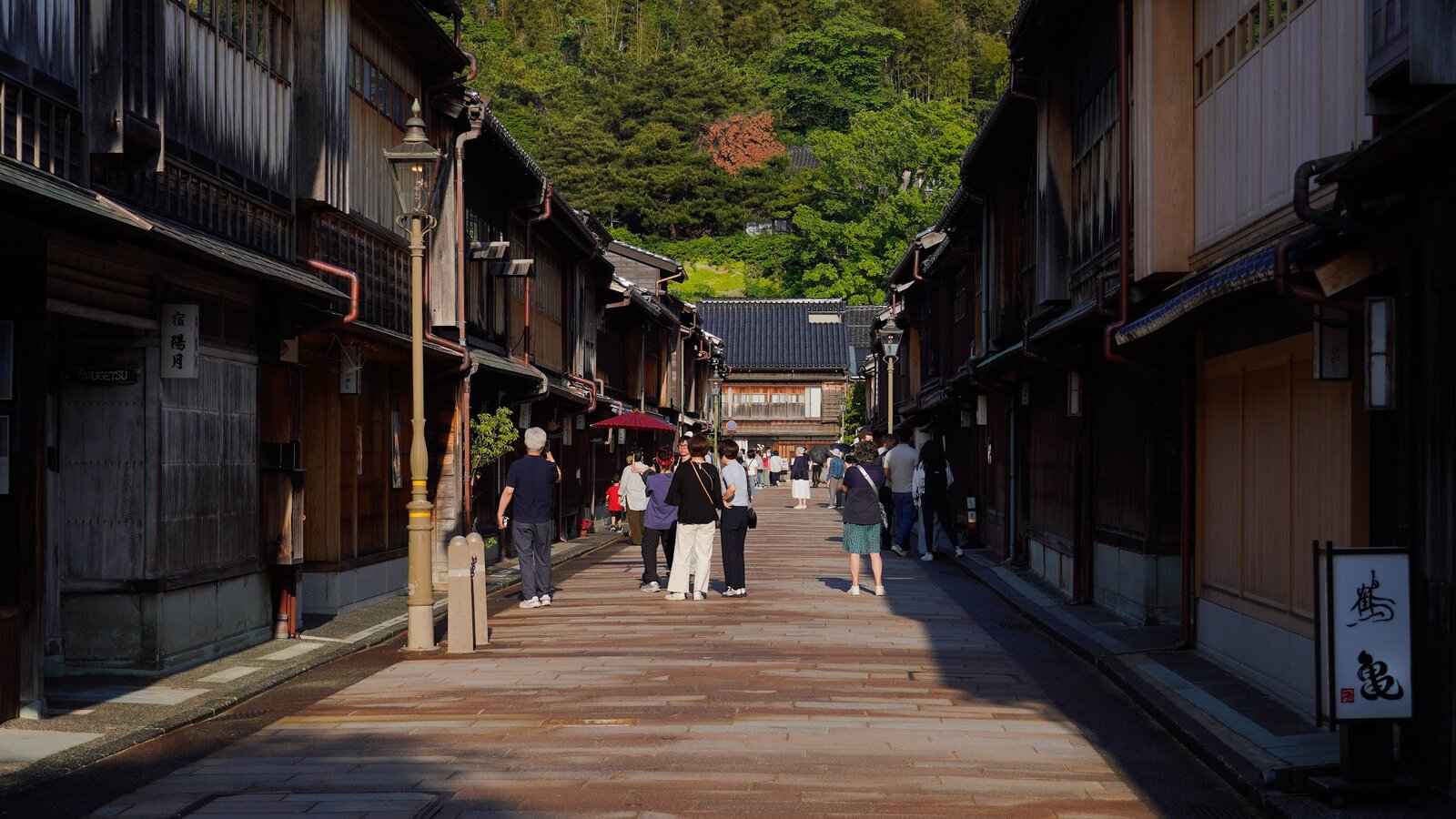
I’m writing this on the Shinkansen heading to Osaka, halfway through a solo 10-day trip across Japan that I planned almost entirely with AI agents.
This post isn’t about how AI can write a generic itinerary — anything can do that now. It’s about the small, weirdly clever ways agents earned their keep on this trip: rewriting the itinerary in place so my own trip viewer would render the day correctly, cross-referencing Reddit, YouTube transcripts, and official sources on its own to validate each leg, optimizing a 7-hour layover down to the minute, and replanning the afternoon when check-in finished early.
Note
This article was co-created with Claude Opus 4.7 Max. It has been human-reviewed and iteratively revised to my liking — still through AI, in the same conversational loop that powered most of the trip itself. The voice and opinions are mine; the first drafts and clean-up passes are Claude’s.
Just me, a Wanderlog trip, a pile of specific questions, and one orchestrator wiring it together: my own fork of Happy (setup details further down).
How I used to plan trips
To be honest, I never actually used a travel agent. My planning method was a kind of artisanal scavenger hunt that started with a Google Flights search and spiralled from there: dozens of search tabs, trusting random Reddit reviews from strangers I’d never met, watching hours of YouTube vlogs at 1.5x speed, and reading Wikivoyage end to end. Whatever survived the filter — a temple, a restaurant, a Shinkansen connection — would land in Wanderlog, my trip-planning home for years. It worked, but it was slow, and the signal-to-noise ratio was rough — for every useful tip there were five outdated ones and a sponsored post pretending not to be. I eventually had to build my own app to make Wanderlog bearable; more on that further down.
That whole scavenger-hunt pipeline is what AI agents are now quietly replacing for me. Not because the sources are gone — Reddit, Wikivoyage, and YouTube are still where the knowledge lives — but because I no longer have to be the one to ingest, deduplicate, and reconcile it. An agent can read ten YouTube transcripts in the time it would take me to watch one. It can cross-check a Reddit anecdote against the official JR site before I even open a tab. The radical change isn’t that AI is smarter than the internet — it’s that it does the boring synthesis work I used to do by hand.
My honeymoon followed a long version of the “golden route” — Tokyo, Nikko, Kyoto, Nara, Osaka, Hiroshima, Yokohama, back to Tokyo — researched the old way: great, but pretty close to everyone else’s trip. For trip number two I wanted something different: a Hokuriku loop with Kanazawa, an onsen night in Kaga, a deliberate detour through Shanghai on the way in and out. The problem with going off-script is that there’s no script. You’re back to research — comparing trains, checking restaurant queues, double-checking whether your passport actually qualifies for visa-free transit. That’s where AI agents stopped being a curiosity and started being genuinely useful.
I’ve already written about how AI made me a happier engineer; turns out it also makes me a happier traveler. I’ll get to the actual stack later in the post.
The trip, briefly
10 days, five Japanese stops, one Shanghai detour:
- Tokyo — arrival, mid-trip pivot, and final base.
- Kanazawa — new territory, anchoring a Hokuriku loop back through places I loved last time.
- Kaga Onsen — one night in a ryokan.
- Osaka — a long day on the way south.
- Shanghai — twice, courtesy of the flight routing. Outbound I left the airport (last year’s China trip skipped Shanghai); return stays airside.
Roughly 60 places on the trip, four flights, half a dozen Shinkansen and limited-express reservations, and exactly zero printed PDFs.
A 7-hour layover, edited from inside it
The trip starts with a 7-hour Shanghai layover. An earlier session had already brainstormed a candidate route — Yu Garden, The Bund, a sit-down xiaolongbao lunch — so the question for the next session wasn’t what should I do but the much more useful am I actually gonna make it?
What came back wasn’t a vague “yes, you have time.” It was:
- A check on PVG immigration wait times from live data
- Confirmation that my passport qualifies for visa-free transit (and a warning not to ask for the 240-hour transit stamp — the 30-day visa-free entry is the right lane)
- Maglev timings vs. metro alternatives
- A queue-aware lunch slot: 11:55 AM at Jia Jia Tang Bao, not 12:15, because the line spikes at noon
- A backup: Lin Long Fang, run by the same family, two blocks away, almost no queue
I followed it almost verbatim. Then, mid-route, I realised I was running ahead of plan, so I opened the session and typed:
I’m in Shanghai right now and it’s 10:23 — I already visited Yu Garden, The Bund, Nanjing road and I’m now super close to Jia Jia Tang — but it’s probably too early for lunch now. What should I do, considering this is my first and likely last time in Shanghai? I still want to get to the airport in time though.
A new mini-itinerary came back tuned to the actual time I had, the actual block I was on, and the hard cutoff for the Maglev back. The pre-trip plan was a starting point; the trip itself got edited while I was inside it.
Mining YouTube for places guidebooks miss
For a second visit to Japan, the usual recommendation engines are useless — every blog post wants to send you to Fushimi Inari. So I asked the AI to do something a guidebook can’t: download the auto-generated transcripts of a dozen “hidden gems in Japan” YouTube videos and synthesize them.
The pipeline, sketched in a couple of prompts:
yt-dlp--write-auto-subs --skip-downloadagainst a list of video URLs- Parse the
.vttcaption files - Cross-reference with relevant Reddit threads (via the
search-mcpserver my agent already had) - Deduplicate and rank by how often a place was mentioned
By the time this finished running, most of my actual May 11–20 itinerary was already locked in — so the real payoff was a ranked shortlist of places that didn’t fit in this trip: a Tōhoku road-trip skeleton and a few Hokkaido anchors, queued up for trip number three. Worth running anyway: the same pipeline will surface much more during pre-trip planning when there’s actually space on the calendar.
Real-time replanning, from wherever I happened to be
Kanazawa, May 14. I finished a morning of sights earlier than expected and suddenly had four hours to kill before my next anchor. “What can I do with the next four hours within walking distance of where I am?” Ten options came back, ranked by time-of-day suitability — D.T. Suzuki Museum (better in afternoon light), Nishi Chaya District, a gold-leaf workshop with a reservation phone number.
The AI didn’t replace the planning; it just made replanning cheap enough that I bothered to do it. The Kaga ryokan check-in below is the canonical example — same idea, longer thread, real MCP mutations at the end.
Trip-viewer: a Wanderlog of my own
Wanderlog’s planning model is great; the app itself is painfully slow and the UI hasn’t improved in years — I stopped paying for Pro over it.
Note
Update, mid-draft: opening Wanderlog to double-check something for this post, I noticed the app is suddenly snappier. Looks like the update they pushed a few days ago genuinely landed. Credit where it’s due.
I’d already taken a stab at fixing this years ago. denysvitali/trip-viewer — a small Flutter app that imports a Wanderlog trip and renders it as a timeline, a map, an expense list, and a packing list — has been around for a while. I originally hacked it together using one of the first GPT models through GitHub Copilot, and it’s served me well across several trips since. For this trip I gave it a proper revamp with GPT-5.5 — most of the timeline and map rewrite came from a single long session, and the new version finally feels like something I’d ship if it weren’t already personal. It refreshes from Wanderlog on pull-to-refresh (and silently in the background after about a week). The planning still lives in Wanderlog; the looking-at-it lives somewhere I (mostly) built, and my trip ends up neatly organized exactly how I want to read it on a phone.
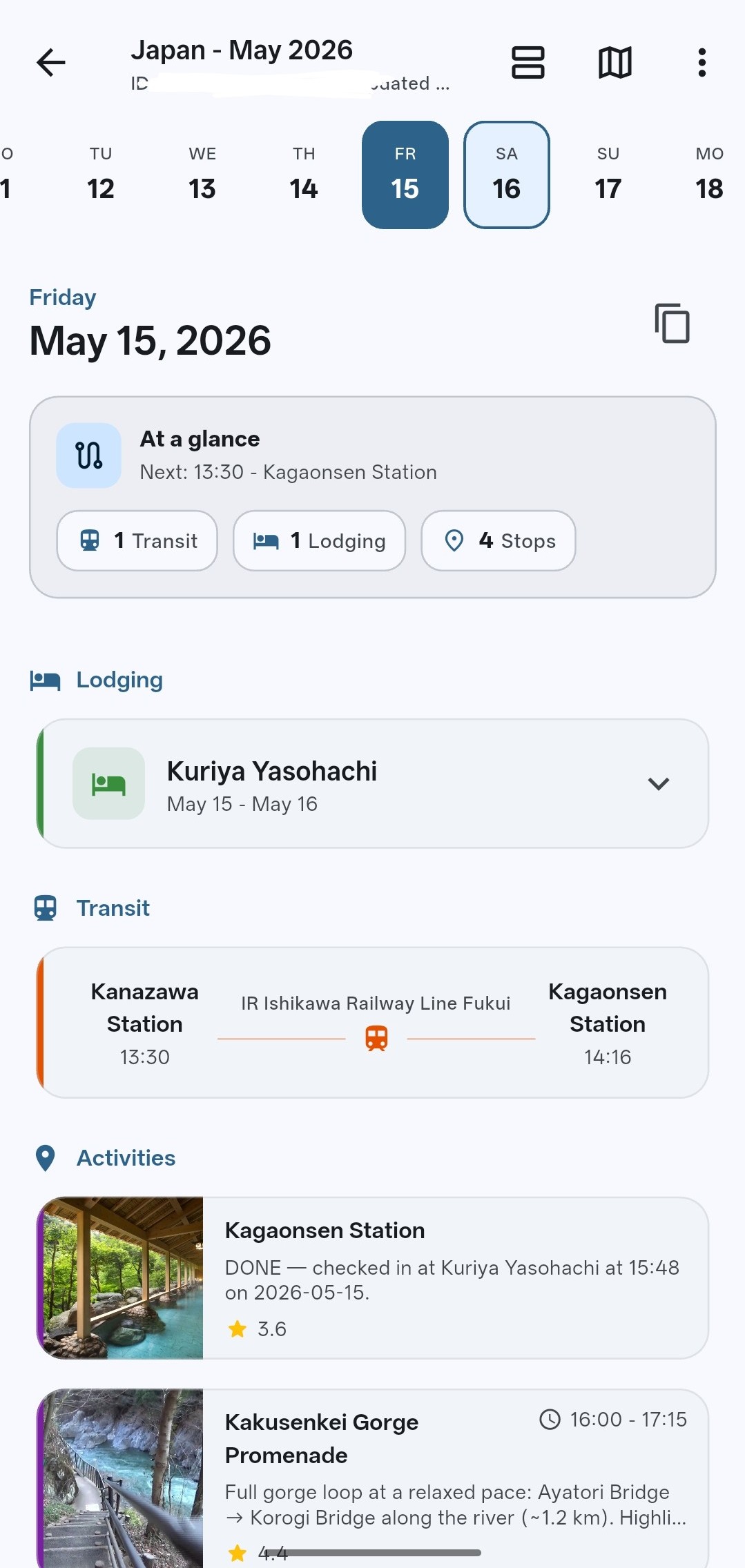
There’s a catch, though: Wanderlog has no documented public API, and — at least until I built wanderlog-cli — no MCP either. So before agents could touch anything I took the app apart, figured out how each operation maps to a backend call, and built an MCP server that exposes the right tools on top of it. With that in place, my agents can now modify any trip I own — add places, reorder days, switch a train reservation, leave a note — through structured tool calls. No prompt-engineering a JSON payload, no manual edits, no copy-pasting from chat into Wanderlog’s UI.
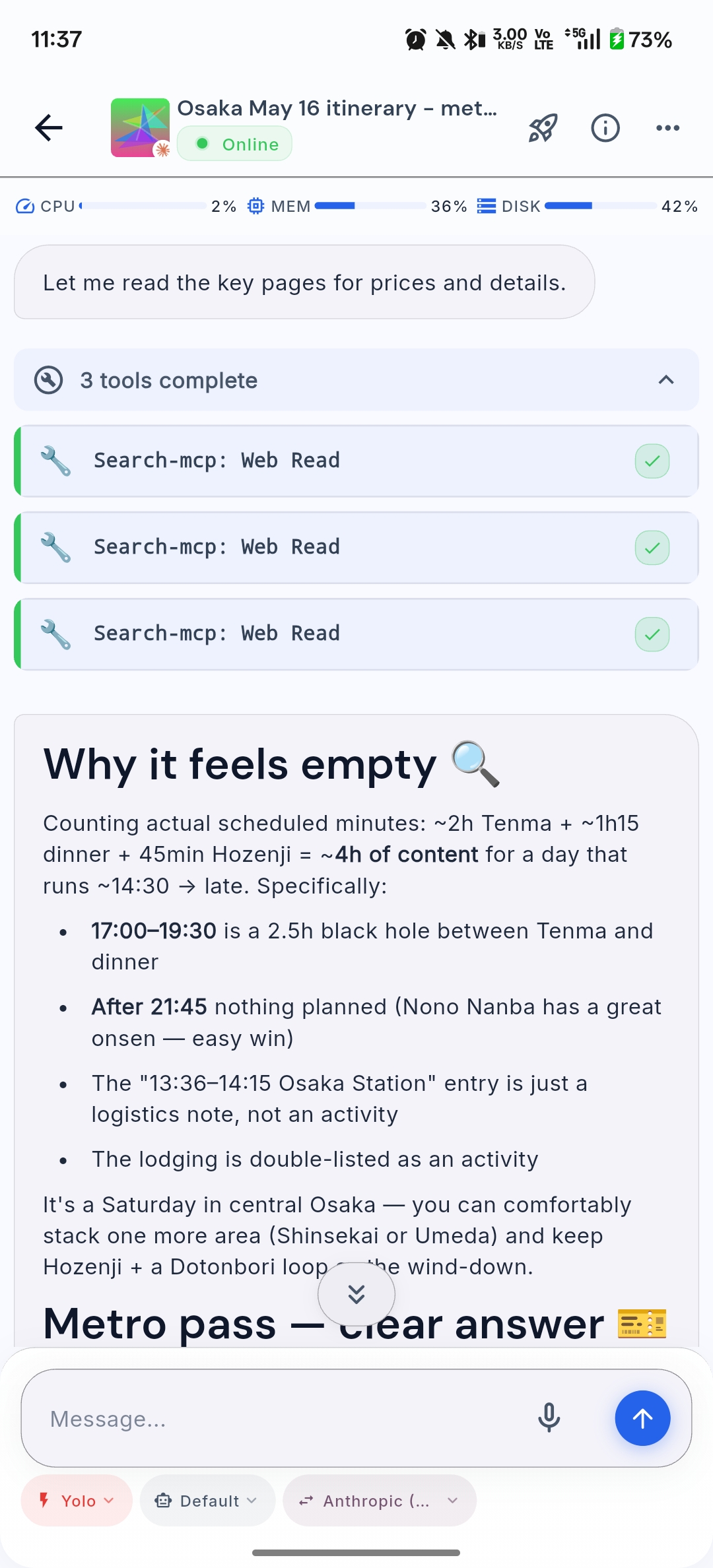
Here’s the loop that emerged during the trip — verbatim from the May 15 thread, the one captured in the screenshot below.
I open the session at the ryokan:
I’ve just arrived at the Ryukan, it’s May 15th. Can you readapt my plan based on this information? I think dinner it at 6 PM. Create a proposal first, then, only if I accept it, modify the plan.
The agent comes back with current vs. proposed:
Here’s the current May 15 plan vs. where you are now:
Original (afternoon):
- 14:00–15:00 mokume woodturning (optional)
- 15:15–16:15 Kakusenkei Gorge Promenade
- 16:15–17:00 Kiku no Yu public bathhouse
- 17:00–17:30 Yamanaka Onsen stroll
Proposed re-plan (you’ve checked in at Kuriya Yasohachi, dinner 18:00):
- Drop mokume — you’ve skipped that window by arriving at the ryokan.
- ~15:30–16:30 · Kakusenkei Gorge Promenade — ~10 min walk north from Yasohachi, the highlight of Yamanaka. Easy 1 km riverside loop with Ayatori Bridge + Korogi Bridge.
- ~16:30–17:00 · Yuge Kaido stroll — the lantern-lit shopping street along the gorge, ends at Kiku-no-yu / Yamanaka Onsen square. Short and on the way back.
- ~17:00–17:45 · Ryokan onsen bath — soak in Yasohachi’s bath before dinner (recommended over Kiku-no-yu since you’ve paid for the in-house onsen and kaiseki is right after).
- 18:00 · Kaiseki dinner at Yasohachi.
Trade-off: this skips the public bathhouse (Kiku no Yu) in favor of the ryokan’s own bath — more relaxed, no rushing back wet. If you’d rather do Kiku no Yu, swap step 4 for it (~16:30–17:15) and shorten the gorge walk.
Want me to apply this to the itinerary?
Meanwhile reality slips:
It’s 3:33 PM right now and I’m checking in. This might take a while
The agent recalibrates against the slip:
Got it — assuming check-in wraps around 16:00, you’ve got ~2 hours before dinner. Tighter proposal:
- ~16:00–17:00 · Kakusenkei Gorge + Yuge Kaido combined — walk from the ryokan up to the gorge (Ayatori Bridge area), loop back along Yuge Kaido (lantern street). About 1 hour at an easy pace.
- ~17:00–17:45 · Ryokan onsen bath at Yasohachi — soak before kaiseki.
- 18:00 · Dinner.
Drop mokume, Kiku-no-yu, and the separate Yamanaka Onsen block entirely — not enough runway and they overlap with what you’ll see on the gorge/Yuge Kaido walk.
If check-in drags past 16:30 and you’re tired, fallback is: skip the outing, head straight to the ryokan bath at ~17:00, dinner at 18:00.
Want me to apply this?
Reality slips a second time — this time, in my favour:
Finished my check-in. It’s 3:48 PM now and the dinner is at 7 PM. Plan accordingly. I’ll be able to do the Onsen until 1AM (and then again at 5AM)
And the final proposal lands:
More breathing room — ~3 hours before dinner, and onsen can wait until after. Revised:
- ~16:00–17:15 · Kakusenkei Gorge Promenade — full loop at a relaxed pace (Ayatori Bridge → Korogi Bridge, ~1.2 km).
- ~17:15–18:00 · Yuge Kaido + Yamanaka Onsen square — lantern street stroll, peek at Kiku-no-yu exterior + the foot bath if open.
- ~18:00–19:00 · Back to ryokan, change into yukata, rest.
- 19:00 · Kaiseki dinner.
- ~20:30–22:00 · Ryokan onsen — first soak post-dinner (give the kaiseki ~1 hour to settle).
- ~05:30 · Sunrise onsen — second soak when it reopens at 05:00.
Skipping mokume (closed by now) and Kiku-no-yu as a separate bath stop (your ryokan onsen is already booked twice).
Want me to apply this to the itinerary?
Yes
The agent runs through a stack of MCP calls — Delete Itinerary Block, Update Place Visit Time, Update Place Notes, a few of each — and confirms:
Applied. May 15 now reads:
- Kaga Onsen Station transfer — marked done (check-in 15:48)
- 16:00–17:15 Kakusenkei Gorge Promenade (full loop)
- 17:15–18:00 Yuge Kaido stroll back to ryokan
- Kuriya Yasohachi — 19:00 dinner, ~20:30 onsen, ~05:30 sunrise onsen
Dropped mokume and Kiku-no-yu. Enjoy the gorge.
A pull-to-refresh in trip-viewer renders the new May 15 in the timeline and on the map.
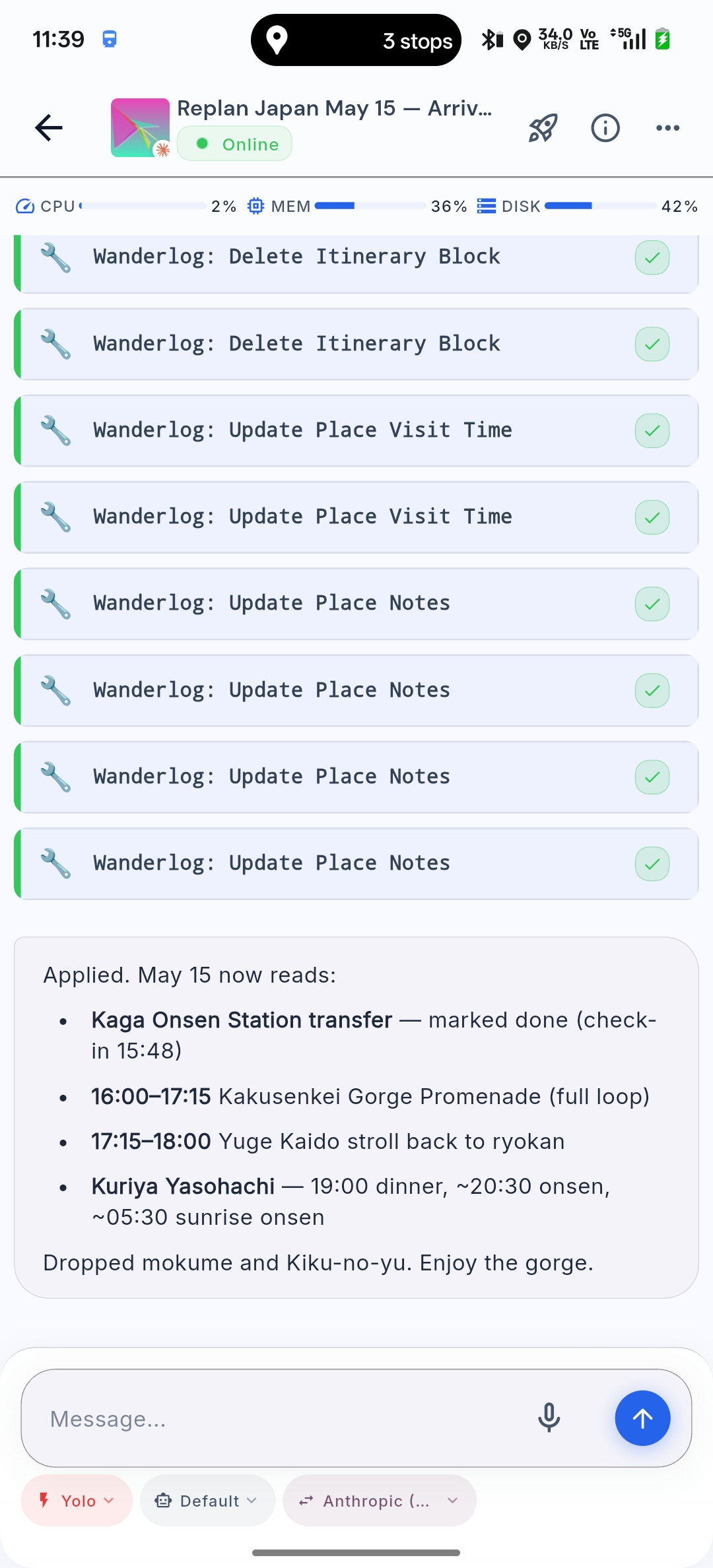
The non-obvious part of all this is shape-awareness. Wanderlog will happily accept sloppy data — a hotel filed as a “place to visit”, a Shinkansen reservation crammed into the wrong day, a note glued to the back of the wrong activity. A naïve agent left to its own JSON-wrangling would do all of that. So wanderlog-cli’s MCP doesn’t expose a generic update_trip(payload) tool: it surfaces a small, opinionated vocabulary — add_train, add_flight, add_place, update_place_visit_time, delete_itinerary_block and so on — that mirrors the shapes trip-viewer can render. The agent picks the right verb; it doesn’t have to invent the JSON.
That cuts out a whole class of errors before they happen, but it doesn’t eliminate them entirely. Early on the agent kept filing hotels as add_place instead of grouping them under their check-in day; I corrected it once, and the rest of the trip stayed clean.
This is the part I keep coming back to: the chat is throwaway, the trip is data, and a small app you own is the real surface. The agent is just the thing that keeps the data clean.
The setup: my Happy fork
A quick aside on the harness, because the whole trip ran through it.
I’ve already written about how I became a happier engineer thanks to Happy — the open-source mobile/web client for Claude Code. I also gave a short talk about that setup at a Zurich Gophers Meetup earlier this year — the recording is on YouTube — walking through the self-hosted deployment, the workspace pods, and the per-provider environment scripts.
Things have only improved since. My current daily driver is my own fork, which adds three things I needed badly:
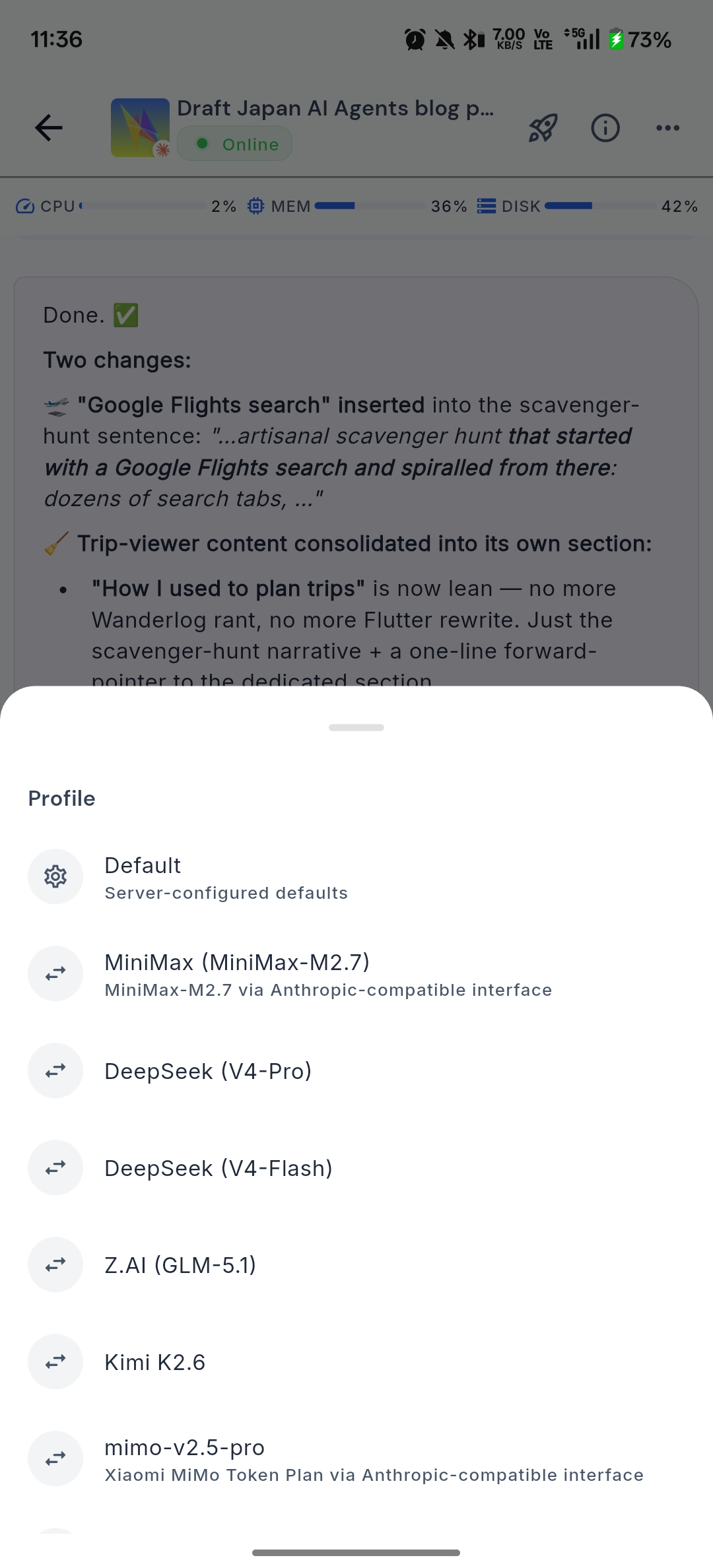
- Per-session harness switching, with aggregation. I can pick Claude Code or OpenAI Codex per session, and the fork happily aggregates multiple sessions inside the same folder into one view. In-session model swapping is more nuanced: it works when the receiving model isn’t picky about a conversation history written by a different model. Anthropic is fussy about that (looking at you, Claude). Kimi 2.6 and Xiaomi’s MiMo, on the other hand, take cross-model history in stride, which is what makes mid-conversation model swaps actually useful. No more
tmux, no more SSH-into-laptop dance — every harness is one tap away. - Model shopping in one tap. The profile picker exposes the full lineup I’ve wired up — MiniMax M2.7, DeepSeek V4-Pro and V4-Flash, Z.AI’s GLM-5.1, Kimi K2.6, Xiaomi’s MiMo, plus the usual Anthropic/OpenAI defaults — all behind an Anthropic-compatible interface. Kimi 2.6 in particular has been a surprise: capable enough to occasionally beat GPT-5.5 and consistently better than the nerfed Opus 4.7, at a fraction of the price. I could A/B two models on the same prompt by spinning up parallel sessions; in practice I almost never do — picking the right model upfront and committing to it tends to be enough.
- Mobile-native I/O. I can dictate via offline speech-to-text — powered by sherpa-onnx, so it keeps working when the connection is spotty and doesn’t ship my voice to a cloud STT — glide-type on Gboard while walking through a station, or have replies read back to me with offline TTS from the same stack. Session resumption from a cold phone is quick enough that “what should I do with the next two hours?” fires off before the platform clock changes. And the rendering is genuinely good (see the screenshots): tool calls collapse cleanly, code is legible at phone-sized type, and there’s no flickering even when long replies stream in.
The companion changes live in a forked server + daemon that I’ll be open-sourcing in a follow-up post — the repo isn’t public yet, but the link will start working the moment it is.
“Tokyo to Canada”: when speech-to-text gets it wrong
A lot of the on-trip planning happened by voice or by glide-typing into the chat — phone in pocket, walking through a station, dictating instead of typing. I leaned on sherpa-onnx the whole trip; it handles spoken English fluently, but the model is English-trained, so Japanese proper nouns dropped mid-sentence routinely got mapped to whichever English word sounds closest. The funniest example I’ve collected:
I am specifically interested in knowing how to get from Tokyo to Canada, one on the first day […] when should I take the train […] from Tokyo station to Kanazawa.
The transcript service heard “Canada” the first time and “Kanazawa” the second time, in the same paragraph. A human reading that would do a double-take. The agent didn’t. It just answered the question I’d actually asked — Tokyo to Kanazawa on the Hokuriku Shinkansen, the Kagayaki vs the Hakutaka, JR Pass math, jet-lag-friendly departure windows — without flagging the typo or asking me to clarify. The context made the intent obvious, and the agent acted on it.
The practical upshot: I stopped proofreading dictated messages before sending. Saved me a surprising amount of time, especially when walking with one hand full of luggage.
Two harnesses, different jobs: Claude Code and Codex
I didn’t use one harness — I used two, and the split was deliberate.
Claude Code (running Opus 4.7) was my travel companion. Voice notes and quick text both, mutations of the Wanderlog trip, layover research, replanning the afternoon when reality slipped — anything stateful and trip-shaped went here, leaning on context from previous days I didn’t have to re-explain. Opus’s planning instincts and tool-use discipline make it my pick for this kind of work.
Codex (running GPT-5.5) got the engineering work — the Flutter and Go code behind trip-viewer and wanderlog-cli, refactors, edge cases in the parser, the rough spots I kept hitting on the road. Focused, repository-rooted work — exactly where Codex + GPT-5.5 shines.
The lesson: having more than one harness isn’t redundant. Each one’s strongest with a particular model on a particular kind of task; picking the right pair upfront beats forcing one to do everything.
Key concepts: what made this work
A few patterns kept showing up across all the planning sessions. They’re worth naming because I’ll use them again on the next trip.
Treat the AI as a researcher, not an oracle
The useful prompts weren’t “plan my trip.” They were “given these constraints, validate this assumption with live sources.” Web search is doing most of the work — the AI’s job is to frame the question, run the searches, and reconcile the answers.
Itinerary as a structured document, not a chat log
Wanderlog was the source of truth. The AI mutated it via an MCP tool, and trip-viewer consumed the same data on my phone. The chat is ephemeral; the trip is data; the viewer is the surface. Inside that data, each day has two or three hard anchors — a train, a dinner reservation, a check-in time — and the rest are soft slots the AI is free to rearrange. The separation means I can hand the itinerary to a human (my wife, future me) without making them scroll through a transcript.
Pipelines beat prompts
The YouTube transcript scraper isn’t a clever prompt — it’s a tiny pipeline (yt-dlp → parse → dedupe). Once you start thinking of trip research as a data problem, the AI stops being a chatbot and starts being a colleague who can write the script.
Real-time use is the real unlock
Pre-trip planning saved hours. On-trip replanning changed how the trip felt. Missed train, queue too long, free afternoon — none of these become stressful when the cost of asking “what now?” is approximately zero.
What I’d improve next time
Two honest critiques:
- Claude planned conservatively — or I just moved fast. A lot of segments were laid out with generous buffers, which had me re-planning mid-trip more than I expected and arriving back from the Shanghai layover comically early. Not a big deal — definitely better than the alternative of missing a flight or a Shinkansen — and I can totally imagine a less-rushed traveler finding the original margins about right. Still, next time I’d nudge the agent to plan a little tighter, or at least flag when its safety margin is bigger than I asked for.
- My MCP surface is too low-level.
Delete Itinerary Block,Update Place Visit Time,Update Place Notesare honest mappings of Wanderlog’s data model, but they leak into the prompts more than I’d like — the agent ends up calling four or five tools to shift one afternoon. A higher-levelreplan_day(date, new_anchors)ormove_block(from, to)would compress the round-trips, cost less in tokens, and reduce the chance of a half-applied edit when something errors out. That’s the next thing I’ll add towanderlog-cli.
Goodbye travel agents
I don’t think travel agents are going away yet. There’s still a market for the I want someone else to handle this entirely experience — especially since Japan, for all its competence, makes train reservations absurdly painful. At home in Switzerland I open the SBB Mobile app, pick origin and destination, tap once, and walk onto the train. I never have to think about who runs the line, how many operators the journey crosses, or whether the schedule is current — one app, end to end. I’m spoiled. In Japan, JR West and JR East are parallel universes with different booking sites, different machines, different rules. JR East lets you load a reservation onto your IC card and tap through. JR West makes you queue at a specific JR West machine for a paper ticket before you can board the train you’ve already paid for. Wtf.
But for someone like me, who’s always done the planning by hand — search tabs, Reddit threads, YouTube vlogs, Wikivoyage — the calculus has changed. The sources haven’t gone anywhere; agents just do the synthesis I used to do, faster, and without skipping the dull pages.
AI doesn’t replace the curiosity. It removes the friction between having a question and getting an answer worth acting on.
And now, my station is up. Time to explore Osaka! If you happen to be around and want to grab a coffee or a beer, ping me on X.