惯性聚合 高效追踪和阅读你感兴趣的博客、新闻、科技资讯
阅读原文 在惯性聚合中打开

推荐订阅源

P
Proofpoint News Feed
博客园 - 聂微东
Application and Cybersecurity Blog
MyScale Blog
MyScale Blog
罗磊的独立博客
H
Help Net Security
L
LangChain Blog
T
Threat Research - Cisco Blogs
量子位
S
Securelist
Last Week in AI
Last Week in AI
L
Lohrmann on Cybersecurity
T
The Exploit Database - CXSecurity.com
P
Privacy International News Feed
The Hacker News
The Hacker News
Vercel News
Vercel News
D
Darknet – Hacking Tools, Hacker News & Cyber Security
C
Cybersecurity and Infrastructure Security Agency CISA
T
The Blog of Author Tim Ferriss
T
Threatpost
Security Latest
Security Latest
P
Palo Alto Networks Blog
Microsoft Security Blog
NISL@THU
NISL@THU
F
Full Disclosure
WordPress大学
WordPress大学
cs.AI updates on arXiv.org
Stack Overflow Blog
Stack Overflow Blog
C
Check Point Blog
Hacker News - Newest:
Hacker News - Newest: "LLM"
酷 壳 – CoolShell
酷 壳 – CoolShell
H
Heimdal Security Blog
J
Java Code Geeks
Recorded Future
Recorded Future
Hugging Face - Blog
Hugging Face - Blog
G
GRAHAM CLULEY
Know Your Adversary
Know Your Adversary
K
KPMG report finds enterprise disconnect between AI and its ROI | CIO
阮一峰的网络日志
阮一峰的网络日志
U
Unit 42
B
Blog RSS Feed
月光博客
月光博客
C
Cisco Blogs
V
Visual Studio Blog
D
DataBreaches.Net
H
Hacker News: Front Page
博客园 - 叶小钗
N
News and Events Feed by Topic
爱范儿
爱范儿
A
Arctic Wolf

Windows on 轻风云

Windows Server 2022 KMS 激活序列号 Navicat Premium for Win v16.0.14 完美激活 win11自带SSH免密登录Linux HEU KMS Activator v23.1.0 win10 office2019激活工具 windows下Navicat15破解详细教程带注册机 Windows10安装GCC和Make工具 Linux下通过rdesktop远程windows WPS Office 2016 专业版/专业增强版/绿色精简版本 Win10数字激活神器HWIDGen v9.32 汉化版
windows下golang编译报running gcc failed错误
2021-03-31 · via Windows on 轻风云

windows下golang编译报running gcc failed错误

报错信息如下

img

img

解决方法

  1. 下载mingw mingw-get-setup.zip
  2. 下载后点击安装
  3. 修改环境变量 如 C:MinGWbin
  4. 打开cmd 输入命令mingw-get,如果弹出 MinGw installation manager 窗口,说明安装正常。此时,关闭 MinGw installation manager 窗口,否则接下来的步骤会报错
  5. 在cmd中输入命令 mingw-get install gcc,等待一会,gcc 就安装成功了。如果想安装 g++,gdb,只要输入命令 mingw-get install g++ 和 mingw-get install gdb
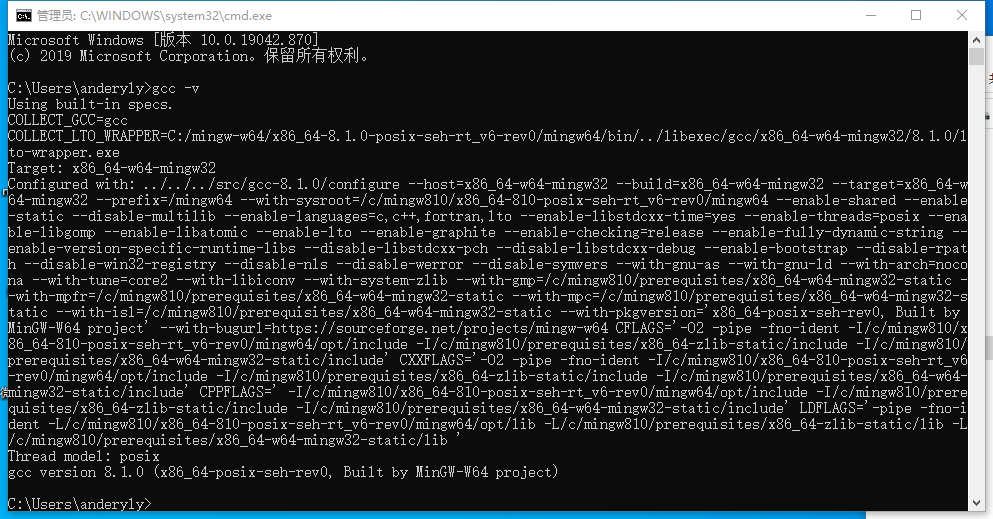
  6. 在cmd中输入 gcc -v 安装成功
    img
  7. 重启ide即可编译成功

tips 在线安装很慢 离线安装包你值得拥有