惯性聚合 高效追踪和阅读你感兴趣的博客、新闻、科技资讯
阅读原文 在惯性聚合中打开

推荐订阅源

Google DeepMind News
Attack and Defense Labs
GbyAI
GbyAI
月光博客
月光博客
Recent Announcements
云风的 BLOG
云风的 BLOG
F
Full Disclosure
宝玉的分享
宝玉的分享
freeCodeCamp Programming Tutorials: Python, JavaScript, Git & More
爱范儿
爱范儿
博客园 - Franky
V
V2EX
Recorded Future
Recorded Future
WordPress大学
WordPress大学
小众软件
小众软件
Webroot Blog
Webroot Blog
雷峰网
雷峰网
Vercel News
Vercel News
N
News and Events Feed by Topic
PCI Perspectives
PCI Perspectives
Cyberwarzone
Cyberwarzone
Threat Intelligence Blog | Flashpoint
W
WeLiveSecurity
S
Schneier on Security
博客园 - 三生石上(FineUI控件)
K
Kaspersky official blog
F
Fortinet All Blogs
Security Archives - TechRepublic
Spread Privacy
Spread Privacy
博客园 - 叶小钗
罗磊的独立博客
D
Docker
Forbes - Security
Forbes - Security
让小产品的独立变现更简单 - ezindie.com
The Register - Security
A
About on SuperTechFans
B
Blog RSS Feed
I
InfoQ
T
Tailwind CSS Blog
G
Google Developers Blog
H
Help Net Security
V
Vulnerabilities – Threatpost
AWS News Blog
AWS News Blog
N
News and Events Feed by Topic
M
MIT News - Artificial intelligence
K
KPMG report finds enterprise disconnect between AI and its ROI | CIO
P
Proofpoint News Feed
cs.AI updates on arXiv.org
MyScale Blog
MyScale Blog
Latest news
Latest news

Mox的笔记库

2026PPoPP MLIR Tutorial学习 | Mox的笔记库 MacOS配置《明日方舟:终末地》 | Mox的笔记库 2025:向内生长 | Mox的笔记库 由mlir::ExecutionEngine引发的跨系统问题 | Mox的笔记库 WSL2配置Cuda-Tile环境记录(未完待续) | Mox的笔记库 Vibe Coding手搓项目记录 | Mox的笔记库 给Debian上包——以DuckDB为例 | Mox的笔记库 UCPD.sys事件存档 | Mox的笔记库 换新电脑之Mac mini M4从购买到配置 | Mox的笔记库 Mac配置MLX-C开发环境 | Mox的笔记库 RISC-V meets RDBMS——RISC-V架构上可运行数据库一览 | Mox的笔记库 DuckDB Sort实现调查 | Mox的笔记库 修复Redis在树莓派5上无法运行的问题 | Mox的笔记库 如何在MLIR中自定义类型并且输出运行 | Mox的笔记库 网站网络结构变更记录 | Mox的笔记库 EDBT25论文阅读:PhoebeDB——A Disk-Based RDBMS Kernel for High-Performance and Cost-Effective OLTP SIGMOD25论文阅读:BPF-DB:——A Kernel-Embedded Transactional Database Management System For eBPF Applications Apache Arrow Gandiva项目解析 | Mox的笔记库 VLDB24论文阅读:Cloud-Native Database Systems and Unikernels——Reimagining OS Abstractions for Modern Hardware NoisePage源码分析(未完待续) | Mox的笔记库 VLDB20论文阅读:Mainlining Databases——Supporting Fast Transactional Workloads on Universal Columnar Data File Formats VLDB17论文阅读:Relaxed Operator Fusion for In-Memory Databases:Making Compilation, Vectorization, and Prefetching Work Together At Last 论文阅读:How not to structure your database-backed web applications——a study of performance bugs in the wild SIGMOD24阅读:ROME——Robust Query Optimization via Parallel Multi-Plan Execution 文章阅读:First Past the Post-Evaluating Query Optimization in MongoDB SIGMOD文章阅读:Apache Calcite——A Foundational Framework for Optimized Query Processing Over Heterogeneous Data Sources VLDB23论文阅读:Analyzing the Impact of Cardinality Estimation on Execution Plans in Microsoft SQL Server SIGMOD22论文阅读:Efficient Massively Parallel Join Optimization for Large Queries VLDB论文阅读:Weaving Relations for Cache Performance VLDB22论文阅读:ConnectorX——Accelerating Data Loading From Databases to Dataframes 论文阅读:UniKraft-Fast, Specialized Unikernels the Easy Way 当DuckDB遇上RISC-V | Mox的笔记库 SIGMOD25论文阅读:An Elephant Under The Microscope——Analyzing The Interaction Of Optimizer Components In PostgreSQL 论文阅读:Compile-Time Analysis of Compiler Frameworks for Query Compilation VLDB23阅读:Bringing Compiling Databases to RISC Architectures SIGMOD24文章阅读:Query Compilation Without Regrets | Mox的笔记库 淦!MLIR输出Hello World不应该这么难! | Mox的笔记库 2024:拥挤年代的想象与创造 | Mox的笔记库 如何给自己的博客添加MLIR和LLVM IR语法高亮 | Mox的笔记库 博客重构:从Hexo到Astro | Mox的笔记库 VLDB19-Parsing Gigabytes of JSON per Second论文阅读 CIDR25:Runtime-Extensible Parsers阅读 | Mox的笔记库 SIGMOD24文章阅读:VeriTxn | Mox的笔记库 MLIR学习资料整理 | Mox的笔记库 VLDB23文章阅读——Exploiting Cloud Object Storage for High-Performance Analytics VLDB24——OLAP on Modern Chiplet-Based Processors走马观花阅读 如何让数据库中的Python跑的更快-VLDB22-YeSQL文章阅读 | Mox的笔记库 你好,世界! | Mox的笔记库 如何愉快的运行一个MLIR程序 | Mox的笔记库 让系统研究更有意义:HarmonyOS NEXT的教训和经验——讲座回顾 | Mox的笔记库 VLDB22:YeSQL文章阅读(已废弃) | Mox的笔记库 UNSW 24T3 COMP9336上课记录 | Mox的笔记库 Velox开发环境配置踩坑记录 | Mox的笔记库 LingoDB源码编译与分析 | Mox的笔记库 论文阅读:Declarative Sub-Operators for Universal Data Processing 论文阅读:Designing an Open Framework for Query Optimization and Compilation MLIR Toy Tutorial实践记录 | Mox的笔记库 2024年7月RSSHub开发体验 | Mox的笔记库 LLVM-Kaleidoscope实操踩坑记录 | Mox的笔记库 澳洲大学计算机硕士比较 | Mox的笔记库 论文阅读——CDUL:CLIP-Driven Unsupervised Learning for Multi-Label Image Classification CVPR2023-CLIP算法调研 | Mox的笔记库 论批量快速添加图片与视频水印的事 | Mox的笔记库 基于元信息写入的服务器压力测试 | Mox的笔记库 家庭组网IPv6+Mesh折腾 | Mox的笔记库 MjAyMw==,希望,前进与平庸之道 | Mox的笔记库 code-server初体验 | Mox的笔记库 从Nginx到Caddy | Mox的笔记库 RMM观察与初探 | Mox的笔记库 计算机网络课设——UDP/TCP/TLS Socket实验 | Mox的笔记库 JQuery的XSS初探 | Mox的笔记库 生产实习记录 | Mox的笔记库 Fedora-CoreOS配置与试用(2023年) | Mox的笔记库 Electron学习笔记 | Mox的笔记库 ServerSentEvent学习 | Mox的笔记库 报告翻译:容器云的安全挑战 | Mox的笔记库 Vagrant配置Metarget靶场环境 | Mox的笔记库 OpenAI-whisper折腾 | Mox的笔记库 202202,困惑,混乱与未曾设想之路 | Mox的笔记库 2022年Hack the box:Tier1免费区全解 | Mox的笔记库 Navidrome部署记录 | Mox的笔记库 长安杯2021-snake复现 | Mox的笔记库 报告概要翻译:OBFUSCATING C++ PROGRAMS VIA CONTROL FLOW FLATTENING 从零开始的Django CVE-2022-28346复现 | Mox的笔记库 2022CISCN(西北区赛)-The shinning | Mox的笔记库 Docker+QEMU+Arm64(Ubuntu)+环境配置(2022版) | Mox的笔记库 Arch Linux运行树莓派系统(2022年) | Mox的笔记库 2022CISCN初赛-ez_usb-复盘WriteUp | Mox的笔记库 Arch Linux迁移计划 | Mox的笔记库 Django事务使用 | Mox的笔记库 记录第一次EduSRC上报 | Mox的笔记库 Jetbrain问题应急处理 | Mox的笔记库 Celery5.2学习&配置 | Mox的笔记库 Waline部署记录 | Mox的笔记库 Frida hook初次实战 | Mox的笔记库 Log4j2漏洞复现 | Mox的笔记库 2022长安“战疫”网络安全卫士守护赛回顾 | Mox的笔记库 2021年12月 Vivo千镜杯回顾 | Mox的笔记库 Windows的WSL2+Docker初探 | Mox的笔记库 Hexo部署安装全流程回顾 | Mox的笔记库
NodeMCU-MicroPython配置实录 | Mox的笔记库
MocusEZ · 2022-01-21 · via Mox的笔记库

发现网络上的记录过于混杂,自己写一下笔记防止到时找不到资料

不会Python?百度搜索“菜鸟教程”,看看Python3就会了,人生苦短,我选Python

刷MicroPython包

去micropython的官网下载,选择正常版本(2Mib+)下载即可
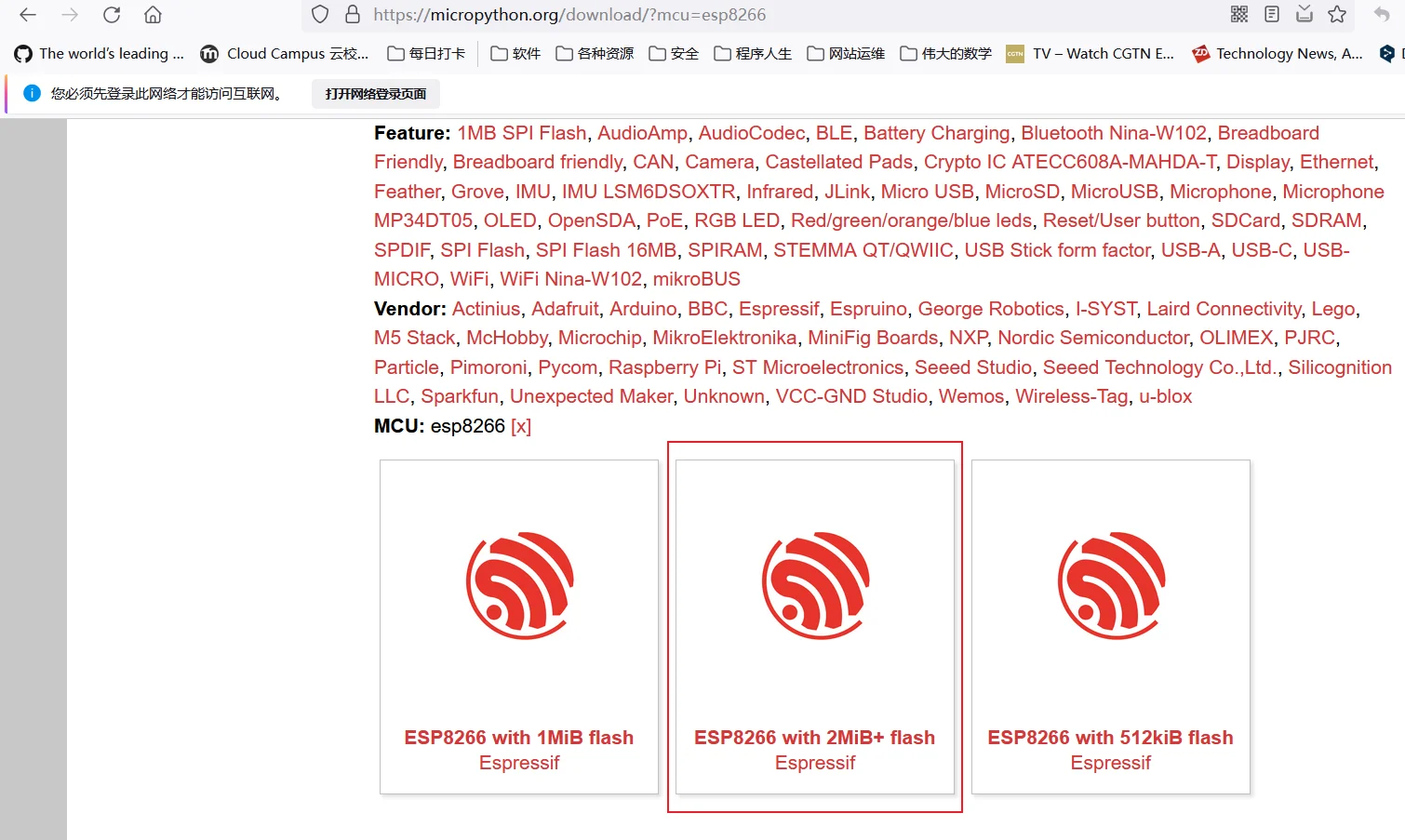
image.png

(此处默认已经装完Python,并默认加入path,如果未安装自行百度)

下载完以后,本地的pip使用这个指令:

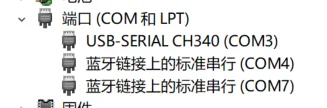
找到设备所在的端口

控制面板->硬件和声音->设备管理器
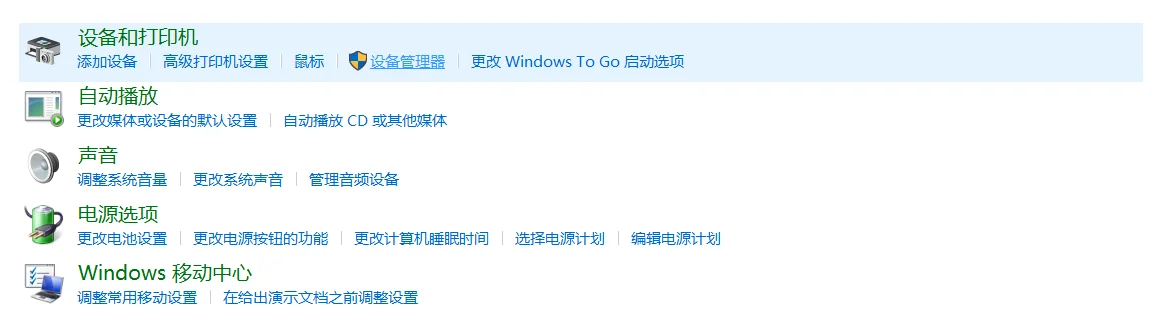
image.png

得知我们的设备运行在COM3

image-20220120190147742.png

在esp8266-20220117-v1.18.bin所在的目录,打开cmd输入以下命令

esptool.py --port COM3 erase_flash

esptool.py --port COM3 --baud 460800 write_flash --flash_size=detect 0 esp8266-20220117-v1.18.bin --verify

等待烧写成功

Thonny版本

纯傻瓜教学版+免安装esptool版

默认Thonny装在C盘默认目录

意外发现Thonny自带esptool,省掉安装麻烦

从这里进入shell
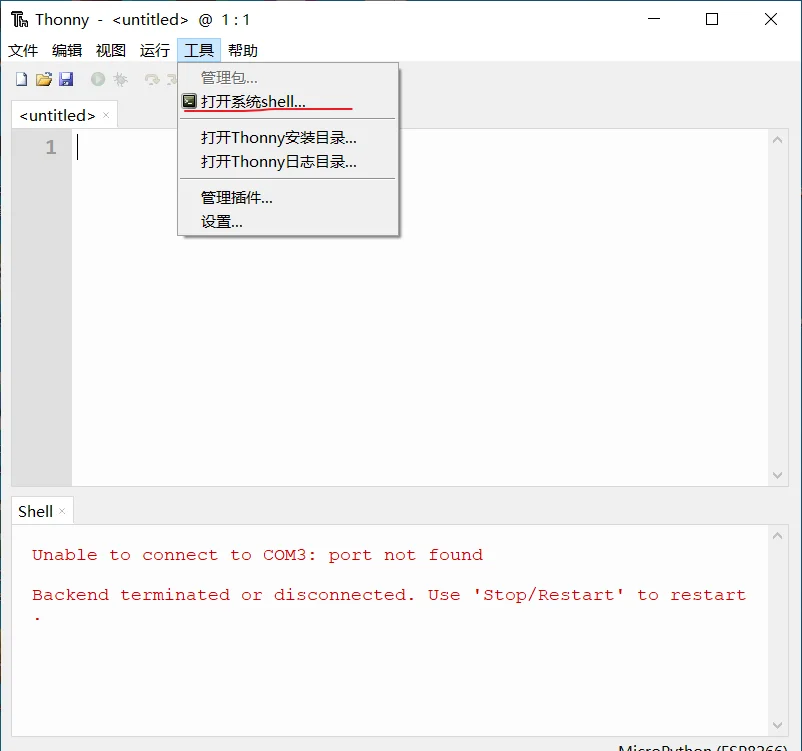
image.png

找到插件的安装位置

输入指令

cd C:\Users\Administrator\AppData\Local\Programs\Thonny\Lib\site-packages

python esptool.py

就会显示这样的界面
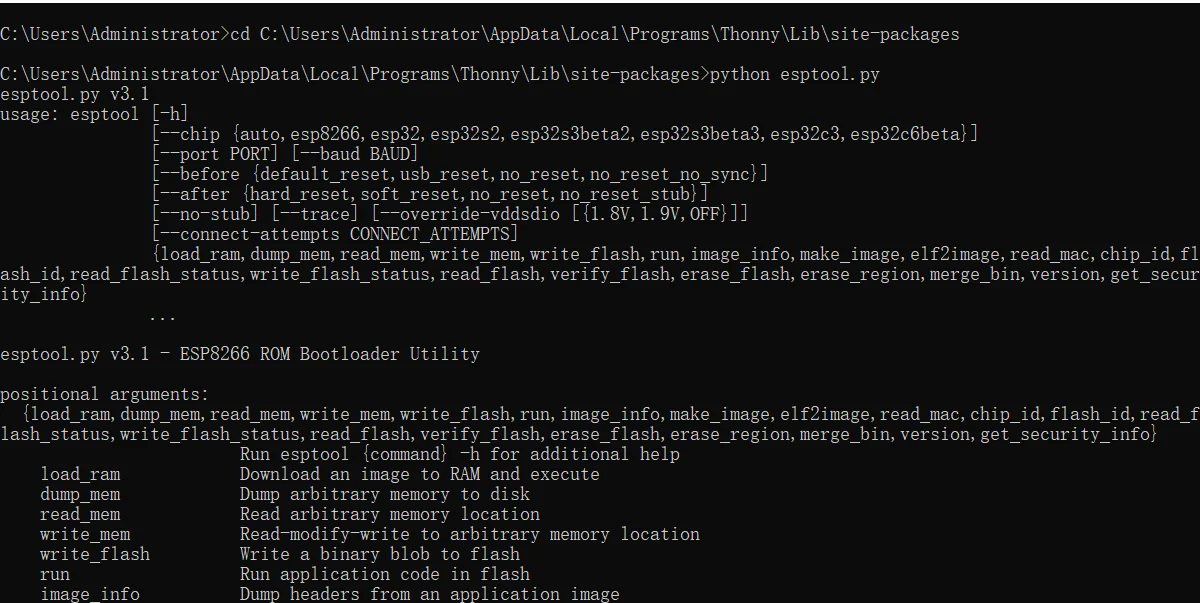
image-20220120185850811.png

效仿上面

python esptool.py --port COM3 erase_flash

python esptool.py --port COM3 --baud 460800 write_flash --flash_size=detect 0 esp8266-20220117-v1.18.bin --verify
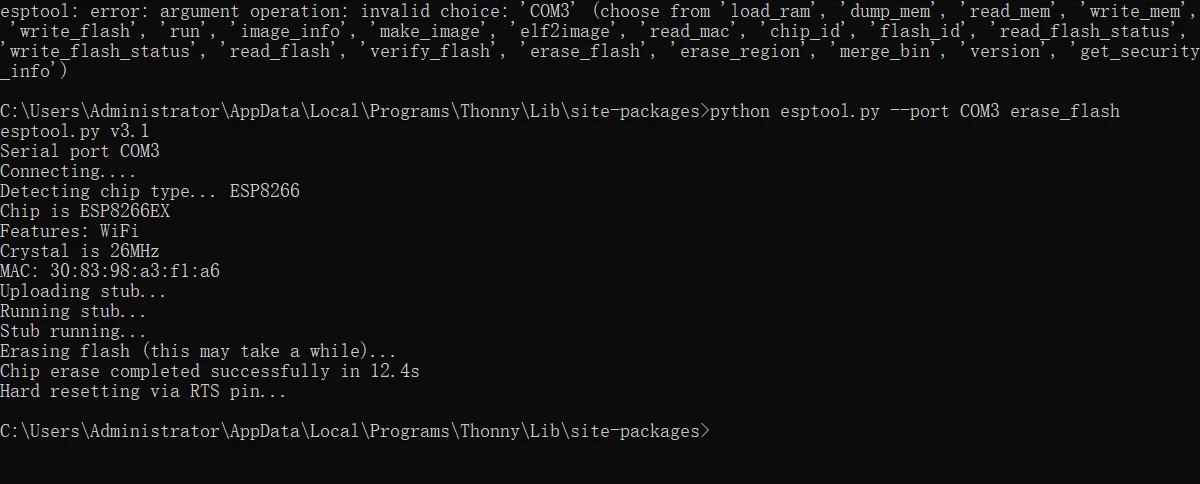
image-20220120190550557.png

等待烧写完成,下图为烧写完成的图像

image-20220120190704552.png

IDE配置

我个人喜欢Pycharm,但Thonny不需要装插件,简单轻巧,推荐这个

(怎么能没有万能的VScode呢?问就是插件配置有问题)

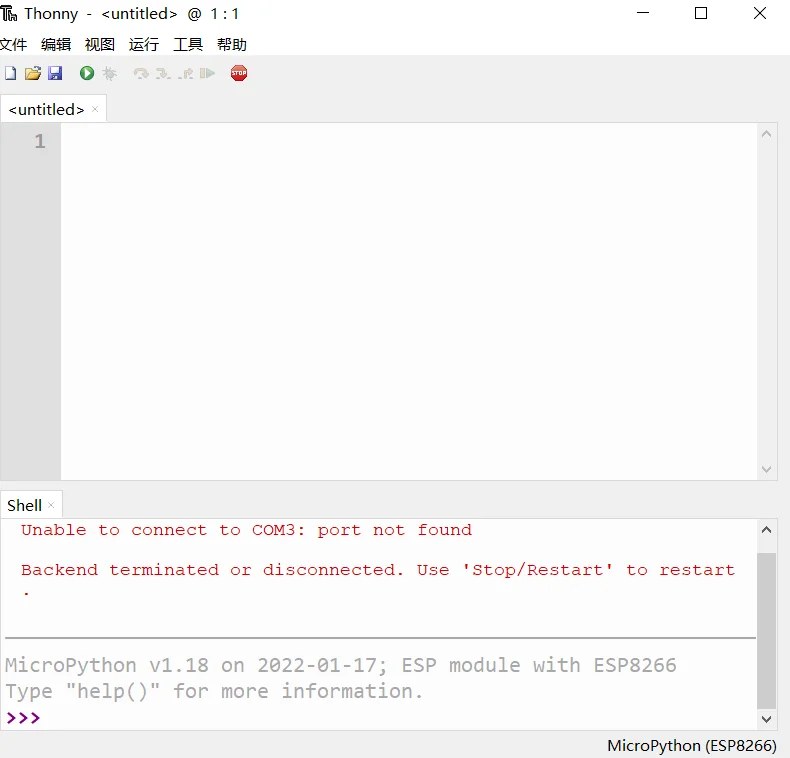
打开运行->设置解释器
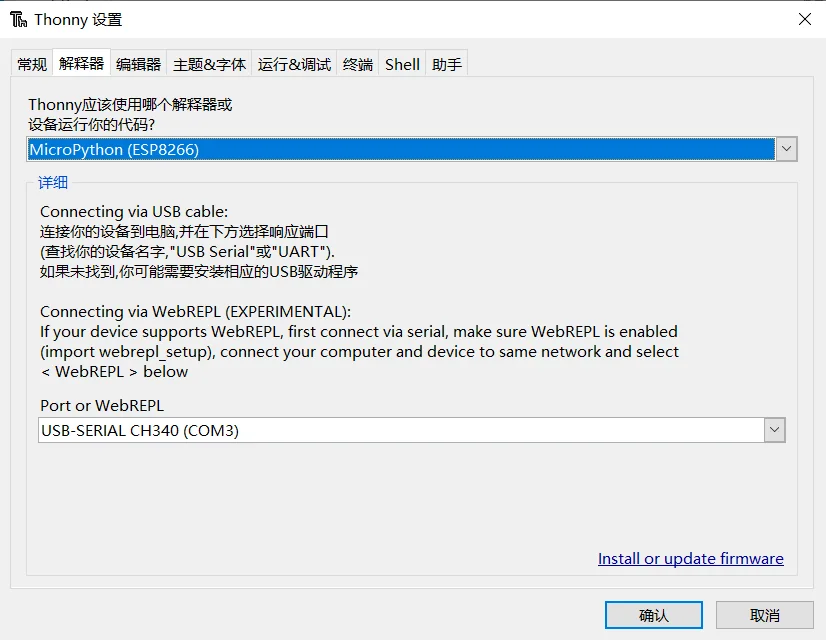
image.png

配置正常应当是这种情况

image.png

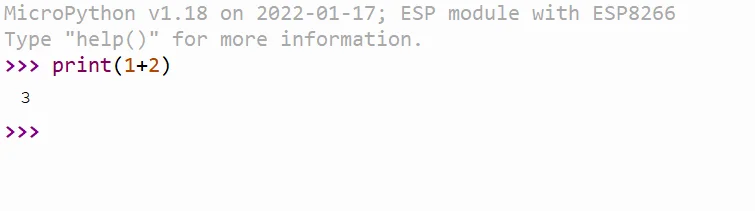
顺利运行

跑个指令看看

image.png

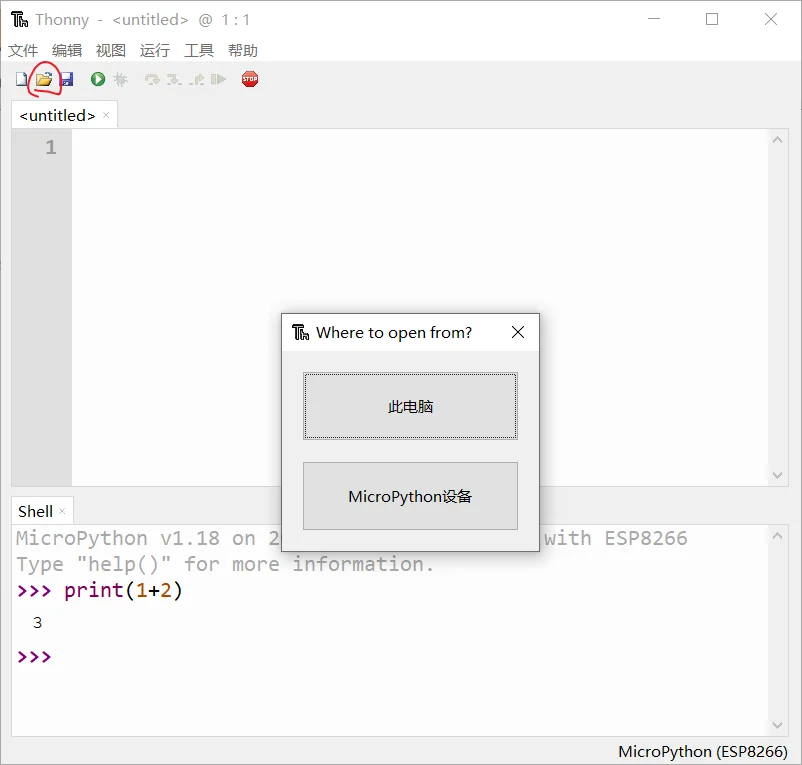
上传文件

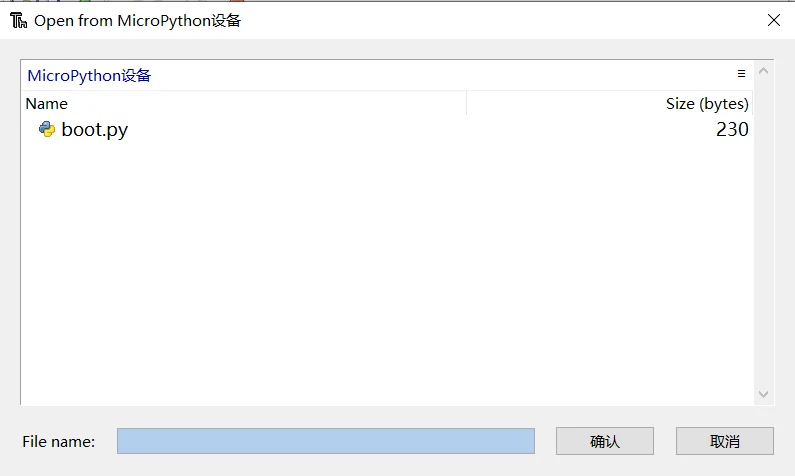
打开

image-20220120191437877.png

选择MicroPython设备,默认只有boot.py

image.png

文件命名为main.py的话,NodeMCU开机就会运行main.py

重要的事情说三遍

不允许写死循环程序!死循环程序拔掉线后板子无法刷入任何程序!!

不允许写死循环程序!死循环程序拔掉线后板子无法刷入任何程序!!

不允许写死循环程序!死循环程序拔掉线后板子无法刷入任何程序!!

2022.2.26更新:找到解决方案了,连上thonny后,对着shell窗口狂按Ctrl+C就有概率使板子停止运行,板子停下来后,移除main.py或者输入其他非micropython固件即可摆脱循环

好用的库

ujson

http://micropython.circuitpython.com.cn/en/latet/library/ujson.html

import json

a={'12':'dd','13':'ee'}

d=json.dumps(a)

print(d)

urequests

发送网络请求

import urequests

response = urequests.get('http://jsonplaceholder.typicode.com/albums/1')

print(response.text)

print(response.status_code)

定时器

定时器相比较于延时函数,不占用CPU运行时间

timer.deinit()

解除定时器的功能

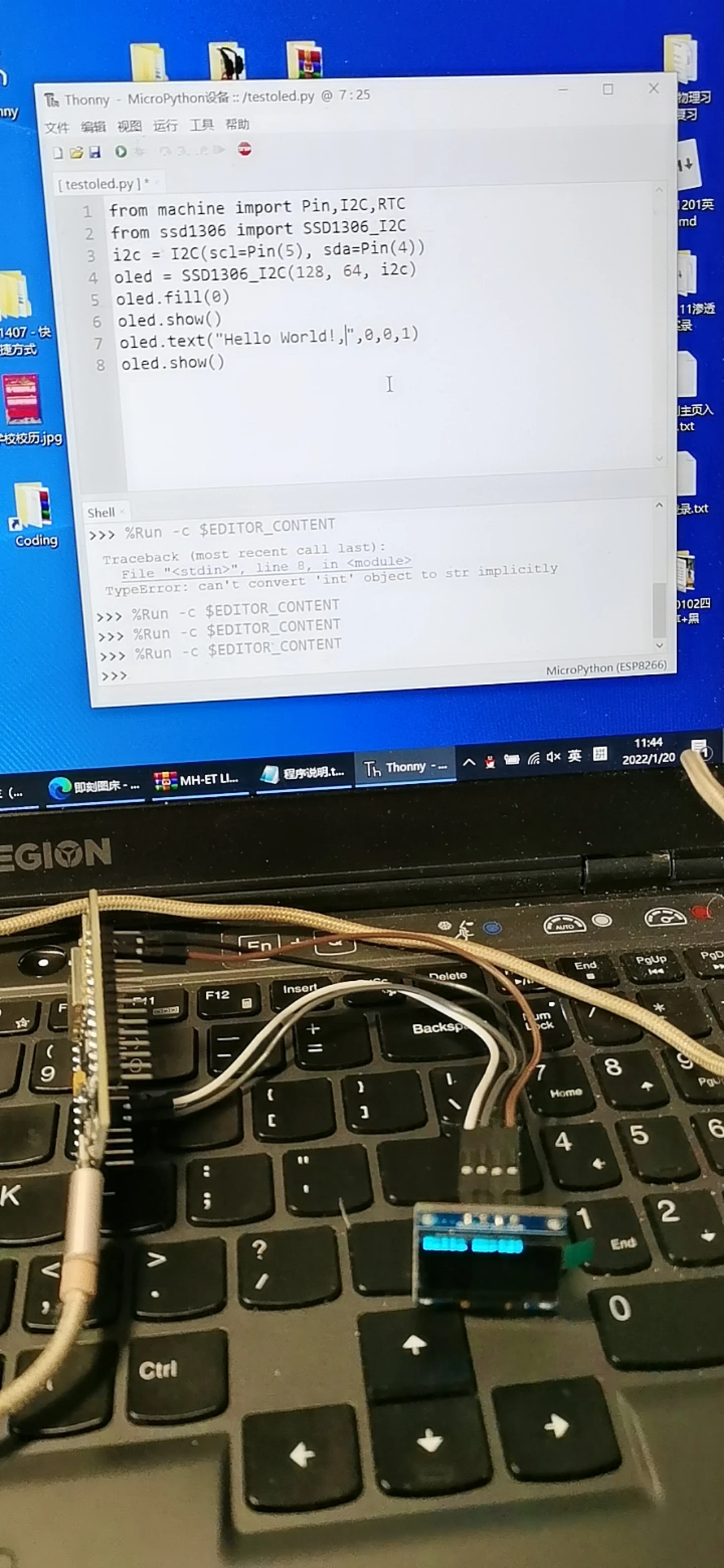
驱动屏幕(I2C)

from machine import Pin,I2C,RTC

from ssd1306 import SSD1306_I2C

i2c = I2C(scl=Pin(5), sda=Pin(4))

oled = SSD1306_I2C(128, 64, i2c)

oled.fill(0)

oled.show()

oled.text("Hello World!",0,0)

oled.text("Welcome",0,16) #第二行

oled.show()

注意

屏幕是12864分辨率,就是横向(X轴)有128个像素点,纵向(Y轴)有64个点,一共是12864=8192个像素点。我们点亮需要的像素点,就能成像出我们需要的图像

具体还得看手册
V)9Y7$%(12L9~77SODR8LXF.jpg

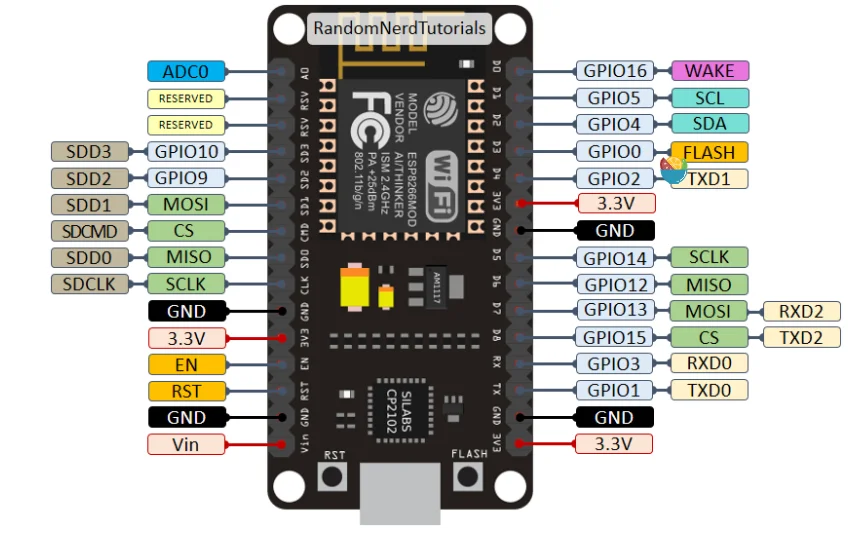
硬件管脚图:

4268f878dcb8a03ecdc14346a1cc4857.jpg

全引脚展示

image-20210205161507654.png

esp8266手册_ESP8266用Micropython点亮I2C接口Oled

参考资料

http://docs.micropython.org/en/latest/library/index.htm

官方资料

http://micropython.circuitpython.com.cn/en/latet/library/index.html

中文翻译资料

编译mpy字节码

https://www.cnblogs.com/yafengabc/p/8682910.html

ESP32有关蓝牙广播的案例

https://github.com/micropython/micropython/blob/master/examples/bluetooth/ble_advertising.py

Webrpl

要连接wifi的话,需要把wifi名称和写进boot.py里面,main.py不行

记录一个诡异事件

全局变量要放在最前面

函数的位置不能随意挪动

明明python没有函数重载,那为什么这个文件能运行?

from tftlcd import LCD32

from touch import XPT2046

import time,gui,random

from machine import Timer,Pin

from test_mqtt import WIFI_Connect

from json import dumps

from simple import MQTTClient #导入MQTT板块

#定义常用颜色

RED = (255,0,0)

GREEN = (0,255,0)

BLUE = (0,0,255)

BLACK = (0,0,0)

WHITE = (255,255,255)

d = LCD32(portrait=1) #默认方向竖屏

t = XPT2046()#默认方向

#填充白色

d.fill(WHITE)

#MQTT配置

SERVER = ''

USERNAME = ''

PASSWORD = ''

PORT = 1883

CLIENT_ID = '' # 客户端ID

TOPIC = 'T87HBZV2AE/ESP32Board/event' # TOPIC名称

# MQTTsend函数("Bug")

def MQTT_Send(list2):

print("hello")

#屏幕刷新

def flash(list2):

d.printStr(str(list2[0]['x'])+","+str(list2[0]['y']), 90, 78, RED, size=2)

d.printStr(str(list2[1]), 90, 123, RED, size=2)

d.printStr(str(list2[2]), 90, 168, RED, size=2)

d.printStr(str(list2[3]), 90, 213, RED, size=2)

#按钮

def fun1(B1):

print("hello")

def fun2(B1):

print("hello 2")

# #############################

# #### 定时器用于扫描按钮触发事件 ##

#############################

tim_flag = 0

def count(tim):

global tim_flag

tim_flag = 1

def ll(tim):

c={'x': round(-3 + random.random() * 6,2),'y': round(-3 + random.random() * 6,2)}

list2=[c,37,round(random.random()*100,2),50 + round(random.random() * 40,2),time.mktime(time.localtime())]

flash(list2)

MQTT_Send(list2)

# MQTTsend函数("True")

def MQTT_Send(list2):

list1=["coordinate","temperature","blood_oxygen","heart_rate","timestamp"]

b=zip(list1,list2)

msg1=dumps(dict(b))

print(msg1)

client.publish(TOPIC, msg1,qos=1)

#主函数+定时器

if WIFI_Connect():

client = MQTTClient(CLIENT_ID, SERVER, PORT,USERNAME,PASSWORD,60)

client.connect()

d.Picture(0,0,"all.jpg")

B1 = gui.TouchButton(40,250,80,50,BLUE,'On',WHITE,fun1)

B2 = gui.TouchButton(140,250,80,50,RED,'Off',WHITE,fun2)

data = Timer(-1)

data.init(period=1000, mode=Timer.PERIODIC,callback=ll)

#构建软件定时器,编号1

tim = Timer(1)

tim.init(period=20, mode=Timer.PERIODIC,callback=count) #周期为20ms

while True:

#执行按钮触发的任务

if tim_flag == 1:

t.tick_inc()

gui.task_handler()

tim_flag = 0

就问,哪个MQTT_Send会被运行?

最终解决方案:把提供mqtt功能的python文件通过mpy_cross编译成字节码以后放到板子上,再也没有出现过这样的问题

踩坑

esp8266没有radint和random.choice()

只有random.``getrandbits(size)

还有个random.``seed**(*用于生成种子

5月4日把ESP8266的GPIO3给干坏了,花了三到四个小时才检测出来

感觉IIC的控制有问题,也有可能是MAX30205的锅

MAX30102使用


avatar

探索未曾设想的道路