惯性聚合 高效追踪和阅读你感兴趣的博客、新闻、科技资讯
阅读原文 在惯性聚合中打开

推荐订阅源

C
Comments on: Blog
S
Schneier on Security
Microsoft Azure Blog
T
Tor Project blog
V
Visual Studio Blog
C
CXSECURITY Database RSS Feed - CXSecurity.com
Threat Intelligence Blog | Flashpoint
Spread Privacy
Spread Privacy
月光博客
月光博客
罗磊的独立博客
Cisco Talos Blog
Cisco Talos Blog
P
Privacy International News Feed
T
Tenable Blog
阮一峰的网络日志
阮一峰的网络日志
AWS News Blog
AWS News Blog
T
ThreatConnect
博客园 - 三生石上(FineUI控件)
Recorded Future
Recorded Future
Hugging Face - Blog
Hugging Face - Blog
T
Tailwind CSS Blog
博客园 - 叶小钗
CTFtime.org: upcoming CTF events
A
Arctic Wolf
L
LINUX DO - 最新话题
美团技术团队
大猫的无限游戏
大猫的无限游戏
I
Intezer
博客园 - 司徒正美
酷 壳 – CoolShell
酷 壳 – CoolShell
量子位
小众软件
小众软件
T
Threatpost
V
V2EX
钛媒体:引领未来商业与生活新知
钛媒体:引领未来商业与生活新知
宝玉的分享
宝玉的分享
The Register - Security
Project Zero
Project Zero
J
Java Code Geeks
Cyberwarzone
Cyberwarzone
IT之家
IT之家
MyScale Blog
MyScale Blog
T
Threat Research - Cisco Blogs
T
The Blog of Author Tim Ferriss
腾讯CDC
S
SegmentFault 最新的问题
F
Fox-IT International blog
S
Security Archives - TechRepublic
Last Week in AI
Last Week in AI
G
GRAHAM CLULEY
M
MIT News - Artificial intelligence

Mox的笔记库

细嗦下MLIR的环境搭建 | Mox的笔记库 博客重构:从Hexo到Astro | Mox的笔记库 2026PPoPP MLIR Tutorial学习 | Mox的笔记库 MacOS配置《明日方舟:终末地》 | Mox的笔记库 2025:向内生长 | Mox的笔记库 由mlir::ExecutionEngine引发的跨系统问题 | Mox的笔记库 WSL2配置Cuda-Tile环境记录(未完待续) | Mox的笔记库 Vibe Coding手搓项目记录 | Mox的笔记库 给Debian上包——以DuckDB为例 | Mox的笔记库 UCPD.sys事件存档 | Mox的笔记库 换新电脑之Mac mini M4从购买到配置 | Mox的笔记库 Mac配置MLX-C开发环境 | Mox的笔记库 RISC-V meets RDBMS——RISC-V架构上可运行数据库一览 | Mox的笔记库 DuckDB Sort实现调查 | Mox的笔记库 修复Redis在树莓派5上无法运行的问题 | Mox的笔记库 如何在MLIR中自定义类型并且输出运行 | Mox的笔记库 网站网络结构变更记录 | Mox的笔记库 EDBT25论文阅读:PhoebeDB——A Disk-Based RDBMS Kernel for High-Performance and Cost-Effective OLTP SIGMOD25论文阅读:BPF-DB:——A Kernel-Embedded Transactional Database Management System For eBPF Applications SIGMOD24文章阅读:Query Compilation Without Regrets | Mox的笔记库 论文阅读:Designing an Open Framework for Query Optimization and Compilation Apache Arrow Gandiva项目解析 | Mox的笔记库 VLDB24论文阅读:Cloud-Native Database Systems and Unikernels——Reimagining OS Abstractions for Modern Hardware NoisePage源码分析(未完待续) | Mox的笔记库 VLDB20论文阅读:Mainlining Databases——Supporting Fast Transactional Workloads on Universal Columnar Data File Formats VLDB17论文阅读:Relaxed Operator Fusion for In-Memory Databases:Making Compilation, Vectorization, and Prefetching Work Together At Last 论文阅读:How not to structure your database-backed web applications——a study of performance bugs in the wild SIGMOD24阅读:ROME——Robust Query Optimization via Parallel Multi-Plan Execution 文章阅读:First Past the Post-Evaluating Query Optimization in MongoDB SIGMOD文章阅读:Apache Calcite——A Foundational Framework for Optimized Query Processing Over Heterogeneous Data Sources VLDB23论文阅读:Analyzing the Impact of Cardinality Estimation on Execution Plans in Microsoft SQL Server SIGMOD22论文阅读:Efficient Massively Parallel Join Optimization for Large Queries VLDB论文阅读:Weaving Relations for Cache Performance VLDB22论文阅读:ConnectorX——Accelerating Data Loading From Databases to Dataframes 论文阅读:UniKraft-Fast, Specialized Unikernels the Easy Way 当DuckDB遇上RISC-V | Mox的笔记库 SIGMOD25论文阅读:An Elephant Under The Microscope——Analyzing The Interaction Of Optimizer Components In PostgreSQL 论文阅读:Compile-Time Analysis of Compiler Frameworks for Query Compilation VLDB23阅读:Bringing Compiling Databases to RISC Architectures LingoDB源码编译与分析 | Mox的笔记库 淦!MLIR输出Hello World不应该这么难! | Mox的笔记库 如何愉快的运行一个MLIR程序 | Mox的笔记库 2024:拥挤年代的想象与创造 | Mox的笔记库 如何给自己的博客添加MLIR和LLVM IR语法高亮 | Mox的笔记库 VLDB19-Parsing Gigabytes of JSON per Second论文阅读 CIDR25:Runtime-Extensible Parsers阅读 | Mox的笔记库 MLIR学习资料整理 | Mox的笔记库 SIGMOD24文章阅读:VeriTxn | Mox的笔记库 VLDB23文章阅读——Exploiting Cloud Object Storage for High-Performance Analytics VLDB24——OLAP on Modern Chiplet-Based Processors走马观花阅读 VLDB22:YeSQL文章阅读(已废弃) | Mox的笔记库 如何让数据库中的Python跑的更快-VLDB22-YeSQL文章阅读 | Mox的笔记库 你好,世界! | Mox的笔记库 让系统研究更有意义:HarmonyOS NEXT的教训和经验——讲座回顾 | Mox的笔记库 UNSW 24T3 COMP9336上课记录 | Mox的笔记库 Velox开发环境配置踩坑记录 | Mox的笔记库 MLIR Toy Tutorial实践记录 | Mox的笔记库 论文阅读:Declarative Sub-Operators for Universal Data Processing LLVM-Kaleidoscope实操踩坑记录 | Mox的笔记库 2024年7月RSSHub开发体验 | Mox的笔记库 澳洲大学计算机硕士比较 | Mox的笔记库 论文阅读——CDUL:CLIP-Driven Unsupervised Learning for Multi-Label Image Classification 论批量快速添加图片与视频水印的事 | Mox的笔记库 CVPR2023-CLIP算法调研 | Mox的笔记库 基于元信息写入的服务器压力测试 | Mox的笔记库 MjAyMw==,希望,前进与平庸之道 | Mox的笔记库 家庭组网IPv6+Mesh折腾 | Mox的笔记库 code-server初体验 | Mox的笔记库 从Nginx到Caddy | Mox的笔记库 Hexo部署安装全流程回顾 | Mox的笔记库 RMM观察与初探 | Mox的笔记库 JQuery的XSS初探 | Mox的笔记库 生产实习记录 | Mox的笔记库 Fedora-CoreOS配置与试用(2023年) | Mox的笔记库 Electron学习笔记 | Mox的笔记库 ServerSentEvent学习 | Mox的笔记库 报告翻译:容器云的安全挑战 | Mox的笔记库 Arch Linux迁移计划 | Mox的笔记库 Vagrant配置Metarget靶场环境 | Mox的笔记库 OpenAI-whisper折腾 | Mox的笔记库 202202,困惑,混乱与未曾设想之路 | Mox的笔记库 2022年Hack the box:Tier1免费区全解 | Mox的笔记库 Navidrome部署记录 | Mox的笔记库 长安杯2021-snake复现 | Mox的笔记库 报告概要翻译:OBFUSCATING C++ PROGRAMS VIA CONTROL FLOW FLATTENING 从零开始的Django CVE-2022-28346复现 | Mox的笔记库 2022CISCN(西北区赛)-The shinning | Mox的笔记库 Docker+QEMU+Arm64(Ubuntu)+环境配置(2022版) | Mox的笔记库 Arch Linux运行树莓派系统(2022年) | Mox的笔记库 2022CISCN初赛-ez_usb-复盘WriteUp | Mox的笔记库 NodeMCU-MicroPython配置实录 | Mox的笔记库 Django事务使用 | Mox的笔记库 记录第一次EduSRC上报 | Mox的笔记库 Jetbrain问题应急处理 | Mox的笔记库 Celery5.2学习&配置 | Mox的笔记库 Waline部署记录 | Mox的笔记库 2021年12月 Vivo千镜杯回顾 | Mox的笔记库 Frida hook初次实战 | Mox的笔记库 Log4j2漏洞复现 | Mox的笔记库 Windows的WSL2+Docker初探 | Mox的笔记库
计算机网络课设——UDP/TCP/TLS Socket实验 | Mox的笔记库
2023-09-09 · via Mox的笔记库

2022年11月整的活儿。我看周围的人去网上去抄一篇C/C++/Java的Socket聊天实验室基本就能很好的把作业交差了,而我则选择用刚学的Go写一个用TLS加密Socket实验室。这几天整理了以下当时的代码,用GPT4生成使用TCP,UDP,TLS的Socker服务,重新温习一下Go语言的的操作。

TCP

tcp_server.go

package main // 声明main包

import ( // 导入需要的包

"bufio" // 带缓冲的IO操作包

"fmt" // 格式化和打印

"net" // 网络操作包

"strings" // 字符串操作包

)

func main() { // 主函数

fmt.Println("Starting server...") // 打印启动服务器的信息

listener, _ := net.Listen("tcp", ":8080") // 监听8080端口

for { // 无限循环 保持服务器运行

conn, _ := listener.Accept() // 接收新的连接

go handleRequest(conn) // 单独的goroutine处理连接

}

}

func handleRequest(conn net.Conn) { // 处理请求的函数

defer conn.Close() // 函数结束时关闭连接

reader := bufio.NewReader(conn) // 从连接中读取

message, _ := reader.ReadString('\n') // 读取字符串直到\n

message = strings.TrimSpace(message) // 去掉字符串两边的空格

fmt.Printf("Received: %s\n", message) // 打印接收到的消息

conn.Write([]byte("Message received.\n")) // 响应客户端

}

一个简单的TCP Socket Server,不涉及对conn的存储

聊天室需要利用对conn的存储进行实现

UDP

udp_server.go

package main // 声明main包

import (

"fmt" // 格式化和打印输出

"net" // 网络操作包

)

func main() {

p := make([]byte, 2048) // 创建一个2048字节的缓冲区

addr := net.UDPAddr{

Port: 12345, // 监听端口

IP: net.ParseIP("127.0.0.1"), // 监听接口

}

ser, err := net.ListenUDP("udp", &addr) // 监听UDP端口

if err != nil {

fmt.Printf("Some error %v", err) // 如果监听失败,打印错误

return

}

for { // 无限循环,持续监听

_, remoteaddr, err := ser.ReadFromUDP(p) // 读取一个UDP数据报文

fmt.Printf("Read a message from %v %s \n", remoteaddr, p) // 打印客户端地址和内容

if err != nil { // 如果读取失败

fmt.Printf("Some error %v", err)

continue

}

go sendResponse(ser, remoteaddr) // 开启goroutine回复客户端

}

}

func sendResponse(conn *net.UDPConn, addr *net.UDPAddr) {

_, err := conn.WriteToUDP([]byte("From server: Hello I got your mesage "), addr) //回复客户端

if err != nil {

fmt.Printf("Couldn't send response %v", err) // 如果回复失败,打印错误

}

}

udp_client.go

go run udp_client.go 127.0.0.1:12345

package main

import (

"fmt" // 格式化和打印输出包

"net" // 网络操作包

"os" // 操作系统功能包

)

func main() {

if len(os.Args) != 2 { // 检查命令行参数数量

fmt.Fprintf(os.Stderr, "Usage: %s host:port", os.Args[0]) // 打印使用说明

os.Exit(1) // 退出程序

}

service := os.Args[1] // 获取服务地址

udpAddr, err := net.ResolveUDPAddr("udp4", service) // 解析UDP地址

CheckError(err) // 检查错误

conn, err := net.DialUDP("udp", nil, udpAddr) // 拨号UDP服务

CheckError(err) // 检查错误

defer conn.Close() // 函数结束时关闭连接

_, err = conn.Write([]byte("Hello from client")) // 发送数据

CheckError(err) // 检查错误

var buf [512]byte // 创建512字节缓冲区

n, err := conn.Read(buf[0:]) // 读取数据

CheckError(err) // 检查错误

fmt.Println(string(buf[0:n])) // 打印接收到的数据

os.Exit(0) // 正常退出

}

func CheckError(err error) { // 错误检查函数

if err != nil {

fmt.Fprintf(os.Stderr, "Fatal error: %s", err.Error())

os.Exit(1)

}

}

TLS

先用OpenSSL生成公钥和私钥证书

# 1. 生成私钥

openssl genrsa -out private.key 2048

# 2. 基于私钥生成证书签名请求(CSR)

openssl req -new -key private.key -out cert.csr

# 3. 生成自签名证书

openssl x509 -req -days 365 -in cert.csr -signkey private.key -out cert.crt

# 4. 查看证书内容

openssl x509 -in cert.crt -text -noout

转成pem文件

# 私钥

openssl pkcs8 -topk8 -inform PEM -in private.key -out private.pem -nocrypt

# 证书

openssl x509 -in cert.crt -out cert.pem -outform PEM

用Claude 2和GPT4都没有生成可用的代码,最后用ChatGPT生成了下面代码

tls_server.go

package main

import (

"crypto/tls"

"fmt"

"io"

"log"

"net"

)

func handleConnection(conn net.Conn) {

defer conn.Close()

// 在这里处理连接

buf := make([]byte, 1024)

for {

n, err := conn.Read(buf)

if err != nil {

if err != io.EOF {

fmt.Println("读取错误:", err)

}

break

}

fmt.Printf("收到消息:%s\n", string(buf[:n]))

}

}

func main() {

// 加载服务器证书和私钥

cert, err := tls.LoadX509KeyPair("cert.pem", "key.pem")

if err != nil {

log.Fatal("加载证书失败:", err)

}

// 创建TLS配置

config := &tls.Config{

Certificates: []tls.Certificate{cert},

// Rand: rand.Reader,

}

// 创建监听器

listener, err := tls.Listen("tcp", ":443", config)

if err != nil {

log.Fatal("监听失败:", err)

}

defer listener.Close()

fmt.Println("等待客户端连接...")

for {

// 接受连接并处理

conn, err := listener.Accept()

if err != nil {

log.Fatal("接受连接失败:", err)

}

fmt.Println("客户端已连接:", conn.RemoteAddr())

go handleConnection(conn)

}

}

tls_client.go

package main

import (

"crypto/tls"

"fmt"

"log"

"os"

"os/signal"

"syscall"

)

func main() {

// 加载客户端证书和私钥

cert, err := tls.LoadX509KeyPair("cert.pem", "key.pem")

if err != nil {

log.Fatal("加载证书失败:", err)

}

// 创建TLS配置

config := &tls.Config{

Certificates: []tls.Certificate{cert},

InsecureSkipVerify: true, // 忽略服务器端证书验证(仅用于示例,请勿在生产环境中使用)

}

// 连接服务器

conn, err := tls.Dial("tcp", "127.0.0.1:443", config)

if err != nil {

log.Fatal("连接服务器失败:", err)

}

defer conn.Close()

fmt.Println("已连接到服务器。可以开始发送消息了。")

// 启动信号监听器以便优雅地关闭连接

go func() {

sigCh := make(chan os.Signal, 1)

signal.Notify(sigCh, os.Interrupt, syscall.SIGTERM)

<-sigCh

fmt.Println("收到退出信号。关闭连接...")

conn.Close()

}()

// 处理用户输入并发送消息

buf := make([]byte, 1024)

for {

n, err := os.Stdin.Read(buf)

if err != nil {

log.Fatal("读取输入错误:", err)

}

_, err = conn.Write(buf[:n])

if err != nil {

log.Fatal("发送消息失败:", err)

}

}

}

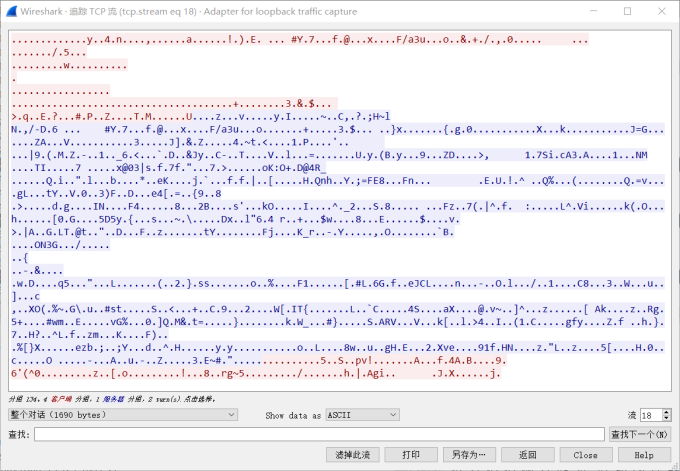
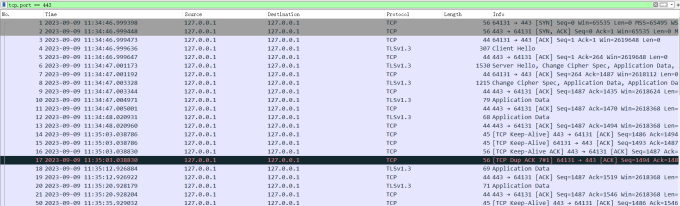
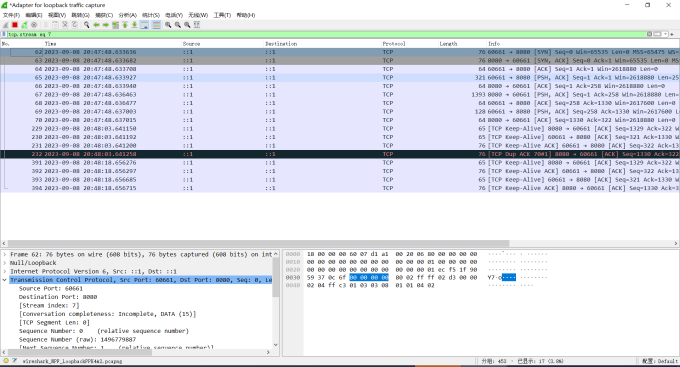
抓出来的包不是TLS
pP6q2SP.md.png

但内容确实是加密的

pP6qRQf.md.png

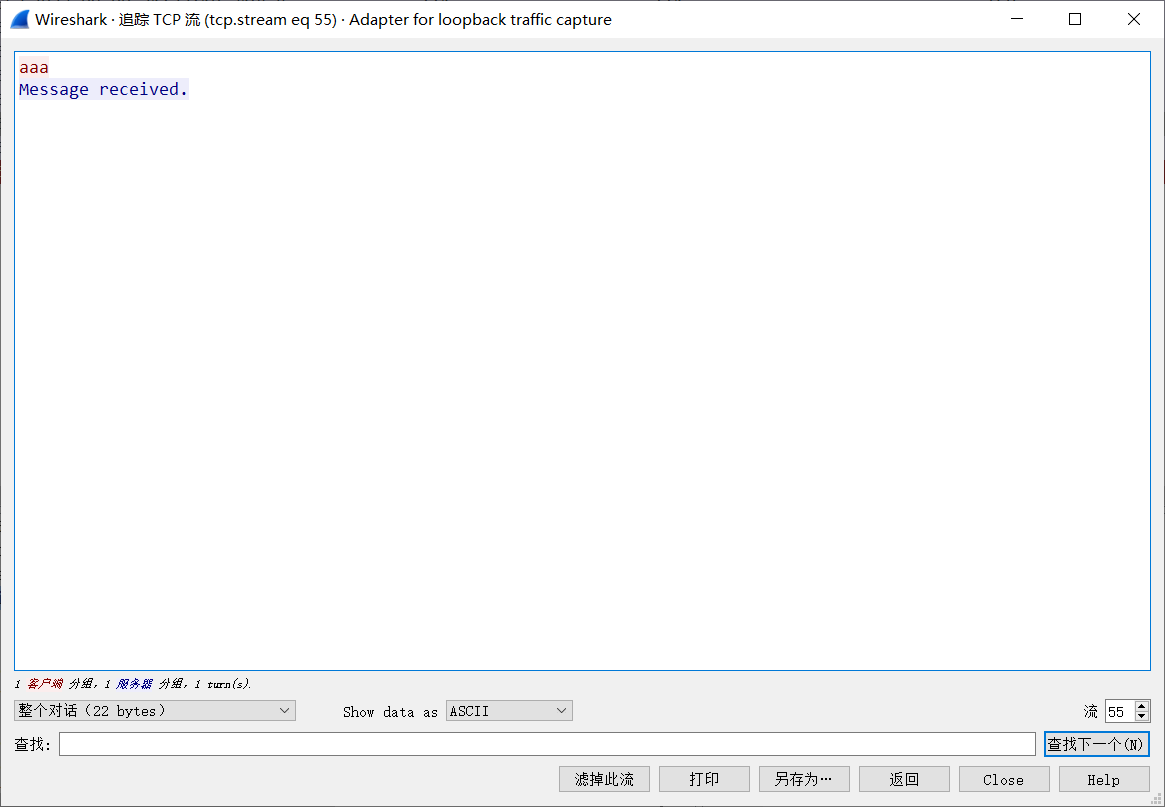
与纯TCP的连接做个对照

pP6qfOS.png

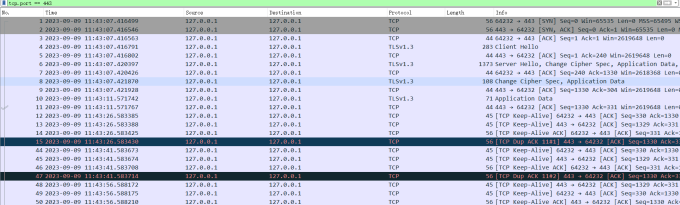
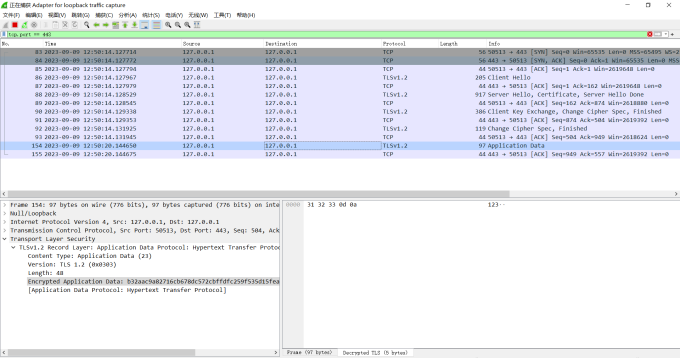
但我手头上的最早的网络实验里,Wireshark可以找到TLS的握手包

pP6q5wQ.md.png

然后第二天早上在跑一遍ChatGPT写的程序,TLS1.3就被识别出来了

pP6q4eg.md.png

所以这个乌龙应该是Wireshark在IPv6上抓包引起的

Wireshark解密

常规办法:

通过设置WSSLKEYLOGFILE进行导出(仅对浏览器有效)

那就会引出下一个问题:我自己写的程序怎么办?

通过导入私钥的办法解决,这个方法用两个限制条件

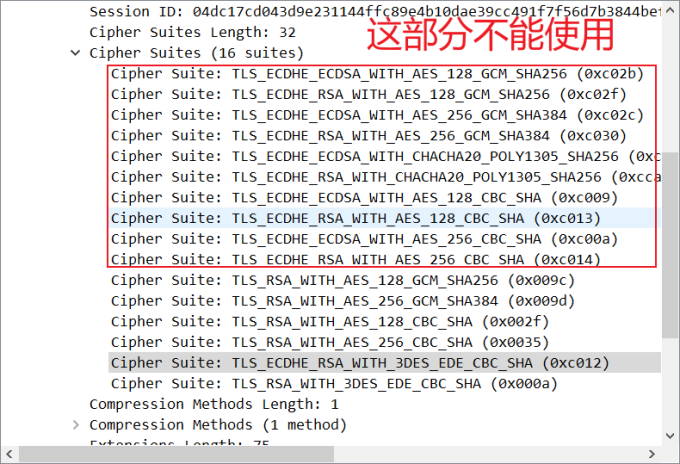
  1. 必须要有完整的握手包(Client Hello还有Client Key Exchange,因此TLS版本必须小于1.3)
  2. 解密套件仅限于TLS_RSA_开头的Suite

pP6q7Yn.md.png

对此,需要对服务端和客户端TLS的config做出修改,添加相关限制

MinVersion: tls.VersionTLS12,

MaxVersion: tls.VersionTLS12,

CipherSuites: []uint16{

tls.TLS_RSA_WITH_AES_128_CBC_SHA,

tls.TLS_RSA_WITH_AES_256_CBC_SHA,

},

满足上述条件即可通过导入私钥抓包
pP6qTFs.md.png

由此可见,就算是服务器丢了私钥,使用TLS1.3的情况下也无法对数据包解密

总结

Sever最终进入死循环,在循环中接收到conn后转移到goroutine中解决

实现聊天室就需要建立连接池,建一个Map或和Array的全局变量把连接添加进去即可。


avatar

MocusEZ

探索未曾设想的道路