本文基于B站视频教程尚硅谷Java版Flink(武老师清华硕士,原IBM-CDL负责人),本文软件版本,行文顺序等可能与视频略有不同
一、概念
1. 是什么
Apache Flink是一个框架和分布式处理引擎,用于对无界和有界数据流进行状态计算。Flink 被设计为在所有常见的集群环境中运行,以内存中的速度和任何规模执行计算
2. 目标
二、使用
1. 使用前准备
pom依赖
1
2
3
4
5
6
7
8
9
10
11
12
13
14
15
16
17
18
19
20
21
22
23
24
25
26
27
28
29
30
31
32
33
34
35
36
| <?xml version="1.0" encoding="UTF-8"?>
<project xmlns="http://maven.apache.org/POM/4.0.0"
xmlns:xsi="http://www.w3.org/2001/XMLSchema-instance"
xsi:schemaLocation="http://maven.apache.org/POM/4.0.0 http://maven.apache.org/xsd/maven-4.0.0.xsd">
<modelVersion>4.0.0</modelVersion> <groupId>com.ifnxs.bigdata</groupId>
<artifactId>FlinkTutorial</artifactId>
<version>1.0-SNAPSHOT</version> <properties>
<maven.compiler.source>8</maven.compiler.source>
<maven.compiler.target>8</maven.compiler.target>
<flink.version>1.12.1</flink.version>
<scala.binary.version>2.12</scala.binary.version>
</properties> <dependencies>
<dependency>
<groupId>org.apache.flink</groupId>
<artifactId>flink-java</artifactId>
<version>${flink.version}</version>
</dependency>
<dependency>
<groupId>org.apache.flink</groupId>
<artifactId>flink-streaming-scala_${scala.binary.version}</artifactId>
<version>${flink.version}</version>
</dependency>
<dependency>
<groupId>org.apache.flink</groupId>
<artifactId>flink-clients_${scala.binary.version}</artifactId>
<version>${flink.version}</version>
</dependency>
</dependencies> </project>
|
flink-streaming-scala_2.12 => org.apache.flink:flink-runtime_2.12:1.12.1 => com.typesafe.akka:akka-actor_2.12:2.5.21,akka就是用scala实现的。即使这里我们用java语言,还是用到了scala实现的包
hello.txt内容
1
2
3
4
5
6
| hello world
hello spark
hello flink
how are you
fine thank you
and you
|
2. 批处理实现WordCount
实现代码
1
2
3
4
5
6
7
8
9
10
11
12
13
14
15
16
17
18
19
20
21
22
23
24
25
26
27
28
29
30
31
32
33
34
35
36
37
38
39
| package com.ifnxs.bigdata.wc;import org.apache.flink.api.common.functions.FlatMapFunction;
import org.apache.flink.api.java.DataSet;
import org.apache.flink.api.java.ExecutionEnvironment;
import org.apache.flink.api.java.tuple.Tuple2;
import org.apache.flink.util.Collector; // 批处理
public class WordCount {
public static void main(String[] args) throws Exception {
// 创建执行环境
ExecutionEnvironment env = ExecutionEnvironment.getExecutionEnvironment(); // 从文件中读取数据
String inputPath = "D:\\learn\\bigdata\\FlinkTutorial\\src\\main\\resources\\hello.txt";
DataSet<String> inputDataSet = env.readTextFile(inputPath); // 对数据集进行处理,按空格分词展开,转换成(word, 1)二元组进行统计
DataSet<Tuple2<String, Integer>> resultSet = inputDataSet.flatMap(new MyFlatMapper())
.groupBy(0) // 按照第一个位置的word分组
.sum(1); // 按照第二个位置上的数据求和
resultSet.print();
} // 自定义类,实现FlatMapFunction接口
public static class MyFlatMapper implements FlatMapFunction<String, Tuple2<String, Integer>> { @Override
public void flatMap(String value, Collector<Tuple2<String, Integer>> out) throws Exception {
// 按空格分词
String[] words = value.split(" ");
// 遍历所有word,包成二元组输出
for (String word : words) {
out.collect(new Tuple2<>(word, 1));
}
}
}
}
|
输出
1
2
3
4
5
6
7
8
9
10
| (flink,1)
(world,1)
(hello,3)
(and,1)
(fine,1)
(how,1)
(spark,1)
(you,3)
(are,1)
(thank,1)
|
3. 流处理实现WordCount
实现代码
1
2
3
4
5
6
7
8
9
10
11
12
13
14
15
16
17
18
19
20
21
22
23
24
25
26
27
28
29
30
| package com.ifnxs.bigdata.wc;import org.apache.flink.api.java.tuple.Tuple2;
import org.apache.flink.client.program.StreamContextEnvironment;
import org.apache.flink.streaming.api.datastream.DataStream;
import org.apache.flink.streaming.api.environment.StreamExecutionEnvironment; // 流处理WordCount
public class StreamWordCount {
public static void main(String[] args) throws Exception {
// 创建流处理执行环境
StreamExecutionEnvironment env = StreamContextEnvironment.getExecutionEnvironment(); // 设置并行度,默认值 = 当前计算机的CPU逻辑核数(设置成1即单线程处理)
// env.setMaxParallelism(32); // 从文件中读取数据
String inputPath = "D:\\learn\\bigdata\\FlinkTutorial\\src\\main\\resources\\hello.txt";
DataStream<String> inputDataStream = env.readTextFile(inputPath); // 基于数据流进行转换计算
DataStream<Tuple2<String, Integer>> resultStream = inputDataStream.flatMap(new WordCount.MyFlatMapper())
.keyBy(item -> item.f0)
.sum(1);
resultStream.print(); // 执行任务
env.execute();
}
}
|
输出
1
2
3
4
5
6
7
8
9
10
11
12
13
14
| 1> (spark,1)
8> (are,1)
11> (how,1)
10> (you,1)
9> (world,1)
13> (flink,1)
5> (hello,1)
5> (hello,2)
5> (hello,3)
9> (fine,1)
6> (thank,1)
10> (you,2)
10> (you,3)
15> (and,1)
|
每行开头的数字代表执行的线程,比如我的电脑是8核心16线程,默认并行度为16
同一个字符串,前面输出的编号是一样的,因为key => hashcode,同一个key的hash值固定,分配给相对应的线程处理
4. 模拟流实现
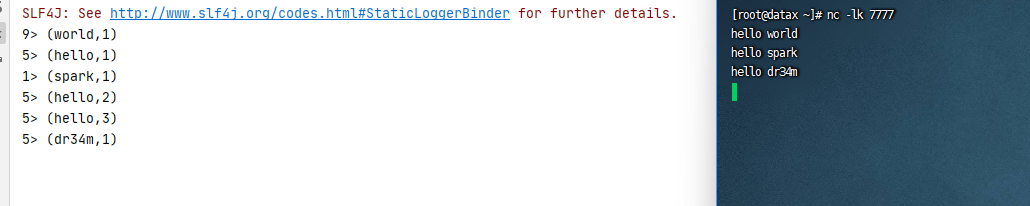
linux系统通过nc -lk <port>打开一个socket服务,用于模拟实时的流数据
如果CentOS没有安装nc可以通过下边的命令安装
代码修改如下
1
2
3
4
5
6
7
8
9
10
11
12
13
14
15
16
17
18
19
20
21
22
23
24
25
26
27
28
29
30
31
32
33
| package com.ifnxs.bigdata.wc;import org.apache.flink.api.java.tuple.Tuple2;
import org.apache.flink.client.program.StreamContextEnvironment;
import org.apache.flink.streaming.api.datastream.DataStream;
import org.apache.flink.streaming.api.environment.StreamExecutionEnvironment; // 流处理WordCount
public class StreamWordCount {
public static void main(String[] args) throws Exception {
// 创建流处理执行环境
StreamExecutionEnvironment env = StreamContextEnvironment.getExecutionEnvironment(); // 设置并行度,默认值 = 当前计算机的CPU逻辑核数(设置成1即单线程处理)
// env.setMaxParallelism(32); // 从文件中读取数据
// String inputPath = "D:\\learn\\bigdata\\FlinkTutorial\\src\\main\\resources\\hello.txt";
// DataStream<String> inputDataStream = env.readTextFile(inputPath); // 从socket文本流读取数据
DataStream<String> inputDataStream = env.socketTextStream("localhost", 7777); // 基于数据流进行转换计算
DataStream<Tuple2<String, Integer>> resultStream = inputDataStream.flatMap(new WordCount.MyFlatMapper())
.keyBy(item -> item.f0)
.sum(1);
resultStream.print(); // 执行任务
env.execute();
}
}
|
执行代码,然后发送socket消息,查看运行情况
因工作不需要笔记暂停
参考:尚硅谷Flink入门到实战-学习笔记



