惯性聚合 高效追踪和阅读你感兴趣的博客、新闻、科技资讯
阅读原文 在惯性聚合中打开

推荐订阅源

AI
AI
博客园 - 叶小钗
Blog — PlanetScale
Blog — PlanetScale
Microsoft Azure Blog
Vercel News
Vercel News
钛媒体:引领未来商业与生活新知
钛媒体:引领未来商业与生活新知
MyScale Blog
MyScale Blog
大猫的无限游戏
大猫的无限游戏
A
About on SuperTechFans
量子位
奇客Solidot–传递最新科技情报
奇客Solidot–传递最新科技情报
博客园 - 【当耐特】
Martin Fowler
Martin Fowler
阮一峰的网络日志
阮一峰的网络日志
D
Docker
Jina AI
Jina AI
Cyber Security Advisories - MS-ISAC
The Register - Security
J
Java Code Geeks
S
SegmentFault 最新的问题
月光博客
月光博客
G
Google Developers Blog
美团技术团队
Last Week in AI
Last Week in AI
L
LangChain Blog
Apple Machine Learning Research
T
The Blog of Author Tim Ferriss
腾讯CDC
Recent Announcements
Recorded Future
Recorded Future
The Cloudflare Blog
有赞技术团队
有赞技术团队
博客园_首页
博客园 - 聂微东
人人都是产品经理
人人都是产品经理
B
Blog
I
InfoQ
CTFtime.org: upcoming CTF events
F
Fortinet All Blogs
B
Blog RSS Feed
Engineering at Meta
Engineering at Meta
让小产品的独立变现更简单 - ezindie.com
Microsoft Security Blog
MongoDB | Blog
MongoDB | Blog
爱范儿
爱范儿
D
DataBreaches.Net
F
Full Disclosure
M
MIT News - Artificial intelligence
博客园 - 司徒正美
H
Help Net Security

Dr34m's Blog

I Expect You To Die(我希望你死) 1,2,3 完整中文攻略 Linux换国内源 && docker安装 && 换加速镜像 Vue3 + Element-Plus 极简速查 随笔 pyinstaller打包的程序执行报错Failed to extract xxxx decompression resulted in return code -1 taoSync排除项简易教程 apscheduler的cron配置项 如何在绿联NAS中使用TaoSync同步我的文件到各个网盘 GB28181抓包记录 JS计算字节大小,把字节转换为KB/MB/GB/TB等 在Python中使用onvif管理摄像头,包括设备发现,获取RTSP地址,获取设备信息,截图,云台控制与缩放,设置时间 编写bat脚本实现对vue项目构建并压缩 内网穿透工具frp快速使用 CentOS 7.9 安装基础开发环境jdk redis nacos nginx mysql Pyinstaller 逆向 VUE实现复制与粘贴_获取剪切板内容 child_process exec 中文乱码 Windows&Linux 解决方法 yum 更新 gcc CentOS安装并使用conda 将fluid主题博客的静态资源由第三方改为本地存储 一个上手即用的通用公众号/小程序/h5/app框架 python批量转化doc到docx SpringBoot单元测试注入空指针 TensorFlow 预测出现NaN的一种可能以及解决方法 随笔 python归一化数据 windows下python安装sasl遇到的问题及解决 将对象List中的某个字段放到新的List中[转载] Python http.server 本地服务支持跨域 TensorFlow入门 Flink学习笔记 windows本地配置spark开发环境 dataX使用 Apache Hive 学习笔记 hadoop学习笔记 element-ui 自带事件添加自定义参数 windows 11安装安卓应用程序 centos7安装zookeeper centos7安装jdk8 用idea开发spring项目过程中热重启 docker学习笔记 CentOS7安装k8s集群 通过Github Actions部署静态网站到腾讯云COS,并自动刷新CDN 用Typora编写Hexo博客时图片的处理 Hexo + Github Actions 提交代码自动部署 云服务器 腾讯云COS github-pages 常用的Linux进程基本命令 python实现微信jsapi签名 VsCode开发Python常用配置 mysql获取当期日期是该年第几周 LocalDate获取当前周周一日期 删除node_modules重新安装 基于firewalld端口转发 pip 安装 tensorflow MemoryError Java过滤html标签 mysql清空表,并让自增从0开始 JavaScript获取当前周或下n周的周n的日期 java复制不同实体类中相同的字段 前端下载二进制文件 mysql获取最近一段时间数据 python - pip换源 svn提交后jenkins自动部署 常见nginx反向代理配置 h5实现一种自动滚动的告警列表 nginx代理网站子目录到本地目录 centos下hexo + svn + jenkins实现博客自动部署 centos中jenkins配置环境变量 centos安装jenkins centos安装svn服务器 Ubuntu 20.04 换国内源 Vs Code编写md文件实现实时预览 Python自动处理依赖 海滨校园助手api使用文档 hexo-yilia主题相册 Java实现文件重命名,Java文件追加写入,java读取图片尺寸 Hexo安装配置并托管至github 新起点,新征程 在ubuntu安装jdk并配置环境变量 一个不到300行的C语言消灭敌机游戏 搭建L(Linux)+A(Apache)+M(MySQL)+P(PHP)网站环境,并安装Discuz 搭建L(Linux)+N(Nginx)+M(MySQL)+P(PHP)网站环境,并安装Wordpress NSA工具包验证之RDP漏洞利用 NSA工具包验证之IIS6.0漏洞利用 NSA工具包验证之SMB漏洞利用 SEO Ultimate 7.6.5.9汉化版(中文版)免费下载 在腾讯云服务器搭建FBCTF平台 FBCTF汉化简体中文免费下载,FBCTF更新缓存代码 wordpress发送邮件设置以及常见问题解决 短网址 一个小白的自学建站史(菜鸟建站入门) 危山 水调歌头 水调歌头
Electron + xterm.js + node-pty + vue 实现本地终端
Dr3@m · 2022-08-25 · via Dr34m's Blog

本文介绍一种简单方法,实现本地终端程序。

项目已上传Github https://github.com/dr34m-cn/electron-term-demo

核心代码

服务提供处:background.js

1
2
3
4
5
6
7
8
9
10
11
12
13
14
15
16
17
18
19
20
21
22
23
24
25
26
27
28
29
30
31
32
33
34
35
36
37
38
39
40
41
42
43
...

import {
app,
protocol,
BrowserWindow,
ipcMain
} from 'electron'

const pty = require("node-pty");
const os = require("os");
const shell = os.platform() === "win32" ? "powershell.exe" : "bash";

...

// 创建终端
ipcMain.handle("terminal-create", (event) => {
let term = pty.spawn(shell, [], {
name: "xterm-color",
cwd: process.env.PWD,
env: process.env
});
const pid = term.pid;
const channels = ["terminal-incomingData-" + pid, "terminal-keystroke-" + pid, "terminal-resize-" + pid, "terminal-close-" + pid];
// 命令反馈
term.onData(function(data) {
win.webContents.send(channels[0], data);
})
// 命令输入
ipcMain.on(channels[1], (event, key) => {
term.write(key);
});
// 尺寸调整
ipcMain.on(channels[2], (event, cols, rows) => {
term.resize(cols, rows);
});
// 终端关闭
ipcMain.on(channels[3], (event) => {
term.kill();
ipcMain.removeAllListeners([channels[1], channels[2], channels[3]]);
});
return pid;
});

封装处:term.vue

1
2
3
4
5
6
7
8
9
10
11
12
13
14
15
16
17
18
19
20
21
22
23
24
25
26
27
28
29
30
31
32
33
34
35
36
37
38
39
40
41
42
43
44
45
46
47
48
49
50
51
52
53
54
55
56
57
58
59
60
61
62
63
64
65
66
67
68
69
70
71
72
73
74
75
76
77
78
79
80
81
82
83
84
85
86
87
88
89
90
91
92
93
94
95
96
97
98
<template>
<div class="term" :id="'terminal' + id">
</div>
</template>
<script>
import 'xterm/css/xterm.css';
const ipc = require("electron").ipcRenderer;
import {
Terminal
} from 'xterm';
import {
FitAddon
} from 'xterm-addon-fit';
export default {
props: {
id: {
type: Number
},
showFlag: {
type: Boolean
}
},
watch: {
showFlag: {
handler: function(newVal, oldVal) {
this.fitSize();
},
immediate: true
}
},
name: 'Term',
data() {
return {
xterm: null,
fitAddon: null,
channels: null
};
},
beforeDestroy() {
this.destoryTerm();
},
mounted() {
this.initConnect();
},
methods: {
initConnect() {
this.destoryTerm();
let that = this;
ipc.invoke('terminal-create').then(res => {
let pid = res;
let xterm = new Terminal();
let fitAddon = new FitAddon();
xterm.loadAddon(fitAddon);
xterm.open(document.getElementById('terminal' + this.id));
that.xterm = xterm;
that.fitAddon = fitAddon;
that.channels = ["terminal-incomingData-" + pid, "terminal-keystroke-" + pid, "terminal-resize-" + pid, "terminal-close-" + pid];
xterm.onData((data) => {
ipc.send(that.channels[1], data);
})
xterm.onResize((size) => {
ipc.send(that.channels[2], size.cols, size.rows);
})
ipc.on(that.channels[0], (event, data) => {
xterm.write(data);
});
window.onresize = function() {
that.fitSize();
}
that.fitSize();
xterm.focus();
})
},
destoryTerm() {
if (this.xterm) {
this.xterm.dispose();
this.xterm = null;
}
if (this.fitAddon) {
this.fitAddon.dispose();
this.fitAddon = null;
}
if (this.channels) {
ipc.send(this.channels[3]);
ipc.removeAllListeners(this.channels[0]);
this.channels = null;
}
},
fitSize() {
if (this.showFlag && this.fitAddon) {
this.fitAddon.fit();
}
}
}
}
</script>
<style>
</style>

调用处:App.vue

1
2
3
4
5
6
7
8
9
10
11
12
13
14
15
16
17
18
19
20
21
22
23
24
25
26
27
28
29
30
31
32
33
34
35
36
37
38
39
40
41
42
43
44
45
<template>
<div id="app">
<term :id="1" :showFlag="true" class="term"></term>
</div>
</template>
<script>
import term from '@/components/term'
export default {
name: 'App',
components: {
term
},
data() {
return {};
},
created() {},
methods: {}
}
</script>
<style>
body {
margin: 0;
padding: 0;
background: #000000;
}
.term {
width: 100vw;
height: 100vh;
}
::-webkit-scrollbar {
/*滚动条整体样式*/
width: 10px;
/*高宽分别对应横竖滚动条的尺寸*/
height: 10px;
}

::-webkit-scrollbar-thumb {
background-color: #FFF;
}

::-webkit-scrollbar-track {
/*滚动条里面轨道*/
background: #000;
}
</style>

推荐版本nodejs 14.X

需要满足node-pty使用依赖,摘录在最后

启动方式:

首次

1
2
3
npm install
npm run rebuild
npm run serve

之后

1
npm run serve

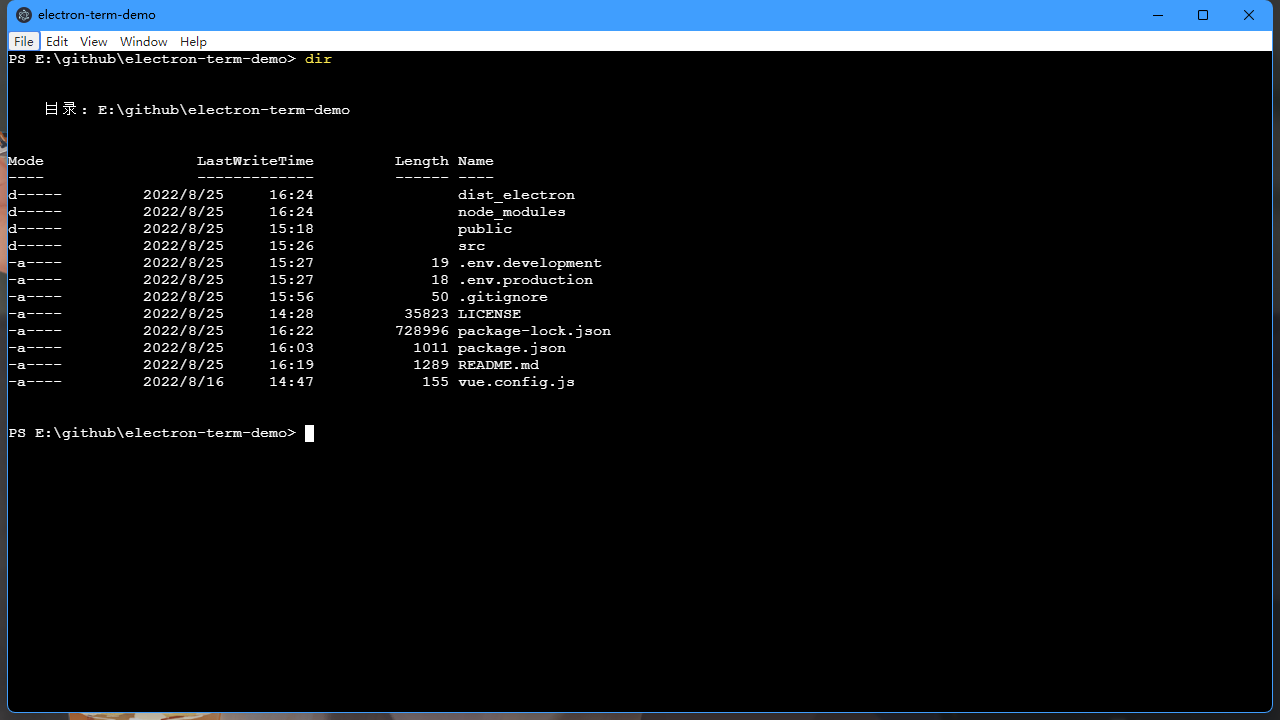
效果如下

node-pty使用依赖摘录如下

Dependencies

Node.JS 12+ or Electron 8+ is required to use node-pty.

Linux (apt)

1
sudo apt install -y make python build-essential

macOS

Xcode is needed to compile the sources, this can be installed from the App Store.

Windows

npm install requires some tools to be present in the system like Python and C++ compiler. Windows users can easily install them by running the following command in PowerShell as administrator. For more information see https://github.com/felixrieseberg/windows-build-tools:

1
npm install --global --production windows-build-tools

The following are also needed:

  • Windows SDK - only the “Desktop C++ Apps” components are needed to be installed