惯性聚合 高效追踪和阅读你感兴趣的博客、新闻、科技资讯
阅读原文 在惯性聚合中打开

推荐订阅源

博客园_首页
MongoDB | Blog
MongoDB | Blog
Google DeepMind News
M
MIT News - Artificial intelligence
D
Docker
云风的 BLOG
云风的 BLOG
B
Blog
让小产品的独立变现更简单 - ezindie.com
G
Google Developers Blog
GbyAI
GbyAI
T
Tailwind CSS Blog
罗磊的独立博客
博客园 - 三生石上(FineUI控件)
V
Visual Studio Blog
C
Check Point Blog
I
InfoQ
Microsoft Azure Blog
Cyber Security Advisories - MS-ISAC
阮一峰的网络日志
阮一峰的网络日志
小众软件
小众软件
N
Netflix TechBlog - Medium
B
Blog RSS Feed
腾讯CDC
aimingoo的专栏
aimingoo的专栏

Dr34m's Blog

I Expect You To Die(我希望你死) 1,2,3 完整中文攻略 Linux换国内源 && docker安装 && 换加速镜像 Vue3 + Element-Plus 极简速查 随笔 pyinstaller打包的程序执行报错Failed to extract xxxx decompression resulted in return code -1 taoSync排除项简易教程 apscheduler的cron配置项 如何在绿联NAS中使用TaoSync同步我的文件到各个网盘 GB28181抓包记录 JS计算字节大小,把字节转换为KB/MB/GB/TB等 在Python中使用onvif管理摄像头,包括设备发现,获取RTSP地址,获取设备信息,截图,云台控制与缩放,设置时间 编写bat脚本实现对vue项目构建并压缩 内网穿透工具frp快速使用 CentOS 7.9 安装基础开发环境jdk redis nacos nginx mysql Pyinstaller 逆向 VUE实现复制与粘贴_获取剪切板内容 Electron + xterm.js + node-pty + vue 实现本地终端 child_process exec 中文乱码 Windows&Linux 解决方法 yum 更新 gcc CentOS安装并使用conda 将fluid主题博客的静态资源由第三方改为本地存储 一个上手即用的通用公众号/小程序/h5/app框架 python批量转化doc到docx SpringBoot单元测试注入空指针 TensorFlow 预测出现NaN的一种可能以及解决方法 随笔 python归一化数据 windows下python安装sasl遇到的问题及解决 将对象List中的某个字段放到新的List中[转载] Python http.server 本地服务支持跨域
Java实现文件重命名,Java文件追加写入,java读取图片尺寸
Dr3@m · 2017-12-15 · via Dr34m's Blog

起由

因为规范要求,需要对一批文件重命名并获取尺寸,刚好上午的java课学了文件输入输出流,学以致用嘛,就利用java做了尝试。

功能

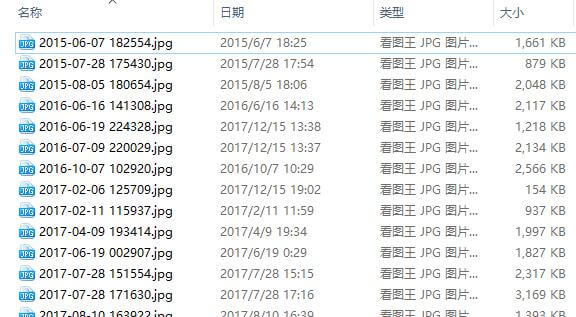
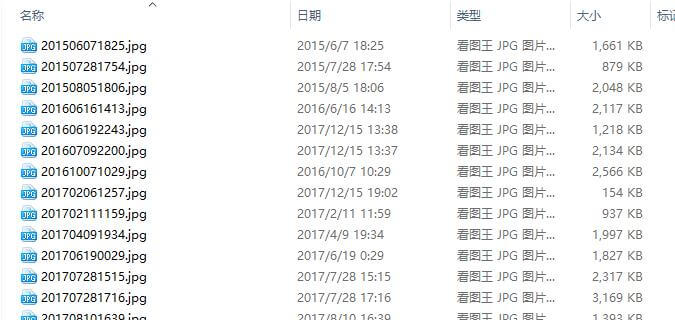
1.文件按照指定格式重命名;

2.文件夹内所有文件名与图片尺寸按格式写入一个TXT文件。

效果

之前:
之后:
代码

1
2
3
4
5
6
7
8
9
10
11
12
13
14
15
16
17
18
19
20
21
22
23
24
25
26
27
28
29
30
31
32
33
34
35
36
import java.io.*;
import java.awt.image.BufferedImage;
import javax.imageio.*;
public class FileNameChange{
public static void main(String[] args){
String dir = "D:/filenamechangejava/";
File f1 = new File(dir+"photo");
File[] s = f1.listFiles();//为目录下所有文件构造对象到文件数组s中
String[] k = new String[100];//定义一个字符串数组来存储文件名
for(int i = 0;i < s.length;i++){
k[i] = s[i].getName();
}//存储所有文件名到k数组中
for(int i = 0;i < s.length;i++){
k[i] = k[i].substring(0,4)+k[i].substring(5,7)+k[i].substring(8,10)+k[i].substring(11,15)+".jpg";//更改文件名为想要的效果
s[i].renameTo(new File(dir+"photo/"+k[i]));//重命名文件
}
System.out.println("Rename complete!");
//以上为重命名部分,以下为写文件部分
File[] s2 = f1.listFiles();
try{
for(int j = 0;j < s.length;j++){
k[j] = "\""+k[j].substring(0,12)+"\",\n";
BufferedImage pic = ImageIO.read(new FileInputStream(s2[j]));//读取图片
String m = k[j] + "\"" + pic.getWidth()+ "x" + pic.getHeight()+"\",\n\n";//获取图片宽和高并和文件名一同存储到字符串m
RandomAccessFile fos = new RandomAccessFile(dir+"name.txt","rw");//用读写方式打开文件
long len = fos.length();//返回文件长度到len
fos.seek(len);//定义指针从len开始写入
fos.writeBytes(m);//写入文件
fos.close();
}
}catch(IOException e){
e.printStackTrace();
}
System.out.println("Write name and size in \""+dir+"name.txt\" complete!");
}
}