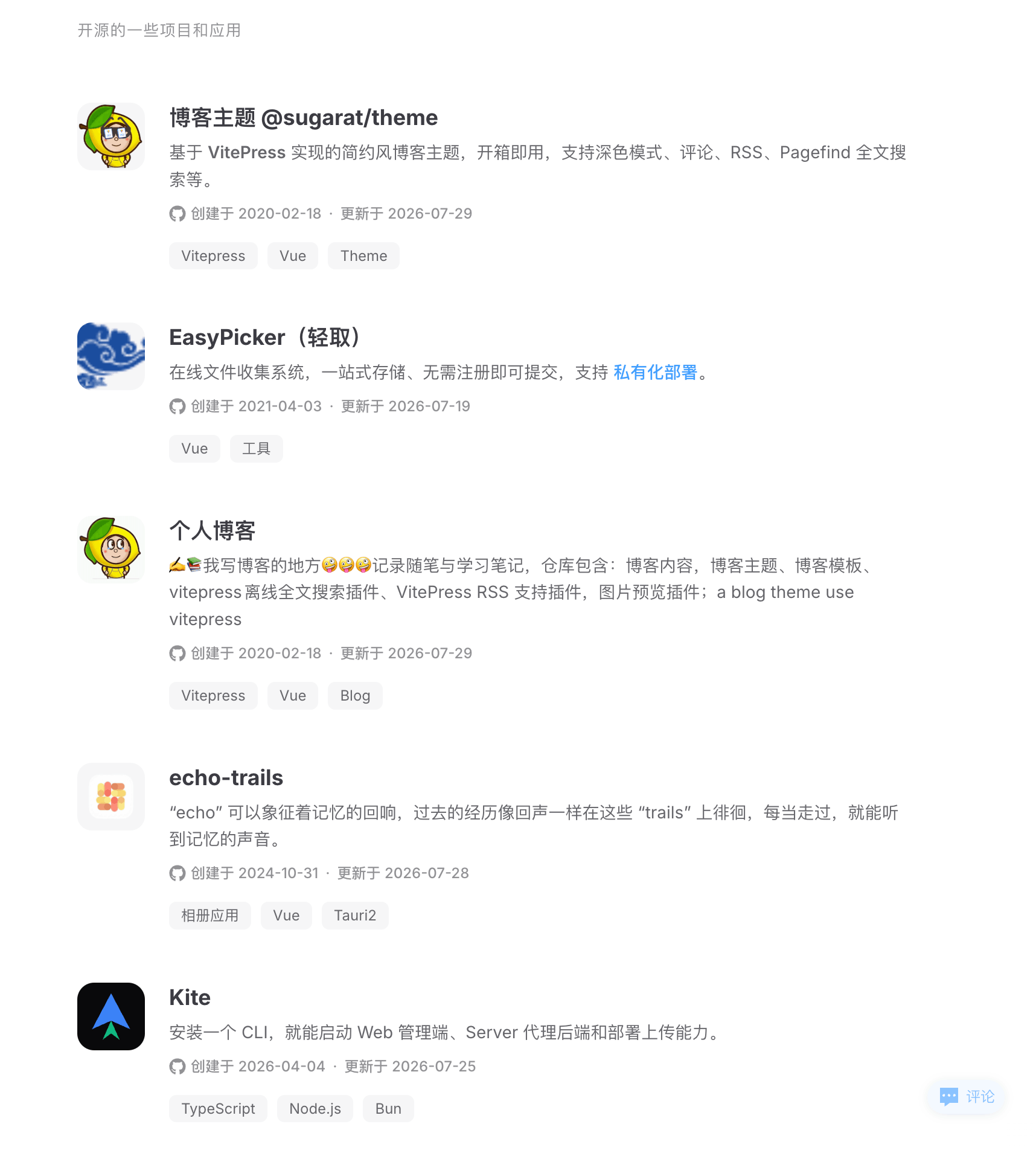
笔者维护的 VitePress 博客主题 中包含一个「作品/产品卡片」的能力,可以在 markdown 里通过简单的 ::: card 容器语法快速展示项目。为便于在主题之外复用,将其抽离为独立插件 vitepress-plugin-product-card。
3 步接入:
bash
pnpm add vitepress-plugin-product-card.vitepress/config.ts 中注册 markdown 容器插件ts
import { defineConfig } from 'vitepress'
import { productCardMarkdownPlugin } from 'vitepress-plugin-product-card'

export default defineConfig({
  markdown: {
    config(md) {
      md.use(productCardMarkdownPlugin, {
        showCreated: true, // 默认 true
        showUpdated: true // 默认 true
      })
    }
  }
}).vitepress/theme/index.ts 中注册 Vue 组件ts
import DefaultTheme from 'vitepress/theme'
import { registerProductCard } from 'vitepress-plugin-product-card/client'

export default {
  extends: DefaultTheme,
  enhanceApp({ app }) {
    registerProductCard(app)
  }
}md
::: card 我的产品
- title: sugar-blog
  desc: 简约风的 VitePress 博客主题
  icon: 📝
  iconColor: '#42b883'
  link: https://theme.sugarat.top
  github: https://github.com/ATQQ/sugar-blog
  tags: [VitePress, Vue3, TypeScript]
----
- title: 另一个项目
  desc: 单卡覆盖全局默认
  github: https://github.com/some/repo
  showCreated: false
:::::: card 我的产品)可选,不写则不渲染分组标题---- 分隔- title: xxx 开头| 字段 | 类型 | 说明 |
|---|---|---|
title | string | 卡片标题(必填) |
desc | string | 卡片描述,支持行内 markdown |
icon | string | 图标:URL / 相对路径 → 渲染 <img>;否则渲染为字符 |
iconColor | string | 字符 icon 的背景色 |
link | string | 点击标题跳转的地址 |
github | string | GitHub 仓库地址,自动拉取创建/更新时间 |
tags | string[] | 标签数组 |
showCreated | boolean | 覆盖全局,是否展示创建时间 |
showUpdated | boolean | 覆盖全局,是否展示最后更新时间 |
| 参数 | 类型 | 默认值 | 说明 |
|---|---|---|---|
showCreated | boolean | true | 全局默认,是否展示创建时间 |
showUpdated | boolean | true | 全局默认,是否展示最后更新时间 |
componentName | string | ProductCard | 输出 html_block 使用的组件名,与 registerProductCard(app, name) 配合使用 |
@sugarat/theme 中使用 主题内置该插件,直接在文章里用 ::: card 即可。
此内容由惯性聚合(RSS阅读器)自动聚合整理,仅供阅读参考。 原文来自 — 版权归原作者所有。