惯性聚合 高效追踪和阅读你感兴趣的博客、新闻、科技资讯
阅读原文 在惯性聚合中打开

推荐订阅源

K
Kaspersky official blog
Threat Intelligence Blog | Flashpoint
AI
AI
SecWiki News
SecWiki News
宝玉的分享
宝玉的分享
Scott Helme
Scott Helme
D
Darknet – Hacking Tools, Hacker News & Cyber Security
Exploit-DB.com RSS Feed
Engineering at Meta
Engineering at Meta
博客园 - 叶小钗
The GitHub Blog
The GitHub Blog
Microsoft Azure Blog
N
News and Events Feed by Topic
Cloudbric
Cloudbric
B
Blog
Cisco Talos Blog
Cisco Talos Blog
V
Vulnerabilities – Threatpost
N
News and Events Feed by Topic
V
Visual Studio Blog
A
Arctic Wolf
奇客Solidot–传递最新科技情报
奇客Solidot–传递最新科技情报
U
Unit 42
S
Security @ Cisco Blogs
博客园 - 聂微东
T
Threat Research - Cisco Blogs
OSCHINA 社区最新新闻
OSCHINA 社区最新新闻
Apple Machine Learning Research
Y
Y Combinator Blog
G
GRAHAM CLULEY
L
LINUX DO - 热门话题
量子位
NISL@THU
NISL@THU
Webroot Blog
Webroot Blog
让小产品的独立变现更简单 - ezindie.com
T
Troy Hunt's Blog
Application and Cybersecurity Blog
T
Tenable Blog
月光博客
月光博客
S
Security Affairs
K
KPMG report finds enterprise disconnect between AI and its ROI | CIO
The Hacker News
The Hacker News
Spread Privacy
Spread Privacy
D
Docker
www.infosecurity-magazine.com
雷峰网
雷峰网
博客园 - 司徒正美
T
The Exploit Database - CXSecurity.com
Hugging Face - Blog
Hugging Face - Blog
Help Net Security
Help Net Security
D
DataBreaches.Net

阿猪的博客

如何使用CNB构建Hexo项目并部署到腾讯云COS 好坑爹!派息后买入的股票怎么也扣股息税? 游哈尔滨 跨年往事 安装Ta-Lib时报错"Could not build wheels" 网站被恶意镜像了该怎么办 延迟退休正式到来!来看看有什么规定 我的基金怎么就被强制卖出了? Hexo-AlgoliaSearch插件报错“Error has occurred during indexing posts” 找工作避坑不完全指南 办理信用卡应该注意什么 华为Pad开启了“共享至电脑”,但是Windows下无法正常访问 webdriver-manager报错一例 Windows无法从环境变量中找到Python的正确位置 习大大2024年新年贺词 号外!号外!Twikoo可以直接屏蔽垃圾评论啦! 如何将Coding的代码仓同步到Github 博客被攻击了 华为Pad开启了“共享至电脑”,但是Ubuntu下无法正常访问 如何恢复Etcher刻录过的U盘 如何在Ubuntu下快速切换网络代理状态 在腾讯云函数中使用Pandas报错`No module named 'numpy.core._multiarray_umath'` 对空的DataFrame使用apply方法未得到预期结果 SQLite中使用关键字作为列名称导致报错 Logging模块重复输出内容的原因及解决方法 如何在Selenium中保持网站的登录状态 如何下载与Chrome浏览器的版本相匹配的ChromeDriver 如何下载旧版本Python的安装包 如何为不同的Python项目自动选择不同的解释器 使用腾讯云函数搭建Web站点 WordPress CORS问题一例 踩坑阿里云函数计算搭建WordPress 在AWS Amplify中部署Jekyll站点 让Chirpy主题支持折叠展示代码块 python中使用'''注释代码后引起报错 使用python自带的email模块解析邮件 使用pandas_bokeh在地图上显示数据 如何通过复权因子计算复权价格 国内量化平台不完全汇总
实现ChatGPT的文字输出效果
阿猪 · 2023-03-31 · via 阿猪的博客

  作为计算机业余爱好者,把网页做得美观高大上对阿猪是一种折磨和挑战,所以阿猪做出来的网页都是清一色的word文档风格。为了给low逼的网页提升点儿逼格,阿猪决定模仿一下ChatGPT的文字输出效果。
  先上效果图:
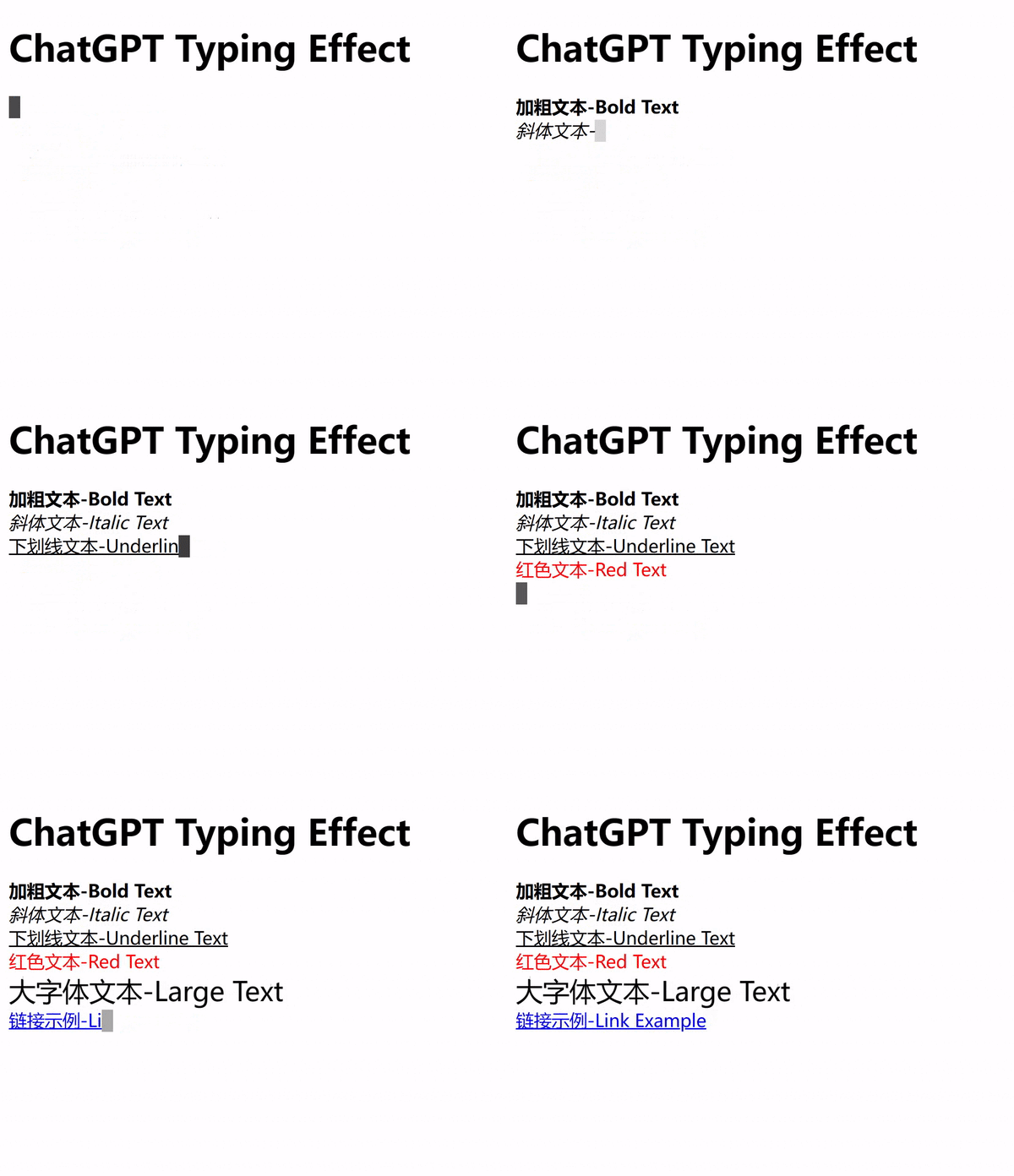
chatgpt-typing-effect

  以下是完整代码:
1
2
3
4
5
6
7
8
9
10
11
12
13
14
15
16
17
18
19
20
21
22
23
24
25
26
27
28
29
30
31
32
33
34
35
36
37
38
39
40
41
42
43
44
45
46
47
48
49
50
51
52
53
54
55
56
57
58
59
60
61
62
63
64
65
66
67
68
69
70
71
72
<!DOCTYPE html>
<html lang="en">
<head>
<meta charset="UTF-8">
<meta name="viewport" content="width=device-width, initial-scale=1.0">
<title>ChatGPT Typing Effect</title>
<style>
#output {
display: inline;
}

.cursor {
display: inline-block;
width: 10px;
height: 20px;
background-color: black;
vertical-align: text-bottom;
animation: blink 1s infinite;
}

@keyframes blink {
50% {
opacity: 0;
}
}
</style>
</head>
<body>
<h1>ChatGPT Typing Effect</h1>
<div id="output"></div><span class="cursor" id="cursor"></span>
<div id="givenText" style="display: none;">
<strong>加粗文本-Bold Text</strong><br>
<em>斜体文本-Italic Text</em><br>
<u>下划线文本-Underline Text</u><br>
<span style="color: red;">红色文本-Red Text</span><br>
<span style="font-size: 24px;">大字体文本-Large Text</span><br>
<a href="https://github.com/azhu021/">链接示例-Link Example</a>
</div>

<script>
const outputElement = document.getElementById("output");
const cursorElement = document.getElementById("cursor");
const givenTextElement = document.getElementById("givenText");
const givenText = givenTextElement.innerHTML;
let currentIndex = 0;
let currentHTML = "";

function typeText() {
if (currentIndex < givenText.length) {
const currentChar = givenText.charAt(currentIndex);

if (currentChar === "<") {
const closingTagIndex = givenText.indexOf(">", currentIndex);
currentHTML += givenText.slice(currentIndex, closingTagIndex + 1);
currentIndex = closingTagIndex + 1;
} else {
currentHTML += currentChar;
currentIndex++;
}

outputElement.innerHTML = currentHTML;
setTimeout(typeText, 100);
} else {

cursorElement.classList.remove("cursor");
}
}

typeText();
</script>
</body>
</html>

  这段代码中:
(1)<div id="output"></div>用于显示输出文本内容。
(2)<span class="cursor" id="cursor"></span>用于显示闪烁的光标。
(3)<style></style>中通过CSS控制光标闪烁的效果。
(4)<script></script>中通过javascript控制文字的输出。
(5)<div id="givenText" style="display: none;">中的内容不会显示,只用于向javascript中的givenTextElement变量赋值。
(6)文字输出的效果是通过拆分givenTextElement变量中的内容向currentHTML变量传递,然后使用innerHTML方法以覆盖显示的方式不断输出显示。
(7)可以通过修改setTimeout(typeText, 100)来控制文字输出的速度。
(8)这段代码只是在实现了与ChatGPT相似的视觉效果,但是原理与ChatGPT并不相同。这段代码需要提前获取需要显示的全部文本内容,然后逐渐输出显示;而ChatGPT则使用了类似stream传输的技术,并不依赖于提前获取需要显示的全部文本内容。

版权声明: 未经书面授权许可,任何个人和组织不得以任何形式转载、引用本站的任何内容。本站保留追究侵权者法律责任的权利。

赏杯咖啡,鼓励一下~

  • 微信打赏

    微信打赏