








Signal, the encrypted messaging app trusted by security-savvy users around the world, has confirmed that hackers have managed to takeover accounts — with government officials and journalists among those being targeted.
The warning came earlier this week, when Signal posted on Bluesky that attacks had taken place, while underlining that its encryption and underlying central infrastructure remained intact and uncompromised.
The problem is not with Signal itself, but rather with its users being tricked into handing over the keys to their accounts.
On the same day, the Dutch General Intelligence and Security Service (AIVD) and Defence Intelligence and Security Service (MIVD) published a joint advisory blaming attacks against Signal and WhatsApp users on Russian-backed hackers.
According to the Dutch intelligence agencies, the operation is "large-scale and global," with victims confirmed to include Dutch government employees. Journalists are also understood to have been targeted.
The attacks highlight that even the strongest encryption cannot protect you if you are tricked into control of your account over to a malicious hacker.
Rather than trying to break the cryptography which protects messages sent via Signal or WhatsApp, attackers are simply persuading users to hand over their verification codes or unwittingly link a second device to their account — quietly giving attackers a access to private conversations.
The hacking campaign uses two main techniques, neither of which requires exploiting any vulnerability in Signal or WhatsApp. Instead, the attackers rely on the tried-and-trusted trick of social engineering.
As Signal explained in its post, targeted victims receive an in-app message which purports to come from "Signal Security Support Chatbot", or a similar official-sounding account.
The message claims that suspicious activity has been detected, and the victim is prompted to complete a "verification procedure" by entering their SMS verification code and Signal PIN.
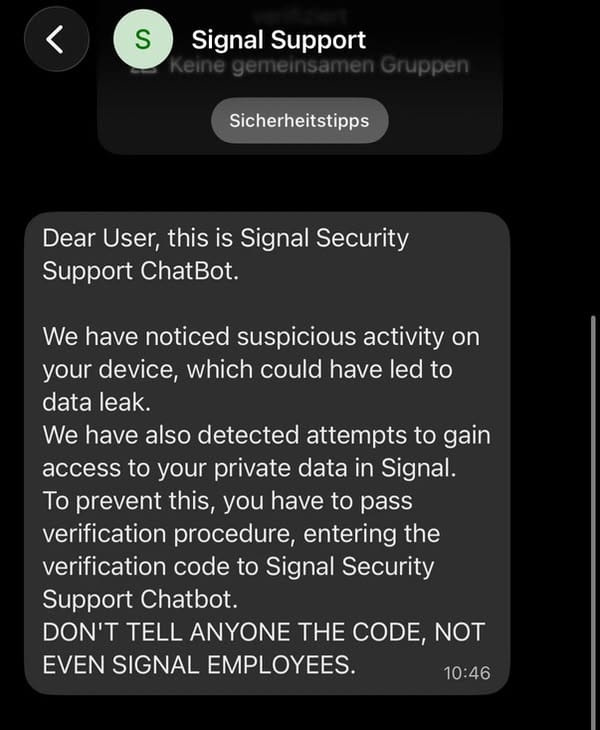
Of course, once the credentials have been handed over, attackers can register the victim's account on a device under their control - gaining access to incoming messages and group chats.
Another attack method abuses the "linked devices" feature used by Signal and WhatsApp. A hacker can send their intended target a QR code or link that appears to be a group chat invitation or routine security prompt. The reality is that scanning the QR code links the attacker's device to the victim's account, allowing their conversations to be monitored surreptitiously.
According to Signal, it is working on adding more warnings within its app to alert users to the potential dangers of responding to a phishing message.
According to the company, it says it will never contact users via in-app messages, SMS, or social media to request verification credentials. And if someone contacts you claiming to be the "Signal Security Support Chatbot" - well, they're an attacker.
You can review what devices are linked to your Signal and WhatsApp accounts by going to Settings > Linked Devices, and remove anything that you do not recognise.
And remember - no amount of encryption can save you from being socially engineered.
此内容由惯性聚合(RSS阅读器)自动聚合整理,仅供阅读参考。 原文来自 — 版权归原作者所有。