


Azure MCP tools now ship built into Visual Studio 2022 — no extension required
Azure MCP tools are now built into Visual Studio 2022 as part of the Azure development workload — no separate extension to find, install, or update. You can enable over 230 tools across 45 Azure services directly in GitHub Copilot Chat and manage Azure resources, deployments, and diagnostics without leaving your IDE. If you already have the Azure development workload installed, you’re one click away from getting started.
What changed
Previously, using Azure MCP tools in Visual Studio 2022 required you to install the “GitHub Copilot for Azure (VS 2022)” extension from the Visual Studio Marketplace, walk through the VSIX installer dialog, and restart Visual Studio. If something went wrong, you had to uninstall and reinstall the extension entirely. That friction added up.
Starting now, Azure MCP tools ship as part of the Azure development workload in Visual Studio 2022. There’s no separate extension to manage. When you install or already have the Azure development workload, the Azure MCP Server is available directly in GitHub Copilot Chat. You enable it once, and it stays enabled across sessions.
This change means fewer installation steps, no version mismatches between the extension and the IDE, and a single update path through the Visual Studio Installer. The Azure MCP Server version gets updated with regular Visual Studio releases, so you always receive the latest tools as part of your normal update cycle.
Note: VS-specific tools available in Visual Studio 2026 are not included in Visual Studio 2022.
What you get
The Azure MCP Server surfaces over 230 tools across 45 Azure services through GitHub Copilot Chat. These tools interact with various Azure services to support developers across the entire development lifecycle. Key scenarios include:
- Learn — Ask questions about Azure services, best practices, and architecture patterns.
- Design & develop — Get recommendations for Azure services and configure your application code.
- Deploy — Provision resources and deploy your application directly from the IDE.
- Troubleshoot — Query logs, check resource health, and diagnose issues in production.
The tools appear in all tools mode within GitHub Copilot Chat. You pick which tools to enable, and Copilot calls them automatically when your prompts relate to Azure.
See it in action
Here are a few examples that show how you can use the Azure MCP tools directly from GitHub Copilot Chat in Visual Studio 2022. Each prompt triggers one or more Azure MCP tool calls behind the scenes.
Explore your Azure resources
List my storage accounts in my current subscription.Copilot calls the Azure MCP tools to query your subscriptions and storage accounts, then returns a list of your storage accounts with their names, locations, and SKUs — right in the chat window. No portal tab needed.
Deploy your app
Deploy my ASP.NET Core app to Azure.Copilot identifies your project, walks you through creating an App Service resource, and initiates the deployment via azd. You can track progress directly in the chat output.
Diagnose issues
Help diagnose my App Service resource.Copilot uses AppLens and resource health tools to analyze your App Service, check for availability issues, and surface actionable recommendations — all without leaving the IDE.
Query your logs
Query my Log Analytics workspace for exceptions.Copilot generates and runs a KQL query against your Log Analytics workspace, returning recent exceptions with timestamps, messages, and stack traces. You can refine the query in follow-up prompts to narrow down the root cause.
These are just a few examples. With over 230 tools across 45 Azure services, you can learn about Azure features, provision resources, deploy applications, and troubleshoot issues — all from a single chat window in Visual Studio 2022.
How to enable Azure MCP tools
The Azure MCP tools ship with the Azure development workload in Visual Studio 2022 version 17.14.30 or higher, but are disabled by default. Follow these steps to enable them:
- Update Visual Studio 2022 — Open the Visual Studio Installer and make sure you’re running version 17.14.30 or higher. If not, select Update.
- Install the Azure development workload — In the Visual Studio Installer, select Modify for your Visual Studio 2022 installation and check the Azure development workload. Select Modify again to apply.
- Launch Visual Studio 2022 — Open or create a project, then open GitHub Copilot Chat.
- Sign in — Make sure you’re signed in to both your GitHub account (for Copilot) and your Azure account (for resource access).
- Enable the Azure MCP Server — In the Copilot Chat window, select the Select tools button (the two wrenches icon). Find Azure MCP Server in the list and toggle it on.
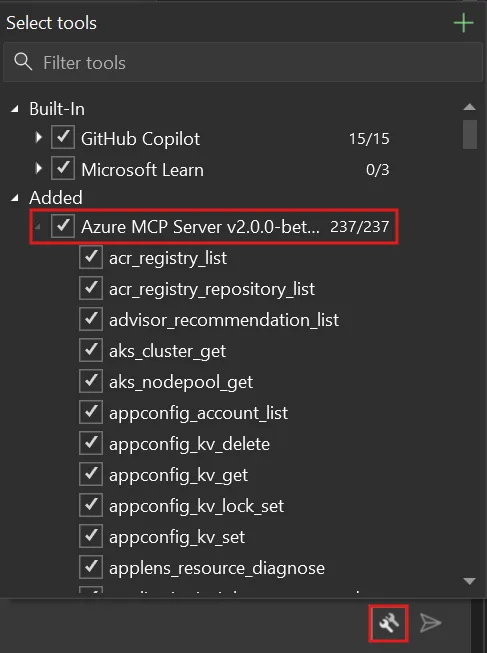
Once enabled, the Azure MCP tools are available in every Copilot Chat session. You don’t need to re-enable them after restarting Visual Studio 2022.
Things to know
Keep these details in mind:
- Azure MCP tools are disabled by default — you need to enable them manually in the Select tools dialog.
- Tools specific to Visual Studio 2026 are not available in Visual Studio 2022.
- Tool availability depends on your Azure subscription permissions — if you can’t perform an action in the Azure portal, you can’t perform it through MCP tools either.
- This feature requires an active GitHub Copilot subscription and an Azure account.
- The Azure MCP Server version is updated with regular Visual Studio releases.
Learn more
Share your feedback through Help > Send Feedback in Visual Studio 2022 or file issues on the Azure MCP Server GitHub repository.
