




HTTP/2 可以让我们的应用更快、更简单、更稳定 - 这几词凑到一块是很罕见的!HTTP/2 将很多以前我们在应用中针对 HTTP/1.1 想出来的“歪招儿”一笔勾销,把解决那些问题的方案内置在了传输层中。 不仅如此,它还为我们进一步优化应用和提升性能提供了全新的机会!
HTTP/2 的主要目标是通过支持完整的请求与响应复用来减少延迟,通过有效压缩 HTTP 标头字段将协议开销降至最低,同时增加对请求优先级和服务器推送的支持。 为达成这些目标,HTTP/2 还给我们带来了大量其他协议层面的辅助实现,例如新的流控制、错误处理和升级机制。上述几种机制虽然不是全部,但却是最重要的,每一位网络开发者都应该理解并在自己的应用中加以利用。
HTTP/2 没有改动 HTTP 的应用语义。 HTTP 方法、状态代码、URI 和标头字段等核心概念一如往常。 不过,HTTP/2 修改了数据格式化(分帧)以及在客户端与服务器间传输的方式。这两点统帅全局,通过新的分帧层向我们的应用隐藏了所有复杂性。 因此,所有现有的应用都可以不必修改而在新协议下运行。
以上介绍摘自 https://developers.google.com
HTTP 2.0 没有推翻之前的协议,而是构筑于 HTTP 1.1 协议之上,主要目标是提升性能。在连接复用、二进制分帧、优先级、流控制、服务器推送、头部压缩等方面做了非常大的改进,以至于不能向前兼容原有协议。无论是浏览器等客户端,还是 WEB 服务器端都要做好协议兼容。
HTTP 协议是最重要的应用层协议,客户端与服务端程序众多,对 HTTP 2.0 的支持情况非常复杂,如何能够确保客户端和服务端采用 2.0 还是 1.1 版本协议呢?这就需要连接后有一个应用层协议协商的过程,这个过程是在 ALPN 协议实现的。
应用层协议协商(Application-Layer Protocol Negotiation,简称ALPN)是一个传输层安全协议(TLS) 的扩展, ALPN 使得应用层可以协商在安全连接层之上使用什么协议, 避免了额外的往返通讯, 并且独立于应用层协议。通过 ALPN,客户端和服务器端可以协商是否采用 HTTP 2.0。
通过上面对 ALPN 的介绍,可以知道,可以通过查看 TLS 握手过程确认网站是否支持 http 2.0 (h2 -> http 2.0),下面是通过工具 curl 请求网址 https://huoyijie.cn
$ curl -vso /dev/null --http2 https://huoyijie.cn/ 2>&1
*   Trying 62.234.116.248:443...
* TCP_NODELAY set
* Connected to huoyijie.cn (62.234.116.248) port 443 (#0)
* ALPN, offering h2
* ALPN, offering http/1.1
* successfully set certificate verify locations:
*   CAfile: /etc/ssl/certs/ca-certificates.crt
  CApath: /etc/ssl/certs
} [5 bytes data]
* TLSv1.3 (OUT), TLS handshake, Client hello (1):
} [512 bytes data]
* TLSv1.3 (IN), TLS handshake, Server hello (2):
{ [122 bytes data]
* TLSv1.3 (IN), TLS handshake, Encrypted Extensions (8):
{ [21 bytes data]
* TLSv1.3 (IN), TLS handshake, Certificate (11):
{ [2660 bytes data]
* TLSv1.3 (IN), TLS handshake, CERT verify (15):
{ [264 bytes data]
* TLSv1.3 (IN), TLS handshake, Finished (20):
{ [52 bytes data]
* TLSv1.3 (OUT), TLS change cipher, Change cipher spec (1):
} [1 bytes data]
* TLSv1.3 (OUT), TLS handshake, Finished (20):
} [52 bytes data]
* SSL connection using TLSv1.3 / TLS_AES_256_GCM_SHA384
* ALPN, server accepted to use http/1.1
* Server certificate:
*  subject: CN=www.huoyijie.cn
*  start date: Feb 21 00:00:00 2021 GMT
*  expire date: Feb 20 23:59:59 2022 GMT
*  subjectAltName: host "huoyijie.cn" matched cert's "huoyijie.cn"
*  issuer: C=CN; O=TrustAsia Technologies, Inc.; OU=Domain Validated SSL; CN=TrustAsia TLS RSA CA
*  SSL certificate verify ok.
} [5 bytes data]
> GET / HTTP/1.1
> Host: huoyijie.cn
> User-Agent: curl/7.68.0
> Accept: */*
>
{ [5 bytes data]
* TLSv1.3 (IN), TLS handshake, Newsession Ticket (4):
{ [265 bytes data]
* TLSv1.3 (IN), TLS handshake, Newsession Ticket (4):
{ [265 bytes data]
* old SSL session ID is stale, removing
{ [5 bytes data]
* Mark bundle as not supporting multiuse
< HTTP/1.1 200 OK
< X-Powered-By: Express
< Content-Type: text/html; charset=utf-8
< Content-Length: 38791
< ETag: W/"9787-XrfUp2h6vBzOxGWafJB41BICKbY"
< Date: Wed, 07 Apr 2021 05:49:32 GMT
< Connection: keep-alive
< Keep-Alive: timeout=5
<
{ [16151 bytes data]
* Connection #0 to host huoyijie.cn left intact
可以看到最开始,curl 输出如下
* ALPN, offering h2
* ALPN, offering http/1.1
表示 client 端同时支持 http/1.1 及 h2
再看后面 server 端的响应输出
* ALPN, server accepted to use http/1.1
说明 server 端不支持 http 2.0,所以协商结果为选择了 http/1.1 协议。还可以通过 chrome 浏览器审查所有 http 请求
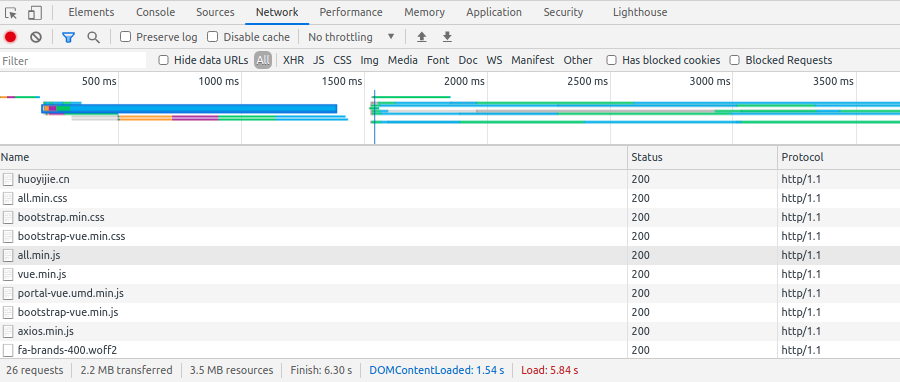
上图可以看到,请求 https://huoyijie.cn 加载的所有资源 Protocol 都显示为 http/1.1。(Protocol 字段默认可能不显示,可以在某个请求上右键-> Header Options 中选择显示)
CDN 开启 http 2.0 支持相对比较简单,腾讯云 CDN 控制台提供了配置选项,可以一键开启或者关闭 http 2.0 支持。
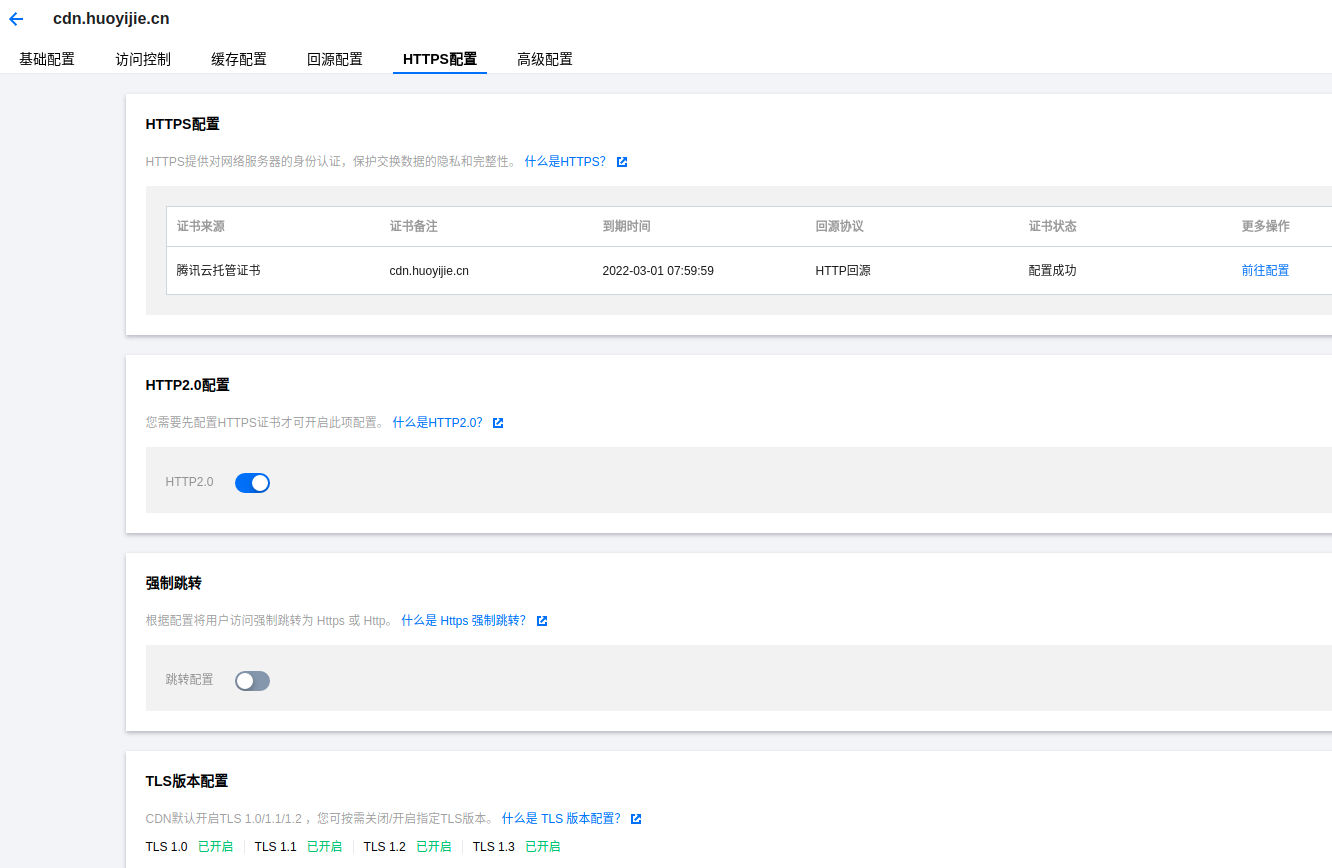
配置开启 http 2.0 有个前提条件,就是首先要先配置证书,支持 https。这个之前已经配置过了,所以直接点选支持 http 2.0 选项。大概需要 5 分钟配置生效。
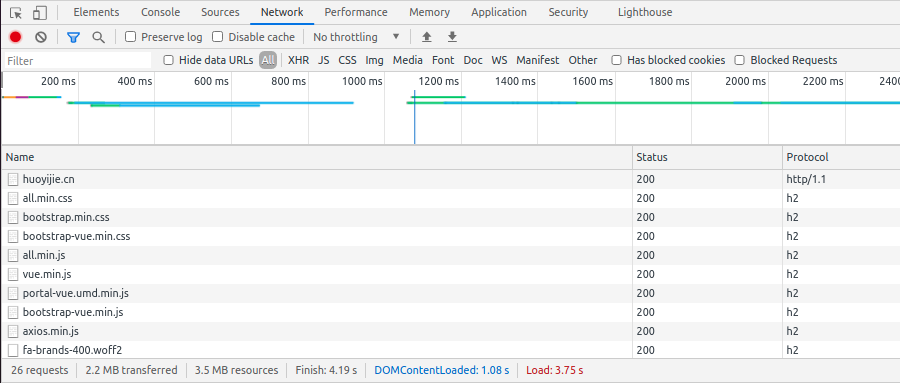
再清空缓存刷新页面,可以看到所有 CDN 资源的请求都已经切换到了 h2 (http 2.0),多强刷试了几次感觉快一点点,不太明显。
我的博客网站很简单,直接用 node.js + express 构建,前面没有类似 ngnix 这样的反向代理,证书配置加解密都是在 node.js 里面完成的。项目中依赖的 express 4,对 http 2.0 支持有限,所以只好考虑部署反向代理了。而且像对进出流量统一加解密的操作放到反向代理服务器里面比较好。
安装 nginx
$ sudo apt install nginx
修改 nginx 配置
ssl_session_timeout 10m;
server {
  listen 443 ssl http2;
  server_name www.huoyijie.cn huoyijie.cn;
  keepalive_timeout 70;

  ssl_certificate 1_www.huoyijie.cn_bundle.crt;
  ssl_certificate_key 2_www.huoyijie.cn.key;

  root /var/www/www.huoyijie.cn;
  index index.html;

  location / {
    proxy_pass http://127.0.0.1:7999;
    proxy_set_header X-Real-IP $remote_addr;
    proxy_set_header Host $host;
    proxy_set_header X-Forwarded-For $proxy_add_x_forwarded_for;

    # WebSocket support
    proxy_http_version 1.1;
    proxy_set_header Upgrade $http_upgrade;
    proxy_set_header Connection "upgrade";
  }
}

server {
  listen 80;
  server_name www.huoyijie.cn huoyijie.cn;
  return 301 https://$server_name$request_uri;
}
上面的配置了证书及密钥,并且把所有请求代理到了 http://127.0.0.1:7999
开启了 SSL 以及 http2
listen 443 ssl http2;
重启服务
$ sudo service nginx restart
访问网站首页 https://huoyijie.cn,页面加载正常,所有请求的协议都是 h2
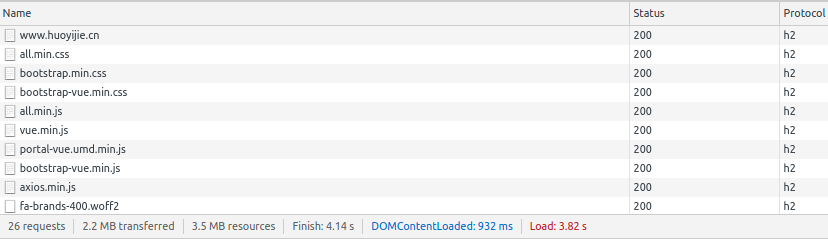
ipaddr - - [07/Apr/2021:17:28:07 +0800] "GET / HTTP/2.0" 304 0 "-" "Mozilla/5.0 (X11; Linux x86_64) AppleWebKit/537.36 (KHTML, like Gecko) Chrome/89.0.4389.114 Safari/537.36"
上面是 nginx access.log 输出日志,可以看到协议字段已显示为 HTTP/2.0。网站支持 http 2.0 后,直观感受网页加载速度快了一些,但是没有特别明显,可能是因为网站比较简单。但对于所有网站来说,支持 http 2.0 是一件值得投入的事情,一定会一定程度上改善网站加载速度。
此内容由惯性聚合(RSS阅读器)自动聚合整理,仅供阅读参考。 原文来自 — 版权归原作者所有。