



惯性聚合 高效追踪和阅读你感兴趣的博客、新闻、科技资讯
阅读原文 在惯性聚合中打开

推荐订阅源

C
Cisco Blogs
爱范儿
爱范儿
有赞技术团队
有赞技术团队
博客园 - 【当耐特】
Jina AI
Jina AI
Project Zero
Project Zero
宝玉的分享
宝玉的分享
Martin Fowler
Martin Fowler
WordPress大学
WordPress大学
Simon Willison's Weblog
钛媒体:引领未来商业与生活新知
钛媒体:引领未来商业与生活新知
T
Tenable Blog
F
Fortinet All Blogs
大猫的无限游戏
大猫的无限游戏
Last Week in AI
Last Week in AI
月光博客
月光博客
雷峰网
雷峰网
G
Google Developers Blog
V
V2EX
T
Tor Project blog
罗磊的独立博客
Schneier on Security
Know Your Adversary
Know Your Adversary
W
WeLiveSecurity
freeCodeCamp Programming Tutorials: Python, JavaScript, Git & More
P
Privacy International News Feed
S
Securelist
奇客Solidot–传递最新科技情报
奇客Solidot–传递最新科技情报
P
Proofpoint News Feed
Blog — PlanetScale
Blog — PlanetScale
Threat Intelligence Blog | Flashpoint
小众软件
小众软件
Scott Helme
Scott Helme
I
Intezer
T
Threat Research - Cisco Blogs
The GitHub Blog
The GitHub Blog
N
Netflix TechBlog - Medium
C
CERT Recently Published Vulnerability Notes
Security Archives - TechRepublic
酷 壳 – CoolShell
酷 壳 – CoolShell
L
LINUX DO - 最新话题
N
News | PayPal Newsroom
L
Lohrmann on Cybersecurity
T
Troy Hunt's Blog
Google DeepMind News
P
Proofpoint News Feed
人人都是产品经理
人人都是产品经理
Latest news
Latest news
AWS News Blog
AWS News Blog
Apple Machine Learning Research

Latest news

LG G6 vs. LG G5: I compared the latest OLED TV models, and it's a surprisingly tough choice I saw the 'MacBook Pro for Linux users' for the first time, and it's a legit Windows threat I'm putting Motorola above Samsung when it comes to flip phones - and won't think twice I tested Surfshark's new Dausos VPN protocol - here's how it compares to WireGuard How to easily encrypt your files on an Android phone - for free I'm not giving up on DJI cameras yet - not when they can upset my GoPro like this The best website builders for small businesses in 2026: Expert tested and reviewed Why I'm recommending last year's phones over 2026 models - with one exception This powerful Gemini setting made my AI results way more personal and accurate After testing this HP laptop, I get why its 'boring' design is adored by business users The best TV antenna of 2026: Expert tested Your old iPad or Android tablet can be your new smart home panel - here's how Apple's original AirTag still tracks effectively, and you can get a 4-pack for its best price ever T-Mobile will give you an iPad for $99 when you sign up for a new line - here's how How to qualify for Apple's education discount - and get a $499 MacBook Neo for school T-Mobile will give you a Samsung Galaxy Watch 8 for free - how to get yours Prolonged AI use can be hazardous to your health and work: 4 ways to stay safe Verizon will give you a free iPad or Apple Watch with your next iPhone - how the deal works The best laptops of 2026: Expert tested and reviewed I hid 4 Bluetooth trackers (including AirTags) to test their reliability - here's how Android rivals compared I stopped using my iPhone's hotspot after testing this 5G router - and that won't change The best Kindles in 2026: Expert recommended Does Best Buy price match? Everything to know about matching prices online and in-store The best WordPress hosting services of 2026: Expert tested and reviewed The best Apple Watch of 2026: Expert tested and reviewed The best TV screen cleaners of 2026: Expert recommended The best 50-inch TVs of 2026: Expert tested I traded my Sonos Era 300 for Denon's new home speaker - and see no reason to go back AI-powered website builders have come a long way - here's your best option in 2026 Amazon just slashed $250 off the Google Pixel 10 - and a Prime subscription isn't required I found the apps slowing down my PC - how to kill the biggest memory hogs These companies are actually upskilling their workers for AI - here's how they do it Verizon will give you Meta Ray-Bans for free with this Fios Internet deal - how to get yours I tried the new Gemini app for Mac - it has one major advantage over the web version How Google's updated AI Mode will ease your tab clutter when you search Why this MagSafe battery pack is our readers' favorite model right now - especially at its price T-Mobile will give you a Google Pixel 10a for free - plus an extra gift OpenAI's Codex Desktop can run your computer now - and has its own browser Want to build a startup that gets acquired? This founder shares 5 proven tips Google to pay $135M settlement to Android phone users - how to claim your share if you qualify Want to stand out on LinkedIn? Try this career strategist's top 3 tips for strengthening your profile I've used Dell's new XPS 16 for a week, and it's the Windows laptop to beat in 2026 You can get 50% off YouTube Premium for 1 year right now - but the deal ends soon Tidal vs. Qobuz: I tried both hi-res streaming services, and they couldn't be more different This stroller turns into a carry on-suitcase, and I recommend it for traveling parents The best small business VoIP providers of 2026: Expert tested and reviewed Protect your devices with our pick for the best antivirus software, now over 60% off MacBook Neo vs. Surface: Why spiraling RAM prices are bruising Microsoft's PC business but not Apple's I tried Google's new desktop app for Windows, and I'll never search the old way again Microsoft's Windows 11 laptop deal for students comes with a $500 bonus - what's included You can buy an LG B5 OLED for $1,500 off at Best Buy - and it comes with a free 4K TV Why Zorin OS 18.1 is simply the best Linux distro - for anyone Why Netgear just got the first FCC router ban exemption in the US Microsoft's latest Windows update now confirms if your PC is Secure Boot-protected - how it works Can this $70 Linux app make up for the lack of Photoshop? I tried it to find out 'Like handing out the blueprint to a bank vault': Why AI led one company to abandon open source iPhone charging slowly? 6 quick fixes to try before blaming your battery Roku TV vs. Fire Stick: Why I'm looking beyond streaming resolution when comparing the two AI is getting better at your job, but you have time to adjust, according to MIT The best internal communication tools of 2026: Expert tested and reviewed Half of all US employees use AI at work now - and waste almost 8 hours a week doing it The latest Google Home update brings Gemini fixes that I'm actually excited to try again I've been subscribed to a data removal service a month now - what I wish I knew sooner You can use Linux 7.0 on these 7 distros today - here's what to expect How I share audio from my Android phone to multiple earbuds (and why it's a big deal) Why the Apple Watch's 20-minute calibration test is worth your time - especially if you're data curious I used the 'Plus Five' rule to fix my iPhone's slow wireless charging - here's how it works I tested Artix Linux: An enjoyable systemd-free distro for experienced users (and ChromeOS speeds) I camera-tested the Samsung Galaxy S26 Ultra with Oppo and Xiaomi - this model won it for me How I boosted my portable solar panels' power by up to 30% - 11 expert-approved tips I see why Ubuntu 26.04 is more than just a performance bump for thrill-seeking gamers As an Android user, this MagSafe wallet is the clearest reason why Qi2 magnets shouldn't be ignored The best Zoom alternatives in 2026: Expert tested and reviewed KDE Linux is the purest form of Plasma I've used in months - but there's a catch LG C6 vs. LG C5: Why the 2025 model is still the smarter OLED TV model buy for me How I disabled 'fast startup' on my Windows 11 laptop to stop overnight battery drain 30 years later, I returned to Enlightenment Linux to test the Elive beta - and it's much better Here's my favorite email trick for cleaning up inbox clutter - automatically The $30 Google TV stick may be the budget Chromecast successor we've been waiting for The best AR and MR glasses in 2026: Expert tested and reviewed This handy electric screwdriver is now 50% off - here's where to snag the deal This Ryobi yard essentials bundle packs a free power tool - how to get yours After trying these boomless headphones in the office, I'm feeling hopeful for the future of work tech I used this EcoFlow battery to run my 3,000-sq-ft home in a blackout - here's how it kept my AC on Microsoft's Windows Insider Program is no longer a confusing mess Forget Shokz: I tried the Suunto Spark earbuds for a month, and they've sold me on air conduction iOS 26.4 brings essential upgrades to your iPhone - including a vital security fix YouTube Premium is getting a price increase in June - but you can save $32 with one change Your router may be vulnerable to Russian hackers, FBI warns: 5 steps to take now I walked 3,000 steps with my Apple Watch, Google Pixel, and Oura Ring - this tracker was most accurate I stopped guessing which AA batteries are dead - this charging station keeps them in check for me My favorite Android Auto find is these hidden shortcuts that are highly customizable AirDrop is coming to older Samsung phones - is yours supported? How to get it early I'm no longer using Google Photos as just a cloud storage - 5 tools that elevate the app The best data removal services of 2026: Expert tested and reviewed The best Samsung TVs of 2026: Expert tested and reviewed The best mobile scanning apps of 2026: Expert tested and reviewed The best HP laptops of 2026: Expert tested and reviewed After using Lenovo's new Yoga laptop, I'm wondering if Windows makers are running out of ideas Samsung S95H vs. Samsung S95F: I compared the OLED TVs and wasn't prepared for the upset
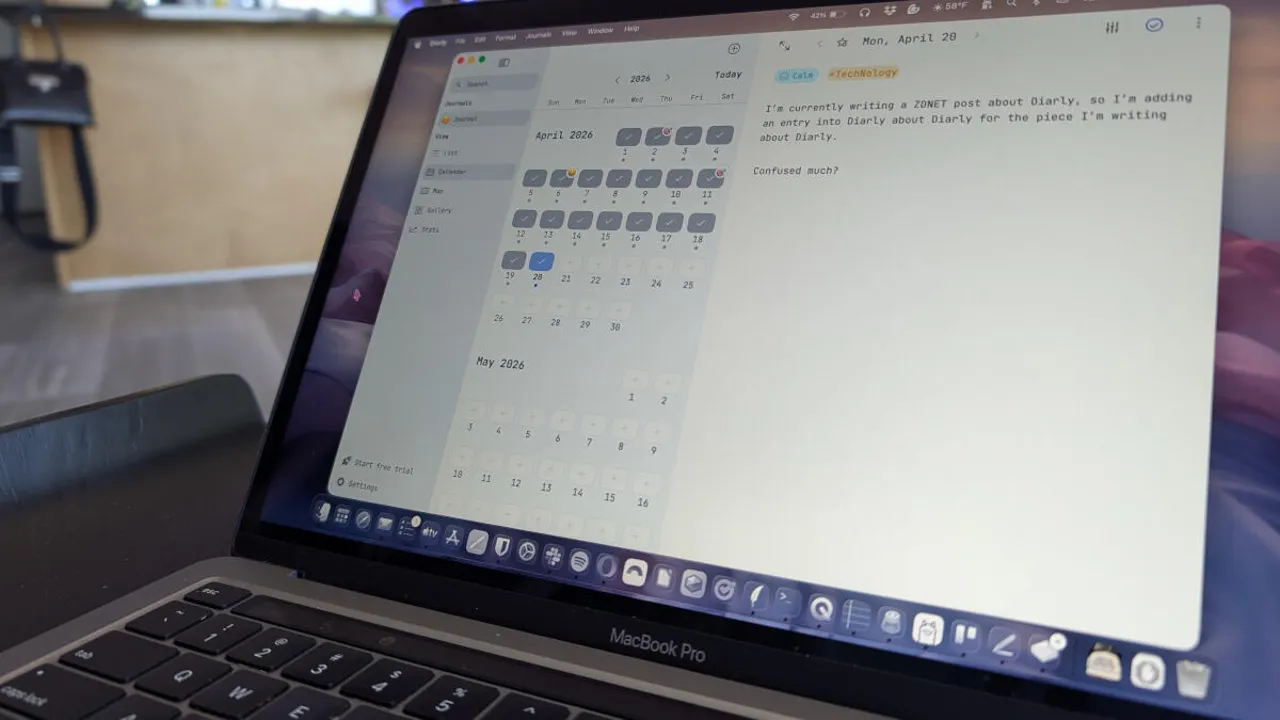
This free app makes journaling so easy that I've managed to do it for 3 months
2026-04-22 · via Latest news
diarlyhero
Jack Wallen/ZDNET

Follow ZDNET: Add us as a preferred source on Google.


ZDNET key takeaways

  • Diarly is the best journaling app I've ever used.
  • It makes journaling easy and actually pleasant.
  • The app is available for all Apple devices.

It's been a rough year for me. So much so that I found myself needing to do something I thought that I'd never do… journal.

Journaling for someone who writes for a living is like an auto mechanic working on their own car: they know they need to, but the idea of doing it, after a long day of working on other people's cars, isn't exactly their idea of fun.

Also: 9 essential Mac apps everyone should be using in 2026 - and why I vouch for them

But my therapist said journaling would be good for me, so I decided to give it a go.

Initially, I struggled to do this, mostly because the journaling apps I'd tried might as well have just been glorified notepads or to-do lists. I wanted something that was not only dedicated to the art of journaling and included only the features I wanted.

Also: 6 note-taking apps for Mac and PC I swear by after trying them all

It took me a few weeks to find the perfect app for the task: Diarly.

Diarly is an app that's available for Mac devices, iPhones, iPads, and Apple Watches. There's a free version, or you can drop $2/month for the Premium version, which adds AI, password/encryption, cross-device sync, unlimited journals, and advanced themes. 

If you don't need those features, the free version is good enough. In fact, I've been using the free version of Diarly for the past three months, and it's been all I need.

Also: Boost your security and productivity with the top Mac apps

Both versions include the following features:

  • List/Calendar/Maps/Gallery/Stats views
  • Image support
  • Basic formatting
  • Icons and moods
  • Tags
  • Templates
  • Notifications
  • Audio recordings
  • Weather
  • File/link support

Diarly has the perfect collection of features, so you don't feel like it's missing anything. Neither is the feature list overwhelming. You can install Diarly and immediately start journaling, which is exactly what I did.

Why Diarly is my go-to

First off, Diarly makes it very easy to journal. Yes, I know that many journaling apps could probably make the same claim, but Diarly really does this task better than most. It's so easy to journal with Diarly that I've yet to feel it was a chore.

Diarly

The Diarly UI is very well designed.

Screenshot by Jack Wallen/ZDNET

I open the app, click +, give the entry a title (I usually use the date), and start writing.

Also: I test AI for a living, and these 3 free tools are the ones I use most

Although those steps make Diarly seem basic, it's not. For example, one of the first things you might do when adding an entry is to set your current mood. To do that, type / and then adjust the mood settings to reflect how you currently feel.

Diarly

Adjust your mood accordingly.

Screenshot by Jack Wallen/ZDNET

You can also then add tags to your entries by typing # and then typing the tag you want to add.

Both Moods and Tags make it easier for you to search for journal entries. For example, if you're in the midst of a life-changing event, and you regularly journal about it, add a tag for that event, so you can easily find all related entries.

Also: Addicted to making lists? Here are my top apps for Windows and MacOS

Ultimately, the primary reason why I immediately took to Diarly is that it's so effortless to use. There is no learning curve, so you can install the app and immediately jump into writing your first entry. Part of the reason Diarly has such a low learning curve is the well-designed user interface. It's clean and as user-friendly as any app that I've ever used.

Yes, some features might take you a while to find (I discovered tags by accident), but you can jump right in and start doing basic journaling without having to read documentation or running a search to find out how the app is used.

Because Diarly is so easy and pleasant to use, I can jump in, write a quick blog, and jump out. I can go back and add more to that blog entry whenever something important comes to mind.

Also: My favorite contact apps for every platform - including one I built with AI

Another feature that I appreciate with Diarly is the ability to add icons on a per-entry basis. For instance, whenever I write an entry I'll want to go back and read at a later date, I'll add a target icon. Those icons appear in the calendar, so all I have to do is click on that entry and give the post a read.

Diarly

Any important entry gets a target icon.

Screenshot by Jack Wallen/ZDNET

To add an icon for an entry, click the Start icon at the top center and select the icon you want from the dropdown.

Also: New to MacOS? 8 beginner tips and tricks to try first - and why

In short, Diarly is the best journaling app I've ever used. I only wish the developer would create a Linux version. Should the developer do that, you can bet I'd pay for the Premium version to sync my journals across platforms.

You can find Diarly in the Apple App Store. Install it, use it, and grow with it.