
惯性聚合 高效追踪和阅读你感兴趣的博客、新闻、科技资讯
阅读原文 在惯性聚合中打开

推荐订阅源

Blog — PlanetScale
Blog — PlanetScale
Vercel News
Vercel News
奇客Solidot–传递最新科技情报
奇客Solidot–传递最新科技情报
量子位
Y
Y Combinator Blog
IT之家
IT之家
博客园 - 聂微东
L
LangChain Blog
爱范儿
爱范儿
H
Help Net Security
GbyAI
GbyAI
F
Fortinet All Blogs
B
Blog
Microsoft Security Blog
罗磊的独立博客
C
Check Point Blog
博客园 - 三生石上(FineUI控件)
小众软件
小众软件
D
DataBreaches.Net
Last Week in AI
Last Week in AI
WordPress大学
WordPress大学
B
Blog RSS Feed
酷 壳 – CoolShell
酷 壳 – CoolShell
宝玉的分享
宝玉的分享

Latest news

LG G6 vs. LG G5: I compared the latest OLED TV models, and it's a surprisingly tough choice I saw the 'MacBook Pro for Linux users' for the first time, and it's a legit Windows threat I'm putting Motorola above Samsung when it comes to flip phones - and won't think twice I got an early look at ChatGPT Images 2.0, and it's impressive - with one exception I tested Surfshark's new Dausos VPN protocol - here's how it compares to WireGuard How to easily encrypt your files on an Android phone - for free I'm not giving up on DJI cameras yet - not when they can upset my GoPro like this The best website builders for small businesses in 2026: Expert tested and reviewed Why I'm recommending last year's phones over 2026 models - with one exception This powerful Gemini setting made my AI results way more personal and accurate After testing this HP laptop, I get why its 'boring' design is adored by business users The best TV antenna of 2026: Expert tested Apple's original AirTag still tracks effectively, and you can get a 4-pack for its best price ever T-Mobile will give you an iPad for $99 when you sign up for a new line - here's how How to qualify for Apple's education discount - and get a $499 MacBook Neo for school T-Mobile will give you a Samsung Galaxy Watch 8 for free - how to get yours Prolonged AI use can be hazardous to your health and work: 4 ways to stay safe Verizon will give you a free iPad or Apple Watch with your next iPhone - how the deal works The best laptops of 2026: Expert tested and reviewed I hid 4 Bluetooth trackers (including AirTags) to test their reliability - here's how Android rivals compared I stopped using my iPhone's hotspot after testing this 5G router - and that won't change The best Kindles in 2026: Expert recommended Does Best Buy price match? Everything to know about matching prices online and in-store The best WordPress hosting services of 2026: Expert tested and reviewed The best Apple Watch of 2026: Expert tested and reviewed The best TV screen cleaners of 2026: Expert recommended The best 50-inch TVs of 2026: Expert tested I traded my Sonos Era 300 for Denon's new home speaker - and see no reason to go back AI-powered website builders have come a long way - here's your best option in 2026 Amazon just slashed $250 off the Google Pixel 10 - and a Prime subscription isn't required
Your old iPad or Android tablet can be your new smart hom...
2026-04-18 · via Latest news
Google Pixel Tablet
Maria Diaz/ZDNET

Follow ZDNET: Add us as a preferred source on Google.

There are many ways to make the most of old devices we no longer use. For example, I have a couple of old Fire tablets that I turned into Echo Shows for my home use. However, one of the best uses for an old tablet is to become a smart home control panel. In fact, it's one of the easiest and cheapest upgrades you can make in your home.

Also: I tested every 'allergy-friendly' smart home gadget - these 6 actually keep the pollen out

If you have a lot of smart lights, plugs, switches, and other devices, you'll likely benefit from adding a control panel to manage them all from one spot. Setting up an old tablet as a central control center not only breathes new life into the device but also gives you a hub that anyone at home can access.

How to use an old tablet as a smart home display

iPad with Apple Home
Maria Diaz/ZDNET

What you need: an old tablet, a charging cord, a wall mount (optional), or a stand (optional).

The smart home automation system you choose will act as the brain that controls your devices. It'll also be the platform you use on your tablet-turned-control panel to manage your smart home. 

You probably already have a preferred smart home automation system, especially if you already have a smart home set up, but here's how the most popular options compare:

  • Home Assistant: This open-source option offers the most control over your dashboard, devices, and automations. It's the top option for power users and smart home enthusiasts who enjoy tinkering to make the system work the way they want. It works locally and is very fast, so your devices are reliably responsive to Home Assistant. This is also one of the most compatible smart home automation systems available, so you can combine devices from different brands under a single controller, even if they don't all support Matter.
  • Amazon Alexa: A top pick for beginners and smart home users who enjoy voice control, Alexa is one of the most reliable and responsive voice assistants. It works with the Alexa app, Echo devices, and, most recently, online on Alexa.com. With the recent release of Alexa+, it's also a generative AI-powered voice assistant, so you can give it more complex commands, like turning off multiple types of devices in a single request.
  • Apple Home: This is the preferred platform for many iPhone users. If you are big into the Apple ecosystem, it's a great option. It's also a top choice for people who appreciate privacy. Apple Home is renowned for its clean user interface, but its strong focus on privacy also makes it a walled garden. However, you can use Matter devices with Apple Home, which opens up compatibility that was once very limited.
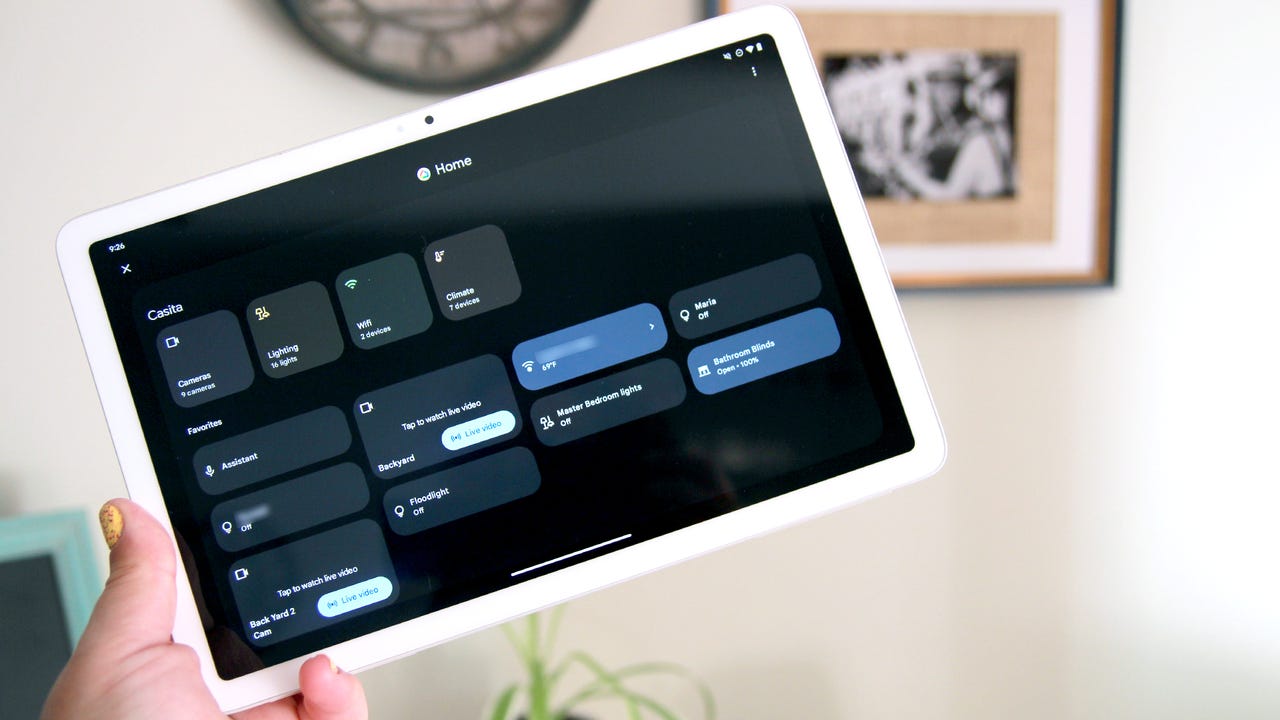
  • Google Home: A great choice for Android ecosystems, it offers simple controls that are easy to find and use, and a clean interface. Google Home also has Gemini for Home, its generative AI-powered voice assistant. However, you do need a subscription to use all of the best features. Google Home is a great option if you use a lot of Nest devices, but it's also compatible with Matter, so you don't have to limit yourself to "Works with Google" devices.

Show more

You can set your tablet screen to never timeout or set it to the longest possible time before going to sleep. Android developer options let you set your tablet to stay awake while charging.

Keep in mind that if this device is permanently in a single spot, you will have to leave it plugged in.

Show more

If you want to keep your tablet locked to a single app, like Google Home or Apple Home, you can turn on Guided Access on iPad, or use an Android app like Fully Kiosk Browser or WallPanel. Using these prevents other users from exiting the home automation app or browser of your choosing. They also automatically launch the smart home app so you can view your dashboard when the tablet wakes.

Show more

After you reset your device and add the smart home animation systems application, it's time to set up your home view. Note that, if you are using an iPad, then Apple Home is already installed, and, if you're using an Android tablet, you probably already have Google Home installed after formatting your tablet.

Also: The latest Google Home update brings Gemini fixes that I'm actually excited to try again

Open your smart home automation app and set up your landing page or dashboard. This is what you will see when you approach your tablet. Add your favorite devices to the landing page so you can control them easily as you approach. For example, this can include smart lights, a smart thermostat, security cameras, and smart locks. You can also add shortcuts to scenes and routines.

Show more

If you plan to mount your tablet on the wall, you can choose from flush wall-mount options, magnetic mounts, or any compatible option for your specific tablet. For an even more seamless look, you can run a hidden charging cable into the wall.

You can also put it on a simple stand on the kitchen counter, for example, or on an entryway table, so you can grab it as needed.

Show more

Can I use Home Assistant on a tablet?

Yes, you can set up a Home Assistant dashboard on a tablet to work as your control panel. Home Assistant lets you customize dashboards and organize your devices almost any way you want, which is very helpful for getting a quick visual of your smart home.

Can my smart panel tablet be the only control method for my home?

I'd strongly discourage making your tablet the only control method for your smart home, as this can cause issues if the tablet ever goes down (for whatever reason). Keep your smart home automation system's app on your phone for control. 

Also, a tablet isn't a hub, so leave any smart speakers and hubs running while you use the tablet as a way to quickly control favorite devices.

Where should I put my smart home panel?

Place your smart home panel wherever you will use it most to control your devices. This may be in your kitchen to work as a main panel for everyone at home, or by your entryway to run quick scenes and control locks. 

I keep one on the wall of our home's staircase so I or anyone else at home can easily control lights and other devices as they're coming downstairs or going up for the nights.

Editorial standards