
惯性聚合 高效追踪和阅读你感兴趣的博客、新闻、科技资讯
阅读原文 在惯性聚合中打开

推荐订阅源

Hacker News: Ask HN
Hacker News: Ask HN
D
DataBreaches.Net
Microsoft Security Blog
U
Unit 42
V
Visual Studio Blog
GbyAI
GbyAI
云风的 BLOG
云风的 BLOG
博客园 - Franky
C
CXSECURITY Database RSS Feed - CXSecurity.com
大猫的无限游戏
大猫的无限游戏
P
Privacy & Cybersecurity Law Blog
T
The Exploit Database - CXSecurity.com
Simon Willison's Weblog
L
LangChain Blog
I
Intezer
V2EX - 技术
V2EX - 技术
Google DeepMind News
T
Threat Research - Cisco Blogs
Apple Machine Learning Research
V
V2EX
腾讯CDC
博客园 - 【当耐特】
Know Your Adversary
Know Your Adversary
TaoSecurity Blog
TaoSecurity Blog
cs.AI updates on arXiv.org
F
Fortinet All Blogs
Project Zero
Project Zero
Blog — PlanetScale
Blog — PlanetScale
S
Security @ Cisco Blogs
量子位
M
MIT News - Artificial intelligence
美团技术团队
C
Cisco Blogs
S
Schneier on Security
Recent Commits to openclaw:main
G
Google Developers Blog
N
News and Events Feed by Topic
MongoDB | Blog
MongoDB | Blog
The Hacker News
The Hacker News
H
Help Net Security
S
Secure Thoughts
Scott Helme
Scott Helme
SecWiki News
SecWiki News
T
Troy Hunt's Blog
cs.CV updates on arXiv.org
博客园 - 叶小钗
O
OpenAI News
Application and Cybersecurity Blog
博客园 - 司徒正美
T
Tenable Blog

Hacker News: Best

Dubai police arrest airline worker after accessing private WhatsApp group madhadron - The seven programming ur-languages GitHub - smol-machines/smolvm: Tool to build & run portable, lightweight, self-contained virtual machines. I Measured Claude 4.7's New Tokenizer. Here's What It Costs You. Introducing Claude Design by Anthropic Labs It Is Time to Ban the Sale of Precise Geolocation The creative software industry has declared war on Adobe Isaac Asimov: The Last Question Newly unsealed records reveal Amazon’s price-fixing tactics, California attorney general claims Clojure - Documentary Android CLI and skills: Build Android apps 3x faster using any agent Qwen3.6-35B-A3B on my laptop drew me a better pelican than Claude Opus 4.7 Codex for almost everything Introducing Claude Opus 4.7 Qwen Studio The Future of Everything is Lies, I Guess: Where Do We Go From Here? Virginia Bans Sale of Geolocation Data YouTube now lets you turn off Shorts Burgers | マクドナルド公式 ChatGPT for Excel Ask HN: Who is using OpenClaw? Live Nation illegally monopolized ticketing market, jury finds Google Broke Its Promise to Me. Now ICE Has My Data. Open Source Isn't Dead. The Future of Everything is Lies, I Guess: New Jobs Unexpected €54k billing spike in 13 hours: Firebase browser key without API restrictions used for Gemini requests IPv6 – Google Your Backpack Got Worse On Purpose Good sleep, good learning, good life Fixing a 20-year-old bug in Enlightenment E16. Does Gas Town 'steal' usage from users' LLM credits & paid services to improve itself? Tell HN: Fiverr left customer files public and searchable Cybersecurity Looks Like Proof of Work Now Getting the Flock out Release OpenSSL 4.0.0 · openssl/openssl Internet será irrespirable los días de fútbol y otros deportes. Telefónica extiende los bloqueos a Champions, tenis y golf. Automate work with routines - Claude Code Docs The Future of Everything is Lies, I Guess: Work Thousands of rare concert recordings are landing on the Internet Archive — listen now What is jj and why should I care? Backblaze has quietly stopped backing up your data Cal.com Goes Closed Source: Why AI Security Is Forcing Our Decision | Cal.com - Scheduling Software for Online Bookings Codex Hacked a Samsung TV The Future of Everything is Lies, I Guess: Safety GitHub - sterlingcrispin/nothing-ever-happens: Polymarket bot that buys "No" on all non-sports markets. For entertainment only, mostly a meme. Make tmux Pretty and Usable - Ham Vocke Microsoft isn't removing Copilot from Windows 11, it's just renaming it Servo is now available on crates.io - Servo aims to empower developers with a lightweight, high-performance alternative for embedding web technologies in applications. We May Be Living Through the Most Consequential Hundred Days in Cyber History, and Almost Nobody Has Noticed All elementary functions from a single binary operator 奈拜提耶市 Seven countries now generate 100% of their electricity from renewable energy Pro Max 5x Quota Exhausted in 1.5 Hours Despite Moderate Usage Tell HN: docker pull fails in spain due to football cloudflare block Bring Back Idiomatic Design @adlrocha - How the "AI Loser" may end up winning Apple update turns Czech mate for locked-out iPhone user Cache TTL silently regressed from 1h to 5m around early March 2026, causing quota and cost inflation The peril of laziness lost AI Will Be Met With Violence, and Nothing Good Will Come of It Center for Responsible, Decentralized Intelligence at Berkeley The disturbing white paper Red Hat is trying to erase from the internet – OSnews The Future of Everything is Lies, I Guess: Annoyances 447 Terabytes per Square Centimetre at Zero Retention Energy: Non-Volatile Memory at the Atomic Scale on Fluorographane Show HN: Pardonned.com – A searchable database of US Pardons 20 Years on AWS and Never Not My Job Artemis II crew splashes down near San Diego after historic moon mission Molotov Cocktail Is Hurled at Home of Sam Altman, OpenAI’s CEO France to ditch Windows for Linux to reduce reliance on US tech On filing the corners off my MacBooks Installing every* Firefox extension Chimpanzees in Uganda locked in vicious 'civil war', say researchers linux/Documentation/process/coding-assistants.rst at master · torvalds/linux GitHub - callumlocke/json-formatter: Makes JSON easy to read. A compelling title that is cryptic enough to get you to take action on it GitHub - Keychron/Keychron-Keyboards-Hardware-Design: Industrial design files for Keychron keyboards and mice. 100+ models with CAD assets in STEP, DXF, DWG, and PDF. Source-available, with commercial use allowed for original compatible accessories within the license terms. [ANNOUNCE] WireGuardNT v0.11 and WireGuard for Windows v0.6 Released 1D-Chess Helium Is Hard to Replace FBI used iPhone notification data to retrieve deleted Signal messages Microsoft suspends dev accounts for high-profile open source projects Serenity Forge (@serenityforge.com) A new trick brings stability to quantum operations OpenAI Backs Bill That Would Limit Liability for AI-Enabled Mass Deaths or Financial Disasters Netflix Prices Went Up Again – I Bought a DVD Player Instead DOJ Wants to Scrap Watergate-Era Rule That Makes Presidential Records Public EFF is Leaving X How NASA built Artemis II’s fault-tolerant computer Meta removes ads for social media addiction litigation How Pizza Tycoon simulated traffic on a 25 MHz CPU Claude mixes up who said what, and that's not OK Reallocating $100/Month Claude Code spend to Zed and OpenRouter Help Keep Thunderbird Alive! Why Are Flock Employees Watching Our Children? The Pentagon Threatened Pope Leo XIV’s Ambassador With the Avignon Papacy Fragments: April 2 Native Instant Space Switching on MacOS Bitcoin miners are losing $19,000 on every BTC produced as difficulty drops 7.8% God sleeps in the minerals Apple Silicon and Virtual Machines: Beating the 2 VM Limit
Why you can’t trust Privacy & Security
2026-04-10 · via Hacker News: Best

In this Friday’s magic demonstration, I’m going to show how what you see in Privacy & Security settings can be misleading, when it tells you that an app doesn’t have access to a protected folder, but it really does.

Although it appears you can achieve this using several ordinary apps, to make things simpler and clearer I’ve written a little app for this purpose, Insent, available from here: insent11

I’m working in macOS Tahoe 26.4, but I suspect you should see much the same in any version from macOS 13.5 onwards, as supported by Insent.
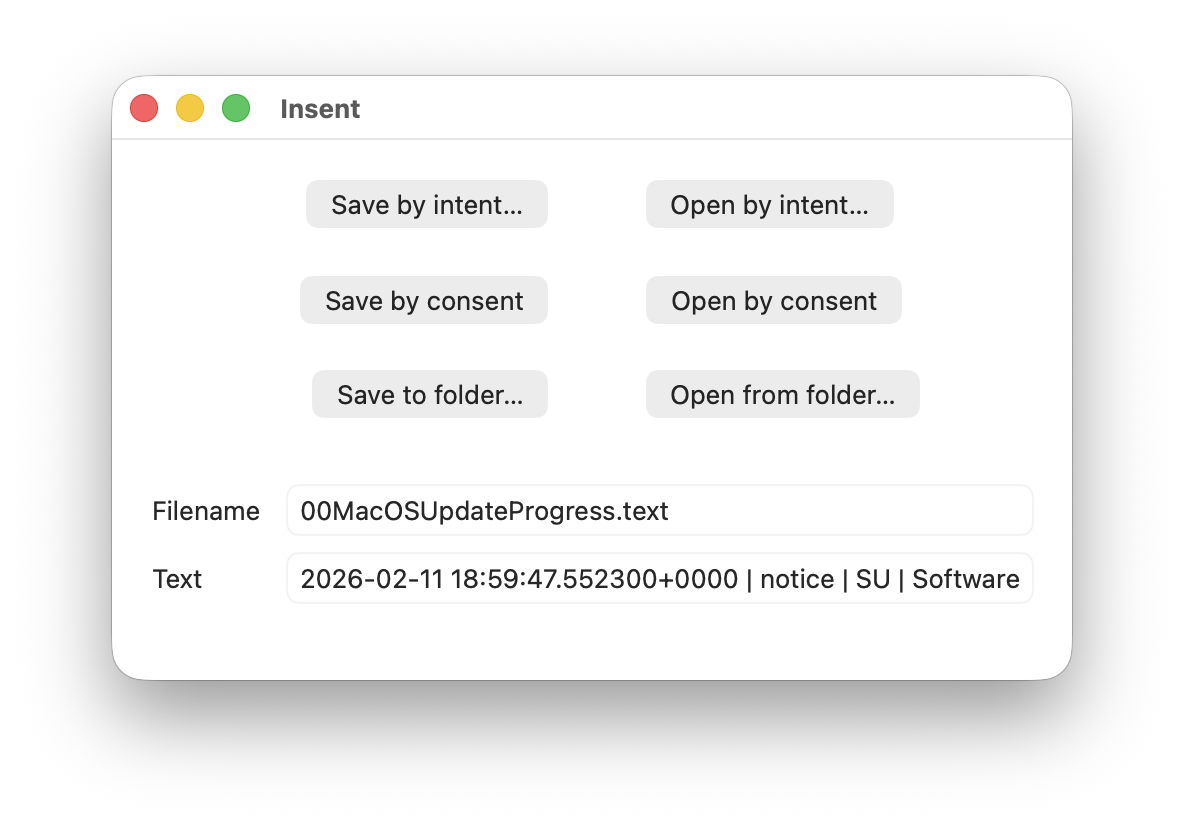
For this magic demo, I’m only going to use two of Insent’s six buttons:

  • Open by consent, which results in Insent choosing a random text file from the top level of your Documents folder, and displaying its name and the start of its contents below. As it does this without involving the user in the process, the macOS privacy system TCC requires it to obtain the user’s consent to list and access the contents of that protected folder.
  • Open from folder, which opens an Open and Save Panel where you select a folder. Insent then picks a random text file from the top level of that folder, and displays its name and the start of its contents below. Because you expressed your intent to access that protected folder, TCC considers that is good enough to give access without requiring any consent.

Demonstration

Once you have downloaded Insent, extracted it from its archive, and dragged the app from that folder into one of your Applications folders, follow this sequence of actions:
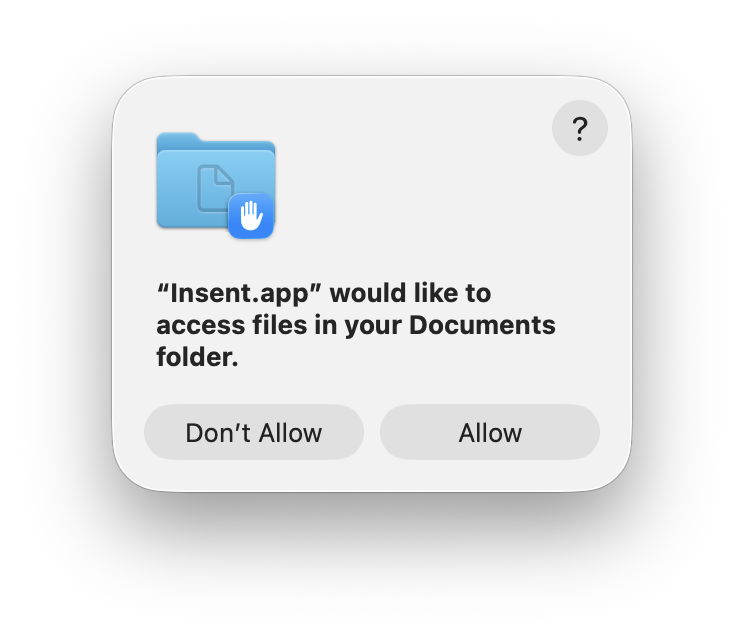
  1. Open Insent, click on Open by consent, and consent to the prompt to allow it to access your Documents folder. Shortly afterwards, Insent will display the opening of one of the text files in Documents. Quit Insent.
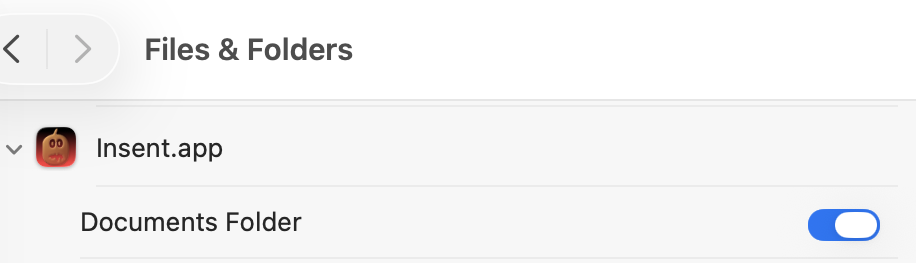
  2. Open Privacy & Security settings, select Files & Folders, and confirm that Insent has been given access to Documents.
  3. Open Insent, click on Open by consent, and confirm it now gains access to a text file without asking for consent. Quit Insent.
  4. Open Privacy & Security settings, select Files & Folders, and disable Documents access in Insent’s entry there using the toggle.
  5. Open Insent, click on Open by consent, and confirm that it can no longer open a text file, but displays [Couldn't get contents of Documents folder].
  6. Click on Open from folder and select your Documents folder there. Confirm that works as expected and displays the name and contents of one of the text files in Documents.
  7. Click on Open by consent, and confirm that now works again.
  8. Confirm that Documents access for Insent is still disabled in Files & Folders.
  9. Whatever you do now, the app retains full access to Documents, no matter what is shown or set in Files & Folders.

Indeed, the only way you can protect your Documents folder from access by Insent is to run the following command in Terminal:
tccutil reset All co.eclecticlight.Insent
then restart your Mac. That should set Insent’s privacy settings back to their default.

You can also demonstrate that this behaviour is specific to one protected folder at a time. If you select a different protected folder like Desktop or Downloads using the Open from folder button, then Insent still won’t be able to list the contents of the Documents folder, as its TCC settings will function as expected.

How does this work?

Insent is an ordinary notarised app, and doesn’t run in a sandbox or pull any clever tricks. When System Integrity Protection (SIP) is enabled some of its operations are sandboxed, though, including attempts to list or access the contents of locations that are protected by TCC.

When you click on its Open by consent button, sandboxd intercepts the File Manager call to list the contents of Documents, as a protected folder. It then requests approval for that from TCC, as seen in the following log entries:
1.204592 Insent sendAction:
1.205160 Insent: trying to list files in ~/Documents
1.205828 sandboxd request approval
1.205919 sandboxd tcc_send_request_authorization() IPC

TCC doesn’t have authorisation for that access by Insent, either by Full Disk Access or specific access to Documents, so it prompts the user for their consent. If that’s given, the following log entries show that being passed back to the sandbox, and the change being notified to com.apple.chrono, followed by Insent actioning the original request:
3.798770 com.apple.sandbox kTCCServiceSystemPolicyDocumentsFolder granted by TCC for Insent
3.802225 com.apple.chrono appAuth:co.eclecticlight.Insent] tcc authorization(s) changed
3.809558 Insent: trying to look in ~/Documents for text files
3.809691 Insent: trying to read from: /Users/hoakley/Documents/asHelp.text
3.842101 Insent: read from: /Users/hoakley/Documents/asHelp.text

If you then disable Insent’s access to Documents in Privacy & Security settings, TCC denies access to Documents, and Insent can’t get the list of its contents:
1.093533 com.apple.TCC AUTHREQ_RESULT: msgID=440.109, authValue=0, authReason=4, authVersion=1, desired_auth=0, error=(null),
1.093669 com.apple.sandbox kTCCServiceSystemPolicyDocumentsFolder denied by TCC for Insent
1.094007 Insent: couldn't get contents of ~/Documents

If you then access Documents by intent through the Open and Save Panel, sandboxd no longer intercepts the request, and TCC therefore doesn’t grant or deny access:
0.897244 Insent sendAction:
0.897318 Insent: trying to list files in ~/Documents
0.900828 Insent: trying to look in ~/Documents for text files
0.901112 Insent: trying to read from: /Users/hoakley/Documents/T2M2_2026-01-06_13_03_00.text
0.904101 Insent: read from: /Users/hoakley/Documents/T2M2_2026-01-06_13_03_00.text

Thus, access to a protected folder by user intent, such as through the Open and Save Panel, changes the sandboxing applied to the caller by removing its constraint to that specific protected folder. As the sandboxing isn’t controlled by or reflected in Privacy & Security settings, that allows TCC, in Files & Folders, to continue showing access restrictions that aren’t applied because the sandbox isn’t applied.

Conclusion

Access restrictions shown in Privacy & Security settings, specifically those to protected locations in Files & Folders, aren’t an accurate or trustworthy reflection of those that are actually applied. It’s possible for an app to have unrestricted access to one or more protected folders while its listing in Files & Folders shows it being blocked from access, or for it to have no entry at all in that list.

Is this likely to occur?

Most apps that want access to protected folders like Documents appear to seek that during their initialisation, and before any user interaction that could result in intent overriding the need for consent. However, many users report that apps appear to have access to Documents but aren’t listed in Files & Folders, suggesting that at some time that sequence of events does occur.

To be effectively exploited this would need careful sequencing, and for the user to select the protected folder in an Open and Save Panel, so drawing attention to the manoeuvre.

Most concerning is the apparent permanence of the access granted, requiring an arcane command in Terminal and a restart in order to reset the app’s privacy settings. It’s hard to believe that this was intended to trap the user into surrendering control over access to protected locations. But it can do.

I’m very grateful to Richard for drawing my attention to this.