


I’ve had the Xteink X4 for a couple of months now, a £40 e-ink reader small enough to stick to the back of a phone. I’d seen a few posts about it (Khairul Selamat, Neil Brown, joelchrono, and moddedbear among them), so I got curious and ordered one.
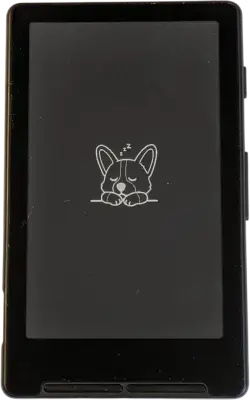
Out of the box, the X4 is lightweight, properly light, the kind where I’d forget it’s in my pocket. The display is crisp for its size, and the device ships with a branded 16GB microSD card (cute touch) plus a card reader and adhesive metal ring for MagSafe mounting.
The microSD slot is awkward (I needed a stylus to push the card out, felt like I was doing something wrong). The stock OS defaults to Chinese, but the UI is navigable enough that I had it switched to English within a minute of blind fumbling.
Marketing pushes the “stick it to your phone” angle hard. I’ve got a MagSafe-compatible case on my Pixel 7a, but that spot’s already taken by my card holder. Even if it wasn’t, the X4 mounts inverted for some reason (polarity issue with third-party MagSafe cases, presumably).
The real portability win is the size and weight, not the phone mount. This thing actually fits in a trouser pocket and disappears.
Stock firmware is usable but minimal (three fonts, basic line-height and paragraph spacing controls, EPUB support). Page turns are instant with no noticeable ghosting. The hardware’s good, the firmware just doesn’t do it justice.
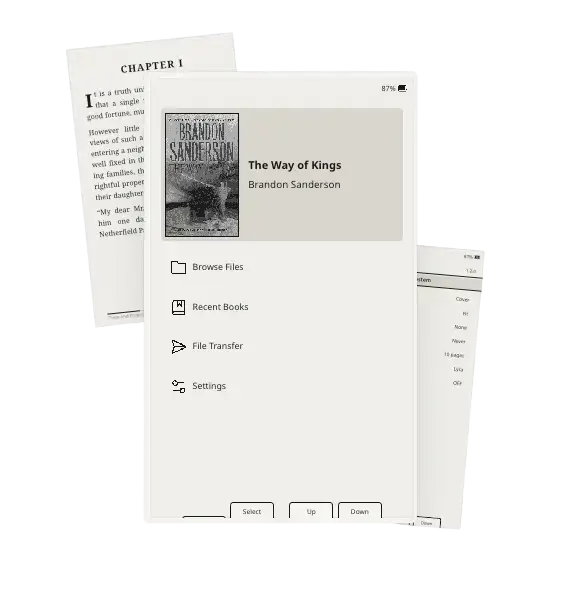
Rather than live with stock, there’s a small crop of custom firmwares, all forked from CrossPoint. CrossPoint itself has come a long way since I first started poking at this (it’s now on v1.3.0 with OTA updates, 24 UI languages, and SD-card font installation without needing to reflash). Flashing takes about two minutes and one terminal command, no button combos or debug modes needed. If the terminal’s off-putting, CrossPoint has a web-based flasher that does it in the browser instead.
Units bought from AliExpress or elsewhere outside China ship with USB flashing disabled. CrossPoint’s docs point to the SD card flashing method instead, which works fine for getting custom firmware on, it just doesn’t unlock USB flashing itself.
I tried Papyrix first, which keeps things minimal and focused on the reading experience. The typography engine punches well above what I’d expect from a £40 device, a Knuth-Plass line breaking algorithm for proper TeX-quality justified text, soft hyphen support, and language-aware hyphenation across six languages. It’ll even handle Vietnamese, Thai, Greek, and Arabic scripts, with right-to-left layout and proper contextual shaping for Arabic. Beyond EPUB it reads FictionBook, HTML, Markdown, and plain text. Custom themes and fonts load straight from the SD card, button remapping is supported, and there’s Calibre Wireless Device support for sending books over WiFi without touching a cable.
It’s good, but I ended up settling on Inx, which goes wider and feels the most polished of the lot. A tab bar across the top (Recent, Library, Settings, Sync, Statistics) gives it a proper app feel, with per-book settings rather than global-only, Wi-Fi with Calibre wireless sync, OPDS catalogue browsing, and more format support beyond EPUB. The reading statistics page is the bit I keep going back to (reading time, pages, chapters, and average time per page, all broken down per book). It syncs with KOReader for anyone already using that for annotations, plus highlighting and footnote navigation baked into the in-book menu. It’s even got a little corgi as its mascot on the sleep and wake screens, and it’s still being actively worked on.
The firmware rabbit hole goes deeper. MicroSlate turns the X4 into a dedicated writing device when paired with a Bluetooth keyboard (scrolling, typewriter, and paginated writing modes), with auto-save and WiFi sync for getting notes off the device. TernOS is a different beast entirely, a PalmOS-inspired OS that runs native Rust apps and classic Palm apps. PlusPoint is a CrossPoint fork with experimental JavaScript app support.
Then there’s the weird stuff (a Tamagotchi app that uses MQTT to switch between moods and display messages, intended as a little companion display for an AI assistant, and a browser-based wallpaper maker that converts any image into the 480x800 BMP format the device needs for custom sleep screens, all processed locally).
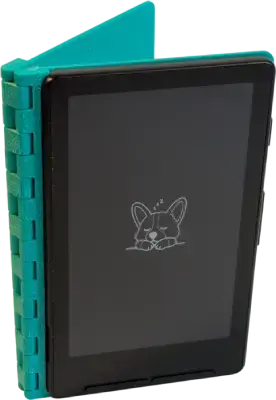
I 3D printed this flip cover case for it, about an hour on my FlashForge AD5X. It uses one of the adhesive MagSafe rings that ships with the X4, so the device sits in the case securely rather than just resting against a magnet.
I reviewed the Bigme B6 in January, a £125 colour e-ink tablet running Android 14. My conclusion there was that colour e-ink isn’t quite ready, muted colours, halved resolution, ghosting when switching between colour and black-and-white. Android brought flexibility (any reading app I wanted) but also the baggage of a phone OS bolted onto a slow screen, stuttering animations, traces left behind by menus, and a load of bloat to strip out before it felt usable.
The X4 sidesteps all of that by being smaller and dumber in the best way. No stylus lag, no waiting on slow colour screens, no Android complexity to debloat. Devices like the Kobo Clara Colour and InkBook Solaris Color have since brought Kaleido 3 colour e-ink to mainstream readers without needing to tinker with Android, which is probably the better way in for colour. But none of them get close to the X4 on portability. The Clara and Paperwhite need a big pocket, the X4 disappears into any pocket. For pure reading, that size difference matters more than colour ever will.
For £40, the X4 with Crosspoint or Inx is a better reading device than it has any right to be. Paging’s instant, the display’s crisp, and it’s small enough to actually carry everywhere. Stock firmware is bare minimum, but custom firmware makes it actually good.
此内容由惯性聚合(RSS阅读器)自动聚合整理,仅供阅读参考。 原文来自 — 版权归原作者所有。