


There are two obvious ways to use coding agents. Both are bad.
The first is to let the LLM run unattended and hope the repository survives. This is fast, exciting, and stupid. It leads to bugs, confused changes, and a flood of PRs that humans cannot review quickly enough, at least not without eventually lowering their standards and merging things they do not really understand.
The second approach is to treat the agent like glorified autocomplete and force a human to review every tiny step. This is safer, but slow enough to partially defeat the purpose of using an agent in the first place. If you still have to steer every minor decision, you have not delegated much.
In this post, I’ll cover a third, not-so-obvious approach: building ways for the agent to validate more of its own work before a human has to step in. The goal to make longer unattended sessions safe enough to be useful without fully removing the human from the loop. It should also reduce the number of low-quality PRs your teammates have to review for details the agent should have caught itself.
What backpressure is and how it can help
In systems engineering, backpressure is the mechanism by which a downstream component signals upstream that it can't accept more work, forcing the producer to slow down, buffer, or shed load.
Whenever there's no backpressure, the producer is free to generate work at will, and the consumer is forced to absorb the mismatch. Then, the consumer either falls behind, breaks under the load, or speeds up by cutting corners.
In our work, backpressure usually takes the form of a machine refusing work the producer hasn't cleaned up yet. The simplest version of that is an automated test: you don't usually submit a PR with failing tests. Ideally, your colleagues shouldn't even review a PR until all tests are green. In that case, the test suite is the backpressure mechanism for a human to clean up their code before asking for a review.
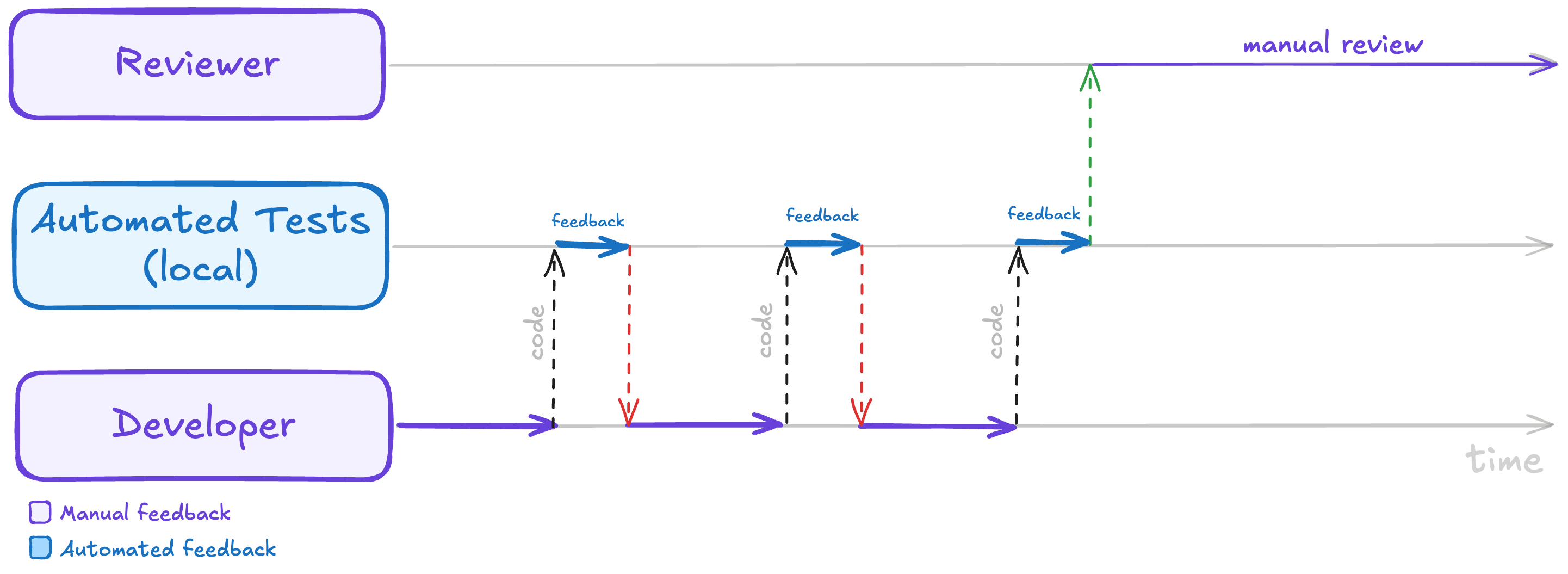
Automated tests are backpressure: the developer iterates against fast local test feedback, so the reviewer only ever sees code that's already green.
In addition to automated testing, types can also be a powerful form of backpressure.
Remember writing plain JavaScript, for example. Back in those days, it was easy to wire a component with the wrong prop shape and only find out much later, when someone clicked a button and got hit in the face with props.onSubmit is not a function.
Before TypeScript, the only way to catch the bug before production was for a reviewer to follow the prop, follow the callback, check the caller, check the caller's caller, and hope the mismatch was visible in the diff.
Some of us learned a lesson from these difficult times and started using types to make impossible states impossible. Others looked at the same lesson, nodded solemnly, and kept passing dictionaries around, but I guess that's a story for another day.
Anyway, the point here is that TypeScript added backpressure and made the producer confront the consumer's expectations before moving the code forward. Now, if a component needs a function, you can't casually hand it a string, an object, or nothing at all and hope the reviewer catches the bug. Instead, the machine will refuse the work at the boundary where you introduced the type mismatch, with no need for an expensive human review.
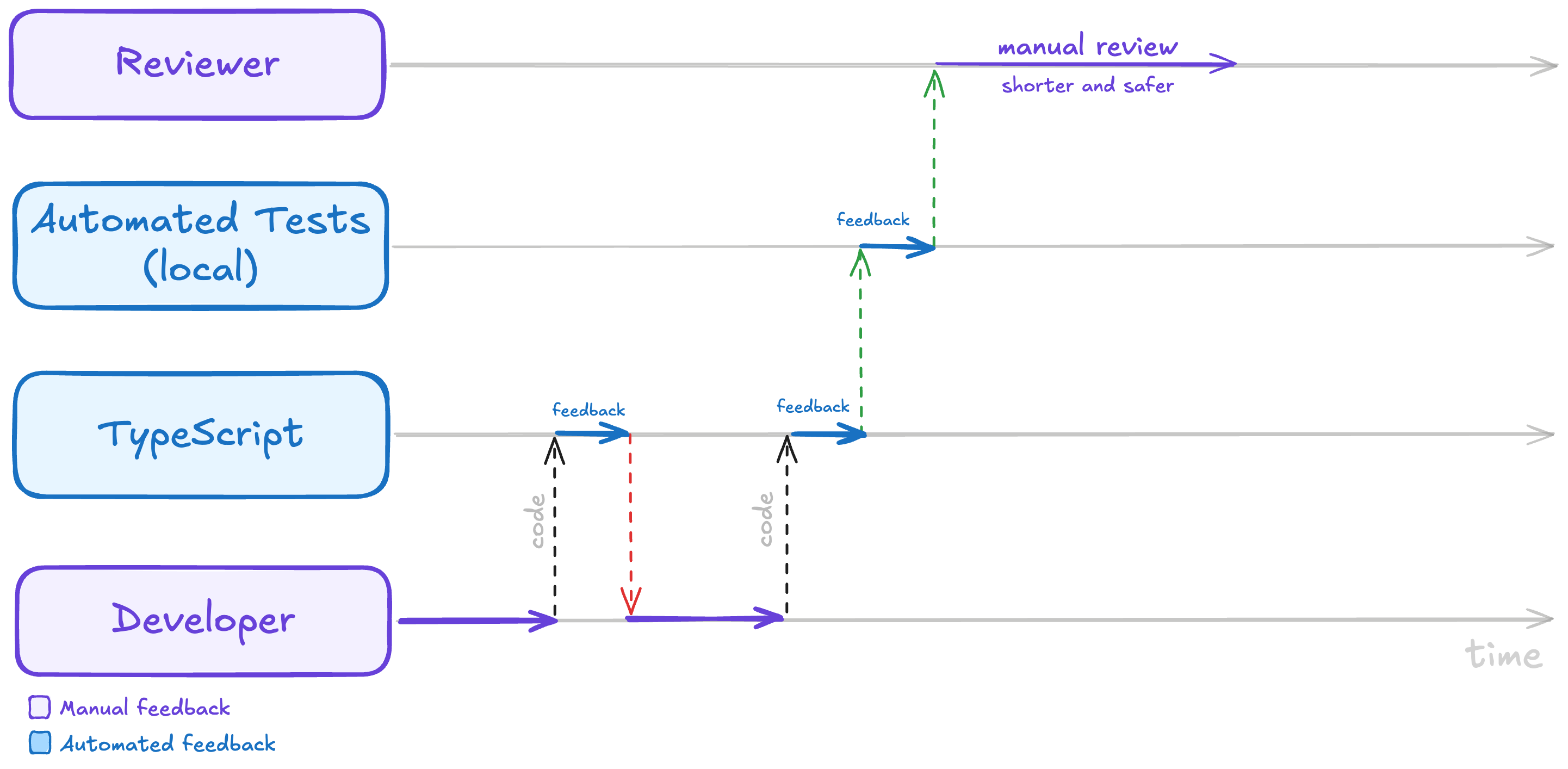
Types add another layer of backpressure ahead of the tests, refusing mismatches at the boundary and making the eventual human review shorter and safer.
As time passed, we kept adding more automated guardrails to the process, like linters, end-to-end tests, canary releases, and so on. We then bundled a bunch of those guardrails into CI pipelines. That way, we could stop reviewing code that wasn't even close to being ready, and we could focus our human attention on the things that machines can't check, like readability, complexity, and overall design.
Today, this lesson is easy to recognize when we're talking about compilers, automated tests, CI, and, for the true believers among us, types. However, it seems much harder to recognize when the producer is an LLM writing code faster than anyone can read it.
That's why, most of the time, the LLM's backpressure is still us. We look at the code in the editor, ask the model to fix the parts that smell wrong (multiple times), open the PR, fix any failing checks, and then someone looks at the same code again with a more serious face.
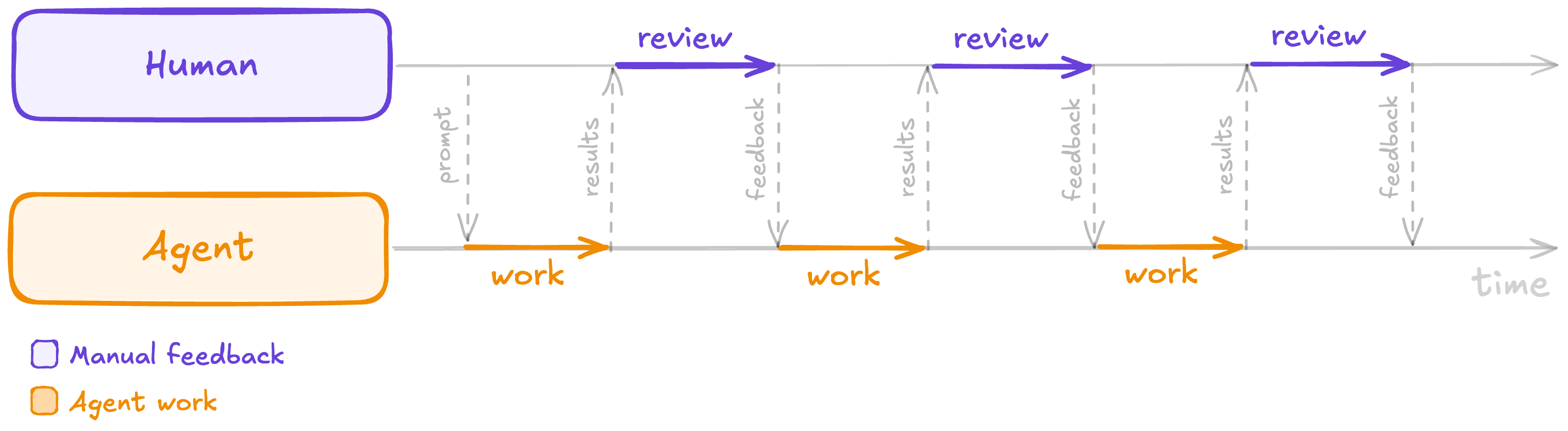
With no automated backpressure, the human is the backpressure—manually reviewing the agent's output and feeding corrections back every cycle.
Often, for extra safety, we install a review bot to check the first AI's code. Then, we copy the bot's feedback back into the coding agent. That way, we have ironically promoted ourselves to an expensive clipboard doing the mechanical work between two machines.
The next step for AI-aided software development is to stop making humans the default backpressure in the AI loop. We need tests that fail early, types that push back, benchmarks that catch regressions, and review agents that send bad patches back before they become a human's problem. That machinery is what makes delegation possible, and frees up our time to focus on higher-level feedback and design decisions instead of low-level correctness and quality issues.
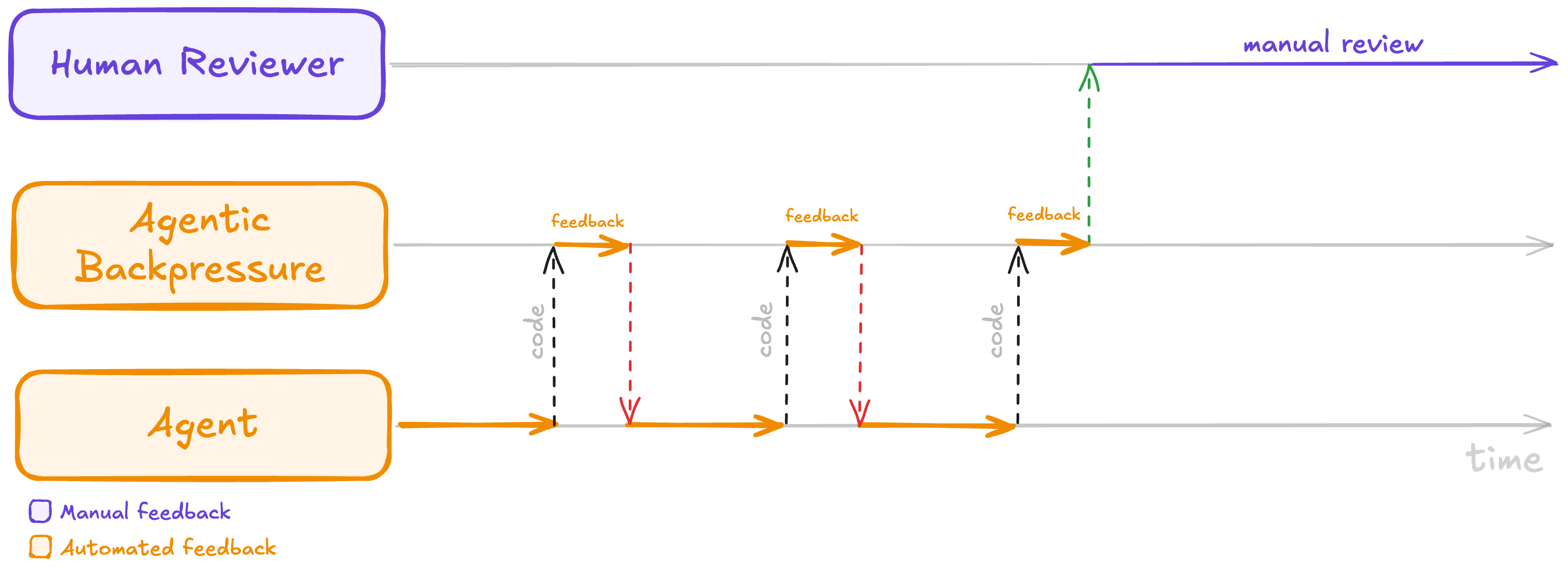
With automated backpressure in place, the agent iterates against fast automated feedback and the human only steps in for a final manual review.
Next, I'll explain how I've been building that machinery in my work, how you can do the same, and interesting approaches I've yet to explore.
You can install this post's backpressure skills by running npx @lucasfcosta/backpressured in your terminal. Then, run /backpressured <goal description> in Claude — or explicitly ask Claude to use the backpressured skill — to kick off the loop.
That skill will automatically iterate towards the goal while running the backpressure checks described in this post. You can also customize the checks and the iteration process by adding a BACKPRESSURE.md file to your project with more specific instructions (in plain English).
Creating backpressure in practice
The first time I applied backpressure to an LLM, I was using Claude's /goal command. That command lets you give Claude a goal and have it keep working until it considers the goal complete.
Initially, my /goal prompts looked something like this:
/goal implement support for <brief feature description>. You should only consider the task done when all of the following criteria are met:

1. <first criterion: i.e. the button X must be disabled while the form is submitting>
2. <second criterion: i.e. the front-end must show an error message if the API returns a 400>
3. <third criterion: i.e. redirect the user to the dashboard after a successful submission>
The problem with this type of prompt is that it focused too much on the feature and not enough on the necessary tests, possible edge cases, and overall quality of the implementation. Essentially, there were no guardrails to prevent the model from declaring victory too early, so it often did. Then, it was up to me to review the code and handhold the model through the process of handling each edge case, adding tests, and refactoring the code until it was good enough to ship. That defeated the purpose of /goal, which was supposed to let me delegate the work and only get involved at the end to review the final product.
That's when I noticed I was wasting my time as a slow backpressure mechanism instead of building automated backpressure into the loop. I was bottlenecking /goal!
After noticing that, I started adding the following backpressure mechanisms into the /goal loop:
- Linting, testing, and simple verification scripts
- Manual testing with
cURLand an actual browser - Benchmarking
- Review agents (functional, tests, types, brevity)
- Planning phase review
- Visual design reviews
- Pull-request monitoring
I'll cover each of these mechanisms in more detail below, but the general idea is that I kept adding more and more automated checks and reviews into the loop, so that the model would have to confront the consumer's expectations more frequently and catch issues on its own before they became my problem.
1. Linting, testing, and simple verification scripts
These are the simplest and most obvious forms of backpressure. If your project already has a test suite and a linter, you can start using them as backpressure mechanisms right away.
In fact, Claude already picks up tests most of the time, but as it goes along, it sometimes forgets to keep them green. Consequently, I decided to explicitly extend my prompt with checks for testing. Then, I also added other easy wins like linting and running other simple verification scripts, like a commit-message checker.
Another important thing I discovered is that it's extremely useful to ask the model to run the checks in each iteration, not just at the end. By running the checks in each iteration, I forced the model to confront the consumer's expectations more frequently, which made it more likely to catch issues early and fix them before moving on to the next step.
/goal implement support for <brief feature description>. Here are the feature's acceptance criteria: 1. <first criterion: i.e. the button X must be disabled while the form is submitting> 2. <second criterion: i.e. the front-end must show an error message if the API returns a 400> 3. <third criterion: i.e. redirect the user to the dashboard after a successful submission> +The task is not done until all of the above acceptance criteria are satisfied. Additionally, the following quality criteria must also be met: +1. The linting is passing+2. Tests are all green+3. The new behavior is covered by tests+4. The commit_check.sh script is passing+ +Run these quality checks in _each_ iteration. Do NOT wait until the end to run them. You should run them after writing each patch, and you should not write a new patch until all checks are passing.+ +If any of the above criteria are not met, you must inspect the failure, fix the issue, and run the check again. Do not stop after writing the patch. Stop only after the acceptance criteria are satisfied, or after you can explain exactly what is blocking you.Now, my prompt had the structure below.
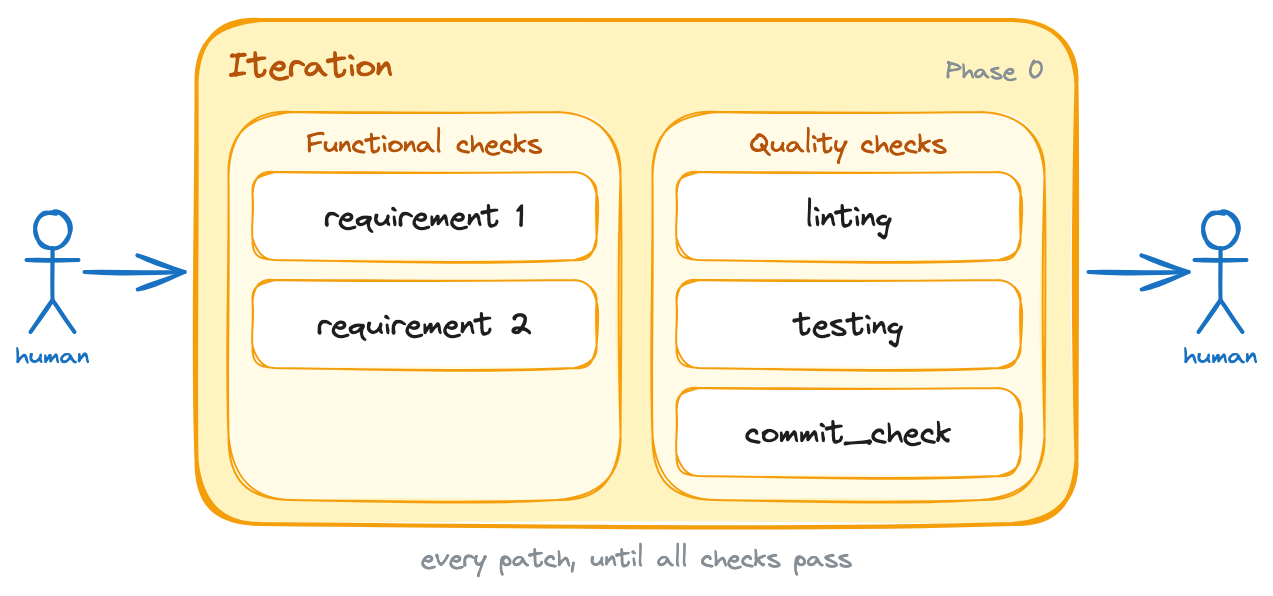
The starting point: a single iteration phase where every patch must satisfy the functional requirements and pass the quality checks.
2. Manual testing with cURL and an actual browser
Even though I wrote 500 pages on automated testing, I'm well aware of its limitations. Automated tests are great for catching a wide range of issues, but they can't catch everything, and they certainly aren't as representative as clicking around in an actual browser or running cURL commands against a real API.
I covered that gap by adding manual testing into the loop. For that, I had to teach the model how to run my front-end and back-end applications locally. I also had to teach it how to run my docker-compose file, set up database schemas, and troubleshoot common issues that come up when running the applications locally.
I used the obra/superpowers builder to build the skills that taught the agent how to run my applications.
Then, I updated the prompt to make Claude use those skills for manual checks.
/goal implement support for <brief feature description>. Here are the feature's acceptance criteria: 1. <first criterion: i.e. the button X must be disabled while the form is submitting> 2. <second criterion: i.e. the front-end must show an error message if the API returns a 400> 3. <third criterion: i.e. redirect the user to the dashboard after a successful submission> The task is not done until all of the above acceptance criteria are satisfied. Additionally, the following quality criteria must also be met: 1. The linting is passing 2. Tests are all green 3. The new behavior is covered by tests 4. The commit_check.sh script is passing Run these quality checks in _each_ iteration. Do NOT wait until the end to run them. You should run them after writing each patch, and you should not write a new patch until all checks are passing. +After you're done iterating, use the `run_local_dependencies`, `run_backend`, and `run_frontend` skills to run the application locally and test the new behavior manually. You can use `cURL` commands to test the API endpoints and the Playwright MCP to test the front-end on a real browser. You should run these manual checks at least once before considering the task done, but you can run them more than once if you think it's necessary to catch issues that automated tests might have missed.+ If any of the above criteria are not met, you must inspect the failure, fix the issue, and run the check again. Do not stop after writing the patch. Stop only after the acceptance criteria are satisfied, or after you can explain exactly what is blocking you.Given manual testing is slower than automated testing, you can see that I told the model to use it sparingly. In practice, that usually means near the end of the task.
Note that these changes added a new phase to the process. Before, the model would just iterate on writing code and running automated checks until it thought it was done. Now, after that iteration phase, it has to run the application locally and test the new behavior manually before it can consider the task done.
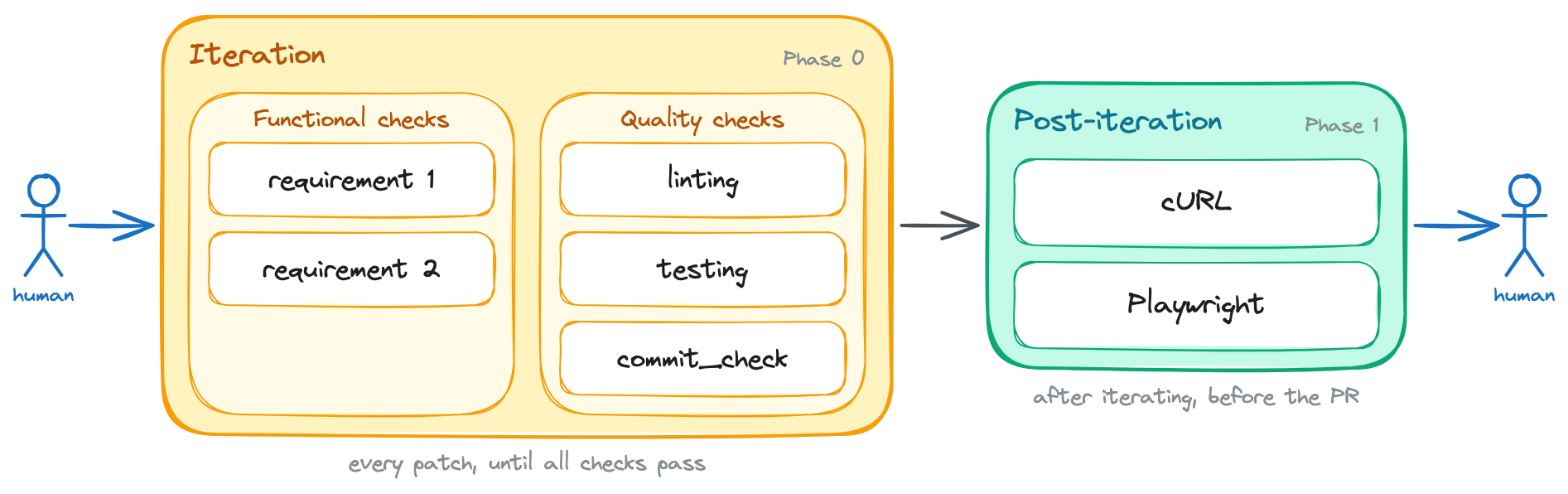
Manual testing with cURL and a real browser becomes a new post-iteration phase, run once the iteration loop settles.
3. Benchmarking
Some of the applications with which I work are performance-sensitive, so I also added benchmarking into the loop for those.
Writing that into the prompt was easy, but making the benchmarking suite easy to run and interpret was a bit more work. Still, I invested significant time in improving our benchmarking tools so that they would:
- Be easy to run with a single command, so that the model could run them frequently without getting into rabbit holes.
- Include multiple suites with different time budgets, so that the model wouldn't get stuck for 10m running benchmarks when it just needed a quick sanity check.
- Write structured output to disk and the console, so that the model could easily understand whether a change was an improvement, a regression, or a wash.
I also created a skill specifically for running benchmarks and interpreting their results. This skill included instructions on which suite to pick, the heuristics for interpreting results, and clear acceptance criteria for what counts as a regression, an improvement, or a wash.
With that skill in place, I updated the prompt to make the model run benchmarks for any performance-sensitive applications.
/goal implement support for <brief feature description>. Here are the feature's acceptance criteria: 1. <first criterion: i.e. the button X must be disabled while the form is submitting> 2. <second criterion: i.e. the front-end must show an error message if the API returns a 400> 3. <third criterion: i.e. redirect the user to the dashboard after a successful submission> The task is not done until all of the above acceptance criteria are satisfied. Additionally, the following quality criteria must also be met: 1. The linting is passing 2. Tests are all green 3. The new behavior is covered by tests 4. The commit_check.sh script is passing+5. Run the benchmarks using the `run_benchmarks` skill. See the acceptance criteria inside it. Run these quality checks in _each_ iteration. Do NOT wait until the end to run them. You should run them after writing each patch, and you should not write a new patch until all checks are passing. +After you're done iterating:+ +1. Use the `run_local_dependencies`, `run_backend`, and `run_frontend` skills to run the application locally and test the new behavior manually. You can use `cURL` commands to test the API endpoints and the Playwright MCP to test the front-end on a real browser. You should run these manual checks at least once before considering the task done, but you can run them more than once if you think it's necessary to catch issues that automated tests might have missed.+2. Use the `run_benchmarks` skill to run the full benchmarking suite. See the acceptance criteria inside it. If any of the above criteria are not met, you must inspect the failure, fix the issue, and run the check again. Do not stop after writing the patch. Stop only after the acceptance criteria are satisfied, or after you can explain exactly what is blocking you.After this change, the process includes a new step within the iteration and post-iteration phases.
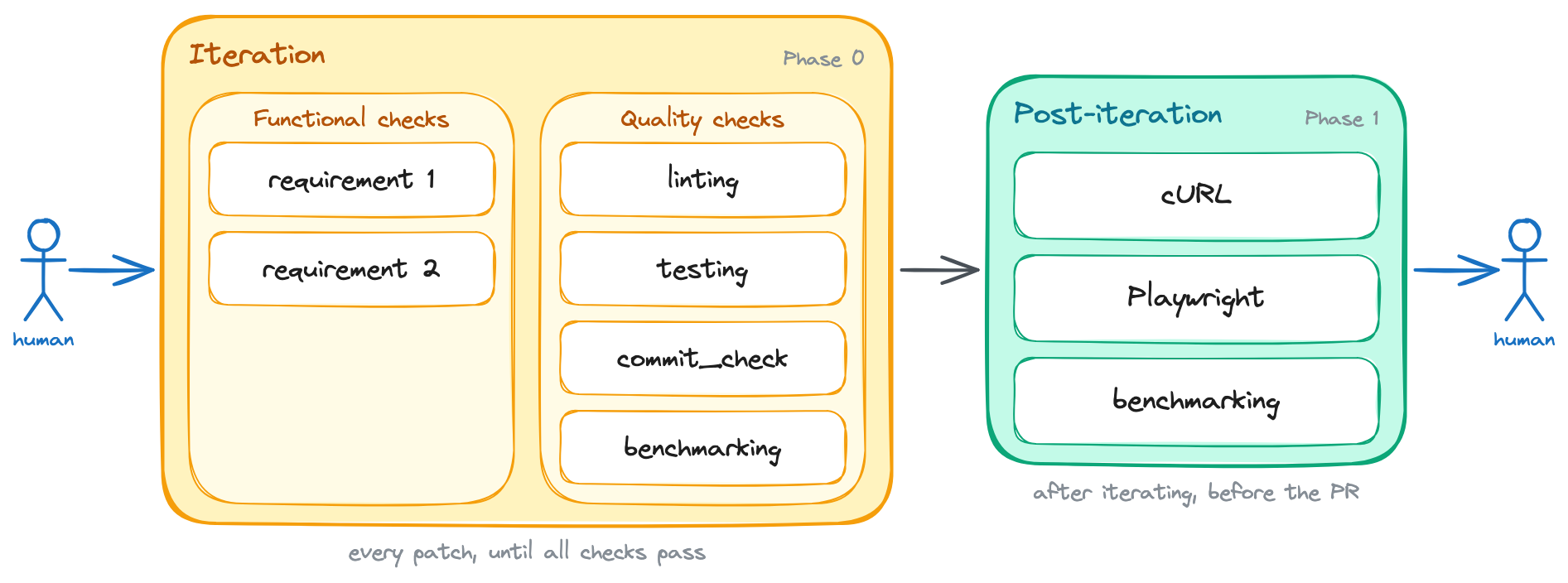
Benchmarking joins both the iteration loop and the post-iteration phase for performance-sensitive applications.
4. Review agents (functional, tests, types, brevity)
Review agents were the most effective form of backpressure that I added to the loop, by far.
I added review agents after noticing the types of issues that still reached me. The earlier layers caught most correctness issues, but the quality problems remained.
Those quality problems included things like readability, excessive complexity, lack of tests, loose types, and explicit casts.
Given that those issues are quite subjective, I built a review skill that included a bit of each of those criteria, and I made it run in each iteration. That way, the model would have to confront a reviewer's opinions more frequently, which made it more likely to catch quality issues on its own instead of relying on me to point them out.
Once I finished that skill, I updated the prompt to include it as another backpressure mechanism in the iteration loop.
/goal implement support for <brief feature description>. Here are the feature's acceptance criteria: 1. <first criterion: i.e. the button X must be disabled while the form is submitting> 2. <second criterion: i.e. the front-end must show an error message if the API returns a 400> 3. <third criterion: i.e. redirect the user to the dashboard after a successful submission> The task is not done until all of the above acceptance criteria are satisfied. Additionally, the following quality criteria must also be met: 1. The linting is passing 2. Tests are all green 3. The new behavior is covered by tests 4. The commit_check.sh script is passing 5. Run the benchmarks using the `run_benchmarks` skill. See the acceptance criteria inside it.+6. Use the `review_agent` skill to review the code Run these quality checks in _each_ iteration. Do NOT wait until the end to run them. You should run them after writing each patch, and you should not write a new patch until all checks are passing. After you're done iterating: 1. Use the `run_local_dependencies`, `run_backend`, and `run_frontend` skills to run the application locally and test the new behavior manually. You can use `cURL` commands to test the API endpoints and the Playwright MCP to test the front-end on a real browser. You should run these manual checks at least once before considering the task done, but you can run them more than once if you think it's necessary to catch issues that automated tests might have missed. 2. Use the `run_benchmarks` skill to run the full benchmarking suite. See the acceptance criteria inside it.+3. Run the `review_agent` skill one last time, but now tell it to review the changeset as a whole. If any of the above criteria are not met, you must inspect the failure, fix the issue, and run the check again. Do not stop after writing the patch. Stop only after the acceptance criteria are satisfied, or after you can explain exactly what is blocking you.This change added a new backpressure mechanism to both phases of the process, and significantly reduced the number of quality issues that slipped through to me.
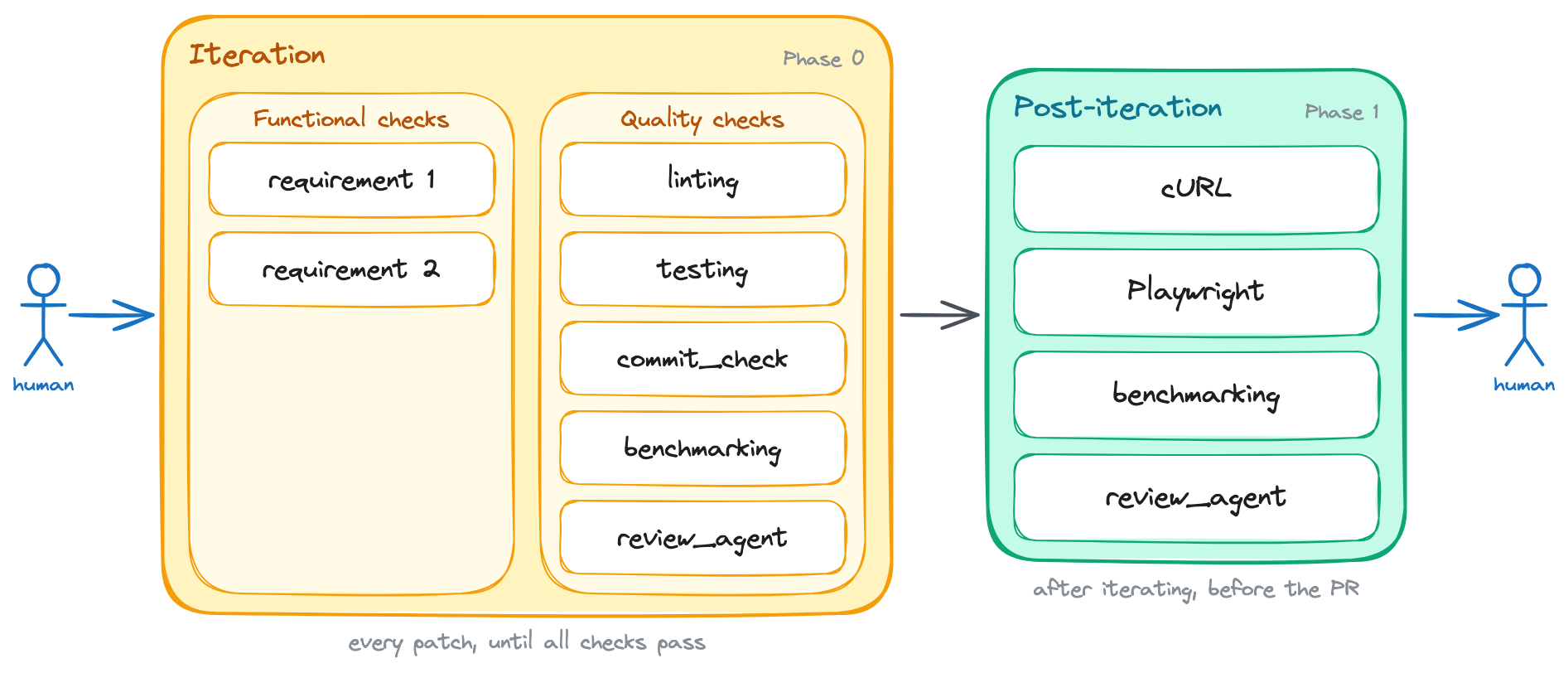
Review agents run in every iteration, and once more over the whole changeset after iterating.
The next steps for this particular backpressure mechanism are to experiment with breaking down the review into multiple agents, each with a specific focus. I'm also not yet sure if it's best to ship this mechanism as a SKILL.md or an /agents/reviewer_agent.md.
5. Planning phase review
Every backpressure mechanism I've covered so far targets the implementation phase. Those worked, but the model would sometimes pick the wrong approach from the start and it couldn't course-correct its way out of a bad foundation.
I addressed that by adding a review step in the planning phase, right after the model creates the initial plan but before it starts writing code. In this case, Claude would spawn a reviewer subagent to check whether the fundamental approach was sound and it would iterate on the plan until the reviewer approved it. Only then would it move on to the implementation phase.
I was also careful to mention that this should be a lightweight plan, focused mostly on the approach and the architecture, and not on implementation details. That's because I wanted to defer implementation details to the implementation phase, where the model could ask reviewers for feedback and course-correct as it went along.
/goal implement support for <brief feature description>. Here are the feature's acceptance criteria: 1. <first criterion: i.e. the button X must be disabled while the form is submitting> 2. <second criterion: i.e. the front-end must show an error message if the API returns a 400> 3. <third criterion: i.e. redirect the user to the dashboard after a successful submission> +Before writing any code, produce a lightweight plan that focuses on the overall approach and architecture, _not_ on implementation details. Then, use the `review_agent` skill to review the plan and confirm the fundamental approach is sound. Keep iterating on the plan until the reviewer approves it, and only then move on to the implementation.+ The task is not done until all of the above acceptance criteria are satisfied. Additionally, the following quality criteria must also be met: 1. The linting is passing 2. Tests are all green 3. The new behavior is covered by tests 4. The commit_check.sh script is passing 5. Run the benchmarks using the `run_benchmarks` skill. See the acceptance criteria inside it. 6. Use the `review_agent` skill to review the code Run these quality checks in _each_ iteration. Do NOT wait until the end to run them. You should run them after writing each patch, and you should not write a new patch until all checks are passing. After you're done iterating: 1. Use the `run_local_dependencies`, `run_backend`, and `run_frontend` skills to run the application locally and test the new behavior manually. You can use `cURL` commands to test the API endpoints and the Playwright MCP to test the front-end on a real browser. You should run these manual checks at least once before considering the task done, but you can run them more than once if you think it's necessary to catch issues that automated tests might have missed. 2. Use the `run_benchmarks` skill to run the full benchmarking suite. See the acceptance criteria inside it. 3. Run the `review_agent` skill one last time, but now tell it to review the changeset as a whole. If any of the above criteria are not met, you must inspect the failure, fix the issue, and run the check again. Do not stop after writing the patch. Stop only after the acceptance criteria are satisfied, or after you can explain exactly what is blocking you.This change added an entirely new phase before the implementation even starts. Now, the model has to get its approach reviewed and approved before it writes a single line of code.
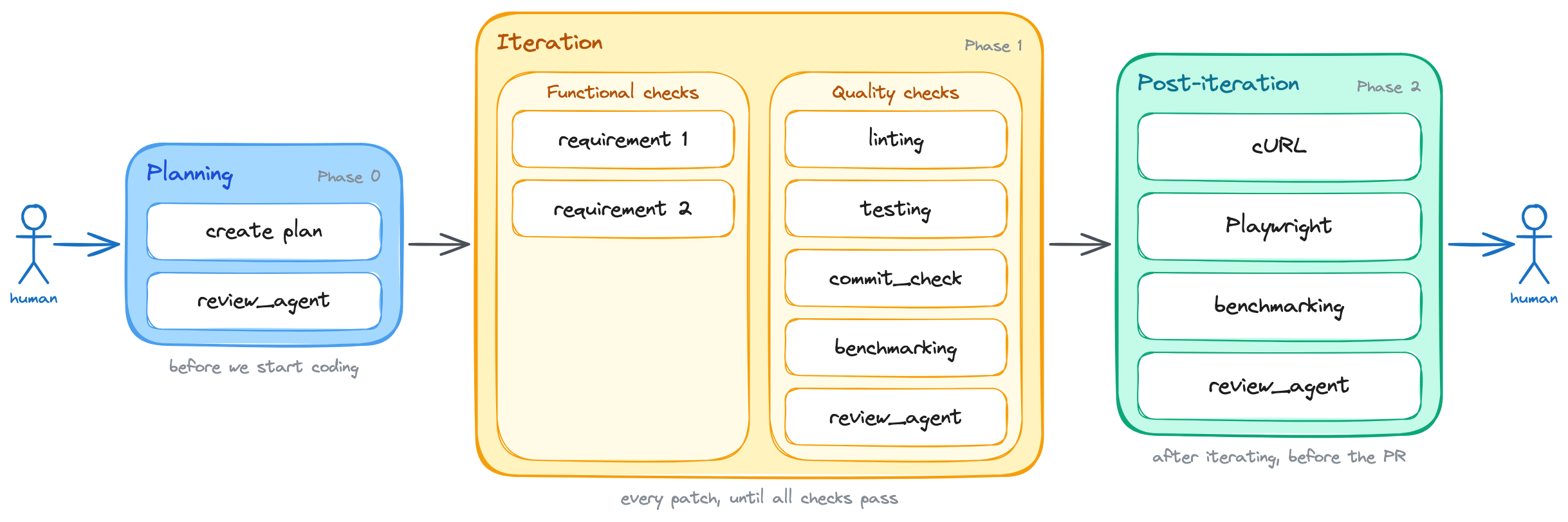
A planning phase is added up front: the approach is reviewed and approved before any code is written.
6. Visual design reviews
I'm honestly not sure about the efficacy of visual design reviews as a backpressure mechanism, but I think it's worth exploring.
This mechanism is especially relevant for front-end work, where the visual design is a critical aspect of the user experience. It's also an area where automated checks and even manual testing might not be sufficient to catch issues, especially when it comes to things like layout, spacing, color contrast, and overall aesthetics.
The way I built this check into the loop was by creating a skill that instructs the model to take screenshots using the Playwright MCP and review them against a Figma file or images from a Linear ticket.
That skill also included a few heuristics to help the agent compare both images more reliably. These heuristics included a list of common issues to look for, like misaligned elements, inconsistent spacing, color contrast issues, and overall visual consistency. The skill further instructed the model to break down the review into smaller parts, like checking the header, then the main content, then the footer, and so on.
/goal implement support for <brief feature description>. Here are the feature's acceptance criteria: 1. <first criterion: i.e. the button X must be disabled while the form is submitting> 2. <second criterion: i.e. the front-end must show an error message if the API returns a 400> 3. <third criterion: i.e. redirect the user to the dashboard after a successful submission> Before writing any code, produce a lightweight plan that focuses on the overall approach and architecture, _not_ on implementation details. Then, use the `review_agent` skill to review the plan and confirm the fundamental approach is sound. Keep iterating on the plan until the reviewer approves it, and only then move on to the implementation. The task is not done until all of the above acceptance criteria are satisfied. Additionally, the following quality criteria must also be met: 1. The linting is passing 2. Tests are all green 3. The new behavior is covered by tests 4. The commit_check.sh script is passing 5. Run the benchmarks using the `run_benchmarks` skill. See the acceptance criteria inside it.+6. Run the `visual_review` skill to review the actual screenshots of the new feature against the design specifications 7. Use the `review_agent` skill to review the code Run these quality checks in _each_ iteration. Do NOT wait until the end to run them. You should run them after writing each patch, and you should not write a new patch until all checks are passing. After you're done iterating: 1. Use the `run_local_dependencies`, `run_backend`, and `run_frontend` skills to run the application locally and test the new behavior manually. You can use `cURL` commands to test the API endpoints and the Playwright MCP to test the front-end on a real browser. You should run these manual checks at least once before considering the task done, but you can run them more than once if you think it's necessary to catch issues that automated tests might have missed. 2. Use the `run_benchmarks` skill to run the full benchmarking suite. See the acceptance criteria inside it. 3. Run the `review_agent` skill one last time, but now tell it to review the changeset as a whole. If any of the above criteria are not met, you must inspect the failure, fix the issue, and run the check again. Do not stop after writing the patch. Stop only after the acceptance criteria are satisfied, or after you can explain exactly what is blocking you.Again, this mechanism ended up as a new item in the iteration phase. I'm still not sure if it's worth the hassle, but I think it's an interesting experiment to run, especially for front-end work where the visual design is a critical aspect of the user experience.
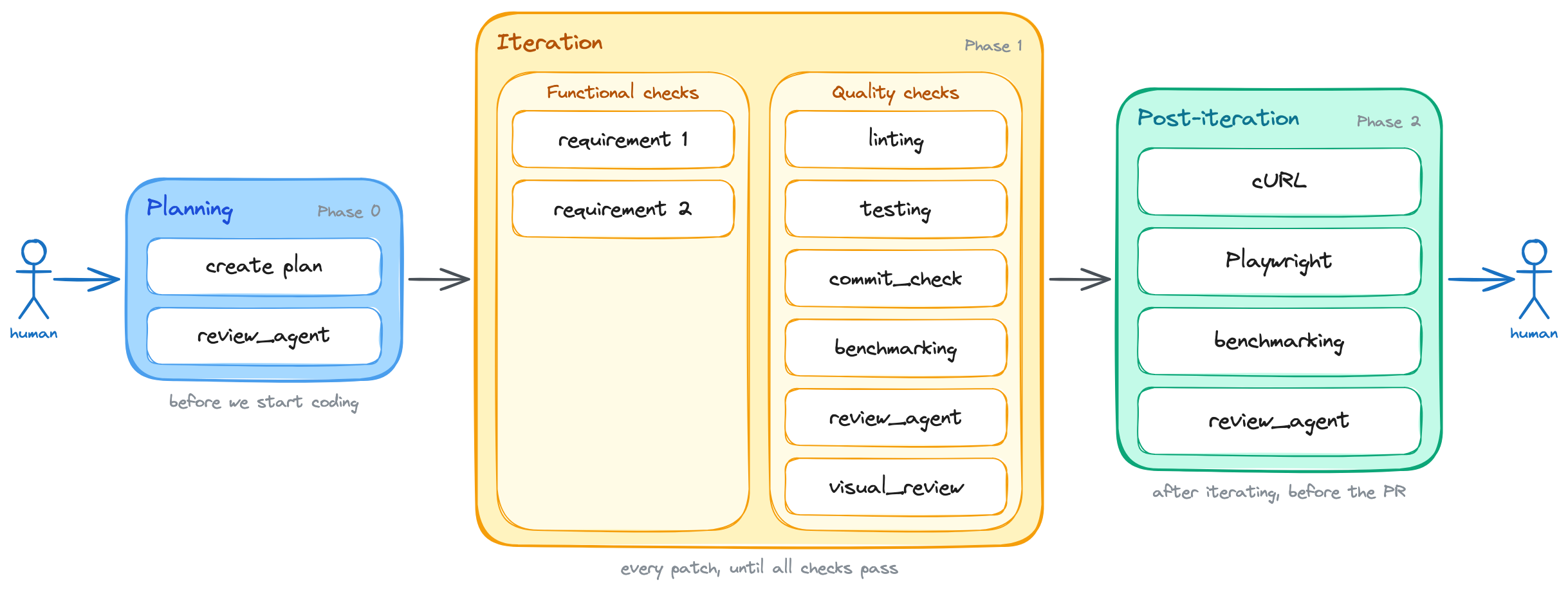
Visual design reviews join the iteration loop, mainly for front-end work.
7. Pull-request monitoring
Monitoring pull requests was probably the second most effective form of backpressure that I added to the loop, right after review agents.
I added this mechanism after noticing that issues still slipped through even with the review agent in place. They were usually conflicts, failing CI checks, or comments from another reviewer agent on the PR.
I built this mechanism by creating a skill that monitors the PR for a certain amount of time after it's opened. During that time, the skill checks for any new comments, CI status changes, or merge conflicts. If it detects any of those issues, it sends a notification to the model and instructs it to address the issue before considering the task done.
/goal implement support for <brief feature description>. Here are the feature's acceptance criteria: 1. <first criterion: i.e. the button X must be disabled while the form is submitting> 2. <second criterion: i.e. the front-end must show an error message if the API returns a 400> 3. <third criterion: i.e. redirect the user to the dashboard after a successful submission> Before writing any code, produce a lightweight plan that focuses on the overall approach and architecture, _not_ on implementation details. Then, use the `review_agent` skill to review the plan and confirm the fundamental approach is sound. Keep iterating on the plan until the reviewer approves it, and only then move on to the implementation. The task is not done until all of the above acceptance criteria are satisfied. Additionally, the following quality criteria must also be met: 1. The linting is passing 2. Tests are all green 3. The new behavior is covered by tests 4. The commit_check.sh script is passing 5. Run the benchmarks using the `run_benchmarks` skill. See the acceptance criteria inside it. 6. Run the `visual_review` skill to review the actual screenshots of the new feature against the design specifications 7. Use the `review_agent` skill to review the code Run these quality checks in _each_ iteration. Do NOT wait until the end to run them. You should run them after writing each patch, and you should not write a new patch until all checks are passing. After you're done iterating: 1. Use the `run_local_dependencies`, `run_backend`, and `run_frontend` skills to run the application locally and test the new behavior manually. You can use `cURL` commands to test the API endpoints and the Playwright MCP to test the front-end on a real browser. You should run these manual checks at least once before considering the task done, but you can run them more than once if you think it's necessary to catch issues that automated tests might have missed. 2. Use the `run_benchmarks` skill to run the full benchmarking suite. See the acceptance criteria inside it. 3. Run the `review_agent` skill one last time, but now tell it to review the changeset as a whole. +If all the above have been done, approved, and there is nothing else left to do:+ +1. Open the PR with the changes.+2. Use the `monitor_pr` skill to monitor the PR for any new comments, CI status changes, or merge conflicts for the next 24 hours. If any of those issues are detected, address them before considering the task done.+ If any of the above criteria are not met, you must inspect the failure, fix the issue, and run the check again. Do not stop after writing the patch. Stop only after the acceptance criteria are satisfied, or after you can explain exactly what is blocking you.The final backpressure loop looked like this:
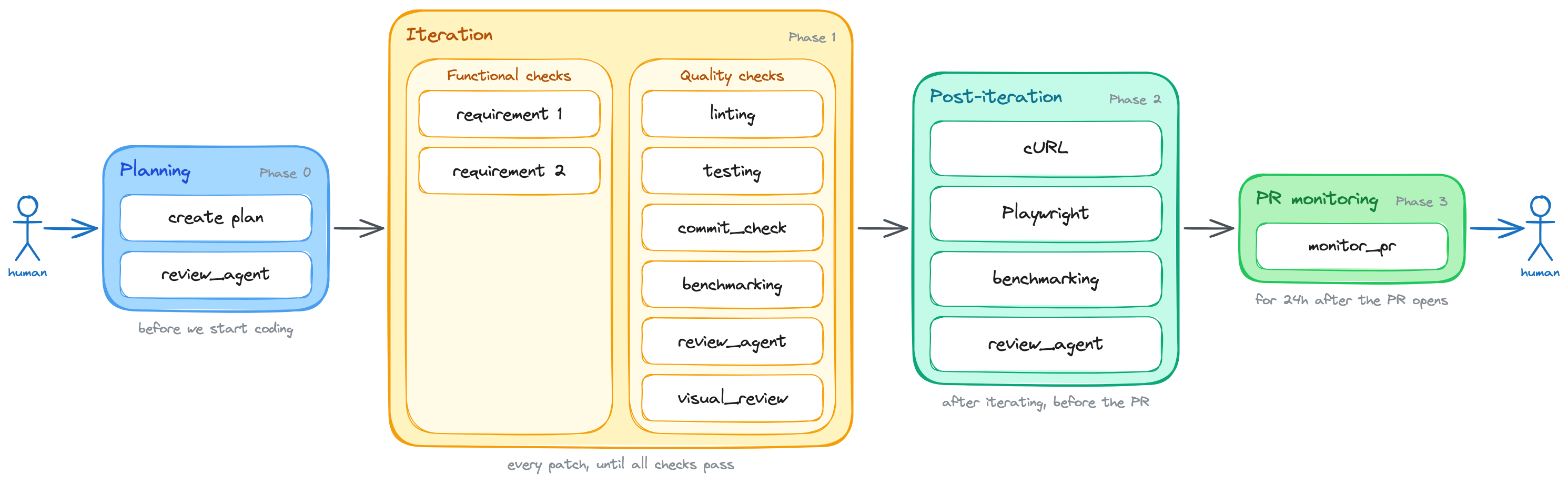
The full backpressure loop: from a goal all the way to a PR that lands clean, with checks gating every phase.
How to try this backpressure loop yourself
I have packaged this backpressure loop into a skill and made it available at @lucasfcosta/backpressured. The source is publicly available on GitHub.
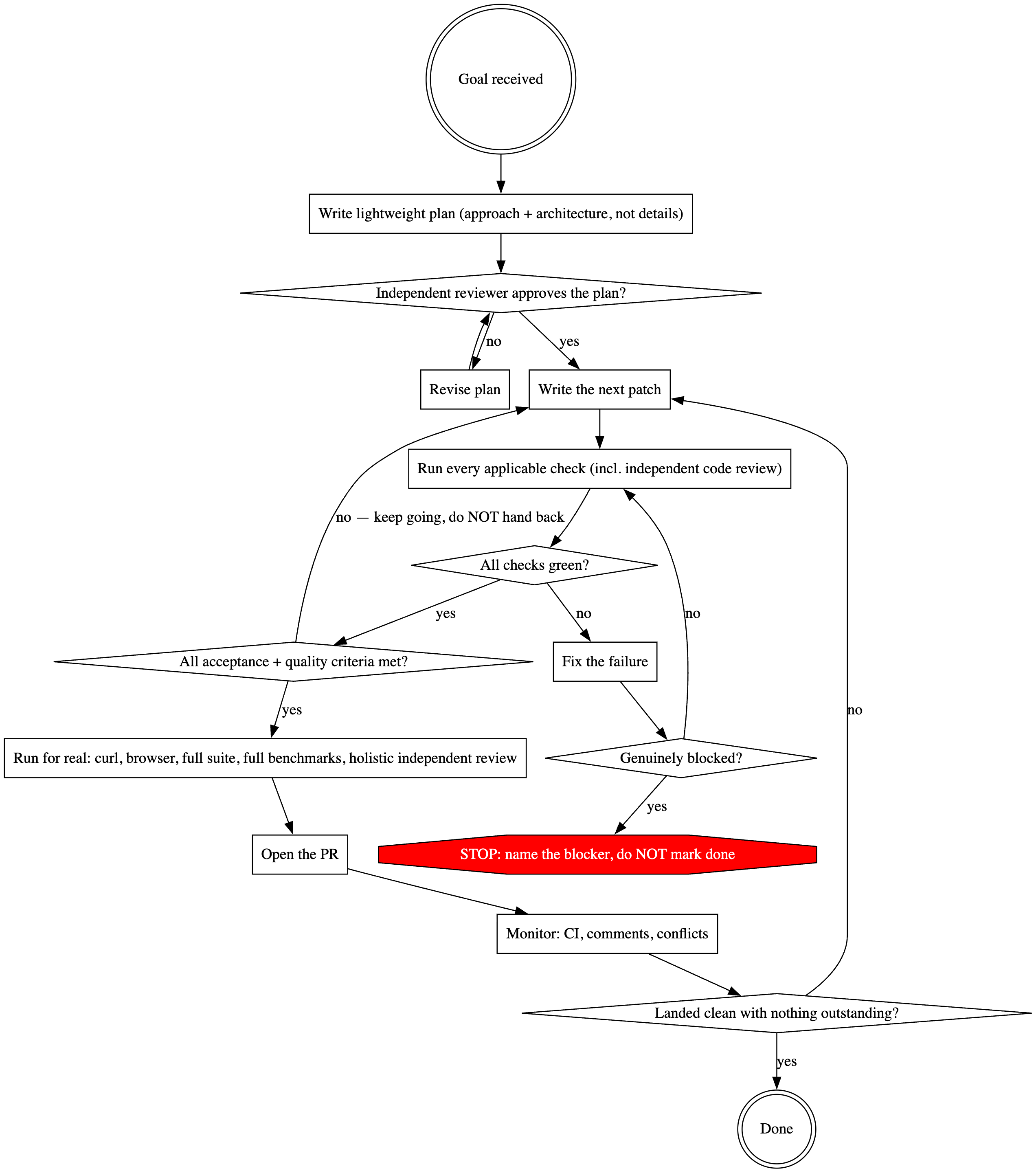
The flow the skill runs: from a goal all the way to a PR that lands clean, with backpressure gates at each step.
You can install this skill in your terminal using npx @lucasfcosta/backpressured.
After installing it, run /backpressured <goal description> in Claude to start the loop — or just ask Claude to use the backpressured skill. The skill only runs when you invoke it explicitly; it won't auto-trigger on other prompts.
Then, the skill will iterate towards the goal on its own while running the backpressure checks described in this post. You can also customize the checks and the iteration process by adding a BACKPRESSURE.md file to your project.
What's next?
I'm not yet sure a SKILL.md is the correct way to package a workflow like this. I wish there were an easier way of enforcing this workflow more natively in the model, without having to rely on a skill that can be ignored or bypassed.
I also want to experiment with breaking down the review agent into multiple agents, each with a specific focus, like readability, complexity, testing, types, and so on. That way, I can have more targeted feedback and make it easier for the model to understand and address specific issues.
Anyway, regardless of how we implement backpressure or package it, I'm pretty sure this is the direction software engineering is headed. We've spent decades moving the "no" off humans. Now we have to do it again, for code that writes itself.
My maxim: any system that relies on a human to catch the machine's mistakes will be limited by the human, not the machine.