

惯性聚合 高效追踪和阅读你感兴趣的博客、新闻、科技资讯
阅读原文 在惯性聚合中打开

推荐订阅源

Y
Y Combinator Blog
MyScale Blog
MyScale Blog
Recent Announcements
酷 壳 – CoolShell
酷 壳 – CoolShell
GbyAI
GbyAI
freeCodeCamp Programming Tutorials: Python, JavaScript, Git & More
Cyber Security Advisories - MS-ISAC
N
Netflix TechBlog - Medium
V
V2EX
MongoDB | Blog
MongoDB | Blog
Microsoft Security Blog
博客园 - 三生石上(FineUI控件)
Stack Overflow Blog
Stack Overflow Blog
U
Unit 42
B
Blog
Microsoft Azure Blog
博客园_首页
H
Help Net Security
D
DataBreaches.Net
OSCHINA 社区最新新闻
OSCHINA 社区最新新闻
阮一峰的网络日志
阮一峰的网络日志
T
The Blog of Author Tim Ferriss
C
Check Point Blog
奇客Solidot–传递最新科技情报
奇客Solidot–传递最新科技情报

Dvel's Blog

Rime 全拼双拼混输 Rime 配置:雾凇拼音 Hammerspoon 自动切换输入法 修复 Hugo 本地图片的累计布局偏移(CLS)问题 macOS 利用 Karabiner 修改 Emacs 键位为 Vim 键位 macOS 修改 Emacs 键位为 Vim 键位 Surge 配置 汉字的混乱 Netflix 中英双语字幕的好办法 优化 Rime 英文输入体验 判断字符是否为简体字或繁体字 Cloudflare 转入域名提示「出现了问题。请重试转移此域。尚未向您收费。」 图片压缩:Squoosh、TinyPNG、ImageOptim、WebP macOS grep + sed 批量替换多个文件的内容 在 macOS 根目录创建文件夹 博客图床小妙招 折腾 Hugo & PaperMod 主题 利用 Cloudflare Workers 进行批量 301 重定向 将博客部署在 Cloudflare Pages Alfred File Navigation(文件导航器)详解 在 Hugo Goldmark Markdown 中设置以新标签打开链接 日期与时间(UTC、GMT、时间戳、时区) 让 Alfred 以新标签的方式打开 Finder 用 git filter-branch 给 Git 仓库瘦身 qBittorrent 设置教程 联通光猫破解+桥接记录 配置 Mac 终端走代理 Steam for Mac 中文游戏推荐 我的 Mac 软件/工具列表 《Flask Web 开发》笔记
CHD 油猴脚本:每日签到自动答题
Dvel · 2023-03-16 · via Dvel's Blog

用 ChatGPT 写一些小脚本真是太方便了。

GPT-4 发布后试了试,还是蛮不错的,代码是 ChatGPT 生成的。

几个来回就可以编写一个能正常使用的油猴脚本:

(略,HTML 代码)
在 https://chdbits.co/bakatest.php 有如上内容。
我要为这个网页编写一个油猴脚本。
通过自动获取 ChatGPT 的 API 来解析此问题的答案,供用户参考。

将内容输出到 `#outer > h1` 的下面,同时输出你提取到的问题内容和答案,以便我看看你是否提取正确。

获取错啦。
问题的获取路径是 `#outer > form > table > tbody > tr:nth-child(1) > td`
选项的获取路径是 `#outer > form > table > tbody > tr:nth-child(2) > td`

使用这个 API:
```
curl https://api.openai.com/v1/chat/completions \
  -H 'Content-Type: application/json' \
  -H 'Authorization: Bearer YOUR_API_KEY' \
  -d '{
  "model": "gpt-3.5-turbo",
  "messages": [{"role": "user", "content": "Say this is a test!"}],
  "temperature": 0.7
}'
```
响应格式为:
```
{
   "id":"chatcmpl-abc123",
   "object":"chat.completion",
   "created":1677858242,
   "model":"gpt-3.5-turbo-0301",
   "usage":{
      "prompt_tokens":13,
      "completion_tokens":7,
      "total_tokens":20
   },
   "choices":[
      {
         "message":{
            "role":"assistant",
            "content":"\n\nThis is a test!"
         },
         "finish_reason":"stop",
         "index":0
      }
   ]
}
```

它没有最近的互联网数据,所以还是需要把 API 的使用方式发给它。

然后它就帮我写好了,我不用复习 JavaScript,不用看油猴脚本的教程和文档,也不用查 @grant 等等标记是干嘛的。

可以再继续要求它改进一些,比如换个输出位置,优化 prompt,自动选中正确回答,支持单选题和多选题等等。

效果展示:
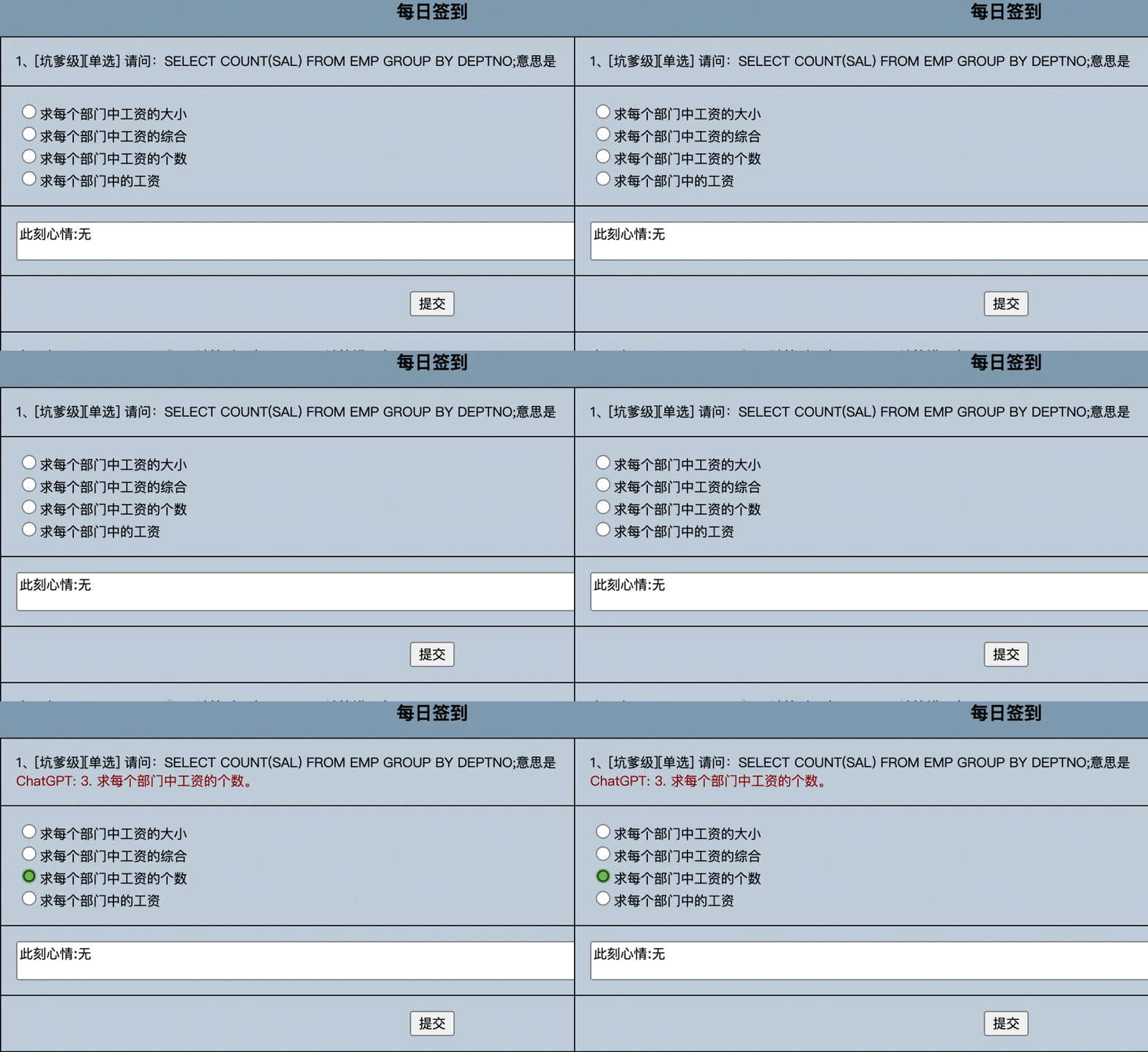
CHD 自动答题

安装: https://greasyfork.org/zh-CN/scripts/461944-chd-quiz-answer