





基于 git 管理的项目,通常在分支管理之外,还会通过 tag 来对代码进行管理,尤其像 go 语言,go mod 更是依赖 tag 来对项目的版本进行管理,因此合理的版本管理,对于项目的发展也会是更加健康的一个激励。GitHub 中有一个 Releases 的概念,其实与 tag 差不多,简单理解就是在打一个 tag 的基础之上,用 releases 来进行管理。如果你没有了解过这里边的概念,那么要想成功打一个 release 还是有点难度的。
本文就来讲一下,如何借助 Github Actions 自动且优雅地为项目构建 Release。
所用 Actions: release-drafter (opens new window)
使用配置其实非常简单,基本上阅读完官方介绍文档就可以上手使用了,这里说一两个需要注意的地方。
首先添加 Actions 配置文件,e.g. .github/workflows/release.yml:
name: Release Drafter

on:
  push:
    branches:
      - main
  pull_request:
    types: [opened, reopened, synchronize]

permissions:
  contents: read

jobs:
  update_release_draft:
    permissions:
      contents: write # for release-drafter/release-drafter to create a github release
      pull-requests: write # for release-drafter/release-drafter to add label to PR
    runs-on: ubuntu-latest
    steps:
      - uses: release-drafter/release-drafter@v5
        env:
          GITHUB_TOKEN: ${{ secrets.ACCESS_TOKEN }}
1
2
3
4
5
6
7
8
9
10
11
12
13
14
15
16
17
18
19
20
21
22
配置文件中用到了 GITHUB_TOKEN,我的这篇文章有详细介绍如何生成以及配置,可直接参考: https://wiki.eryajf.net/pages/47a507/ (opens new window)
然后添加自动生成的变更日志模板,e.g: .github/release-drafter.yml
# Configuration for Release Drafter: https://github.com/toolmantim/release-drafter
name-template: 'v$NEXT_PATCH_VERSION 🌈'
tag-template: 'v$NEXT_PATCH_VERSION'
version-template: $MAJOR.$MINOR.$PATCH
# Emoji reference: https://gitmoji.carloscuesta.me/
categories:
  - title: '🚀 Features'
    labels:
      - 'feature'
      - 'enhancement'
      - 'kind/feature'
  - title: '🐛 Bug Fixes'
    labels:
      - 'fix'
      - 'bugfix'
      - 'bug'
      - 'regression'
      - 'kind/bug'
  - title: 📝 Documentation updates
    labels:
      - documentation
      - 'kind/doc'
  - title: 👻 Maintenance
    labels:
      - chore
      - dependencies
      - 'kind/chore'
      - 'kind/dep'
  - title: 🚦 Tests
    labels:
      - test
      - tests
exclude-labels:
  - reverted
  - no-changelog
  - skip-changelog
  - invalid
change-template: '* $TITLE (#$NUMBER) @$AUTHOR'
template: |
  ## What’s Changed
  $CHANGES
Terms
Privacy
Security
1
2
3
4
5
6
7
8
9
10
11
12
13
14
15
16
17
18
19
20
21
22
23
24
25
26
27
28
29
30
31
32
33
34
35
36
37
38
39
40
41
42
43
44
模板的含义是当提交的 PR 符合其中的 labels 时,对应提交的标题会作为当次提交的说明信息,生成在 release 的草稿中。
有了这些内容,在每次 push 或者 pr 的时候,Actions 都会自动将当次的内容写入到 release 的草稿中,下次再有 pr 则内容将会是追加,并不会覆盖一开始的草稿。
还有一个注意点就是,通常普通协作者在提交 pr 的时候,大概都很少会有主动给 pr 添加 labels 的,每次还需要项目负责人自己添加,会比较麻烦,而这个功能又是依赖 pr 的 labels 的,因此可以再加一个配置,.github/pull-request-template.md
<!-- 请务必在创建PR前,在右侧 Labels 选项中加上label的其中一个: [feature]、[fix]、[documentation] 。以便于Actions自动生成Releases时自动对PR进行归类。-->

**在提出此拉取请求时,我确认了以下几点(请复选框):**

- [ ] 我已阅读并理解[贡献者指南]()。
- [ ] 我已检查没有与此请求重复的拉取请求。
- [ ] 我已经考虑过,并确认这份呈件对其他人很有价值。
- [ ] 我接受此提交可能不会被使用,并根据维护人员的意愿关闭拉取请求。

**填写 PR 内容:**

-
1
2
3
4
5
6
7
8
9
10
11
12
这样协作者提交 pr 的时候就会主动提示协作者尽量给当次 pr 添加一个或多个合适的 labels。
最后来看下生成的 release drafter:
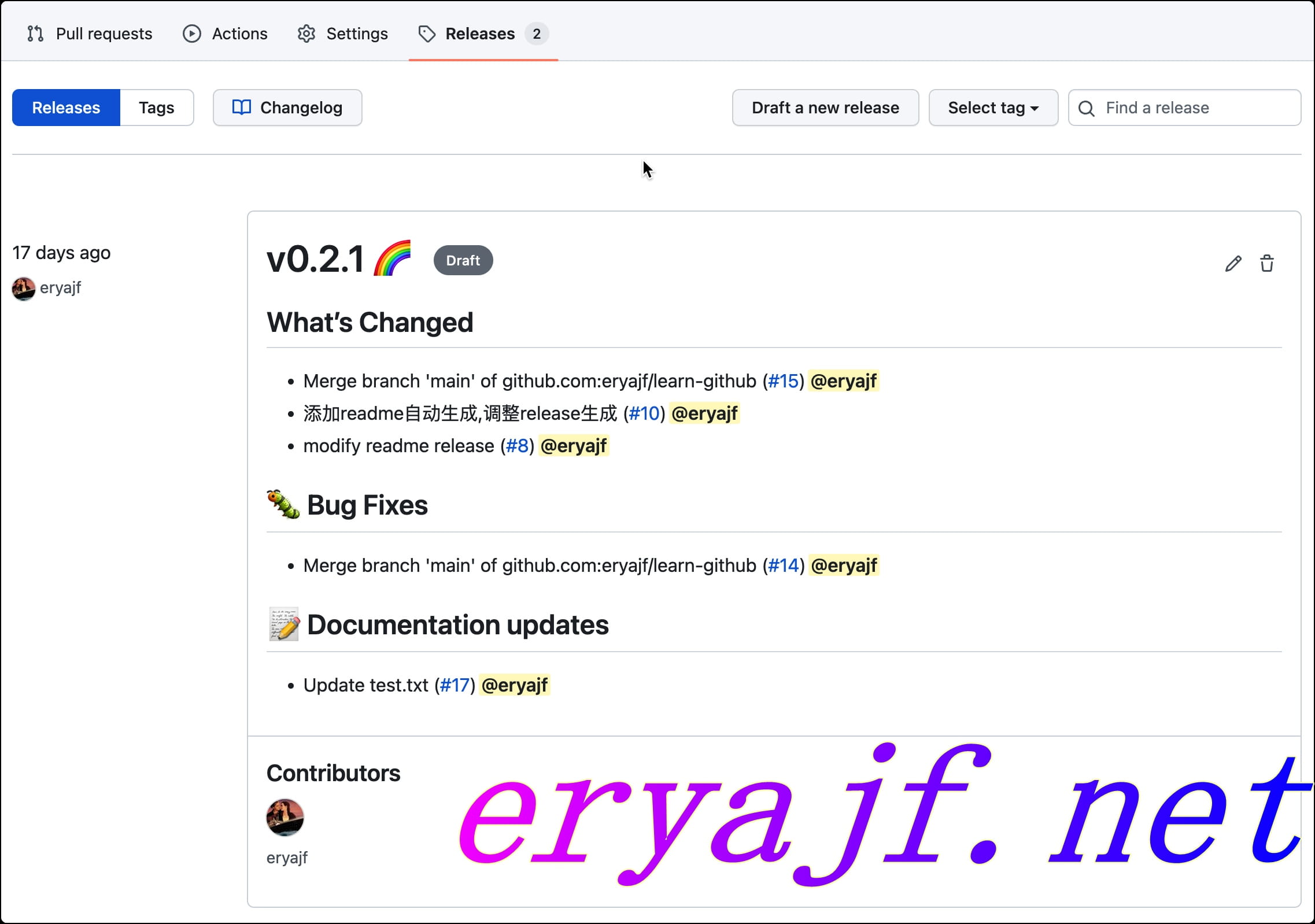
当你觉得可以发布一个新的版本的时候,就可以点击小铅笔按钮,对内容二次审查之后,点击发布:
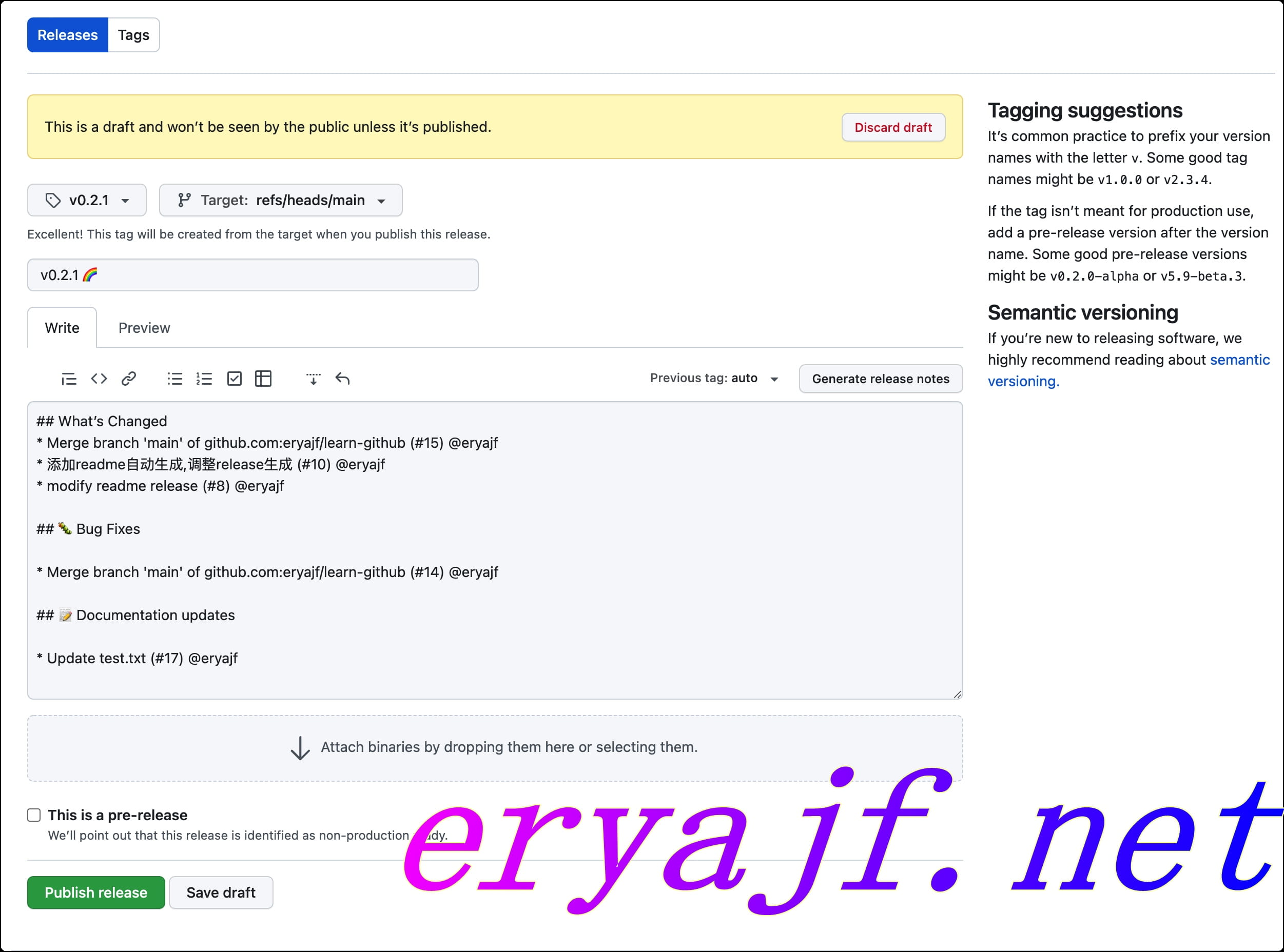
以上就是借助 GitHub Actions 的能力,自动给项目构建 releases 的全部内容。
此内容由惯性聚合(RSS阅读器)自动聚合整理,仅供阅读参考。 原文来自 — 版权归原作者所有。