这个方法并不是自己发现的,只是在探索过程中发现这么一个方案,记录一下。
故事
最早接触的Windows下键盘映射方案应该是Capslock+, 很多人吹上天,尝试了一下,一开始不习惯,后来发现Capslock+字母的方案实现光标移动用法真的很方便,尤其是在连续输入文字的时候使用Capslock+w来代替Backspace不要太爽。
但是Capslock+的功能有点多,而我只想要键盘映射方案而已,而且不知道哪个功能一定要用管理员运行,在准备将代码抽取出来单独使用的时候发现了这个基于AutoHotKey的xlr-space方案。
基于Autohotkey,简单、可定制化,虽然我没找到xlr-space方案的源头在哪里,但是还是感谢最初的设计者以及后来优化的同志们。
xlr-space方案与Clapslock+的方案类似,只是修饰键换成了space键,这下不用委屈左手小母指了。
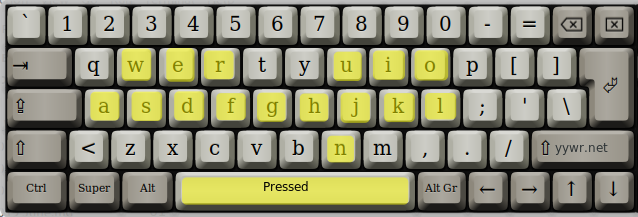
我目前使用的方案如下,不是很多,太多记不得,也就用不上,没有必要,当在写邮件等大段文字内容的时候,双手不用离开键盘的文字输入区域即可实现光标的移动、选择、字符的前、后删除,这些功能够用了。
方案图示
简单来说就是按下 空格+字母 的时候执行指定的一个快捷键,比如按下空格+W = Backspace,空格+j = Shift+向左键,这些配置都经由AutoHotKey解释后在系统层面执行,只有想不到,没有做不到
配置文件
我使用的配置文件如下,如果需要自定义,官方文档是最好的老师,简单浏览一下的基本用法和语法即可写出自己的方案。 简单说一下,^表示Ctrl,#表示WIN键,!表示Alt,具体参考AutoHotKey 热键
;  ***  space
space::Send {space}

^space::Send ^{space}
#space::Send #{space}
^#space::Send ^#{space}
!space::Send {Alt down}{space}
^!space::Send ^!{space}


;  *** space + Num
space & 1::Send {space}
space & 2::Send {space}{space}
space & 3::Send {space}{space}{space}
space & 4::Send {space}{space}{space}{space}
space & 5::Send {space}{space}{space}{space}{space}
space & 6::Send {space}{space}{space}{space}{space}{space}
space & 7::Send {space}{space}{space}{space}{space}{space}{space}
space & 8::Send {space}{space}{space}{space}{space}{space}{space}{space}
space & 9::Send {space}{space}{space}{space}{space}{space}{space}{space}{space}

;  *** space + XX
#if GetKeyState("space", "P") or GetKeyState("Capslock", "P")
i:: Send +{up}
j:: Send +{left}
k:: Send +{down}
l:: Send +{right}
h:: Send ^+{left}
n:: Send ^+{right}
u:: Send +{home}
o:: Send +{end}

p:: Send {home}
`;:: Send {end}
y:: Send {Pgup}
b:: Send {Pgdn}
enter:: Send {end} {enter}


e:: Send {up}
s:: Send {left}
d:: Send {down}
f:: Send {right}
a:: Send ^{left}
g:: Send ^{right}
w:: Send {backspace}
r:: Send {Delete}

c:: Send ^c
x:: Send ^x
v:: Send ^v
z:: Send ^z

return
配置使用方法
使用方法很简单,AutoHotKey主程序+脚本文件+开机启动即可
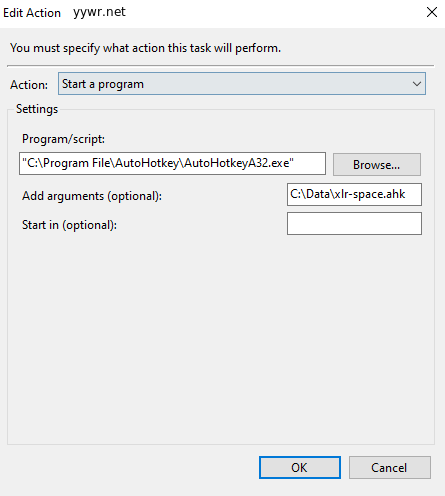
- 下载安装好AutoHotkey,并获得主程序的路径,比如:C:\Program File\Autohotkey\AutoHotKeyA32.exe
- 下载或自己编写好脚本文件找个地方放好,获得完整的路径,比如:C:\Data\xlr-space.ahk
- 在任务计划中创建一个开机运行的任务,让脚本开机自动启动,运行Task Scheduler ,按下面配置即可,注意路径都要添加引号