惯性聚合 高效追踪和阅读你感兴趣的博客、新闻、科技资讯
阅读原文 在惯性聚合中打开

推荐订阅源

Vercel News
Vercel News
OSCHINA 社区最新新闻
OSCHINA 社区最新新闻
S
SegmentFault 最新的问题
让小产品的独立变现更简单 - ezindie.com
博客园 - Franky
有赞技术团队
有赞技术团队
Last Week in AI
Last Week in AI
Martin Fowler
Martin Fowler
MyScale Blog
MyScale Blog
aimingoo的专栏
aimingoo的专栏
Recent Announcements
雷峰网
雷峰网
T
Tor Project blog
博客园_首页
D
Darknet – Hacking Tools, Hacker News & Cyber Security
The Register - Security
T
The Blog of Author Tim Ferriss
Recorded Future
Recorded Future
V
Vulnerabilities – Threatpost
Project Zero
Project Zero
J
Java Code Geeks
AWS News Blog
AWS News Blog
Security Latest
Security Latest
Spread Privacy
Spread Privacy
T
Threatpost
博客园 - 三生石上(FineUI控件)
I
Intezer
G
Google Developers Blog
Scott Helme
Scott Helme
CTFtime.org: upcoming CTF events
The Hacker News
The Hacker News
博客园 - 【当耐特】
Apple Machine Learning Research
NISL@THU
NISL@THU
A
Arctic Wolf
F
Full Disclosure
P
Proofpoint News Feed
G
GRAHAM CLULEY
cs.CL updates on arXiv.org
Cyber Security Advisories - MS-ISAC
Microsoft Azure Blog
P
Proofpoint News Feed
N
Netflix TechBlog - Medium
C
Cybersecurity and Infrastructure Security Agency CISA
T
Threat Research - Cisco Blogs
B
Blog
IT之家
IT之家
MongoDB | Blog
MongoDB | Blog
L
LangChain Blog
Know Your Adversary
Know Your Adversary

私有云 – Ed_'s Blog

私有音乐服务 Navidrome:部署与Nginx 二级目录反代访问 – yywr's Blog 简单的私有云数据访问工具 – FileBrowser 部署记要 – yywr's Blog
UPower – 将笔记本电池当成UPS使用 – yywr's Blog
yywr · 2024-10-26 · via 私有云 – Ed_'s Blog

Skip to content

由于我使用老旧笔记本作为私有云使用,除了之前提到的「合盖子不休眠」的设置外,电池的设置也是一项很有用的设定,谁也不知道哪次的突然断电会不会带来意想到不到的结果,所以 UPower 安排起来

UPower 的功能描述太抽象,就不抄了,自己官网看(https://upower.freedesktop.org)

准备

  • 安装: apt install upower
  • 开机启动:systemctl enable upower

配置

打开配置文件并编辑,文件在:/etc/UPower/UPower.conf (注意大小写)

找到下面几个参数进行设置

  • 前三项分别是「低电量,临界值,动作执行」时的电量百分比
  • 最后一项是动作执行,可选关机、休眠、混合睡眠(PowerOff / Hibernate / HybridSleep)
PrecentageLow=40
PercentageCritical=30
PercentageAction=20
CriticalPowerAction=HybridSleep

保存配置文件后,重启服务 systemctl restart upower

其它补充

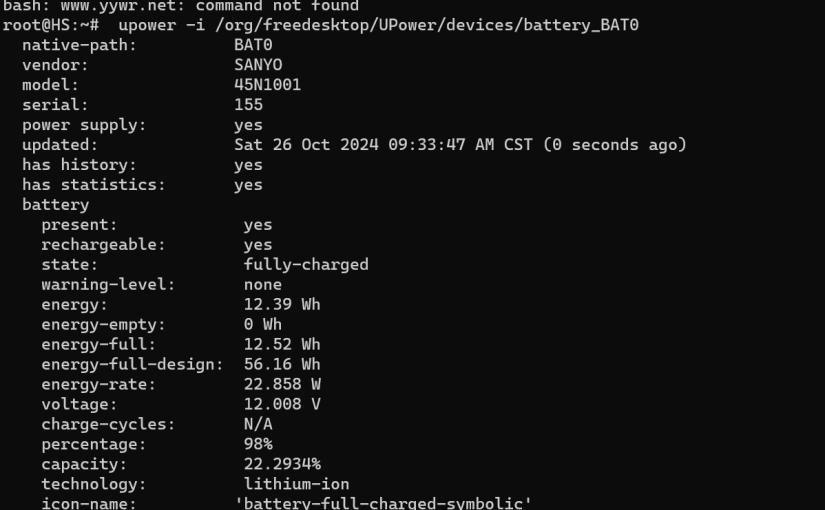
为什么我的值设置的这么高,因为我的电池不行了,56Wh 的出厂设计容量,现在只有 12.5Wh,随时断电

可以通过下面方式查看电池信息

  • 查看电池名称: upower -e 
  • 查看具体的电池信息: upower -i 上一条命令查到的电池名称
  • 更多使用方法:upower -h

以上

本文是 居家服务器折腾笔记 的一部分