
惯性聚合 高效追踪和阅读你感兴趣的博客、新闻、科技资讯
阅读原文 在惯性聚合中打开

推荐订阅源

Recent Announcements
H
Hackread – Cybersecurity News, Data Breaches, AI and More
Cyber Security Advisories - MS-ISAC
B
Blog
T
The Blog of Author Tim Ferriss
J
Java Code Geeks
腾讯CDC
D
Docker
G
Google Developers Blog
D
DataBreaches.Net
雷峰网
雷峰网
Blog — PlanetScale
Blog — PlanetScale
S
SegmentFault 最新的问题
The Cloudflare Blog
有赞技术团队
有赞技术团队
OSCHINA 社区最新新闻
OSCHINA 社区最新新闻
Stack Overflow Blog
Stack Overflow Blog
大猫的无限游戏
大猫的无限游戏
量子位
美团技术团队
aimingoo的专栏
aimingoo的专栏
奇客Solidot–传递最新科技情报
奇客Solidot–传递最新科技情报
Engineering at Meta
Engineering at Meta
freeCodeCamp Programming Tutorials: Python, JavaScript, Git & More

Replicate's blog

How to make remarkable videos with Seedance 2.0 – Replicate blog How to prompt Seedream 5.0 – Replicate blog Recraft V4: image generation with design taste – Replicate blog Run Isaac 0.1 on Replicate – Replicate blog Run FLUX.2 on Replicate – Replicate blog How to prompt Nano Banana Pro – Replicate blog Retro Diffusion's pixel art models are now on Replicate – Replicate blog Replicate is joining Cloudflare – Replicate blog Extract text from documents and images with Datalab Marker and OCR – Replicate blog How to prompt Veo 3.1 – Replicate blog IBM's Granite 4.0 is now on Replicate – Replicate blog Which image editing model should I use? – Replicate blog Introducing our new search API – Replicate blog Torch compile caching for inference speed – Replicate blog Announcing Replicate's remote MCP server – Replicate blog How to prompt Veo 3 with images – Replicate blog Open source video is back – Replicate blog Generate consistent characters – Replicate blog Bria is now on Replicate – Replicate blog How we optimized FLUX.1 Kontext [dev] – Replicate blog Compare AI video models – Replicate blog The FLUX.1 Kontext hackathon – Replicate blog How to prompt Veo 3 for the best results – Replicate blog Get the most from Google Veo 3 – Replicate blog FLUX.1 Kontext from the community – Replicate blog Use FLUX.1 Kontext to edit images with words – Replicate blog Generate incredible images with Google's Imagen 4 – Replicate blog Run OpenAI’s latest models on Replicate – Replicate blog NVIDIA H100 GPUs are here – Replicate blog Run 30,000+ LoRAs on Hugging Face with Replicate – Replicate blog
Run Meta Llama 3 with an API – Replicate blog
2024-04-18 · via Replicate's blog

Llama 3 is the latest language model from Meta. It has state of the art performance and a context window of 8000 tokens, double Llama 2’s context window.

With Replicate, you can run Llama 3 in the cloud with one line of code.


Try Llama 3 in our API playground

Before you dive in, try Llama 3 in our API playground.

Try tweaking the prompt and see how Llama 3 responds. Most models on Replicate have an interactive API playground like this, available on the model page: https://replicate.com/meta/meta-llama-3-70b-instruct

The API playground is a great way to get a feel for what a model can do, and provides copyable code snippets in a variety of languages to help you get started.

Running Llama 3 with JavaScript

You can run Llama 3 with our official JavaScript client:

Install Replicate’s Node.js client library

Set the REPLICATE_API_TOKEN environment variable

(You can generate an API token in your account. Keep it to yourself.)

Import and set up the client

Run meta/meta-llama-3-70b-instruct using Replicate’s API. Check out the model’s schema for an overview of inputs and outputs.

To learn more, take a look at the guide on getting started with Node.js.

Running Llama 3 with Python

You can run Llama 3 with our official Python client:

Install Replicate’s Python client library

Set the REPLICATE_API_TOKEN environment variable

(You can generate an API token in your account. Keep it to yourself.)

Import the client

Run meta/meta-llama-3-70b-instruct using Replicate’s API. Check out the model’s schema for an overview of inputs and outputs.

To learn more, take a look at the guide on getting started with Python.

Running Llama 3 with cURL

Your can call the HTTP API directly with tools like cURL:

Set the REPLICATE_API_TOKEN environment variable

(You can generate an API token in your account. Keep it to yourself.)

Run meta/meta-llama-3-70b-instruct using Replicate’s API. Check out the model’s schema for an overview of inputs and outputs.

To learn more, take a look at Replicate’s HTTP API reference docs.

You can also run Llama using other Replicate client libraries for Go, Swift, and others.

Choosing which model to use

There are four variant Llama 3 models on Replicate, each with their own strengths. Llama 3 comes in two parameter sizes: 70 billion and 8 billion, with both base and chat tuned models.

  • meta/meta-llama-3-70b-instruct: 70 billion parameter model fine-tuned on chat completions. If you want to build a chat bot with the best accuracy, this is the one to use.
  • meta/meta-llama-3-8b-instruct: 8 billion parameter model fine-tuned on chat completions. Use this if you’re building a chat bot and would prefer it to be faster and cheaper at the expense of accuracy.
  • meta/meta-llama-3-70b: 70 billion parameter base model. This is the 70 billion parameter model before the instruction tuning on chat completions.
  • meta/meta-llama-3-8b: 8 billion parameter base model. This is the 8 billion parameter model before the instruction tuning on chat completions.

Example chat app

If you want a place to start, we’ve built a demo chat app in Next.js that can be deployed on Vercel:
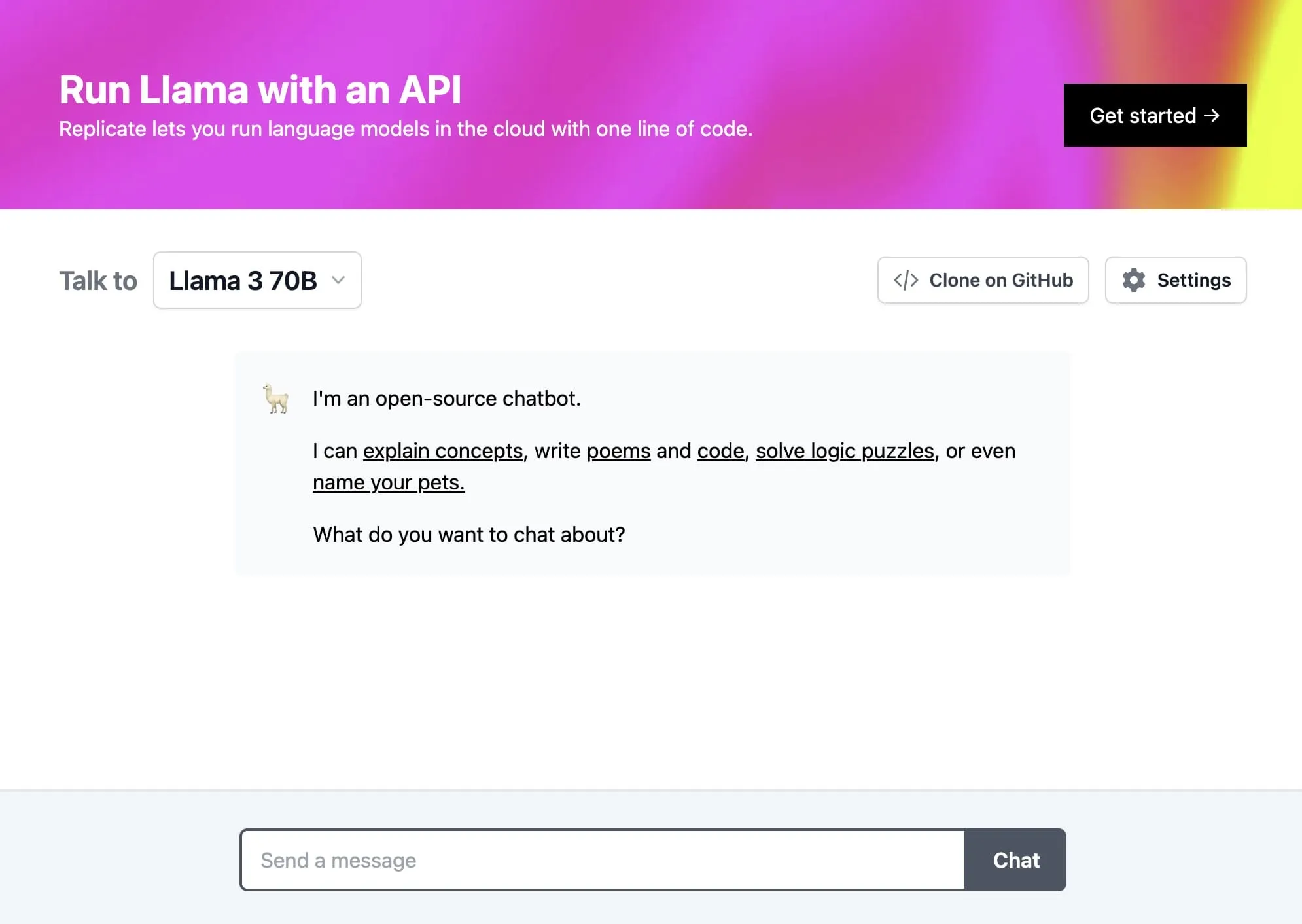
Llama chat

Try it out on llama3.replicate.dev. Take a look at the GitHub README to learn how to customize and deploy it.

Keep up to speed

Happy hacking! 🦙