


不置可否,Hugo的template同样是使用golang的标准库html/template。为了能实现一个属于自己独特的Hugo theme,或是修改他人的主题,都得对其模板语法有所知晓,方能改的称心如意,亦或是制作出一套即简约,又不失典雅的Hugo theme。
创建golang项目
很明显的事,我们首先得先创建个golang项目,才能去讲解golang中的html/template,关于这一点,毋庸置疑。毕竟现在玩的是golang,说的是golang标准库html/template。
好了,闲话少叙,切入正题。关于golang怎么创建项目,您应该是比较清楚的吧!否则的话,您是不会浏览这篇文章的,当然咯,也不能这样说的哦!或许他只是想了解下golang的模板语法,以便能够开发Hugo theme,这倒也是。
关于该如何配置golang的module相关属性,可以查看以往的文章,本文将不再赘述,而是着重讲解html/template语法。
您在您电脑任意空文件下,在cmd(也就是命令行)中键入如下命令即可创建项目。
go mod init template.qiucode.cn #其中 template.qiucode.cn 是您项目模块名称,您可以起个响亮的名字,以便符合您的气质!(纯属笑谈)

在当前目录下新建main.go文件,并键入如下代码:
package main

import (
"log"
"net/http"
)

func main() {

	mux := http.NewServeMux()
	mux.HandleFunc("/", home)
	mux.HandleFunc("/blog/view", snippetView)
	mux.HandleFunc("/blog/create", snippetCreate)
	log.Print("Starting server on :4000")
	err := http.ListenAndServe(":4000", mux)
	log.Fatal(err)

}

我们将原先请求处理方法堆积在main.go文件中,抽离到新文件中。继而需新建handlers.go文件,至于内容便是如下:
package main

import (
	"fmt"
	"net/http"
	"strconv"
)

func home(w http.ResponseWriter, r *http.Request) {
	if r.URL.Path != "/" {
		http.NotFound(w, r)
		return
	}
	w.Write([]byte("Hello from Snippetbox"))
}

func snippetView(w http.ResponseWriter, r *http.Request) {
	id, err := strconv.Atoi(r.URL.Query().Get("id"))
		if err != nil || id < 1 {
		http.NotFound(w, r)
		return
	}

	fmt.Fprintf(w, "Display a specific snippet with ID %d...", id)
}

func snippetCreate(w http.ResponseWriter, r *http.Request) {
	if r.Method != http.MethodPost {
		w.Header().Set("Allow", http.MethodPost)
		http.Error(w, "Method Not Allowed", http.StatusMethodNotAllowed)
		return
	}
	w.Write([]byte("Create a new snippet..."))
}

模板组成
在当前文件夹创建home.tmpl模板文件,文件路径如下。

<!doctype html>
<html lang='zh'>
    <head>
        <meta charset='utf-8'>
        <title>首页</title>
    </head>
    <body>
        <header>
            <h1><a href='/'>这是头部</a></h1>
        </header>
        <main>
            <h2>主体部分s</h2>
            <p>写点什么吧!</p>
        </main>
        <footer>Powered by <a href='https://golang.org/'>Go</a></footer>
    </body>
</html>
回到handlers.go文件,修改其home处理函数。
package main

import (
	"fmt"
	"html/template" // 新添加
    "log"           // 新添加
	"net/http"
	"strconv"
)

func home(w http.ResponseWriter, r *http.Request) {

	if r.URL.Path != "/" {
		http.NotFound(w, r)
		return
	}

	//解析模板文件
	ts, err := template.ParseFiles("./ui/html/pages/home.tmpl")
	if err != nil {
		log.Print(err.Error())
		http.Error(w, "Internal Server Error", 500)
		return
	}

	err = ts.Execute(w, nil)
	if err != nil {
		log.Print(err.Error())
		http.Error(w, "Internal Server Error", 500)
	}
}

//... 省略其他方法
诚然,文件夹也会有更多的*.tmpl文件,该如何将头部、侧边栏、底部等公共内容共享给其他页面呢?为了剔除冗余内容,便是所有模板文件都将包含base.tmpl文件。

{{define "base"}}
<!doctype html>
<html lang='zh'>
    <head>
        <meta charset='utf-8'>
        <title>{{template "title" .}} - 秋码记录</title>
    </head>
    <body>
        <header>
            <h1><a href='/'>这是头部</a></h1>
        </header>
        <main>
            {{template "main" .}}
        </main>
        <footer>Powered by <a href='https://golang.org/'>Go</a></footer>
    </body>
</html>
{{end}}
{{define "base"}}...{{end}} 操作来定义一个模板名称为base,其中包含我们想要在每个页面上出现的内容。 在此内部,我们使用 {{template "title" .}} 和{{template "main" .}} 操作来 表示我们想要在特定的位置调用其他命名模板(称为 title 和 main) 。
让我们修改下ui/html/pages/home.tmpl文件内容。
{{define "title"}}Home{{end}}
{{define "main"}}
    <h2>这是主体</h2>
    <p>说点什么吧!</p>
{{end}}
当然,我们还得去修改handlers.go中的home处理函数。
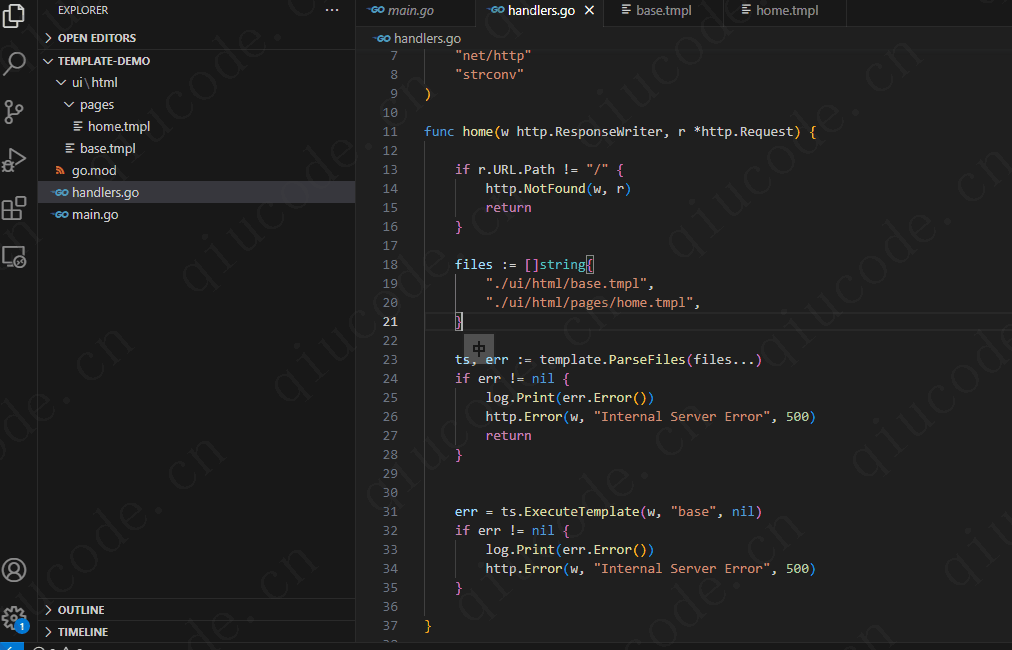
package main

import (
	"fmt"
	"html/template" // 新添加
    "log"           // 新添加
	"net/http"
	"strconv"
)

func home(w http.ResponseWriter, r *http.Request) {

	if r.URL.Path != "/" {
		http.NotFound(w, r)
		return
	}

	files := []string{
		"./ui/html/base.tmpl",
		"./ui/html/pages/home.tmpl",
	}

	ts, err := template.ParseFiles(files...)
	if err != nil {
		log.Print(err.Error())
		http.Error(w, "Internal Server Error", 500)
		return
	}


	err = ts.ExecuteTemplate(w, "base", nil)
	if err != nil {
		log.Print(err.Error())
		http.Error(w, "Internal Server Error", 500)
	}

}

//... 省略其他方法
所以现在,我们的模板集不再直接包含 HTML,而是包含 3 个命名模板 — base、title和main。 我们使用ExecuteTemplate()方法告诉 Go, 我们具体 想要使用base的内容进行响应(这又调用我们的title和 main模板)。
模板嵌入
我们希望某些内容抽离出来,可以在不同页面或布局中重复使用。
为了说明这一点,让我们创建一个包含以下部分内容的导航栏。

{{define "nav"}}
    <nav>
        <a href='/'>首页</a>
    </nav>
{{end}}
同时,修改ui/html/base.tmpl文件。
{{define "base"}}
<!doctype html>
<html lang='zh'>
    <head>
        <meta charset='utf-8'>
        <title>{{template "title" .}} - 秋码记录</title>
    </head>
    <body>
        <header>
            <h1><a href='/'>这是头部</a></h1>
        </header>
        {{template "nav" .}}
        <main>
{{template "main" .}} {{/*添加了这一行内容*/}}
        </main>
        <footer>Powered by <a href='https://golang.org/'>Go</a></footer>
    </body>
</html>
{{end}}
当然,handlers.go文件中的home处理函数也得做相应修改。
package main

import (
	"fmt"
	"html/template" // 新添加
    "log"           // 新添加
	"net/http"
	"strconv"
)

func home(w http.ResponseWriter, r *http.Request) {

	if r.URL.Path != "/" {
		http.NotFound(w, r)
		return
	}

	files := []string{
		"./ui/html/base.tmpl",
        "./ui/html/partials/nav.tmpl", //添加这一行内容
		"./ui/html/pages/home.tmpl",
	}

	ts, err := template.ParseFiles(files...)
	if err != nil {
		log.Print(err.Error())
		http.Error(w, "Internal Server Error", 500)
		return
	}


	err = ts.ExecuteTemplate(w, "base", nil)
	if err != nil {
		log.Print(err.Error())
		http.Error(w, "Internal Server Error", 500)
	}

}

//... 省略其他方法
block
在上述您也看到了,使用的是{{template}}。其实,golang还会我们提供了另外,也就是Hugo·``中常用的{{block}} … {{end}}```操作。
例如:
{{define "base"}}
    <h1>An example template</h1>
    {{block "sidebar" .}}
    	<p>My default sidebar content</p>
    {{end}}
{{end}}
您不需要在 {{block}} 之间包含任何默认内容 和{{end}}操作。 在这种情况下,调用的模板就像是“可选的”。 如果模板 存在于模板集中,则将其渲染。 但如果不这样做,那就什么都不是 显示。