







💡 鸿蒙生态为开发者提供海量的HarmonyOS模板/组件,助力开发效率原地起飞 💡
★ 一键直达生态市场组件&模板市场 , 快速应用DevEco Studio插件市场集成组件&模板 ★
实战分享:如何基于模板快速开发一款记账应用?本期案例为您解答。
👉 覆盖20+行业,点击查看往期案例汇总贴,持续更新,点击收藏!一键三连!常看常新!
【第7期】金融理财 · 记账应用
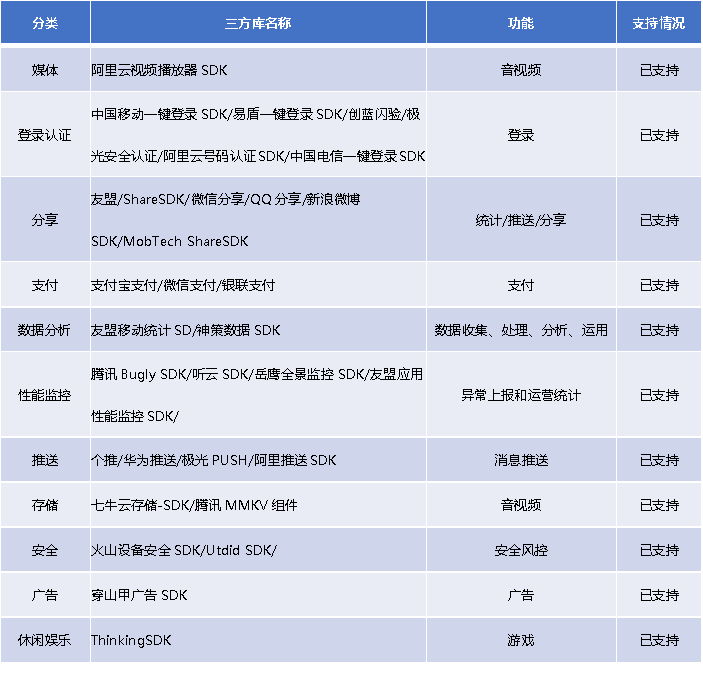
SDK链接:支付宝SDK、微信支付SDK、银联SDK、腾讯QQ SDK、新浪微博SDK、极光PUSH SDK、友盟移动统计SDK、腾讯微信SDK、个推、Bugly、ShareSDK、听云SDK、七牛云存储SDK
说明:“以上三方库及链接仅为示例,三方库由三方开发者独立提供,以其官方内容为准”
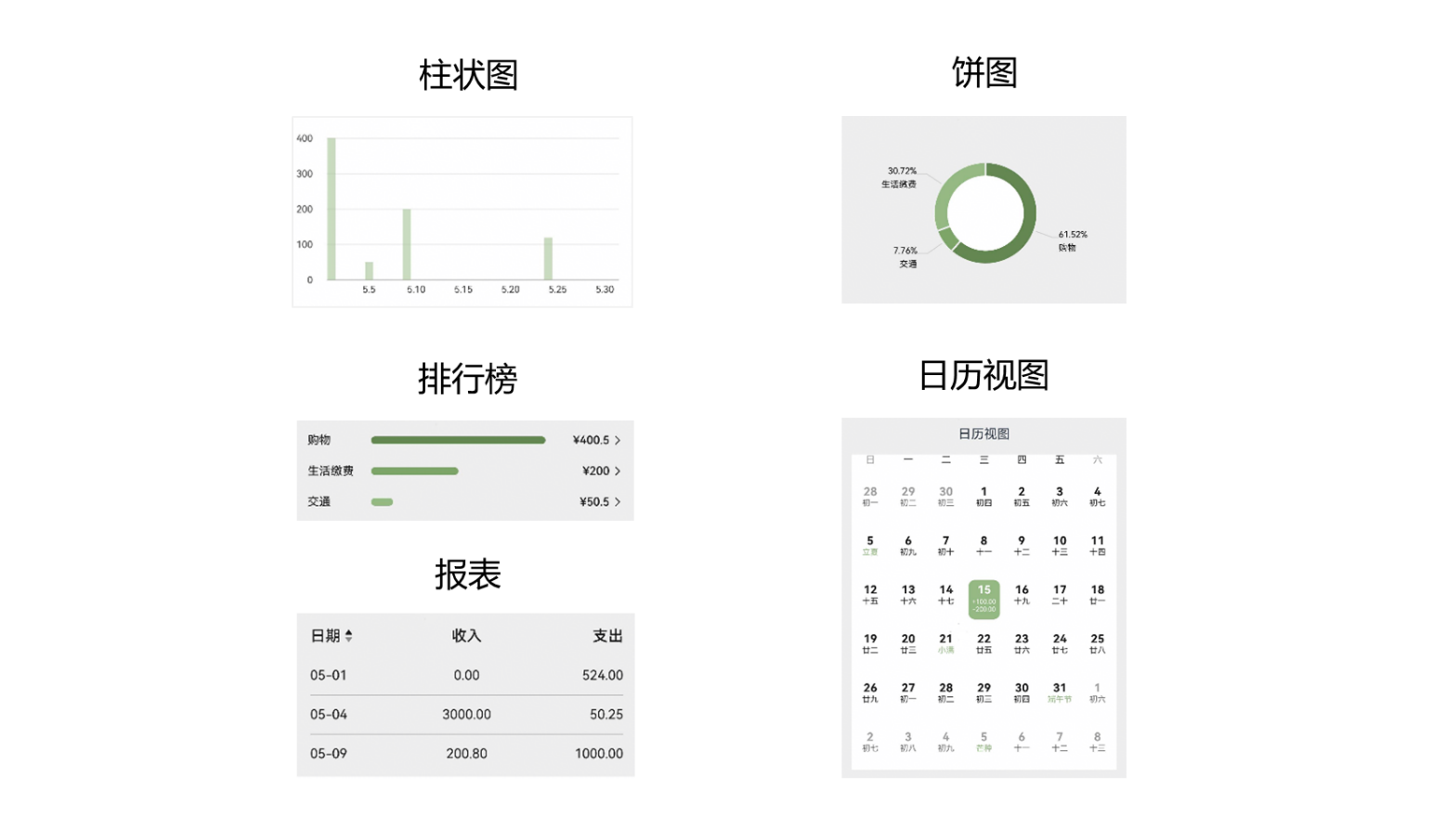
基于以上行业分析,本期将介绍鸿蒙生态市场金融类行业模板——记账应用模板,为行业提供常用功能的开发案例,模板主要分首页、统计和资产三大模块。
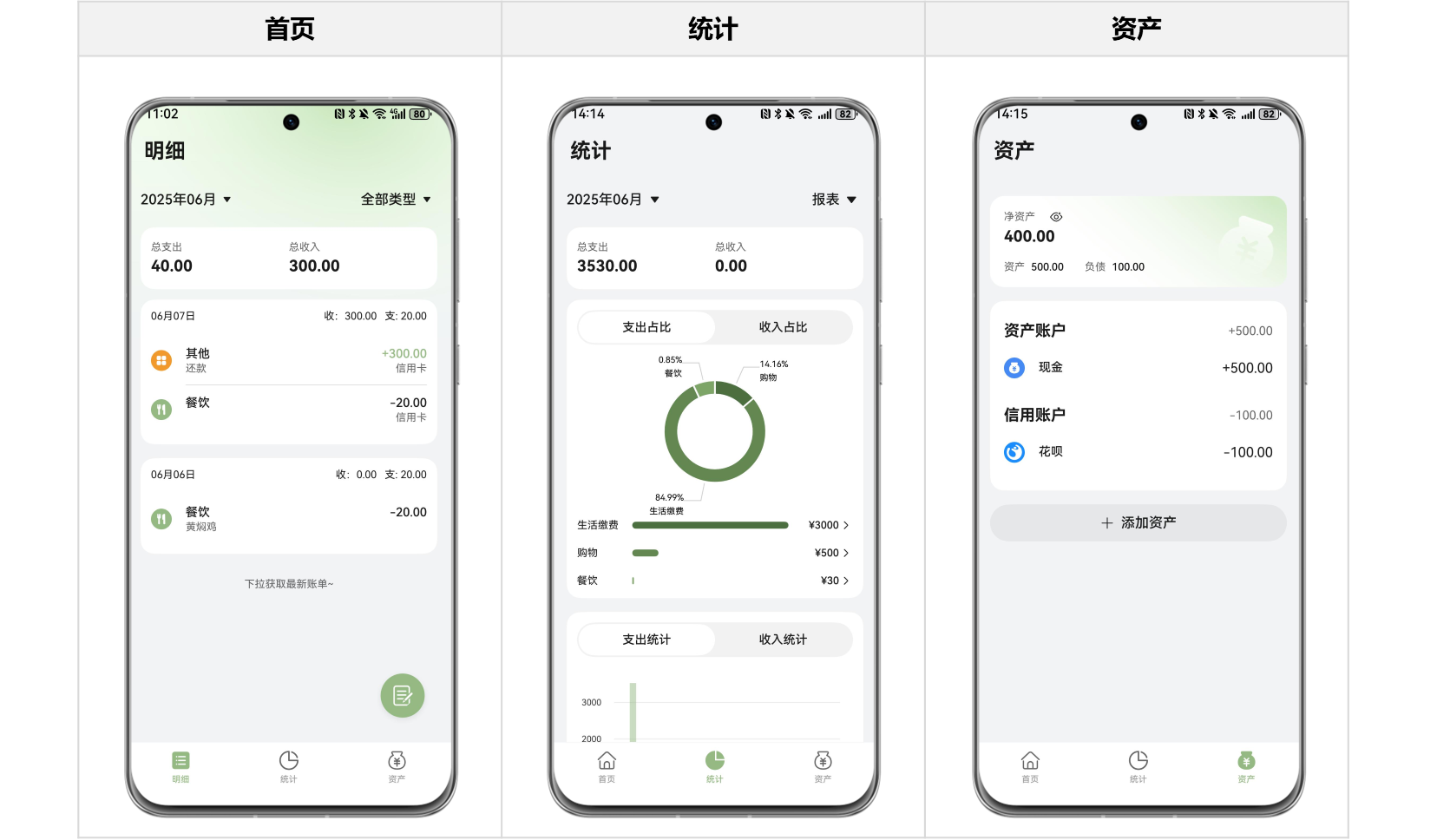
本模板主要页面及核心功能如下所示:
|– 首页
| |– 账单查询
| |– 新增账单
| |– 账单类型管理
| |– 编辑账单
| |– 删除账单
| └– 账单详情查看
|– 统计
| |– 账单报表查看
| |– 账单分类查看
| └– 日历视图
└– 资产
|– 资产查询
|– 新增资产
|– 编辑资产
|– 删除资产
└– 资产内记账
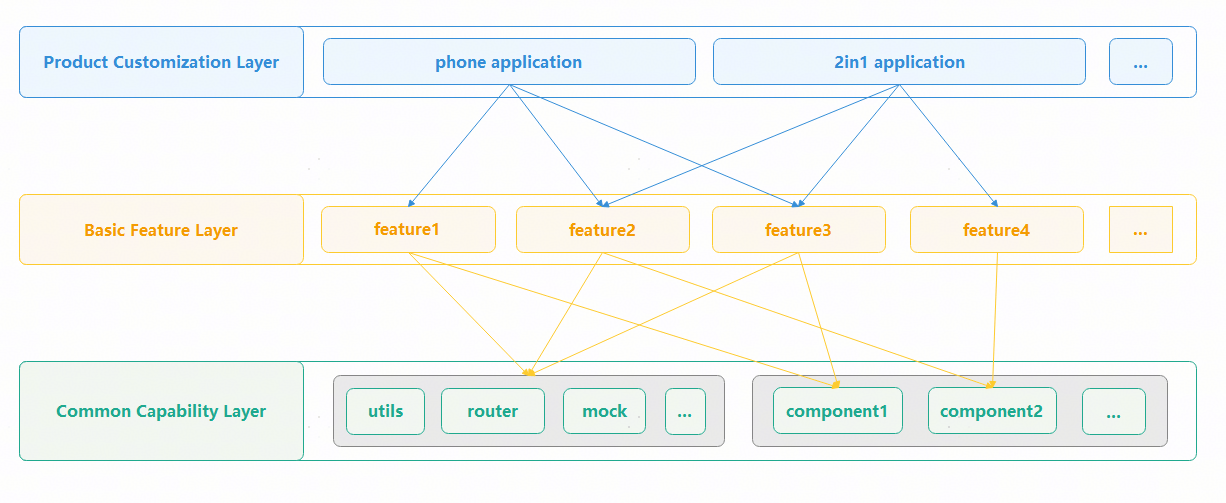
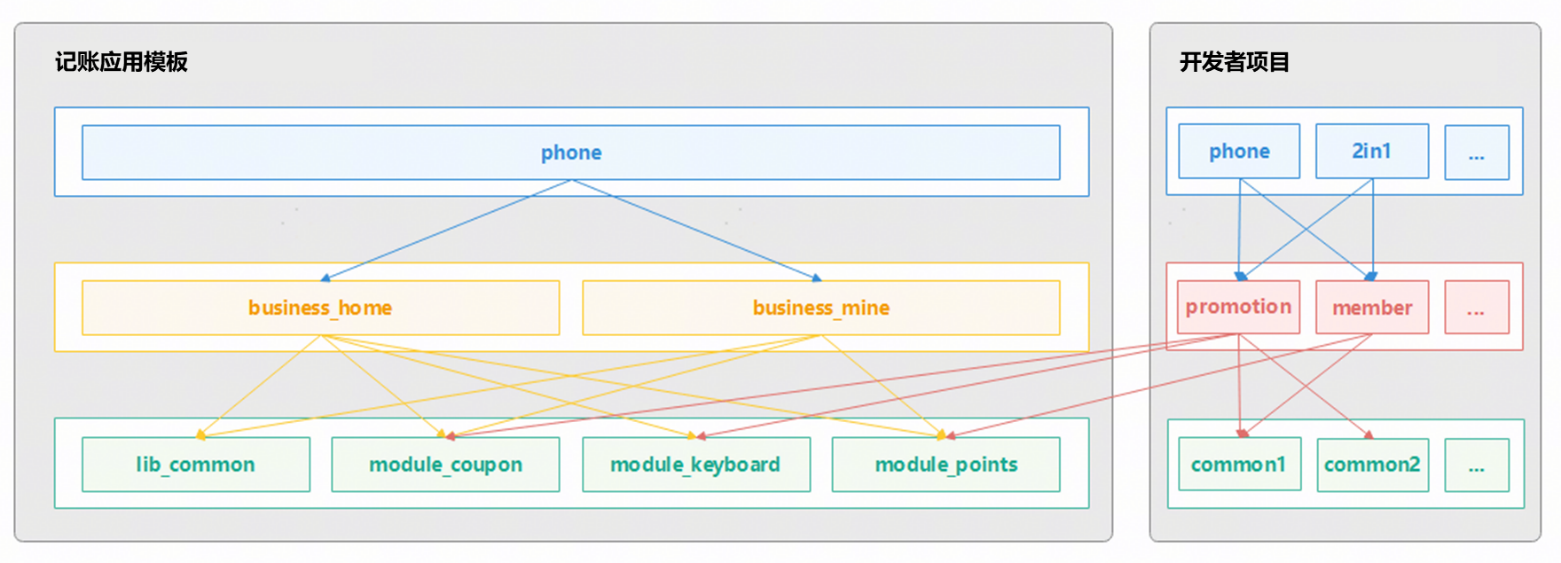
为支持开发者单独获取特定场景的页面和功能,本模板将功能完全自闭环的部分能力抽离出独立的行业组件模块,不依赖公共基础能力包,开发者可以单独集成,开箱即用,降低使用难度。
详细代码结构如下所示:
|–commons // 公共能力层
| └–commonlib // 基础能力包
| └–src/main
| |–ets
| | |–components // 公共组件
| | | |– CommonButton.ets // 公共按钮
| | | |– CommonDivider.ets // 公共分割线
| | | |– CommonHeader.ets // 公共标题栏
| | | |– CommonMonthPicker.ets // 月份选择
| | | |– ContainerColumn.ets // 垂直卡片容器
| | | └– ContainerRow.ets // 水平卡片容器
| | |–constants // 公共静态变量
| | | |– CommonConstants.ets // 公共常量
| | | └– CommonEnums.ets // 公共枚举
| | |
| | |–dialogs // 公共弹窗
| | | └– CommonConfirmDialog.ets // 二次确认弹窗
| | |
| | └–utils // 公共方法
| | |– eventbus // 全局事件管理
| | |– framework // 全局框架管理
| | |– logger // 日志
| | |– router // 路由
| | └– window // 窗口
| |
| └– resources/base/element
| |– color.json // 全局颜色
| |– font.json // 全局字号
| └– style.json // 全局样式
|
|–components // 可分可合组件包
| |– asset_base // 资产通用基础包
| |– asset_card // 资产卡片
| |– asset_manage // 资产管理
| |– bill_base // 账单通用基础包
| |– bill_card // 账单卡片
| |– bill_chart // 账单图表
| |– bill_data_processing // 账单数据处理
| └– bill_manage // 账单管理
|
|–features // 基础特性层
| |– assets // 资产
| | └–src/main/ets/views
| | |–AssetDetailPage.ets // 资产详情页
| | └–AssetsView.ets // 资产页
| |– home // 首页明细
| | └–src/main/ets/views
| | |–BillDetailPage.ets // 账单详情页
| | └–HomeView.ets // 首页
| └– statistics // 统计
| └–src/main/ets/views
| |–BillByResourceView.ets // 分类账单详情
| └–StatisticsView.ets // 统计页
└–products // 设备入口层
└– entry
└–src/main/ets
|– pages
| └– MainEntry.ets // 主入口
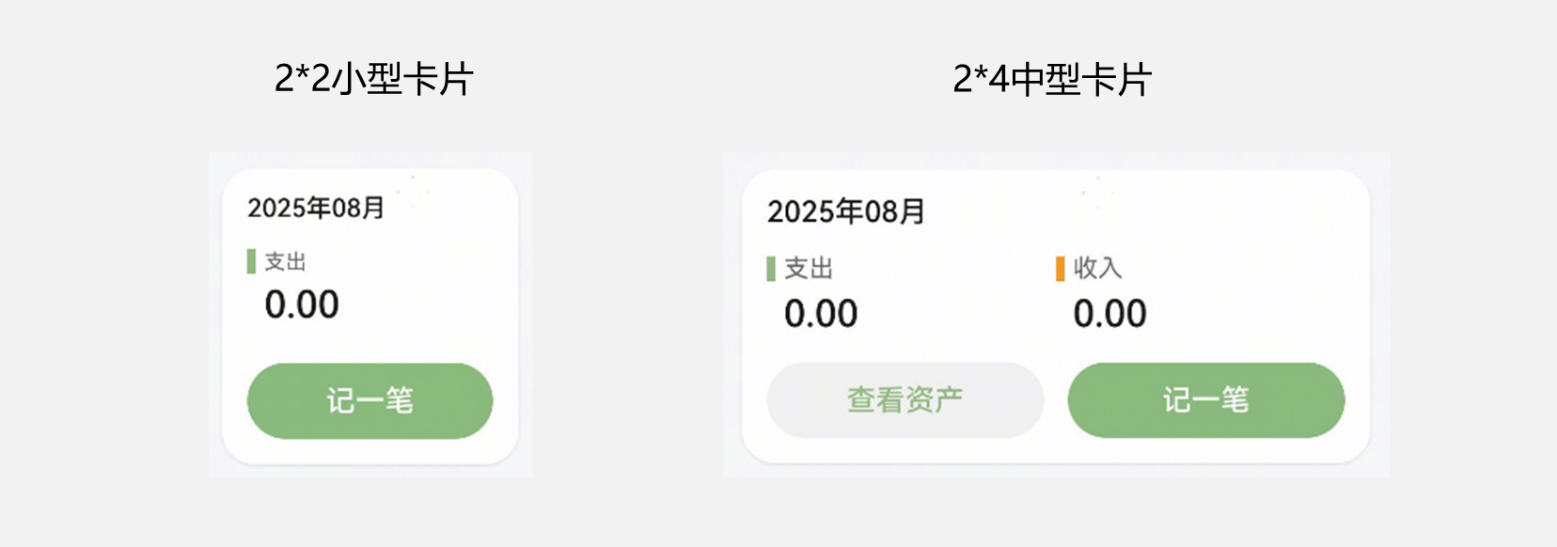
└– widgets
|– MiddleCard.ets // 2*4中号卡片
└– MiniCard.ets // 2*2小号卡片
本篇代码非应用的全量代码,只包括应用的部分能力的关键代码。
// MoneyTrack/components/bill_data_processing/src/main/ets/utils/basedb/BaseDB.ets
const TAG = ‘[BaseDB]’;
// 基础数据库操作类
export abstract class BaseDB {
protected rdbStore: relationalStore.RdbStore | null = null;
protected abstract dbConfig: relationalStore.StoreConfig;
protected abstract tableSchemas: TableSchema[];
// 初始化数据库
public async initialize(context: Context) {
try {
this.rdbStore = await relationalStore.getRdbStore(context, this.dbConfig);
await this._createTables();
Logger.info(TAG, `[${this.dbConfig.name}] database initialized success`);
} catch (err) {
Logger.error(
TAG,
`database initialized failed. error: ${JSON.stringify(err)}`,
);
}
}
// 创建表结构
private async _createTables() {
if (!this.rdbStore) {
return;
}
try {
for (const schema of this.tableSchemas) {
await this.rdbStore.executeSql(schema.createSQL);
if (schema.indexes) {
for (const indexSQL of schema.indexes) {
await this.rdbStore.executeSql(indexSQL);
}
}
}
} catch (err) {
Logger.error(TAG, `create table failed. error: ${JSON.stringify(err)}`);
}
}
// 通用插入方法
protected async insert<T>(tableName: string, values: T): Promise<number> {…}
// 通用更新方法
protected async update<T>(
tableName: string,
values: T,
conditions: TablePredicateParams[],
): Promise<number> {…}
// 通用删除方法
protected async delete(
tableName: string,
conditions: TablePredicateParams[],
): Promise<number> {…}
// 通用查询方法
protected async query<T>(
tableName: string,
conditions: TablePredicateParams[],
orderBy?: TableOrderByParams,
limit?: number,
): Promise<T[]> {…}
}
// MoneyTrack/components/bill_data_processing/src/main/ets/utils/accountingdb/AccountingDB.ets
const TAG = ‘[AccountingDB]’;
class AccountingDB extends BaseDB {
protected dbConfig: relationalStore.StoreConfig =
AccountingDBConstants.DB_CONFIG;
protected tableSchemas: TableSchema[] = [
{
tableName: AccountingDBConstants.ACCOUNT_TABLE_NAME,
createSQL: AccountingDBConstants.ACCOUNT_TABLE_SQL_CREATE,
indexes: AccountingDBConstants.ACCOUNT_TABLE_INDEXES_CREATE,
},
{
tableName: AccountingDBConstants.TRANSACTION_TABLE_NAME,
createSQL: AccountingDBConstants.TRANSACTION_TABLE_SQL_CREATE,
indexes: AccountingDBConstants.TRANSACTION_TABLE_INDEXES_CREATE,
},
{
tableName: AccountingDBConstants.ASSET_TABLE_NAME,
createSQL: AccountingDBConstants.ASSET_TABLE_SQL_CREATE,
indexes: AccountingDBConstants.ASSET_TABLE_INDEXES_CREATE,
},
];
public async initialize(context: Context) {
await super.initialize(context);
await this._initDefaultAccounts();
}
// 初始化账本
private async _initDefaultAccounts() {
const accountTable: AccountTableBasis = {
accountId: AccountID.DEFAULT,
name: ‘默认账本’,
type: ‘default’,
};
const existing = await this.query<Account>(
AccountingDBConstants.ACCOUNT_TABLE_NAME,
[
{
field: AccountTableFields.NAME,
operator: DBOperator.EQUAL,
value: accountTable.name,
},
{
field: AccountTableFields.TYPE,
operator: DBOperator.EQUAL,
value: accountTable.type,
},
],
);
if (existing.length === 0) {
await this.insert(AccountingDBConstants.ACCOUNT_TABLE_NAME, accountTable);
Logger.info(TAG, ‘create account table success’);
}
}
// 新增交易记录
public async addTransaction(userTx: UserTransaction): Promise<void> {
const tx: TransactionTableBasis = {
transactionId: new Date().getTime(),
accountId: userTx.accountId,
type: userTx.type,
resource: userTx.resource,
amount: userTx.amount,
date: userTx.date,
note: userTx.note,
excluded: userTx.excluded,
assetId: userTx.assetId,
};
return this.transaction(async () => {
try {
await this.insert(AccountingDBConstants.TRANSACTION_TABLE_NAME, tx);
promptAction.showToast({ message: ‘交易记录新增成功~’ });
await this.updateAssetAccountFromTransaction(userTx);
Logger.info(TAG, ‘insert transaction success.’);
} catch (err) {
promptAction.showToast({ message: ‘交易记录新增失败,请稍后重试~’ });
Logger.error(
TAG,
‘insert transaction failed. error:’ + JSON.stringify(err),
);
}
});
}
// …
}
const accountingDB = new AccountingDB();
export { accountingDB as AccountingDB };
// MoneyTrack/products/entry/src/main/ets/common/WidgetUtil.ets
import { preferences } from ‘@kit.ArkData’;
import { BusinessError, commonEventManager } from ‘@kit.BasicServicesKit’;
import { formBindingData, formProvider } from ‘@kit.FormKit’;
import { AmountSummary, BillProcessingModel } from ‘bill_data_processing’;
import { Logger } from ‘commonlib’;
const TAG = ‘[WidgetUtil]’;
export class WidgetUtil {
private static readonly _fileName: string = ‘accounting_form_id_file’;
private static readonly _formIdKey: string = ‘accounting_form_id_key’;
private static readonly _formIdEventName: string = ‘form_id_event_name’;
private static _billProcessing: BillProcessingModel =
new BillProcessingModel();
public static getFormIds(ctx: Context) {
const store = WidgetUtil._getStore(ctx);
return store.getSync(WidgetUtil._formIdKey, []) as string[];
}
public static async addFormId(formId: string, cxt: Context) {
const list = WidgetUtil.getFormIds(cxt);
if (!list.some((id) => id === formId)) {
list.push(formId);
const store = WidgetUtil._getStore(cxt);
store.putSync(WidgetUtil._formIdKey, list);
await store.flush();
}
}
public static async delFormId(formId: string, cxt: Context) {
const list = WidgetUtil.getFormIds(cxt);
const index = list.findIndex((id) => id === formId);
if (index !== -1) {
list.splice(index, 1);
const store = WidgetUtil._getStore(cxt);
store.putSync(WidgetUtil._formIdKey, list);
await store.flush();
}
}
// 发布公共事件跨进程传递卡片id
public static publishFormId(formId: string, isDelete: boolean) {
commonEventManager.publish(
WidgetUtil._formIdEventName,
{ data: formId, parameters: { isDelete } },
(err: BusinessError) => {
if (err) {
Logger.error(
TAG,
`Failed to publish common event. Code is ${err.code}, message is ${err.message}`,
);
} else {
Logger.info(TAG, ‘Succeeded in publishing common event.’);
}
},
);
}
// 订阅获取卡片id
public static async subscribeFormId(ctx: Context) {
let subscriber: commonEventManager.CommonEventSubscriber | undefined =
undefined;
let subscribeInfo: commonEventManager.CommonEventSubscribeInfo = {
events: [WidgetUtil._formIdEventName],
publisherPermission: ”,
};
commonEventManager.createSubscriber(subscribeInfo, (err1, data1) => {
if (err1) {
Logger.error(
TAG,
`Failed to create subscriber. Code is ${err1.code}, message is ${err1.message}`,
);
return;
}
subscriber = data1;
// 订阅公共事件回调
commonEventManager.subscribe(subscriber, async (err2, data2) => {
if (err2) {
Logger.error(
TAG,
`Failed to subscribe common event. Code is ${err2.code}, message is ${err2.message}`,
);
return;
} else {
if (data2.parameters?.isDelete) {
WidgetUtil.delFormId(data2.data as string, ctx);
} else {
WidgetUtil.addFormId(data2.data as string, ctx);
WidgetUtil.updateWidgetsWhenChange();
}
Logger.info(TAG, ‘Succeeded in creating subscriber1.’);
}
});
});
}
public static async updateWidgetsWhenChange() {
await WidgetUtil._billProcessing.getBillReport();
const summary: AmountSummary = {
totalExpense: Number(WidgetUtil._billProcessing.totalExpense),
totalIncome: Number(WidgetUtil._billProcessing.totalIncome),
};
WidgetUtil.getFormIds(getContext()).forEach((id) => {
const income = summary.totalIncome;
const expense = summary.totalExpense;
class TempForm {
date: Date = new Date();
income: number = 0;
expense: number = 0;
}
const formData: TempForm = {
date: new Date(),
income,
expense,
};
formProvider.updateForm(
id,
formBindingData.createFormBindingData(formData),
);
});
}
private static _getStore(ctx: Context) {
return preferences.getPreferencesSync(ctx, { name: WidgetUtil._fileName });
}
}
// MoneyTrack/products/entry/src/main/ets/entryformability/EntryFormAbility.ets
import { Want } from ‘@kit.AbilityKit’;
import { emitter } from ‘@kit.BasicServicesKit’;
import { formBindingData, FormExtensionAbility, formInfo } from ‘@kit.FormKit’;
import { WidgetUtil } from ‘../common/WidgetUtil’;
export default class EntryFormAbility extends FormExtensionAbility {
public onAddForm(want: Want) {
let formId = want.parameters?.[formInfo.FormParam.IDENTITY_KEY] as string | undefined;
if (formId) {
WidgetUtil.addFormId(formId, this.context);
WidgetUtil.publishFormId(formId, false);
}
return formBindingData.createFormBindingData(”);
}
public onUpdateForm() {
emitter.emit({ eventId: 1 });
}
public onRemoveForm(formId: string) {
WidgetUtil.delFormId(formId, this.context);
WidgetUtil.publishFormId(formId, true);
}
}
以上代码展示了商务笔记应用的核心功能实现,包括多选管理、富文本编辑、分类管理和响应式布局等关键技术方案。
本模板提供了两种代码集成方式,供开发者自由选用。
开发者可以选择直接基于模板工程开发自己的应用工程。
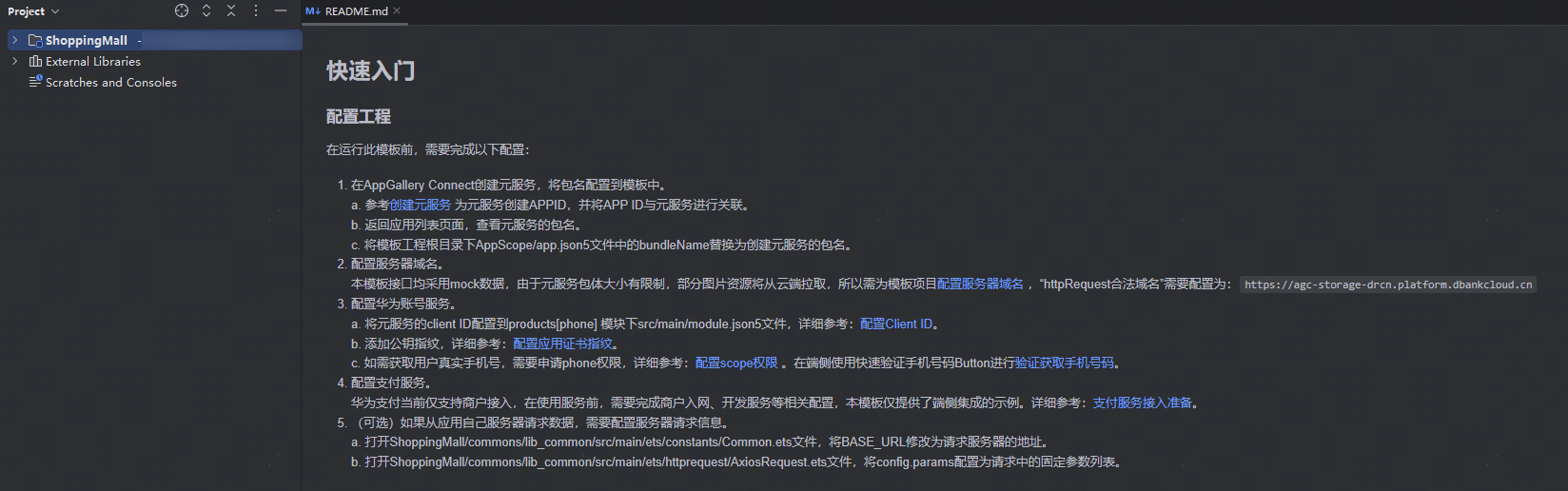
将commons/lib_common/src/main/ets/httprequest/HttpRequestApi.ets文件中的mock接口替换为真实的服务器接口。
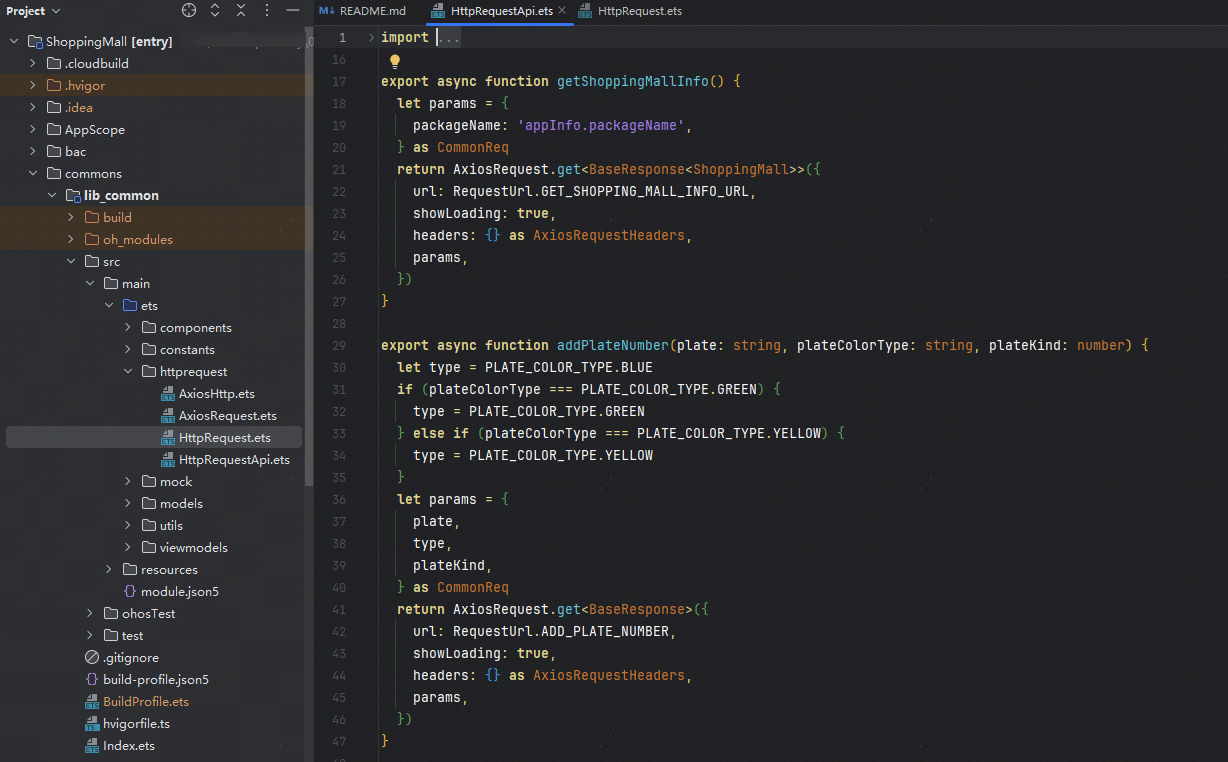
在commons/lib_common/src/main/ets/httprequest/HttpRequest.ets文件中将云侧开发者自定义的数据结构转换为端侧数据结构。
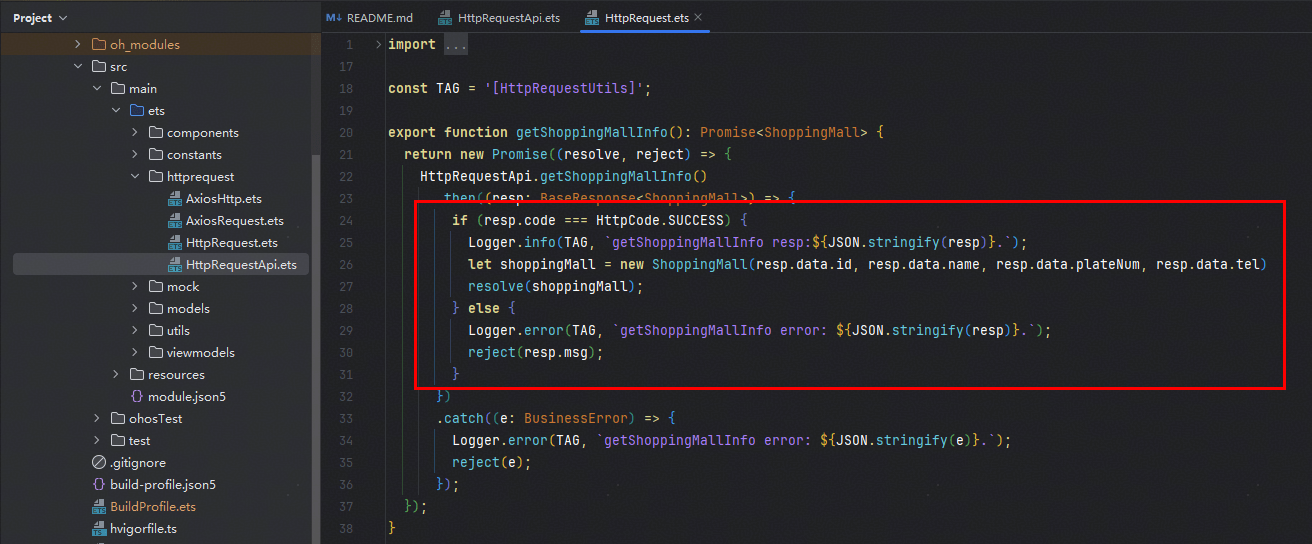
根据自己的业务内容修改模板,进行定制化开发。
若开发者已搭建好自己的应用工程,但暂未实现其中的部分场景能力,可以选择取用其中的业务组件,集成在自己的工程中。
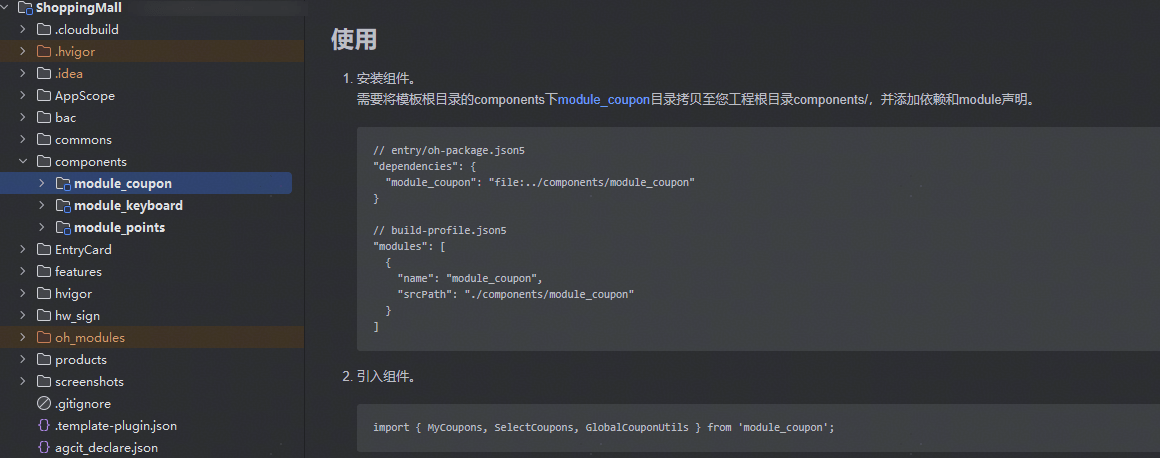
以上是第7期“金融理财-记账应用”行业案例的内容,更多行业敬请期待~
欢迎下载使用行业模板“点击下载”,若您有体验和开发问题,或者迫不及待想了解XX行业的优秀案例,欢迎在评论区留言,小编会快马加鞭为您解答~
同时诚邀您添加下方二维码加入“组件模板开发者社群”,精彩上新&活动不错过!

👉 HarmonyOS官方模板优秀案例系列持续更新, 点击查看往期案例汇总贴, 点击收藏方便查找!
👉【互动有礼】邀请你成为HarmonyOS官方模板产品经理,优化方案由你制定!点击参加
此内容由惯性聚合(RSS阅读器)自动聚合整理,仅供阅读参考。 原文来自 — 版权归原作者所有。