









It all starts so innocently. You get a text saying “Your package couldn’t be delivered. Click here to reschedule.” Little do you know, clicking that link could open the door for scammers to steal your identity, empty your bank account, or even plant malicious software (malware) on your device. Unless you know what to look out for, one little tap on the wrong text could cost you money and peace of mind.
Text scams, also known as smishing (SMS + phishing), are on the rise. These fraudulent messages are sent by cybercriminals and are showing up more often and getting harder to spot. The goal is to get you to give up sensitive personal details that can be used to hack into your accounts, and they are alarmingly successful. The Federal Trade Commission reports that in 2024, consumers lost $470 million to scams that started with text messages.
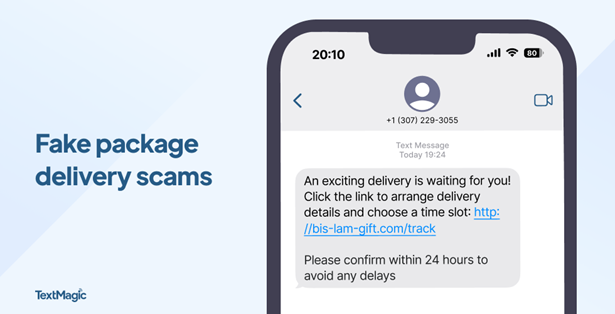
Package delivery alerts
Package delivery alerts are the most common text scam. They often impersonate trusted delivery services like UPS, FedEx, and USPS. They claim there’s a delivery problem, then try to trick you into acting quickly by creating a sense of urgency. Because so many of us shop online and have packages delivered regularly, this is a scam that’s easy to fall for. Instead of clicking a link in a suspicious text, go directly to the delivery service’s website and enter your tracking number manually.
Tip: Messages like “Click now to avoid fees” are a red flag that you should make you think twice.
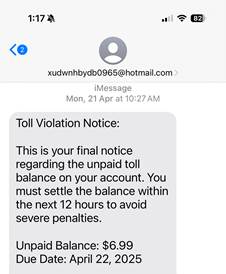
Unpaid toll alerts
These scams claim you have an overdue toll charge and demand that you click a link to make a payment or you’ll be hit with late charges. Don’t do it! These scammers are trying to gather personal data like your driver’s license number and credit card information so they can steal from you. Remember, fake texts are often sent from phone numbers or email addresses you do not recognize, so never click on a link sent from an unknown number.
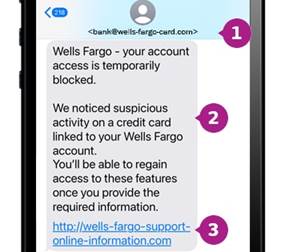
Bank account alerts
These scams look like they’re from your bank and claim there’s an issue with your funds. You’re asked for sensitive information like bank logins and passwords, which can be used to drain your bank account. They direct you to click a fake link or call a phony number to resolve it.
Tip: Most major banks, including Chase, Wells Fargo and Bank of America, will never ask for personal or account information via text.
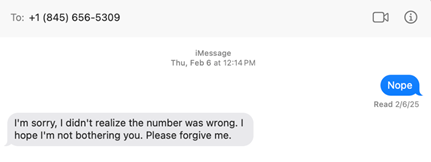
Wrong number texts
Wrong number texts are designed to seem like a legitimate accident. They start with a simple text like “Hi Mary, are we still on for Thursday?” and you respond “Sorry, wrong number.” The unknown person then tries to start up a friendly conversation, with the goal of establishing a connection and sometimes even cultivating a romantic relationship. It’s common for these cybercriminals to try and con you into a fraudulent investment like a cryptocurrency scam.
Task scams
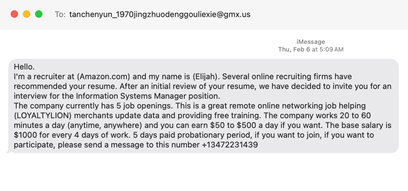
Task scams are fake job opportunities. You get a text promising online work with lucrative pay and flexibility. The offer may entail fun tasks like getting paid to shop, but the purpose is to lure you into sharing personal information like your social security number, which can be used to steal your identity. As always, if something sounds too good to be true, it probably is.
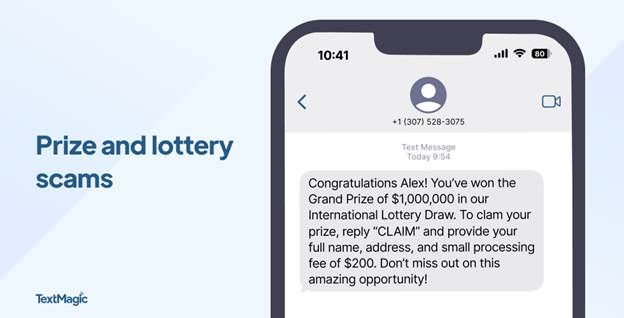
Prize or gift card scams
It’s easy to feel lucky if you get a text claiming you’ve won a prize, a gift card or other type of reward. Sadly, many people fall for this type of fraud. These messages appear to be from legitimate retailers like Amazon, Walmart or Target. They say things like “You’ve been selected for a $100 gift card!” and tell you to click a link to claim your prize. These scams often work because they generate a sense of excitement and urgency, but they’re just another way to trick you into clicking and entering personal or payment information. In reality, there’s no prize – just a phishing site or malware ready to steal your data.
Most of us use our phones for everything – banking, shopping, messaging, and storing personal information. That makes them a treasure trove of sensitive data and a high-value target for cyberthieves. Here are some tips to help you strengthen your mobile security against text scams and other types of fraud.
Text scams are a sneaky way for hackers to get access on your private data, but you don’t have to fall prey to them. By staying alert to the subtle signs of text scams and arming yourself with the security of Webroot, you can stay safe from the latest mobile threats. Browse, shop, and bank with confidence, knowing that your phone — and everything on it — is protected.
Introducing Text Scams Detection on Webroot Mobile Security for Android!
Stay one step ahead of scammers with Webroot’s latest feature: Text Scams Detection. Our advanced technology scans incoming text messages for suspicious links and fraudulent content, protecting you from phishing attempts and malicious schemes like fake delivery tracking links or fraudulent bank notifications. With real-time alerts and flagging, you can confidently navigate your digital world without the fear of falling victim to text scams. Download Webroot Mobile Security for Android today and experience peace of mind like never before!
Explore Webroot plans or Download Mobile Security for Android now from My Account.
Looking for more information and solutions?
The Strategy Behind Phishing Texts
How to Spot and Report Text Scams
此内容由惯性聚合(RSS阅读器)自动聚合整理,仅供阅读参考。 原文来自 — 版权归原作者所有。