warning: 这篇文章距离上次修改已过1690天,其中的内容可能已经有所变动。
要想实现标题中的功能,sql 语句可以这样写
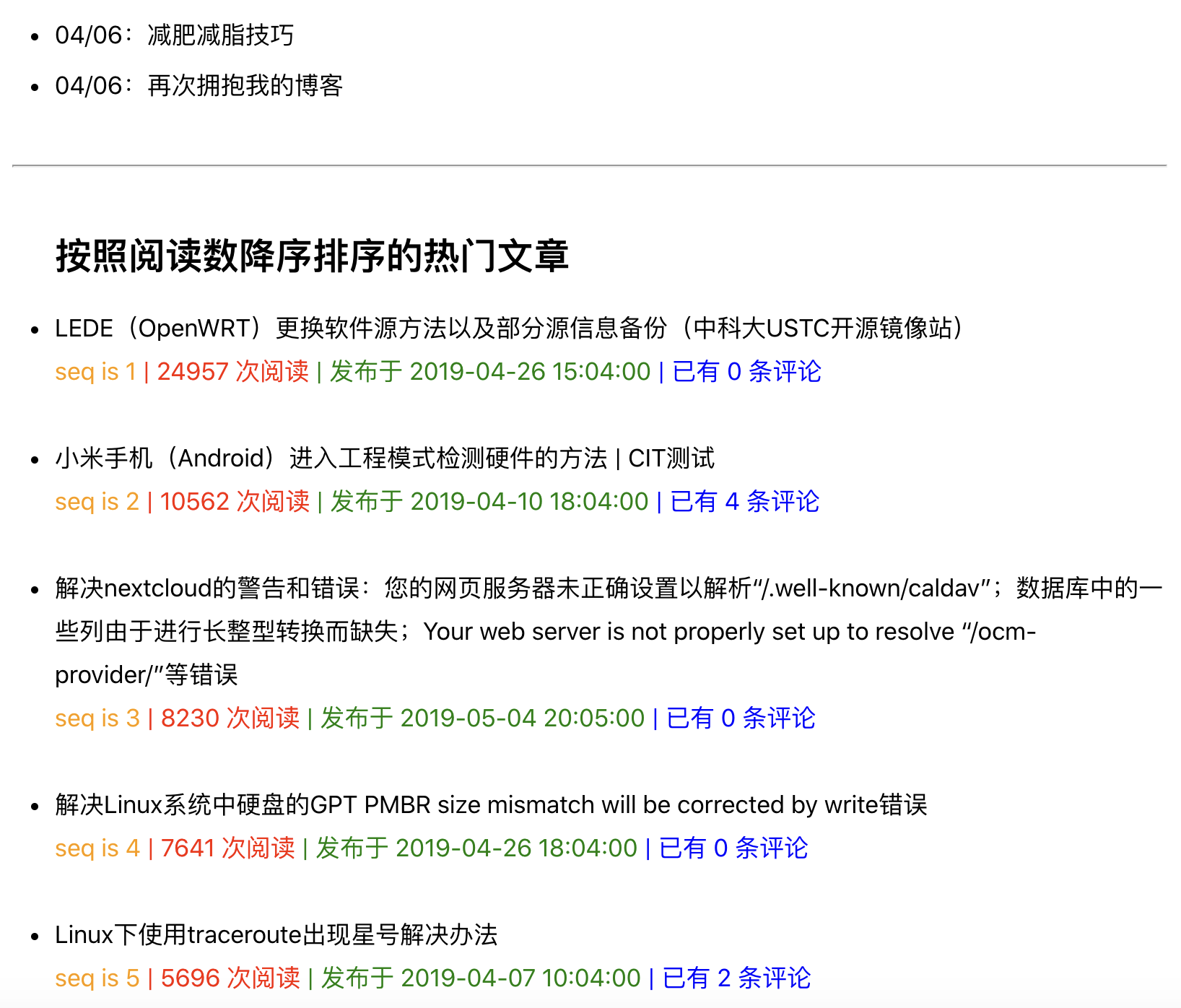
select views, cid, from_unixtime(created, '%Y-%m-%d %H:%m:%s') as created_time, title, commentsNum from typecho_contents where type='post' and status='publish' order by views desc;现在通过在 typecho 博客上实现,并在 归档页面 展示。下面展示我的方法。
functions.php 中增加以下函数
/**
 * 根据文章阅读数排序的热门发布文章
 */
function mostViewsPosts()
{
    $archive = Typecho_Widget::widget('Widget_Archive');
    // $hotNums = 5; //热门文章数
    // $minViews = 10; //最低阅读量
    $db = Typecho_Db::get();
    $select = $db->select()->from('table.contents')
        ->where('table.contents.type = ?', 'post')
        ->where('table.contents.status = ?', 'publish');
    //->limit($hotNums);
    $select->order("table.contents.views", Typecho_Db::SORT_DESC);
    $rows = $db->fetchAll($select);
    foreach ($rows as $row) {
        $mostViewsPosts[] = $archive->filter($row);
    }
    return $mostViewsPosts;
}
page-archives.php 中增加如下代码(用于 html 显示)
<hr />
    <article class="post">
        <?php $HotPosts = mostViewsPosts(); ?>
        <?php if (count($HotPosts) > 1) : ?>
            <div class="mostViewsPosts">
                <ul>
                    <h1 class="post-title">按照阅读数降序排序的热门文章</h1>
                    <?php $loopItem = 1; ?>
                    <?php foreach ($HotPosts as $v) { ?>
                        <a class="title" title="<?= $v['title']; ?>" href="<?= $v['permalink']; ?>">
                            <li>
                                <div><?= $v['title']; ?></div>
                            </li>
                        </a>
                        <span class="seqNumber">seq is <?= $loopItem++; ?></span><span class="views"> | <?= $v['views']; ?> 次阅读</span><span class="postTime"> | 发布于 <?= date('Y-m-d H:m:s', $v['created']); ?></span><span class="commentsNum"> | 已有 <?= $v['commentsNum']; ?> 条评论</span>
                        <br />
                        <br />
                    <?php } ?>
                </ul>
            </div>
        <?php endif; ?>
    </article>
tyle.min.css 中增加样式
.mostViewsPosts .title {
    color: black;
}

.mostViewsPosts .seqNumber {
    color: #FF9900;
}

.mostViewsPosts .views {
    color: red;
}

.mostViewsPosts .postTime {
    color: green;
}

.mostViewsPosts .commentsNum {
    color: blue;
}

a {
    color: black;
    text-decoration: none;
}
最终界面预览如下 归档页面