


warning: 这篇文章距离上次修改已过1784天,其中的内容可能已经有所变动。
在一次使用 nextcloud for windows desktop client 的时候,突然无法认证。nextcloud windows 客户端呼出了 browser 进行身份验证,但是一直失败。出现了如下图所示的错误
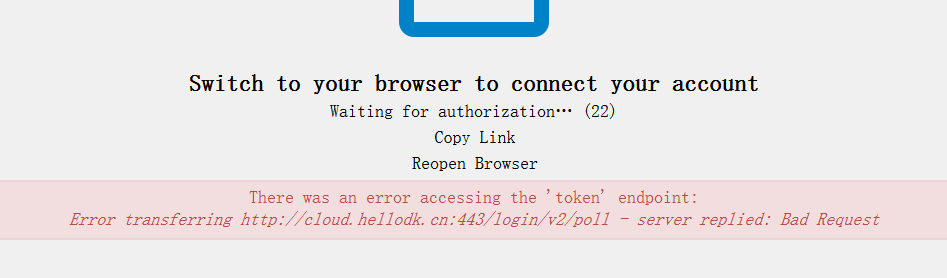
nextcloud there was an error accessing the token endpoint: error transferring login/v2/poll server replied: bad request
google 一段时间,终于发现这篇proxy_set_header Host $http_host;,说到点上了。
Hi guys,
I just had a similar situation on my nextcloud docker (port 80) behind nginx proxy (serving https on non-standard 9876) and redirecting to nextcloud http:80 backend). In case your setup is similar, just add this to your nginx config:
proxy_set_header Host $http_host;
I use this to prevent port change on redirect
alternatively use the common
proxy_set_header Host $host;
proxy_set_header X-Real-IP $remote_addr; proxy_set_header X-Forwarded-For $proxy_add_x_forwarded_for;
proxy_set_header X-Forwarded-Proto $scheme;this preserves the initial protocol, the https…
after reloading nginx the nextcloud-client obtained the token from https correctly.
I am logged in.
随后看了一下我的 nginx reverse proxy 的 conf 配置。
在 server 块中增加配置 proxy_set_header Host $http_host;
增加后 执行 nginx -t 和 nginx -s reload 再次尝试,发现整个网站主页不能访问了。我意识到是 header 的问题。于是注释掉 proxy_set_header Host $host:$server_port; 这一行。最终再次尝试,果然可以重新访问了。而且,nextcloud windows 客户端也可以通过浏览器验证然后登录了!
server
    {
    listen 443 ssl http2;
    # certs sent to the client in SERVER HELLO are concatenated in ssl_certificate
    proxy_ssl_server_name on;
    # ssl on;
    server_tokens off;
    ssl_certificate    /etc/letsencrypt/live/hellodk.cn/fullchain.pem;
    ssl_certificate_key    /etc/letsencrypt/live/hellodk.cn/privkey.pem;
    ssl_session_timeout 1d;
    #ssl_session_cache shared:SSL:50m;
    ssl_session_tickets off;

    # intermediate configuration. tweak to your needs.
    ssl_protocols TLSv1 TLSv1.1 TLSv1.2;
    ssl_ciphers 'ECDHE-ECDSA-CHACHA20-POLY1305:ECDHE-RSA-CHACHA20-POLY1305:ECDHE-ECDSA-AES128-GCM-SHA256:ECDHE-RSA-AES128-GCM-SHA256:ECDHE-ECDSA-AES256-GCM-SHA384:ECDHE-RSA-AES256-GCM-SHA384:DHE-RSA-AES128-GCM-SHA256:DHE-RSA-AES256-GCM-SHA384:ECDHE-ECDSA-AES128-SHA256:ECDHE-RSA-AES128-SHA256:ECDHE-ECDSA-AES128-SHA:ECDHE-RSA-AES256-SHA384:ECDHE-RSA-AES128-SHA:ECDHE-ECDSA-AES256-SHA384:ECDHE-ECDSA-AES256-SHA:ECDHE-RSA-AES256-SHA:DHE-RSA-AES128-SHA256:DHE-RSA-AES128-SHA:DHE-RSA-AES256-SHA256:DHE-RSA-AES256-SHA:ECDHE-ECDSA-DES-CBC3-SHA:ECDHE-RSA-DES-CBC3-SHA:EDH-RSA-DES-CBC3-SHA:AES128-GCM-SHA256:AES256-GCM-SHA384:AES128-SHA256:AES256-SHA256:AES128-SHA:AES256-SHA:DES-CBC3-SHA:!DSS';
    ssl_prefer_server_ciphers on;

    # HSTS (ngx_http_headers_module is required) (15768000 seconds = 6 months)
    add_header Strict-Transport-Security max-age=15768000;

    # OCSP Stapling ---
    # fetch OCSP records from URL in ssl_certificate and cache them
    ssl_stapling on;
    ssl_stapling_verify on;

    server_name     cloud.hellodk.cn;
    client_max_body_size 10240M;

    proxy_redirect off;
    proxy_set_header X-Forwarded-Host $host;
    proxy_set_header X-Forwarded-Server $host;
    proxy_set_header X-Forwarded-For $proxy_add_x_forwarded_for;
    #proxy_set_header Host $host:$server_port;
    proxy_set_header Host $http_host;
    proxy_set_header X-Real-IP $remote_addr;

    location / {
        proxy_pass http://127.0.0.1:8081;
    }

}

server {
    listen       80;
    server_name  cloud.hellodk.cn;
    server_tokens off;
    return 301 https://$server_name:443$request_uri;
}
end.
此内容由惯性聚合(RSS阅读器)自动聚合整理,仅供阅读参考。 原文来自 — 版权归原作者所有。