


惯性聚合 高效追踪和阅读你感兴趣的博客、新闻、科技资讯
阅读原文 在惯性聚合中打开

推荐订阅源

WordPress大学
WordPress大学
M
MIT News - Artificial intelligence
MyScale Blog
MyScale Blog
博客园_首页
G
Google Developers Blog
博客园 - 【当耐特】
美团技术团队
博客园 - 聂微东
Stack Overflow Blog
Stack Overflow Blog
Vercel News
Vercel News
小众软件
小众软件
博客园 - 司徒正美
雷峰网
雷峰网
T
Tailwind CSS Blog
V
V2EX
博客园 - 三生石上(FineUI控件)
F
Fortinet All Blogs
罗磊的独立博客
量子位
P
Proofpoint News Feed
Microsoft Azure Blog
月光博客
月光博客
A
About on SuperTechFans
Hugging Face - Blog
Hugging Face - Blog

Allen Hua 的网络博客

由于 Linux 桌面没有一个好用的天气程序就写了一个跨平台的CheckitoutWeather 给 caesium-image-compressor 图片压缩程序构建了 Linux AppImage v2.8.5 最新版 debian13(debian trixie)安装了nvidia闭源驱动后从x11切换到wayland的方法 山间摩旅追风,偶遇一场绚烂晚霞 最近使用debian系统的一些心得 机械革命无界14Pro笔记本debian forky成功驱动内置扬声器和麦克风 记录 typecho 1.2.0 升级到 1.3.0 过程 开发了一款openwrt插件:文本剪贴板 解决机械革命笔记本内屏高刷240Hz闪屏问题 使用 Java 写了一个局域网端口扫描器 - Allen Hua 的网络博客 openwrt使用外置根extroot机制扩展根分区大小 - Allen Hua 的网络博客 将机场ss节点批量转换成ss字符串链接批量添加到passwall - Allen Hua 的网络博客 给机械革命钛钽plus换屏:NY2换成NZ2 - Allen Hua 的网络博客 记录一次pve宿主机和上面的debian虚机无故down机事件 - Allen Hua 的网络博客 给图床部署cdn腾讯云的edgeone并排查Cache-Control max-age 3600的问题 - Allen Hua 的网络博客 从高山草甸到徽派古村:武功山反穿与皖浙赣自驾行记 - Allen Hua 的网络博客 增程器就是充电宝?别被忽悠了 - Allen Hua 的网络博客 浦口龙虎巷扫街,记录人间真实 博客图片压缩方案更新|AVIF|WebP|MozJPEG|标准JPEG Windows 电脑使用 Obs Studio 录制各个网站视频/桌面画面教程 为typecho博客添加latex支持 新能源汽车之纯电车使用交流慢充和直流快充的充电损耗对比 2025年3月更新全国5A景区名录 2025最新查看小米/红米手机电池健康度和循环次数方法 完美解决 seafile FILE_SERVER_ROOT 配置导致的内网外网不能同时访问和上传下载的问题 纯css实现typecho博客文章文字spoiler剧透效果 我对Typecho Facile主题的一些修改,图片懒加载优化,样式定制 2024年8月我的宜昌 - 重庆 - 川西小环线自驾旅行分享 2022年打卡南京市区人防工程纳凉点 2024年带着A7C2+腾龙28-200 再次来到红山森林动物园
openwrt 定时检查进程是否还在运行并自动重启(以 qbittorrent...
Allen Hua · 2021-01-10 · via Allen Hua 的网络博客
阅读量:4127

warning: 这篇文章距离上次修改已过1824天,其中的内容可能已经有所变动。

众所周知 openwrt 的软件包不够完善,除了自己编译,目前官方或第三方源里都没有 systemd 这些程序

本文以 qbittorrent-nox 为栗子?

首先找到 qbittorrent-nox 的执行命令,是 /usr/bin/qbittorrent-nox --profile=/mnt/ThreeTB2/qbit_backup

编写 /mnt/ThreeTB2/check_qbittorrent.sh

#!/bin/bash
# author: hellodk
# time: 2021-01-10
# script feature description: check if qbittorrent-nox is running, if not, start it

function check_qbittorrent(){
  qbittorrentCount=`ps aux | grep qbittorrent-nox |grep -v grep |wc -l`
  echo "current running qbittorrent process count: "$qbittorrentCount
  if [ 0 == $qbittorrentCount ]; then
      nohup /usr/bin/qbittorrent-nox --profile=/mnt/ThreeTB2/qbit_backup >> /tmp/qbit.out.file 2>&1 &
  fi
}

check_qbittorrent

注意

  • ps grep 的进程名称是 qbittorrent-nox 而不是 qbittorrent,楼主在这里踩过坑。而且 openwrt 中的 ps 没有相关参数,是个“简易版”的 ps 程序
  • 使用 |grep -v grep 过滤掉 grep 程序自身,避免统计错误
  • 使用 |wc -l 统计 匹配了 qbittorrent-nox 的程序数量
  • > 是重定向操作符 把前面的命令执行结果输出到文件 /tmp/qbit.out.file
  • 2>&1 把标准错误重定向到标准输出 &是等同于的意思
  • nohup command & 后台执行某个命令,即使终端进程关闭程序依然后台运行,即使用户退出进程也会继续运行

关于 linux 文件描述符
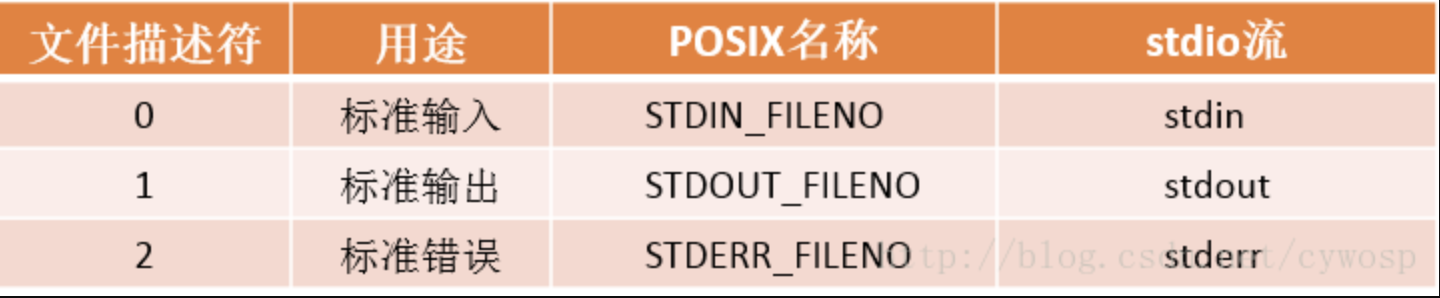
文件描述符.jpg

参考这篇文章: https://blog.csdn.net/cywosp/article/details/38965239

给这个 .sh 文件的所有用户添加可执行权限

chmod a+x /mnt/ThreeTB2/check_qbittorrent.sh

编写 cron 脚本 使用命令 crontab -e 进入类似 vi/vim 的编辑界面

0 0,6,12,18 * * * /bin/ash /mnt/ThreeTB2/check_qbittorrent.sh > /tmp/crontab-qbittorrent-sh.log

以上 cron 表达式代表 每天的 00:00:00、06:00:00、12:00:00和18:00:00 都会去执行这个 shell 脚本,并将脚本的标准输出内容 导出到 /tmp/crontab-qbittorrent-sh.log 文件中

然后重载 cron 服务并重启 即可

/etc/init.d/cron reload
/etc/init.d/cron restart

end.