











warning: 这篇文章距离上次修改已过1818天,其中的内容可能已经有所变动。
首先指路一下官方的文档,dnsmasq (简体中文) 这是一份简体中文文档,阅读十分友好。
本文有一定内容基于以前这篇文章: 使用 DNSmasq 部署家庭网络的公共 dns 和个性化的局域网内的 dns 域名服务
然后抛出我今天遇到的问题。
iOS 微博官方客户端,我在升级到最新版(微博 11.5.3)之后使用家里的联通宽带收发消息都极其缓慢,一条消息需要转圈30多秒才能发送出去。iOS的推送机制不影响,拿运行在ipad上的小号测试,推送立刻过来了,但是点进微博客户端需要加载很长时间最新消息才会出现。当我切换到联通4G网络时这个现象就消失了,收发消息都非常快。
我使用ipad测试,由于ipad安装的微博客户端还是很久以前的一个版本,私信都还没有引用功能(就是针对性回复),我拿ipad给iphone发消息,倒是秒发,接收消息也很快。初步怀疑是dns问题。但是经过最后的排查,还是很难将问题产生的原因归因于dns。iPhone尝试了重启、忘记当前wifi重新连接、重置/还原网络设置重新连接,均没有解决使用联通宽带发微博私信消息极其慢的问题。
这个问题目前还是没有解决,后续在iPhone上抓包看看。
上面这个问题,刚刚换了一个 114 dns 好了 ?️
需要重启 dnsmasq 和 network:
/etc/init.d/dnsmasq restart
/etc/init.d/network restart
换成微博国际版之后发现压根没有推送,于是安装回微博官方版,并且将nameserver的第一个设置成 114.114.114.114
后面惊奇的发现好了!
前几天使用联通宽带打开qq和tim(手机连接联通宽带 wifi),总是转圈,消息要过很久才会出现的问题也修复好了!!!(换成联通4G网络也是立马加载)
终于好了,舒服了
前排提示,dnsmasq开启dns日志方式:在/etc/dnsmasq.conf 配置文件中增加下面三行重启就好了。
log-dhcp
log-queries
log-facility=/tmp/dnsmasq.log
本文讨论一下 openwrt 上 dnsmasq 配置问题。dnsmasq 运行时配置文件是 /var/etc/dnsmasq.conf.cfg01411c
文件中 conf-file=/etc/dnsmasq.conf 指定了使用额外的配置文件: /etc/dnsmasq.conf
而这个额外配置文件中 resolv-file=/etc/resolv.dnsmasq.conf 又指定了很多 nameserver 来作为本地局域网的 dns 服务器,但是查看 /tmp/dnsmasq.log 为什么看到的日志是 reading /tmp/resolv.conf.auto 呢
由于 dnsmasq 运行时配置文件是基于 /etc/config/dhcp 生成的,观察其中配置项 resolvfile 发现默认是 /tmp/resolv.conf.auto
内容是
# Interface lan
nameserver 223.5.5.5
nameserver 8.8.8.8
nameserver 10.10.10.1
nameserver 1.1.1.1
# Interface wan
nameserver 58.240.57.33
nameserver 221.6.4.66
但是这不是我们想要的结果。更改这个配置项的内容,将解析文件指向 /etc/resolv.dnsmasq.conf 重启查看日志
config dnsmasq
    option resolvfile '/etc/resolv.dnsmasq.conf'
这个在luci页面中也可以更改,位置如下图
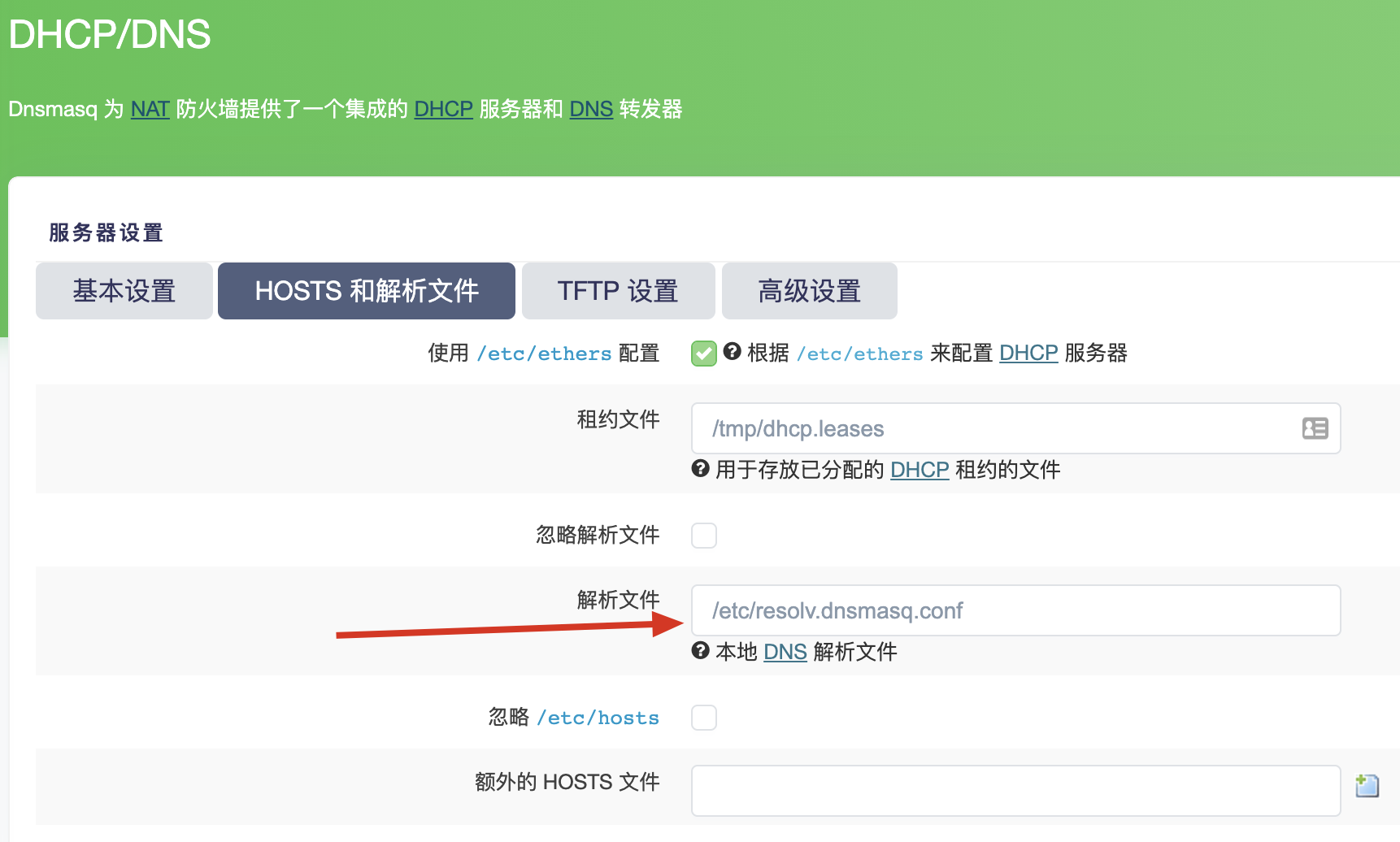
然后使用 /etc/init.d/dnsmasq restart 重启 dnsmasq 服务,再次查看日志 /tmp/dnsmasq.log,重启会记录 exiting on receipt of SIGTERM 语句
May 30 13:11:13 dnsmasq[9354]: reading /etc/resolv.dnsmasq.conf
May 30 13:11:13 dnsmasq[9354]: using local addresses only for domain test
May 30 13:11:13 dnsmasq[9354]: using local addresses only for domain onion
May 30 13:11:13 dnsmasq[9354]: using local addresses only for domain localhost
May 30 13:11:13 dnsmasq[9354]: using local addresses only for domain local
May 30 13:11:13 dnsmasq[9354]: using local addresses only for domain invalid
May 30 13:11:13 dnsmasq[9354]: using local addresses only for domain bind
May 30 13:11:13 dnsmasq[9354]: using local addresses only for domain lan
May 30 13:11:13 dnsmasq[9354]: using nameserver 180.76.76.76#53
May 30 13:11:13 dnsmasq[9354]: using nameserver 1.1.1.1#53
May 30 13:11:13 dnsmasq[9354]: using nameserver 223.5.5.5#53
May 30 13:11:13 dnsmasq[9354]: using nameserver 8.8.8.8#53
May 30 13:11:13 dnsmasq[9354]: using nameserver 119.29.29.29#53
May 30 13:11:13 dnsmasq[9354]: using nameserver 223.6.6.6#53
May 30 13:11:13 dnsmasq[9354]: using nameserver 8.8.4.4#53
ok 成功了,成功读取我们指定的解析文件 /etc/resolv.dnsmasq.conf ,但是为什么 /etc/dnsmasq.conf 这个文件中定义的 resolv-file 没有生效呢……
看 dhcp 配置文件 (/etc/config/dhcp) 中的解析文件的选项名是 resolvfile 而 /etc/dnsmasq.conf 中是 resolv-file 会不会是前者多了个减号?
于是删掉了减号重启,发现并不行~~~ 于是又改回来 哈哈哈
测试一下配置文件语法(删掉减号之后测试)
# dnsmasq --test

dnsmasq: bad option at line 1 of /etc/dnsmasq.conf
果然第一行的格式不对(少了个减号是不对的),再看看本文一开始推荐的官方文档,解析文件的键的确是需要减号的,又改了回来再次测试…… 这次语法没问题了
# dnsmasq --test
dnsmasq: syntax check OK.再次观察日志,reading /etc/resolv.dnsmasq.conf 成功了,生效了!再看看 /etc/config/dhcp 中指定的解析文件 option resolvfile '/tmp/resolv.conf.auto 嗯,事先改回成这个文件,没错,要的就是这个效果。因为 resolv-file=/etc/resolv.dnsmasq.conf 指定的配置将会覆盖 /etc/config/dhcp 中指定的解析文件地址。
下面是一次dns请求 dnsmasq 的日志,多次查询在一定时间间隔内还会存在缓存,加速局域网内网络访问。
May 30 10:24:50 dnsmasq[10989]: query[AAAA] hellodk.com from 127.0.0.1
May 30 10:24:50 dnsmasq[10989]: config hellodk.com is NODATA-IPv6
May 30 10:24:50 dnsmasq[10989]: query[A] hellodk.com from 127.0.0.1
May 30 10:24:50 dnsmasq[10989]: cached hellodk.com is 91.206.93.38
May 30 10:24:52 dnsmasq[10989]: query[A] on.springsunday.net from 127.0.0.1
May 30 10:24:52 dnsmasq[10989]: forwarded on.springsunday.net to 58.240.57.33
May 30 10:24:52 dnsmasq[10989]: query[AAAA] on.springsunday.net from 127.0.0.1
May 30 10:24:52 dnsmasq[10989]: config on.springsunday.net is NODATA-IPv6
May 30 10:24:52 dnsmasq[10989]: reply on.springsunday.net is 139.162.171.72
May 30 10:24:52 dnsmasq[10989]: reply on.springsunday.net is 192.155.86.107
May 30 10:24:52 dnsmasq[10989]: query[AAAA] hellodk.com from 10.10.10.3
May 30 10:24:52 dnsmasq[10989]: config hellodk.com is NODATA-IPv6
May 30 10:24:52 dnsmasq[10989]: query[A] hellodk.com from 10.10.10.3
May 30 10:24:52 dnsmasq[10989]: cached hellodk.com is 91.206.93.38
May 30 10:24:52 dnsmasq[10989]: query[A] tracker.m-team.cc from 127.0.0.1
May 30 10:24:52 dnsmasq[10989]: forwarded tracker.m-team.cc to 58.240.57.33
May 30 10:24:52 dnsmasq[10989]: query[AAAA] tracker.m-team.cc from 127.0.0.1
May 30 10:24:52 dnsmasq[10989]: config tracker.m-team.cc is NODATA-IPv6
May 30 10:24:52 dnsmasq[10989]: reply tracker.m-team.cc is 104.26.12.50
May 30 10:24:52 dnsmasq[10989]: reply tracker.m-team.cc is 104.26.13.50
May 30 10:24:52 dnsmasq[10989]: reply tracker.m-team.cc is 172.67.73.8
所以你说这问题出在哪呢,为什么之前配置是没有问题的但是没有“激活” resolv-file 中定义的解析文件呢,不太清楚,但更改了下这块配置,后面重启就好了。真是神奇。
目前定义的公共dns如下
# cat /etc/resolv.dnsmasq.conf
nameserver 114.114.114.114
nameserver 180.76.76.76
nameserver 1.1.1.1
nameserver 223.5.5.5
nameserver 8.8.8.8
nameserver 119.29.29.29
nameserver 223.6.6.6
nameserver 8.8.4.4
目前完整版的 dnsmasq 额外配置文件如下
resolv-file=/etc/resolv.dnsmasq.conf
strict-order
listen-address=127.0.0.1,10.10.10.1,172.10.10.1,192.168.20.1
addn-hosts=/etc/dnsmasq.hosts
#log-dhcp
#log-queries
#log-facility=/tmp/dnsmasq.log
日志记录看情况开启。
目前完整的 /etc/config/dhcp 文件如下
config dnsmasq
    option domainneeded '1'
    option localise_queries '1'
    option rebind_protection '1'
    option rebind_localhost '1'
    option local '/lan/'
    option domain 'lan'
    option expandhosts '1'
    option authoritative '1'
    option readethers '1'
    option leasefile '/tmp/dhcp.leases'
    option nonwildcard '1'
    option localservice '1'
    option filter_aaaa '1'
    option port '53'
    list server '127.0.0.1#53'
    option resolvfile '/tmp/resolv.conf.auto'

config dhcp 'lan'
    option interface 'lan'
    option start '100'
    option limit '150'
    option leasetime '12h'
    option ra_slaac '1'
    list ra_flags 'managed-config'
    list ra_flags 'other-config'

config dhcp 'wan'
    option interface 'wan'
    option ignore '1'

config odhcpd 'odhcpd'
    option maindhcp '0'
    option leasefile '/tmp/hosts/odhcpd'
    option leasetrigger '/usr/sbin/odhcpd-update'
    option loglevel '4'

config srvhost
    option srv '_vlmcs._tcp'
    option target 'dkRouter'
    option port '1688'
    option class '0'
    option weight '100'

config host
    option name 't400'
    option dns '1'
    option mac '00:1c:25:a2:54:c6'
    option ip '10.10.10.3'
    option leasetime 'infinite'
其中 config dnsmasq 部分是 dnsmasq 主配置。
end.
此内容由惯性聚合(RSS阅读器)自动聚合整理,仅供阅读参考。 原文来自 — 版权归原作者所有。