






压缩剪贴板内图片并立即写入剪贴板,减轻服务器存储压力
warning: 这篇文章距离上次修改已过935天,其中的内容可能已经有所变动。
更新日志
- v1.0.1 发现 jdk 内置的压缩效果实在太差,最终引入了
net.coobird的thumbnailator库进行图片的压缩 - v1.0.0 最初版本发布
背景
在使用 self-built chatting system 聊天时,用的是非官方的服务器,有时候从 X 或者 TG 上粘贴一张图片过来,9 MB 的大小让人深感 vps 硬盘不够大,得省着点用。所以我想压缩一下图片再粘贴到聊天框,于是我就寻找一个简单快捷的工作流,但是很遗憾我没有找到。
于是我用 Java 写了一段代码实现了这个逻辑
- 从其他任意地方复制图片(此时系统剪贴板里应是一张图片)
- 执行一条命令,直接将压缩后的图片写入剪贴板(此时剪贴板里是压缩后的图片)
- 直接在聊天页面中粘贴,此时粘贴的是压缩后的图片,达到了我们想要照顾服务器硬盘太小的这个目的
使用效果
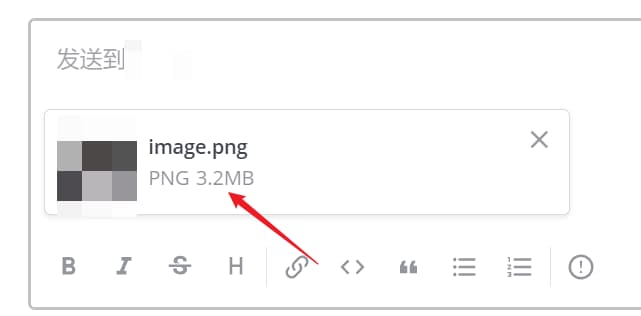
我用自建的 Mattermost 举例
压缩前
压缩后
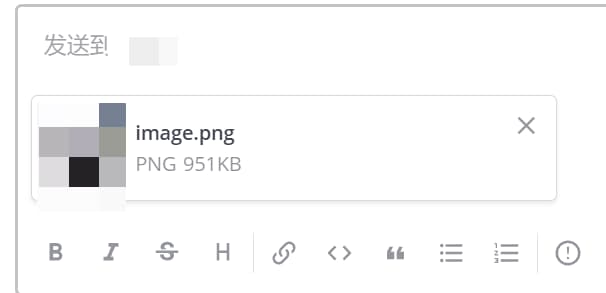
压缩前后对比

源码实现
基于 OpenJDK11 开发和构建,打包成了 jar,全部使用 jdk 内嵌包,没有引入第三方图片压缩的库,按理说可以引入,因为压缩后的成片质量可能比自带的 Graphics2D g = resImage.createGraphics(); g.drawImage(image, 0, 0, newWidth, newHeight, null); 效果好,但我此处的需求很简单,就是聊天时用用,对于图片的清晰度可能要求不是很高,有些文字很多的都快包浆了的那种图片也不适合压缩后再发送。
源码
import net.coobird.thumbnailator.Thumbnails;

import javax.imageio.ImageIO;
import java.awt.Graphics2D;
import java.awt.Toolkit;
import java.awt.datatransfer.Clipboard;
import java.awt.datatransfer.DataFlavor;
import java.awt.datatransfer.Transferable;
import java.awt.datatransfer.UnsupportedFlavorException;
import java.awt.image.BufferedImage;
import java.io.ByteArrayOutputStream;
import java.io.File;
import java.io.IOException;
import java.nio.file.Files;
import java.nio.file.Path;
import java.text.DecimalFormat;

/**
 * @author: hellodk
 * @description CompressImageAndPaste
 * @date: 11/3/2023 1:13 PM
 */

public class CompressImageAndPaste {

    /**
     * 压缩倍率
     */
    private static final double compress_ratio = 0.4;

    public static void main(String[] args) {
        CompressImageAndPaste ciap = new CompressImageAndPaste();
        BufferedImage srcImage = ciap.readImageFromClipboard();
        if (srcImage == null) {
            return;
        }
        long sizeInBytes = ciap.getImageSizeInBytes(srcImage);
        String sizeInHumanReadable = ciap.formatSize(sizeInBytes);
        System.out.println("Original image size is " + sizeInHumanReadable + ".");
        BufferedImage compressedImage = ciap.compressImage(srcImage, compress_ratio); // 压缩比例设置为 0.4
        ciap.writeImage2Clipboard(compressedImage);
        long newSizeInBytes = ciap.getImageSizeInBytes(compressedImage);
        String newSizeInHumanReadable = ciap.formatSize(newSizeInBytes);
        System.out.print("Compressed image size is " + newSizeInHumanReadable);
        System.out.println(", and has been written to your clipboard, you can paste it anywhere.");
    }

    private BufferedImage readImageFromClipboard() {
        Clipboard clipboard = Toolkit.getDefaultToolkit().getSystemClipboard();
        Transferable transferable = clipboard.getContents(null);
        if (transferable != null && transferable.isDataFlavorSupported(DataFlavor.imageFlavor)) {
            try {
                return (BufferedImage) transferable.getTransferData(DataFlavor.imageFlavor);
            }
            catch (UnsupportedFlavorException | IOException e) {
                e.printStackTrace();
            }
        }
        else {
            System.out.println("Make sure your clipboard latest item is image and continue.");
            System.out.println("Jar usage description: read your clipboard image and compress it, finally write the compressed image to your clipboard, you can paste it anywhere.");
        }
        return null;
    }

    private BufferedImage compressImage(BufferedImage image, double compressRatio) {
        BufferedImage resImage = null;
        try {
            Path tmpFilePath = Files.createTempFile("compressed_image", ".jpg");
            File targetFile = tmpFilePath.toFile();
            Thumbnails.of(image)
                    .scale(1)
                    .outputQuality(compressRatio)
                    .toFile(targetFile);
            resImage = ImageIO.read(targetFile);
        }
        catch (IOException e) {
            e.printStackTrace();
        }
        return resImage;
    }

    private void writeImage2Clipboard(BufferedImage image) {
        Clipboard cb = Toolkit.getDefaultToolkit().getSystemClipboard();
        ImageTransferable it = new ImageTransferable(image);
        cb.setContents(it, null);
    }

    private long getImageSizeInBytes(BufferedImage image) {
        ByteArrayOutputStream outputStream = new ByteArrayOutputStream();
        try {
            ImageIO.write(image, "jpg", outputStream);
        }
        catch (IOException e) {
            e.printStackTrace();
        }
        byte[] compressedImageBytes = outputStream.toByteArray();
        long sizeInBytes = compressedImageBytes.length;
        return sizeInBytes;
    }

    private String formatSize(long sizeInBytes) {
        String[] units = {"B", "KB", "MB", "GB", "TB"};
        int unitIndex = 0;
        double size = sizeInBytes;
        while (size >= 1024 && unitIndex < units.length - 1) {
            size /= 1024;
            unitIndex++;
        }
        DecimalFormat df = new DecimalFormat("#.##");
        return df.format(size) + " " + units[unitIndex];
    }

    // 自定义Transferable类,用于将BufferedImage对象传输到剪贴板
    private static class ImageTransferable implements Transferable {
        private final BufferedImage image;

        public ImageTransferable(BufferedImage image) {
            this.image = image;
        }

        @Override
        public DataFlavor[] getTransferDataFlavors() {
            return new DataFlavor[]{DataFlavor.imageFlavor};
        }

        @Override
        public boolean isDataFlavorSupported(DataFlavor flavor) {
            return flavor.equals(DataFlavor.imageFlavor);
        }

        @Override
        public Object getTransferData(DataFlavor flavor) throws UnsupportedFlavorException, IOException {
            if (flavor.equals(DataFlavor.imageFlavor)) {
                return image;
            }
            else {
                throw new UnsupportedFlavorException(flavor);
            }
        }
    }
}
使用方法
发布到了 GitHub: https://github.com/hellodk34/CompressImageAndPaste ,从 release 页面下载 jar 包(最新版本 v1.0.1)。需要在电脑上安装 jdk11 环境,然后直接执行
java -jar compress_image_and_paste.jar即可。
一些执行日志:
java -jar compress_image_and_paste.jar
Make sure your clipboard latest item is image and continue.
Jar usage description: read your clipboard image and compress it, finally write the compressed image to your clipboard, you can paste it anywhere.

java -jar compress_image_and_paste.jar
Original image size is 9.18 MB.
Compressed image size is 1.47 MB, and has been written to your clipboard, you can paste it anywhere.