惯性聚合 高效追踪和阅读你感兴趣的博客、新闻、科技资讯
阅读原文 在惯性聚合中打开

推荐订阅源

F
Fortinet All Blogs
S
Secure Thoughts
月光博客
月光博客
美团技术团队
雷峰网
雷峰网
Exploit-DB.com RSS Feed
奇客Solidot–传递最新科技情报
奇客Solidot–传递最新科技情报
N
News and Events Feed by Topic
freeCodeCamp Programming Tutorials: Python, JavaScript, Git & More
Forbes - Security
Forbes - Security
W
WeLiveSecurity
P
Proofpoint News Feed
阮一峰的网络日志
阮一峰的网络日志
爱范儿
爱范儿
G
GRAHAM CLULEY
cs.AI updates on arXiv.org
AI
AI
Last Week in AI
Last Week in AI
Google Online Security Blog
Schneier on Security
云风的 BLOG
云风的 BLOG
Threat Intelligence Blog | Flashpoint
Recent Announcements
Webroot Blog
Webroot Blog
T
Tor Project blog
Cisco Talos Blog
Cisco Talos Blog
N
News and Events Feed by Topic
罗磊的独立博客
The Register - Security
Blog — PlanetScale
Blog — PlanetScale
T
Threat Research - Cisco Blogs
博客园 - 【当耐特】
Apple Machine Learning Research
人人都是产品经理
人人都是产品经理
T
The Exploit Database - CXSecurity.com
www.infosecurity-magazine.com
B
Blog
腾讯CDC
Microsoft Azure Blog
酷 壳 – CoolShell
酷 壳 – CoolShell
H
Hacker News: Front Page
Application and Cybersecurity Blog
Engineering at Meta
Engineering at Meta
Latest news
Latest news
IT之家
IT之家
D
DataBreaches.Net
博客园 - 司徒正美
N
Netflix TechBlog - Medium
V
V2EX
钛媒体:引领未来商业与生活新知
钛媒体:引领未来商业与生活新知

czp's blog

使用 VNC 来远程管理服务器 · HonKit Linux 下无限试用 JetBrains · HonKit 使用 KMS 激活 Windows · HonKit 为 KVM 中的 Windows 虚拟机启用 VirtIO · HonKit 在 Spring Boot 中处理 MissingKotlinParameterException · HonKit 用 Spring Native 拯救微服务 · HonKit 正确调试 PHP · HonKit Ubuntu 增加最大文件打开数量限制 · HonKit 将 Minecraft 服务端编译到 native · HonKit 用凝聚力购买 P 社游戏 DLC · HonKit 模拟超星网课 Android 客户端 · HonKit 模拟 Bilibili Android 客户端 · HonKit 模拟哔咔 Android 客户端 · HonKit 异步是什么 · HonKit GCP Pub/Sub push 至 IAP 保护的 Endpoint · HonKit 部署 Spring Native 到 GCP App Engine · HonKit 多个 Gradle SubProject 同时编译导致 CI/CD 内存耗尽 · HonKit Google Cloud Build 运行 DIND · HonKit 在 Google Storage 中部署 SPA · HonKit Terraform 不自动更新 CloudRun service · HonKit Telegram Bot 收不到普通群聊消息的问题 · HonKit 加密货币交易 · HonKit 挖掘以太坊 · HonKit 挖掘门罗币 · HonKit 小明学英语 · HonKit 卖程序的小女孩 · HonKit 一个测试工程师走进一家酒吧 · HonKit 我给你们讲个 TCP 笑话吧! · HonKit 我给你们讲个 UDP 笑话吧! · HonKit 格局打开 · HonKit c 语言常见未定义行为 · HonKit 在 Kotlin 使用 SpaceEngineers Remote API · HonKit Kotlin 协程 · HonKit 在 Spring Boot 中正确注册 Jackson Module · HonKit Spring Boot Jpa 使用 Google Cloud SQL · HonKit Spring Boot 中配置单页应用 · HonKit Spring Boot 无法加载 ClasspathResource 问题 · HonKit 正确打包 Spring Boot 到 war · HonKit czp's blog · HonKit 鸣谢列表 · HonKit 友链 · HonKit
Ubuntu 下使用 zsh · HonKit
2026-04-11 · via czp's blog

环境: Ubuntu 18.04 | zsh 5.4.2

久闻 zsh 大名, 但是一直没有用过, 因为听说配置起来很麻烦.

直到最近听说了 oh-my-zsh (早就有了), 据称它可以几乎零配置, 所以我们今天就来试一试它.

安装 zsh

oh-my-zsh 只是 zsh 的自动配置脚本, 我们得首先安装 zsh.

在 Ubuntu 上, 我们可以使用包管理器来简单的安装它

apt install zsh

之后我们开始安装 oh-my-zsh

安装 oh-my-zsh

安装 oh-my-zsh 可谓是出奇的简单, 但是先要安装 git, 很多 Linux 发行版并不会自带 git.

Ubuntu 上我们执行以下命令行来安装 git(root 用户)

apt install git

之后安装 oh-my-zsh(普通用户)

wget https://github.com/robbyrussell/oh-my-zsh/raw/master/tools/install.sh -O - | zsh

没错, 这就安装好了. 也可以用 curl 来下载脚本, 详见 https://github.com/robbyrussell/oh-my-zsh#basic-installation

然后设置 zsh 为默认 shell

chsh -s `which zsh`

可能需要重启设备.

更换主题

一打开终端, 我们发现, 好像跟 bash 看起来没有什么区别, 依然很丑, 没有网上看到的别人的终端那么酷炫.

其实, 别人只是设置了一个主题而已.

oh-my-zsh 自带了很多个主题, 看预览图的话详见此处 https://github.com/robbyrussell/oh-my-zsh/wiki/themes

那么, 怎么换主题呢, 我们以 agnoster 为例.

我们打开用户目录的 ~/.zshrc 文件, 然后我们搜索 ZSH_THEME, 修改主题设置

ZSH_THEME="agnoster"

使用命令来立即重载配置

source ~/.zshrc

然后我们会看到这么一个景象
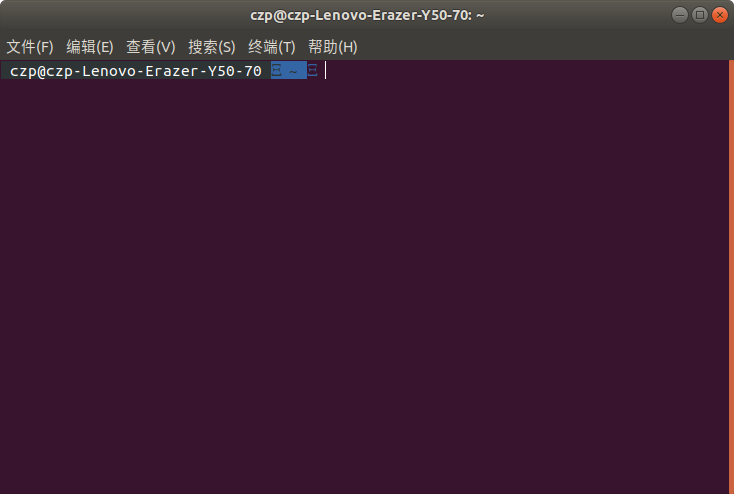
zsh 字体错误

预览图中, 这个主题的向右箭头, 现在都变成了一个不可读字符.

然后我们在 Google 搜索这个问题, 很快就知道了问题所在.

原因是因为缺少 Powerline 字体.

安装 Powerline 字体

既然如此, 我们就要来安装这个字体(字体系列)

使用命令

git clone https://github.com/powerline/fonts
cd fonts
./install.sh

就安装好了.

然后我们修改终端的字体设置.
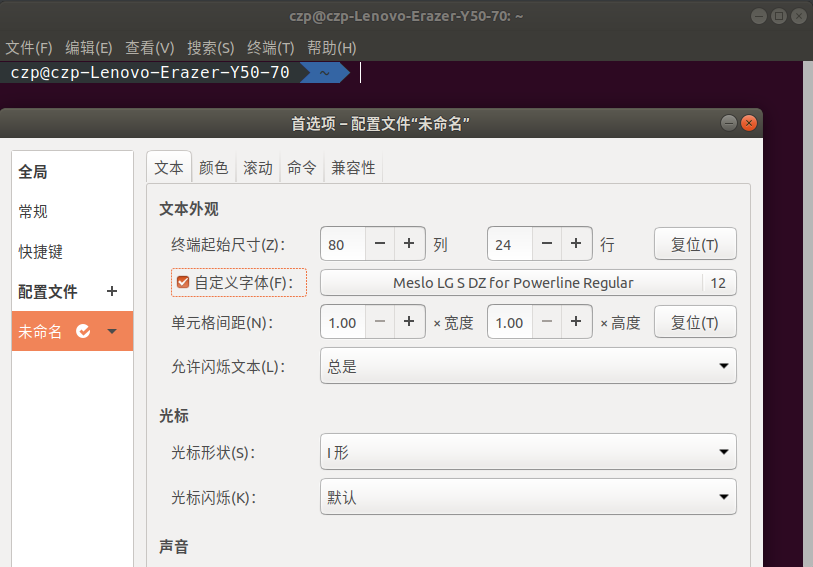
ubuntu 终端首选项

很好, 我们的终端看上去十分漂亮了.

插件

有时候, 我们看到别人的 zsh 是这样的

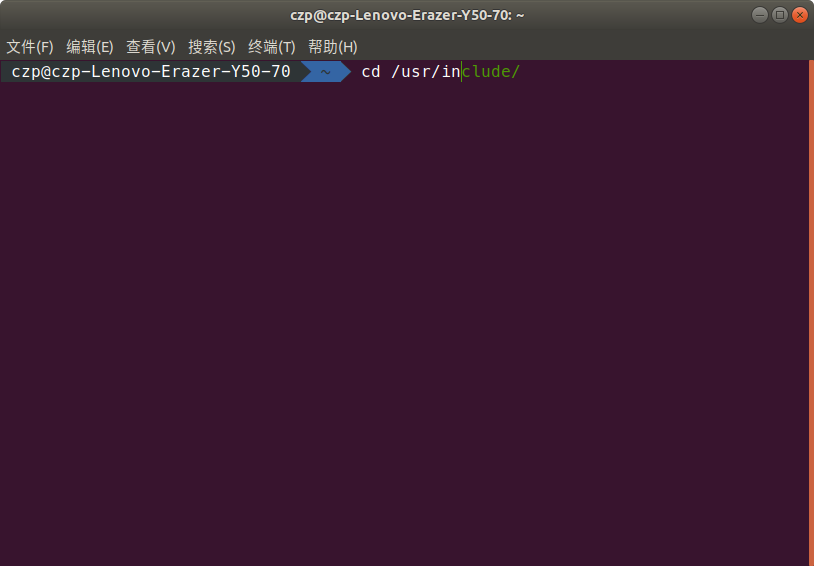
zsh incr 插件补全效果

命令还没输入完, zsh 就自动使用唯一可能的候选项充填了光标后的部分, 使得我们不需要不停的按 tab 来确认确实没有其他的以这几个字符开头的可能候选项.

但是这个功能并不是 zsh 自带的, 而是一个插件.

这个插件叫做 incr, 来自 https://mimosa-pudica.net/zsh-incremental.html

他的效果图是这样的
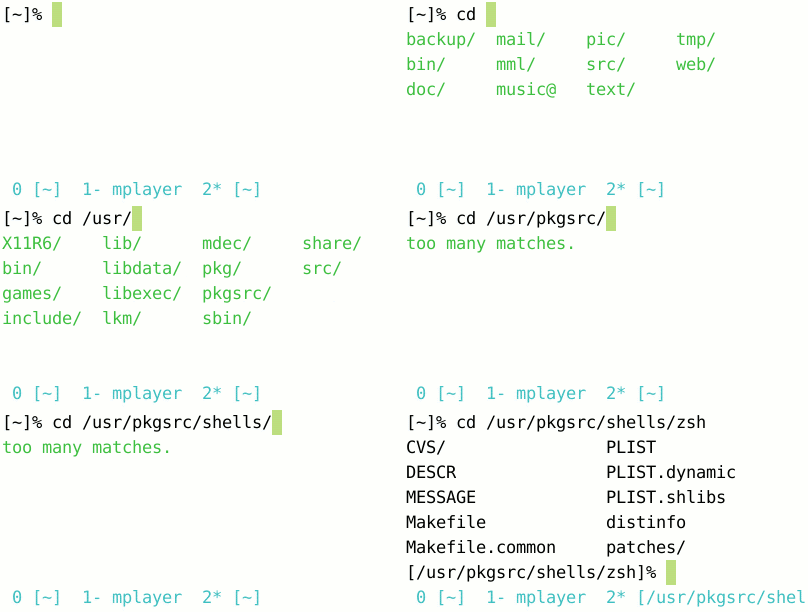
我们先下载它 https://mimosa-pudica.net/src/incr-0.2.zsh

然后我们将其改名并放入正确的目录

~/.oh-my-zsh/custom/plugins/incr/incr.plugin.zsh

修改 zsh 配置, 打开 ~/.zshrc

找到 plugins= 这一行

默认应该只有 git 插件被启用了, 我们将他改为

plugins=(
  git
  incr
)

然后重载配置.

source ~/.zshrc

现在, 我们的终端, 也非常好看非常好用了. 小伙伴们欢呼雀跃!