
惯性聚合 高效追踪和阅读你感兴趣的博客、新闻、科技资讯
阅读原文 在惯性聚合中打开

推荐订阅源

B
Blog
V
Vulnerabilities – Threatpost
Apple Machine Learning Research
V
V2EX
博客园 - 叶小钗
阮一峰的网络日志
阮一峰的网络日志
人人都是产品经理
人人都是产品经理
Latest news
Latest news
博客园 - 三生石上(FineUI控件)
美团技术团队
aimingoo的专栏
aimingoo的专栏
Google Online Security Blog
Security Archives - TechRepublic
T
Threatpost
Y
Y Combinator Blog
T
Tailwind CSS Blog
CTFtime.org: upcoming CTF events
A
Arctic Wolf
C
Cyber Attacks, Cyber Crime and Cyber Security
小众软件
小众软件
Recent Commits to openclaw:main
T
Tenable Blog
W
WeLiveSecurity
L
LINUX DO - 热门话题
D
Docker
Cyberwarzone
Cyberwarzone
量子位
A
About on SuperTechFans
The Last Watchdog
The Last Watchdog
雷峰网
雷峰网
C
CERT Recently Published Vulnerability Notes
P
Palo Alto Networks Blog
The Hacker News
The Hacker News
Blog — PlanetScale
Blog — PlanetScale
P
Proofpoint News Feed
OSCHINA 社区最新新闻
OSCHINA 社区最新新闻
F
Full Disclosure
The Cloudflare Blog
T
The Blog of Author Tim Ferriss
T
The Exploit Database - CXSecurity.com
Engineering at Meta
Engineering at Meta
O
OpenAI News
Hacker News - Newest:
Hacker News - Newest: "LLM"
Scott Helme
Scott Helme
IT之家
IT之家
S
Secure Thoughts
MongoDB | Blog
MongoDB | Blog
L
Lohrmann on Cybersecurity
博客园 - 司徒正美
Google DeepMind News

czp's blog

Ubuntu 下使用 zsh · HonKit 使用 VNC 来远程管理服务器 · HonKit Linux 下无限试用 JetBrains · HonKit 使用 KMS 激活 Windows · HonKit 为 KVM 中的 Windows 虚拟机启用 VirtIO · HonKit 在 Spring Boot 中处理 MissingKotlinParameterException · HonKit 用 Spring Native 拯救微服务 · HonKit 正确调试 PHP · HonKit Ubuntu 增加最大文件打开数量限制 · HonKit 将 Minecraft 服务端编译到 native · HonKit 用凝聚力购买 P 社游戏 DLC · HonKit 模拟超星网课 Android 客户端 · HonKit 模拟 Bilibili Android 客户端 · HonKit 模拟哔咔 Android 客户端 · HonKit 异步是什么 · HonKit 部署 Spring Native 到 GCP App Engine · HonKit 多个 Gradle SubProject 同时编译导致 CI/CD 内存耗尽 · HonKit Google Cloud Build 运行 DIND · HonKit 在 Google Storage 中部署 SPA · HonKit Terraform 不自动更新 CloudRun service · HonKit Telegram Bot 收不到普通群聊消息的问题 · HonKit 加密货币交易 · HonKit 挖掘以太坊 · HonKit 挖掘门罗币 · HonKit 小明学英语 · HonKit 卖程序的小女孩 · HonKit 一个测试工程师走进一家酒吧 · HonKit 我给你们讲个 TCP 笑话吧! · HonKit 我给你们讲个 UDP 笑话吧! · HonKit 格局打开 · HonKit c 语言常见未定义行为 · HonKit 在 Kotlin 使用 SpaceEngineers Remote API · HonKit Kotlin 协程 · HonKit 在 Spring Boot 中正确注册 Jackson Module · HonKit Spring Boot Jpa 使用 Google Cloud SQL · HonKit Spring Boot 中配置单页应用 · HonKit Spring Boot 无法加载 ClasspathResource 问题 · HonKit 正确打包 Spring Boot 到 war · HonKit czp's blog · HonKit 鸣谢列表 · HonKit 友链 · HonKit
GCP Pub/Sub push 至 IAP 保护的 Endpoint · HonKit
2026-04-11 · via czp's blog

众所周知 IAP(Identity Aware Proxy)对 AppEngine 开启后, 所有 GAE 的 service 都需要先通过 OAuth2 鉴权才能访问. 普通用户在浏览器打开 IAP 保护的 GAE 地址就会被跳转到登录页面去登录谷歌账号. 那问题来了, Pub/Sub 的消息如果要推送到一个 IAP 保护的地址应该怎么操作.

创建 subscription 的时候如果选择了 Push 方式, 下面就会有一个 Enable Authentication 的勾选框. 填好 Endpoint(必须得是谷歌可以验证其所属的地址, 比如 GAE) 后再选择一个用来产生 JWT 签名的服务账号. 命令行操作可以看 https://cloud.google.com/pubsub/docs/push#setting_up_for_push_authentication

(命令行操作还需要手动给予 Pub/Sub 自动创建的服务账号额外权限, 详见上面的文档链接)
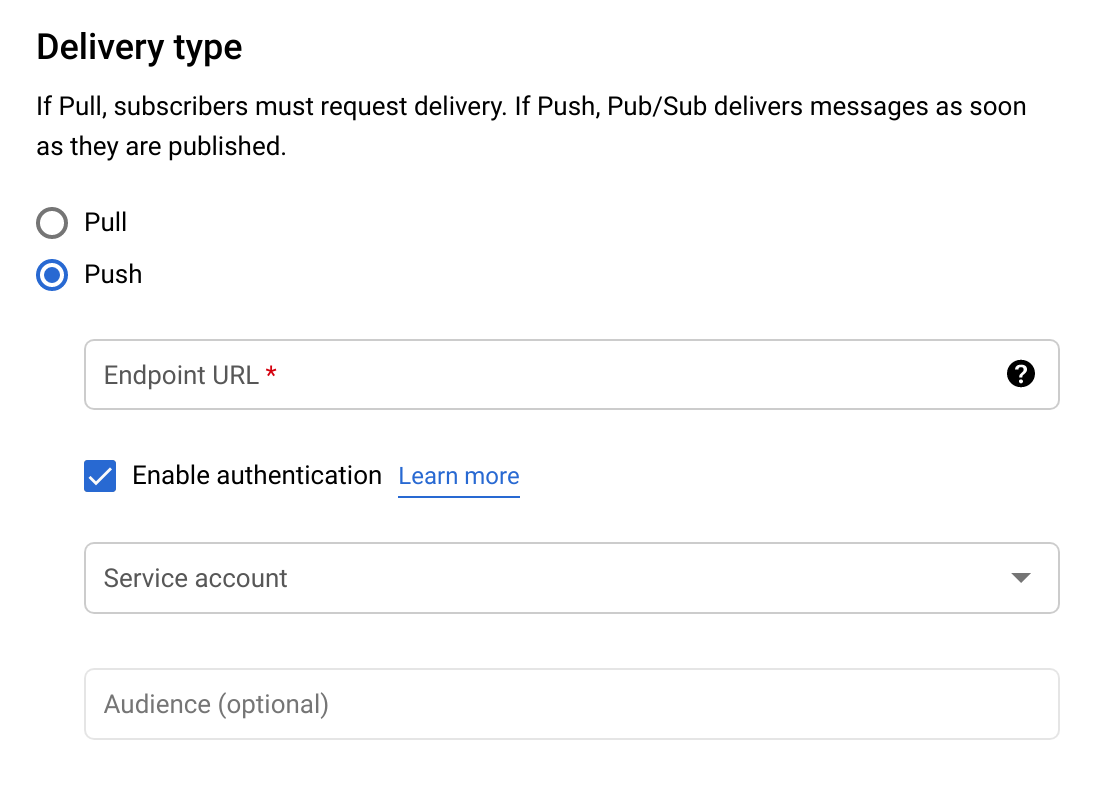
之后就像授权普通用户访问 IAP 那样给 JWT 签名用的服务账号添加 IAP-secured Web App User 权限. 然后来试一试.

随便发个消息, 以为已经弄好了, 结果消息一直没有 ACK.

更气人的是看不到 IAP 的访问日志, 日志里只有 IAP 设置的修改.

这一部分日志属于 API 内部日志, 不由用户代码产生, 默认不记录这些日志, 要先去 Audit Logs (在网页控制台搜索这一页面)打开 IAP 日志.
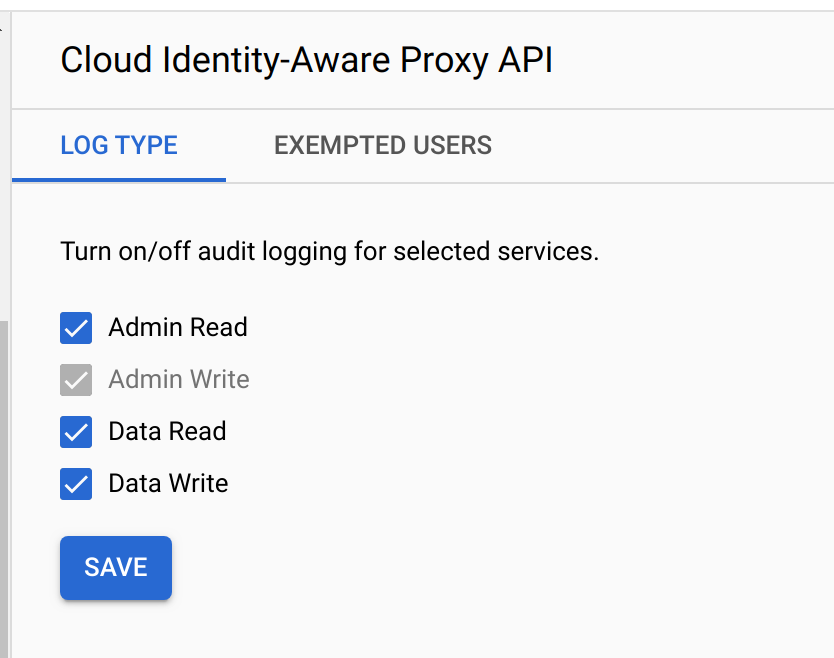
Logging 中按以下 Query 来查询日志

resource.type="gae_app"

可以在左边的 Log Fields 看到一个 module_id 是 null 的东西
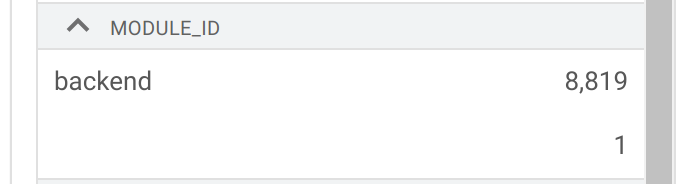
这个没有名字的模块就是 IAP 的访问日志, 由于它没有名字不能单独筛选, 只能混在所有 module 的日志里一起看.

然后就会看到一个双感叹号的条目, 赫然写着 'Permission Denied'. 这说明 Pub/Sub 发出的请求没有通过 IAP 验证.

在 StackOverflow 搜索这个问题只有一个结果, 评论区有人提到创建 subscription 时的 Audience 是必填项, 其值为 IAP 自己的 Client ID(不是用于签 JWT 的服务账号的 OAuth2 Client ID) https://stackoverflow.com/questions/57817374/google-pub-sub-push-message-not-working-for-iap-enabled-app-engine#comment104348926_58151897

我们回到 IAP 的文档去看 Programmatic Authentication 一节再去看一下 https://cloud.google.com/iap/docs/authentication-howto#accessing_the_application

自己获取 JWT 的 curl 命令是这样的

curl --verbose \
      --data client_id=DESKTOP_CLIENT_ID \
      --data client_secret=DESKTOP_CLIENT_SECRET \
      --data refresh_token=REFRESH_TOKEN \
      --data grant_type=refresh_token \
      --data audience=IAP_CLIENT_ID \
      https://oauth2.googleapis.com/token

配文: 'IAP_CLIENT_ID is the primary client ID used to access your application, and DESKTOP_CLIENT_ID and DESKTOP_CLIENT_SECRET are the client ID and secret you created when you set up the client ID above'

DESKTOP_CLIENT_ID 就是用来产生 JWT 用的服务账号的 Client ID, 而 IAP_CLIENT_ID 是系统给出的 IAP 自己的 Client ID.

回到 Credentials 页面, 除了每个服务账号对应的 Client IDs, 还会有一个系统创建 Client 的叫做 IAP-App-Engine-app

把 IAP-App-Engine-app 对应的 Client ID 填到 subscription 的 audience 就可以让 Sub/Pub 正确推送到目标 GAE 了.

不得不说, 谷歌的文档写的是真的烂.