






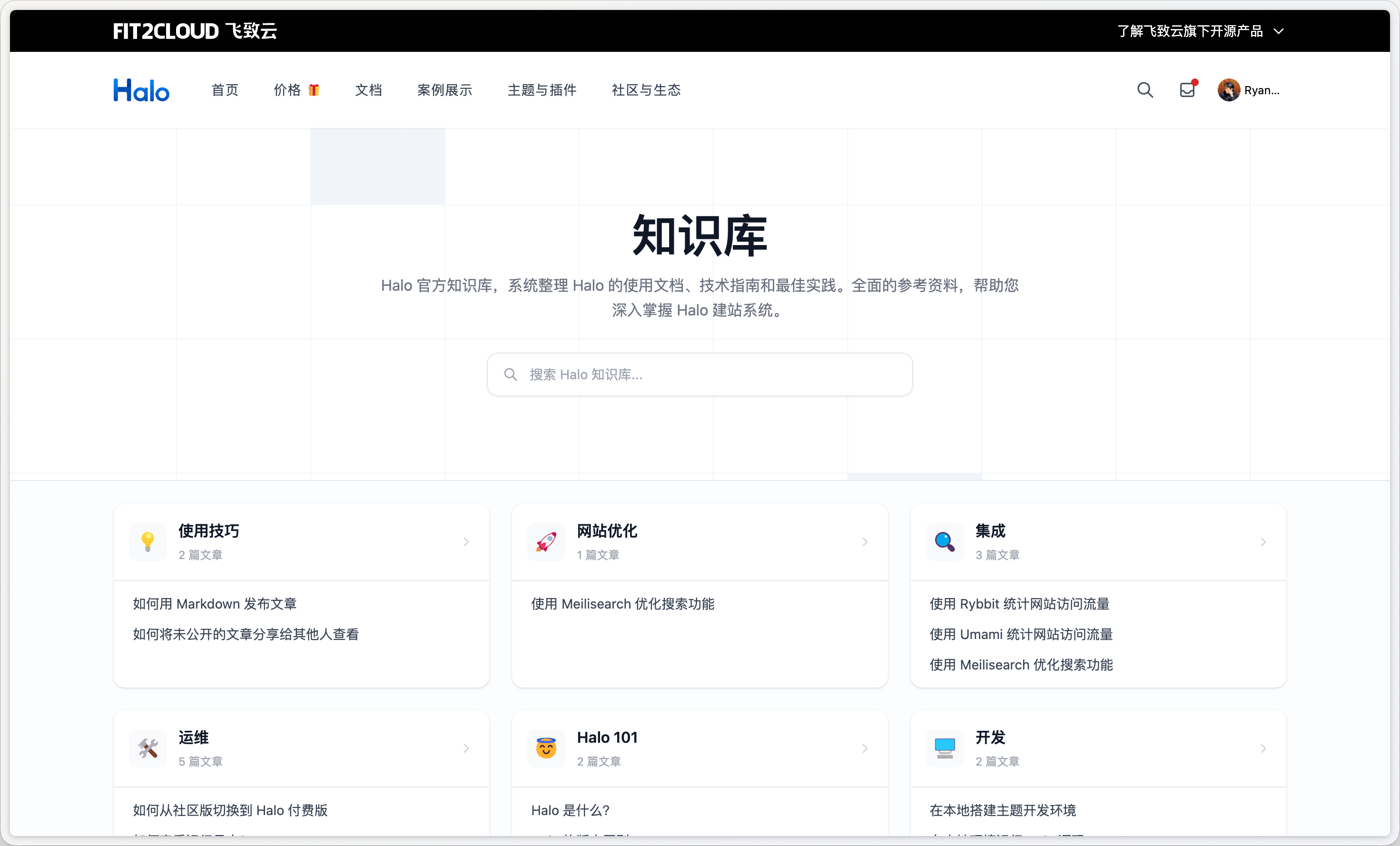
随着 Halo 站点内容越来越丰富,许多站长会面临一个问题:博客列表页适合展示时效性内容,但对于产品文档、使用教程、常见问题等结构化知识内容来说,用普通博客列表来组织显得太扁平,用户很难快速找到自己需要的内容。
本文介绍如何利用 Halo 的自定义分类模板机制,在不依赖任何额外插件的情况下,为主题添加一套完整的知识库页面,包括知识库入口和子分类文章列表。
实现原理
Halo 支持在 theme.yaml 中为分类(category)注册额外的渲染模板,称为 自定义分类模板。用户在后台管理某个分类时,可以从下拉菜单中选择使用哪套模板来渲染该分类页面。
知识库的层级结构正好与分类树对应:
知识库根分类(使用 category_knowledge_base_root 模板)
├── 入门指南(使用 category_knowledge_base 模板)
│   ├── 文章 A
│   └── 文章 B
└── 进阶使用(使用 category_knowledge_base 模板)
    ├── 文章 C
    └── 文章 D
第一步:在 theme.yaml 注册模板
在 theme.yaml 的 spec.customTemplates 下注册模板:
spec:
  customTemplates:
    post:
      - name: 知识库
        description: 知识库文章页
        file: post_knowledge_base.html
    category:
      - name: 知识库入口
        description: 知识库入口页,展示所有子分类及文章预览
        file: category_knowledge_base_root.html
      - name: 知识库
        description: 知识库子分类,展示该分类下的文章列表
        file: category_knowledge_base.html
修改完 theme.yaml 后,需要在后台 主题 → 重载主题配置 才能生效。之后在分类设置中就能看到这些模板选项。
第二步:知识库入口页
模板名称:category_knowledge_base_root.html
入口页负责展示整个知识库的全貌:标题、描述、搜索入口,以及所有子分类的卡片网格。
核心 API
categoryFinder.getByNames(category.spec.children)— 根据父分类的children字段获取子分类列表postFinder.listByCategory(1, 5, subCat.metadata.name)— 获取每个子分类的前 5 篇文章
<!-- Hero 区域:展示知识库标题、描述和搜索入口 -->
<section class="hero">
  <h1 th:text="${category.spec.displayName}"></h1>
  <p
    th:text="${category.spec.description ?: '快速查找所需内容,轻松解决每一个问题。'}"
  ></p>

  <!-- 搜索按钮(需安装 PluginSearchWidget) -->
  <button
    th:if="${pluginFinder.available('PluginSearchWidget')}"
    onclick="javascript: SearchWidget.open();"
    type="button"
  >
    搜索文章...
  </button>
</section>

<!-- 子分类宫格 -->
<section class="kb-grid-section">
  <th:block
    th:with="subCategories = ${categoryFinder.getByNames(category.spec.children)}"
  >
    <div class="kb-grid">
      <th:block th:each="subCat : ${subCategories}">
        <div
          th:with="subPosts = ${postFinder.listByCategory(1, 5, subCat.metadata.name)}"
          class="kb-card"
        >
          <!-- 卡片头部:图标 + 名称 + 文章数 -->
          <a th:href="@{${subCat.status.permalink}}" class="kb-card-header">
            <img
              th:unless="${#strings.isEmpty(subCat.spec.cover)}"
              th:src="${subCat.spec.cover}"
            />
            <h2 th:text="${subCat.spec.displayName}"></h2>
            <span th:text="|${subCat.postCount} 篇文章|"></span>
          </a>
          <!-- 文章预览列表 -->
          <ul class="kb-article-list">
            <li th:each="post : ${subPosts.items}">
              <a
                th:href="@{${post.status.permalink}}"
                th:text="${post.spec.title}"
              ></a>
            </li>
            <li th:if="${subPosts.total > 5}">
              <a
                th:href="@{${subCat.status.permalink}}"
                th:text="|查看全部 ${subPosts.total} 篇 →|"
              ></a>
            </li>
          </ul>
        </div>
      </th:block>
    </div>
  </th:block>
</section>
有两处值得注意:搜索按钮通过 pluginFinder.available('PluginSearchWidget') 判断是否安装了搜索插件,安装了才渲染,点击后调用 SearchWidget.open() 打开全站搜索弹窗;子分类的图标直接使用了 category.spec.cover,可以在后台为每个子分类上传一张图标图片。
第三步:子分类文章列表页
模板名称:category_knowledge_base.html
该模板使用分类模板的标准变量 category(当前分类信息)和 posts(分页文章列表),展示当前子分类下的所有文章。
面包屑导航
利用 categoryFinder.getBreadcrumbs(category.metadata.name) 自动生成完整路径,无需手动维护层级关系:
<nav
  th:with="breadcrumbs = ${categoryFinder.getBreadcrumbs(category.metadata.name)}"
>
  <ol>
    <li><a href="/">首页</a></li>
    <li th:each="bc, stats : ${breadcrumbs}">
      <a
        th:unless="${stats.last}"
        th:href="@{${bc.status.permalink}}"
        th:text="${bc.spec.displayName}"
      ></a>
      <span
        th:if="${stats.last}"
        th:text="${bc.spec.displayName}"
        aria-current="page"
      ></span>
    </li>
  </ol>
</nav>
文章列表
文章列表不显示封面,只展示标题和发布日期,保持知识库的专注感:
<ul class="post-list">
  <li th:each="post : ${posts.items}">
    <a th:href="@{${post.status.permalink}}" th:text="${post.spec.title}"></a>
    <time th:text="${#dates.format(post.spec.publishTime, 'yyyy-MM-dd')}"></time>
  </li>
</ul>

<nav th:if="${posts.hasPrevious() || posts.hasNext()}">
  <a
    th:href="@{${posts.prevUrl}}"
    th:classappend="${!posts.hasPrevious() ? 'disabled' : ''}"
    rel="prev"
    >
    上一页
  </a>
  <span th:text="|${posts.page} / ${posts.totalPages}|"></span>
  <a
    th:href="@{${posts.nextUrl}}"
    th:classappend="${!posts.hasNext() ? 'disabled' : ''}"
    rel="next"
    >
  下一页
  </a>
</nav>
第四步:知识库文章页
模板名称:post_knowledge_base.html
这一步并非必须。如果你希望知识库的文章和其他文章样式不同(比如去掉封面图、简化作者信息、侧边栏只保留目录),可以单独新建一个文章模板 post_knowledge_base.html。
文章模板同样可以使用 categoryFinder.getBreadcrumbs 来生成面包屑,只需从文章的第一个分类开始反查路径:
<th:block
  th:unless="${#lists.isEmpty(post.categories)}"
  th:with="breadcrumbs = ${categoryFinder.getBreadcrumbs(post.categories[0].metadata.name)}"
>
  <!-- 面包屑结构同上 -->
</th:block>
在 Halo 后台配置
完成模板开发后,在 Halo 后台按以下步骤配置:
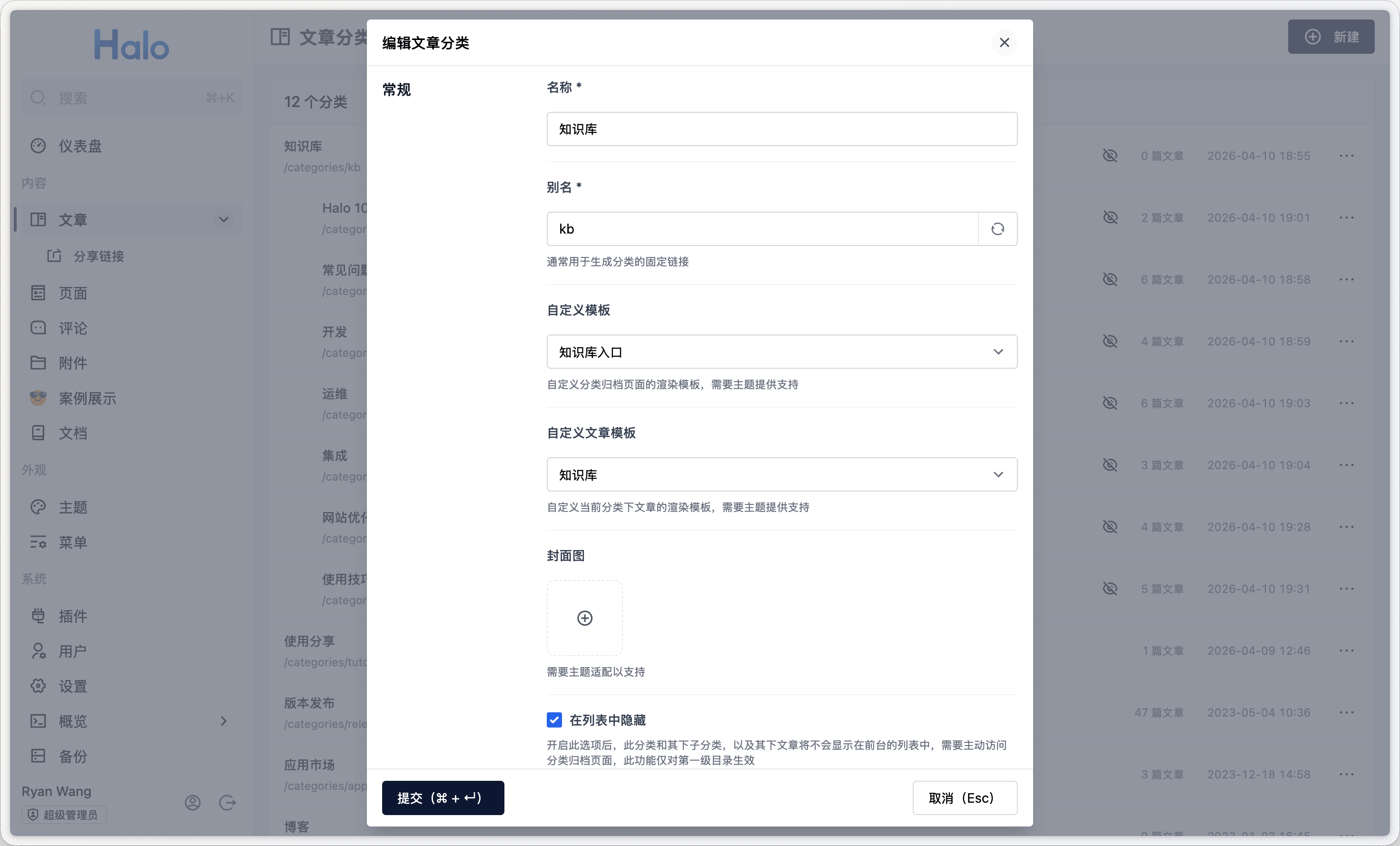
新建知识库根分类:自定义模板选择「知识库入口」,如果你为知识库的文章单独新建了文章模板,还可以在此处设置自定义文章模板为「知识库」。另外建议勾选在列表中隐藏,勾选之后该分类下的文章将不会出现在博客归档、首页文章列表等公共列表中,相当于把知识库内容从博客流中独立出来。
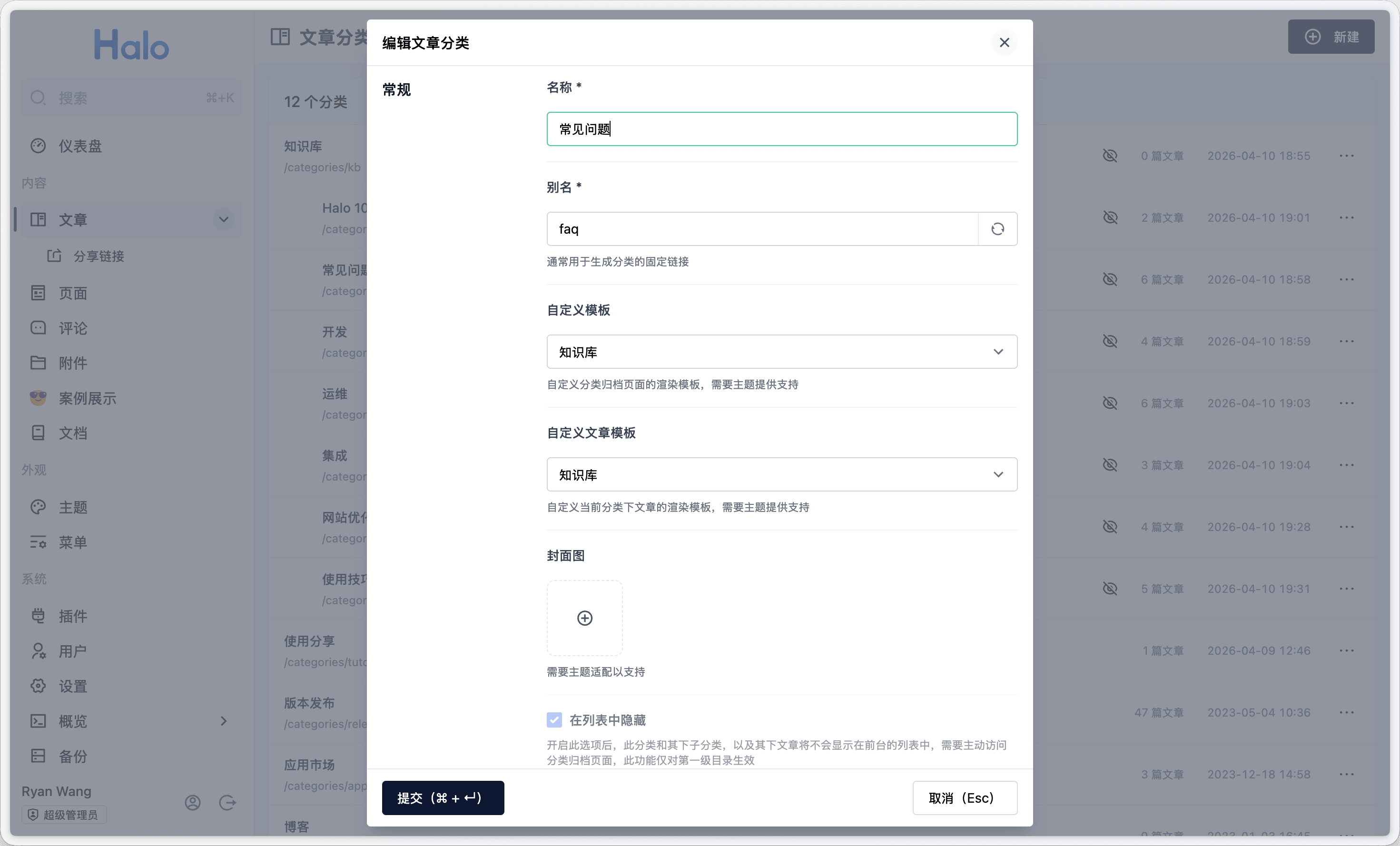
新建子分类:在根分类下新建若干子分类(如「入门指南」「常见问题」),自定义模板选择「知识库」。日后发布文章时只需勾选对应子分类即可自动归入知识库体系。
总结
整套知识库功能完全基于 Halo 现有机制实现,无需额外插件:
| 功能 | 机制 |
|---|---|
| 多套页面样式 | theme.yaml 自定义分类模板 |
| 子分类列表 | categoryFinder.getByNames(category.spec.children) |
| 文章预览列表 | postFinder.listByCategory(page,size,name) |
| 面包屑导航 | categoryFinder.getBreadcrumbs(name) |
| 搜索入口 | pluginFinder.available() + SearchWidget.open() |
| 内容隔离 | 分类「在列表中隐藏」选项 |
这种「模板即功能」的思路在 Halo 主题开发中非常实用,同样可以用来做产品发布页、案例展示页等差异化内容区域。