


惯性聚合 高效追踪和阅读你感兴趣的博客、新闻、科技资讯
阅读原文 在惯性聚合中打开

推荐订阅源

IT之家
IT之家
奇客Solidot–传递最新科技情报
奇客Solidot–传递最新科技情报
大猫的无限游戏
大猫的无限游戏
美团技术团队
OSCHINA 社区最新新闻
OSCHINA 社区最新新闻
博客园_首页
MyScale Blog
MyScale Blog
N
Netflix TechBlog - Medium
I
InfoQ
Jina AI
Jina AI
Martin Fowler
Martin Fowler
Recent Announcements
量子位
月光博客
月光博客
罗磊的独立博客
雷峰网
雷峰网
The Cloudflare Blog
V
V2EX
小众软件
小众软件
人人都是产品经理
人人都是产品经理
博客园 - Franky
T
Tailwind CSS Blog
有赞技术团队
有赞技术团队
S
SegmentFault 最新的问题

Help Net Security

Police arrest 10 suspected members of Black Axe cybercrime gang ShinyHunters claims it stole 1.4 million records from Udemy Sevii unveils Cyber Swarm Defense Mode to stop AI-driven attacks at scale Alleged Chinese hacker extradited to US over cyberattacks targeting COVID-19 research Cequence Agent Personas bring granular control and governance to enterprise AI agents NowSecure MARI gives enterprises evidence-based visibility into third-party mobile app risk The metrics killing your SOC, and what to use instead US state privacy fines reached $3.425 billion in 2025 Canada’s first SMS blaster case leads to three arrests Linux storage management tool Stratis 3.9.0 adds online encryption and cache-less pool startup TLS Connect gives SMBs a right-sized automated tool to manage TLS certificates Aptori expands its platform with autonomous offensive testing to reduce security bottlenecks Your IAM was built for humans, AI agents don’t care The AI criminal mastermind is already hiring on gig platforms 25 open-source cybersecurity tools that don’t care about your budget Product showcase: LuLu reveals unauthorized outbound connections from Mac apps Week in review: Claude Mythos finds 271 Firefox flaws, Vercel breach Users advised to drop passwords and make room for passkeys - Help Net Security Indirect prompt injection is taking hold in the wild - Help Net Security Compromised everyday devices power Chinese cyber espionage operations - Help Net Security New Cisco firewall malware can only be killed by pulling the plug - Help Net Security Meta is overhauling how you sign in, manage settings, and protect your accounts - Help Net Security Ubuntu 26.04 LTS delivers memory-safe system tools and live patching for Arm servers - Help Net Security OpenAI’s GPT-5.5 is out with expanded cybersecurity safeguards - Help Net Security AI is speeding up nation-state cyber programs - Help Net Security A study of 1,000 Android apps finds a privacy policy logging gap - Help Net Security IT spending to hit $6.31 trillion record, thanks to AI - Help Net Security Where AI in CI/CD is working for engineering teams - Help Net Security With AI's help, North Korean hackers stumbled into a near-undetectable attack - Help Net Security Hacker with a special interest in breaching sports institutions ends behind bars - Help Net Security
Microsoft's workplace check-in via Wi-Fi tracks who's in ...
Anamarija Pogorelec · 2026-06-15 · via Help Net Security

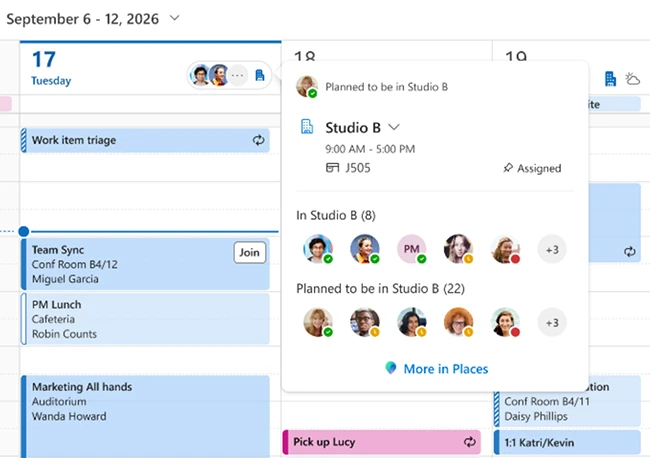
Microsoft is rolling out workplace check-in via Wi-Fi for Teams and Microsoft Places. Connect to your office network and your in-office presence updates automatically, no manual status change needed.

Microsoft says the signal isn’t stored as location history, and that you can configure your own settings. Here’s the catch. Your employer enables the feature at the tenant level, and you only control how it’s used on your end. Privacy advocates and labor groups have already flagged that gap.
microsoft workplace check-in

How Wi-Fi workplace check-in works

When enabled by the organization and the employee, workplace check-in via Wi-Fi can automatically update a user’s work location when their device connects to a configured workplace network. Employees can manage workplace check-in, presence sharing, and location permissions through their settings. They can also manually set or override their work location.

Microsoft says workplace presence is an in-the-moment signal that indicates where someone is working, such as in the office or remotely, and is not stored as historical data. The feature does not track or retain employees’ movements or location history. At least for now.

“It applies only to workplace contexts. The signal is generated when a device connects to configured corporate office networks through the Teams client and does not extend beyond those environments. If a device is not connected to a configured workplace network, the user’s location is shown as ‘Remote’,” Brennan McReynolds, Product Lead at Microsoft Places, explained.

Workplace check-in and presence sharing are separate decisions. In Microsoft Places, Teams, and Outlook, coworkers can see whether someone is working from the office or remotely and, in some cases, whether they are currently at a workplace. Employees can choose whether to share this information with others when working from the office.