
惯性聚合 高效追踪和阅读你感兴趣的博客、新闻、科技资讯
阅读原文 在惯性聚合中打开

推荐订阅源

Jina AI
Jina AI
云风的 BLOG
云风的 BLOG
人人都是产品经理
人人都是产品经理
T
The Blog of Author Tim Ferriss
阮一峰的网络日志
阮一峰的网络日志
罗磊的独立博客
J
Java Code Geeks
博客园 - 聂微东
B
Blog
奇客Solidot–传递最新科技情报
奇客Solidot–传递最新科技情报
WordPress大学
WordPress大学
腾讯CDC
L
LangChain Blog
Apple Machine Learning Research
Microsoft Azure Blog
D
DataBreaches.Net
The GitHub Blog
The GitHub Blog
美团技术团队
博客园 - Franky
Google DeepMind News
V
V2EX
让小产品的独立变现更简单 - ezindie.com
月光博客
月光博客
The Cloudflare Blog

Help Net Security

Police arrest 10 suspected members of Black Axe cybercrime gang ShinyHunters claims it stole 1.4 million records from Udemy Sevii unveils Cyber Swarm Defense Mode to stop AI-driven attacks at scale Alleged Chinese hacker extradited to US over cyberattacks targeting COVID-19 research Cequence Agent Personas bring granular control and governance to enterprise AI agents NowSecure MARI gives enterprises evidence-based visibility into third-party mobile app risk The metrics killing your SOC, and what to use instead US state privacy fines reached $3.425 billion in 2025 Canada’s first SMS blaster case leads to three arrests Linux storage management tool Stratis 3.9.0 adds online encryption and cache-less pool startup TLS Connect gives SMBs a right-sized automated tool to manage TLS certificates Aptori expands its platform with autonomous offensive testing to reduce security bottlenecks Your IAM was built for humans, AI agents don’t care The AI criminal mastermind is already hiring on gig platforms 25 open-source cybersecurity tools that don’t care about your budget Product showcase: LuLu reveals unauthorized outbound connections from Mac apps Week in review: Claude Mythos finds 271 Firefox flaws, Vercel breach Users advised to drop passwords and make room for passkeys - Help Net Security Indirect prompt injection is taking hold in the wild - Help Net Security Compromised everyday devices power Chinese cyber espionage operations - Help Net Security New Cisco firewall malware can only be killed by pulling the plug - Help Net Security Meta is overhauling how you sign in, manage settings, and protect your accounts - Help Net Security Ubuntu 26.04 LTS delivers memory-safe system tools and live patching for Arm servers - Help Net Security OpenAI’s GPT-5.5 is out with expanded cybersecurity safeguards - Help Net Security AI is speeding up nation-state cyber programs - Help Net Security A study of 1,000 Android apps finds a privacy policy logging gap - Help Net Security IT spending to hit $6.31 trillion record, thanks to AI - Help Net Security Where AI in CI/CD is working for engineering teams - Help Net Security With AI's help, North Korean hackers stumbled into a near-undetectable attack - Help Net Security Hacker with a special interest in breaching sports institutions ends behind bars - Help Net Security
Phishing hides in routine Microsoft 365 workflows - Help ...
Sinisa Markovic · 2026-06-23 · via Help Net Security

Attackers are abusing Outlook Groups and Microsoft 365 collaboration features to make phishing campaigns appear routine, according to Fortra.

“The technique shifts malicious intent away from a single phishing email into a trusted productivity workflow. A user may see what looks like a normal group addition, internal update, shared resource, or calendar item before being pushed toward an action,” said Daud Jawad, Security Engineer on Fortra’s Intelligence & Threat Management team.

The attack begins when a target is added to or invited into an attacker-controlled Microsoft 365 Group. The group’s name, description, or welcome message is designed to create urgency, often using themes such as payroll updates, contract renewals, supplier requests, or mandatory training notices.
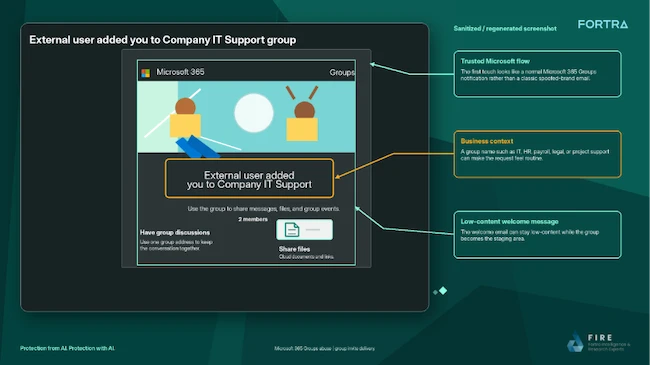
Microsoft 365 Outlook phishing

Attackers use Microsoft 365 Groups as an entry point for phishing campaigns (Source: Fortra)

Follow-up content is delivered through the group mailbox, shared files, or calendar invitations, often using one of four CalPhishing techniques. CalPhishing, short for Calendar Phishing, uses Outlook and Microsoft 365 calendar features to deliver phishing lures through meeting invitations and .ics files that can place events directly on a victim’s calendar.

Victims may be prompted to review a document, approve a request, sign in to an account, or download a file. The final action can lead to credential theft, token theft, malware delivery, data exposure, or further social engineering activity.

Fortra said the value of CalPhishing lies in repeated exposure. A user might ignore the initial email, then later notice the calendar event, open the invitation, read the description, click a link, or access a referenced file. Over time, the event can start to look like an unfinished work task, while calendar reminders keep bringing it back into view.

“Shared files create another path,” added Jawad.

“A clean group email can still lead to a document containing a fake support process, QR code, credential-harvesting page, macro lure, or remote-access instruction. Because the content is reached through a Microsoft collaboration surface, the user may treat it safer than a direct attachment.”

Fortra warned that these attacks can complicate investigations because the activity is spread between email, Microsoft 365 Groups, shared files, and calendar events.

“Unexpected groups, meetings, and shared files should be treated with the same caution as unexpected emails, especially when the theme is urgent, administrative, or account related,” concluded Jawad.