








Security and data governance are among the key considerations in Google’s latest AI update, which introduces Workspace Intelligence within Google Workspace.
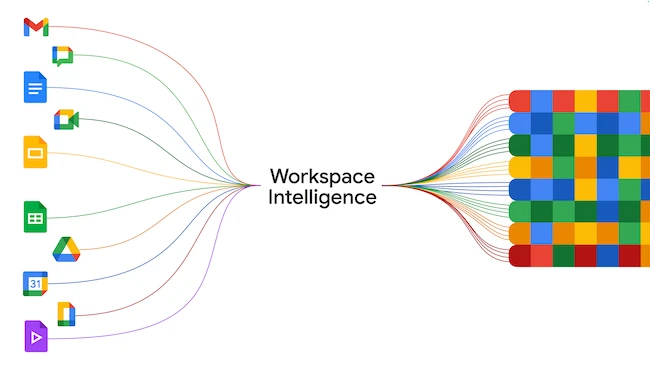
Google describes the feature as “a secure, dynamic system that inherently understands complex semantic relationships within your Workspace apps (such as Docs, Slides, or Gmail) content, your active projects, your collaborators, and your organization’s domain knowledge.”
“Workspace Intelligence is built on the same reliable, secure, and compliant infrastructure as the rest of Workspace,” Yulie Kwon Kim, VP, Product at Google, said.
Workspace Intelligence relies on access to organizational data to generate responses and suggestions. According to Google, the system draws from services such as Gmail, Drive, Calendar, and Chat to build context based on a user’s activity and available content.
The company says these capabilities operate within existing access controls, with AI-generated responses limited to content a user is already permitted to view. Permissions are enforced at the individual level. Google also states in its Workspace privacy documentation that customer data is not used to train generative AI models outside the service or for advertising purposes.
Administrative controls are part of the setup. Organizations can decide which Workspace services are used to support AI features, with options to enable or disable specific data sources. These settings apply at the organizational level and may take up to 48 hours to take effect. By default, supported data sources are enabled.
“If you turn off Workspace Intelligence or disable a specific data source, generative AI features won’t actively search for content from the disabled source. However, if a user adds a specific source to their prompt, that source will be used to help Gemini answer,” Google notes.
Access to data sources can also be controlled by an organization’s Data Loss Prevention (DLP) rules.
Google indicates that AI features may evolve in how they use Workspace Intelligence data sources, with some becoming required and others less central.
Organizations can restrict where data is processed and stored to meet regulatory requirements, including limiting it to the US or the EU, with more countries supported in the future, such as Germany and India. Client-side encryption allows control over encryption keys and limits access to sensitive data, including by Google.
The system also extends into everyday tools within Google Workspace, where AI features are built into existing workflows.
In Chat, “Ask Gemini” lets users describe what they want to do in natural language and have the system pull in information from conversations and documents to generate a response or complete a task. It can gather details, bring together relevant information, and produce results without requiring users to manually gather information from different apps.
Workspace Intelligence also supports features in Gmail, Docs, and Slides. In Gmail and Docs, users can generate drafts based on emails and files, while in Slides, AI can assist with creating presentations using available content. These features use information already available in Workspace to assist with everyday tasks.
The system can, for example, create project updates by pulling information from meeting notes, chat discussions, and related documents. It can summarize conversations, highlight key points, and generate updates, with responses including citations to the original sources.
“We believe AI should help you get things done. It should understand what projects are most important and how to prioritize work. It should understand the key stakeholders, and which information will be most helpful to accomplish any task,” concluded Kwon Kim.
此内容由惯性聚合(RSS阅读器)自动聚合整理,仅供阅读参考。 原文来自 — 版权归原作者所有。