
惯性聚合 高效追踪和阅读你感兴趣的博客、新闻、科技资讯
阅读原文 在惯性聚合中打开

推荐订阅源

WordPress大学
WordPress大学
博客园 - 司徒正美
宝玉的分享
宝玉的分享
阮一峰的网络日志
阮一峰的网络日志
The Cloudflare Blog
月光博客
月光博客
博客园 - 【当耐特】
让小产品的独立变现更简单 - ezindie.com
奇客Solidot–传递最新科技情报
奇客Solidot–传递最新科技情报
博客园 - 三生石上(FineUI控件)
博客园 - 聂微东
小众软件
小众软件
Hugging Face - Blog
Hugging Face - Blog
酷 壳 – CoolShell
酷 壳 – CoolShell
Apple Machine Learning Research
V
V2EX
Jina AI
Jina AI
钛媒体:引领未来商业与生活新知
钛媒体:引领未来商业与生活新知
OSCHINA 社区最新新闻
OSCHINA 社区最新新闻
罗磊的独立博客
雷峰网
雷峰网
博客园 - 叶小钗
量子位
IT之家
IT之家

Help Net Security

FIDO Alliance wants to keep AI agents from going rogue on online payments Police arrest 10 suspected members of Black Axe cybercrime gang ShinyHunters claims it stole 1.4 million records from Udemy Sevii unveils Cyber Swarm Defense Mode to stop AI-driven attacks at scale Alleged Chinese hacker extradited to US over cyberattacks targeting COVID-19 research Cequence Agent Personas bring granular control and governance to enterprise AI agents NowSecure MARI gives enterprises evidence-based visibility into third-party mobile app risk The metrics killing your SOC, and what to use instead US state privacy fines reached $3.425 billion in 2025 Canada’s first SMS blaster case leads to three arrests Linux storage management tool Stratis 3.9.0 adds online encryption and cache-less pool startup TLS Connect gives SMBs a right-sized automated tool to manage TLS certificates Aptori expands its platform with autonomous offensive testing to reduce security bottlenecks Your IAM was built for humans, AI agents don’t care The AI criminal mastermind is already hiring on gig platforms 25 open-source cybersecurity tools that don’t care about your budget Product showcase: LuLu reveals unauthorized outbound connections from Mac apps Week in review: Claude Mythos finds 271 Firefox flaws, Vercel breach Users advised to drop passwords and make room for passkeys - Help Net Security Indirect prompt injection is taking hold in the wild - Help Net Security Compromised everyday devices power Chinese cyber espionage operations - Help Net Security New Cisco firewall malware can only be killed by pulling the plug - Help Net Security Meta is overhauling how you sign in, manage settings, and protect your accounts - Help Net Security Ubuntu 26.04 LTS delivers memory-safe system tools and live patching for Arm servers - Help Net Security OpenAI’s GPT-5.5 is out with expanded cybersecurity safeguards - Help Net Security AI is speeding up nation-state cyber programs - Help Net Security A study of 1,000 Android apps finds a privacy policy logging gap - Help Net Security IT spending to hit $6.31 trillion record, thanks to AI - Help Net Security Where AI in CI/CD is working for engineering teams - Help Net Security With AI's help, North Korean hackers stumbled into a near-undetectable attack - Help Net Security
Product showcase: Syncthing for secure, private file sync...
Anamarija Po · 2026-04-20 · via Help Net Security

Syncthing is a free and open-source application that synchronizes files directly between your devices. Instead of uploading data to a central server, it uses a peer-to-peer approach, transferring files whenever peers are online. This decentralized model ensures that your data remains private and under your control.
Syncthing private file synchronization

Syncthing monitors shared folders for changes. When a file is created, modified, or removed, updates are propagated to connected peers. Synchronization happens automatically once they are online, keeping folder contents consistent without manual intervention.

Device identity and connections

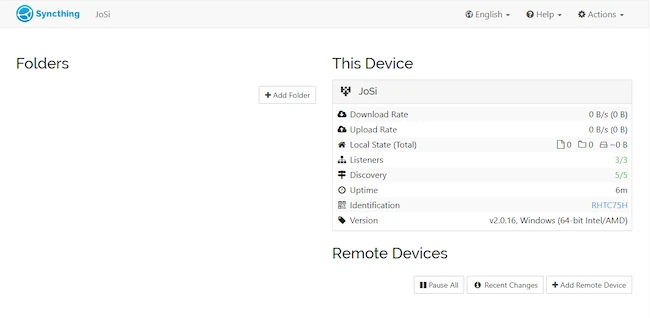
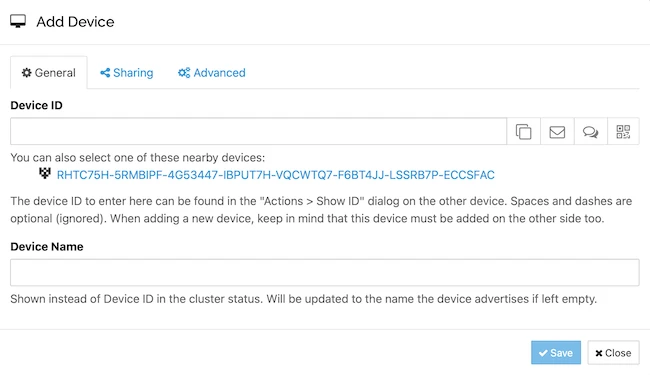
Syncthing does not require account creation because it does not rely on a central server. Identity, authentication, and trust are handled directly between peers. Each instance is assigned a unique device ID generated at first startup, which is used to establish trust. Connections are formed by exchanging these IDs and approving them on both sides, creating trusted relationships without external services.
Syncthing private file synchronization

Syncthing private file synchronization

Setup and interface

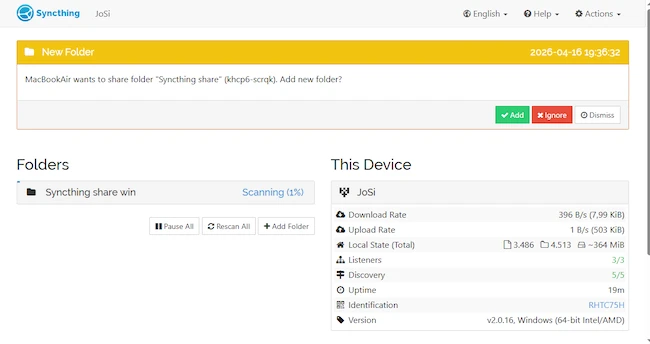
Initial setup involves installing the application, connecting devices, and selecting folders to share. In this setup, the application was installed on both a Windows system and a macOS device.

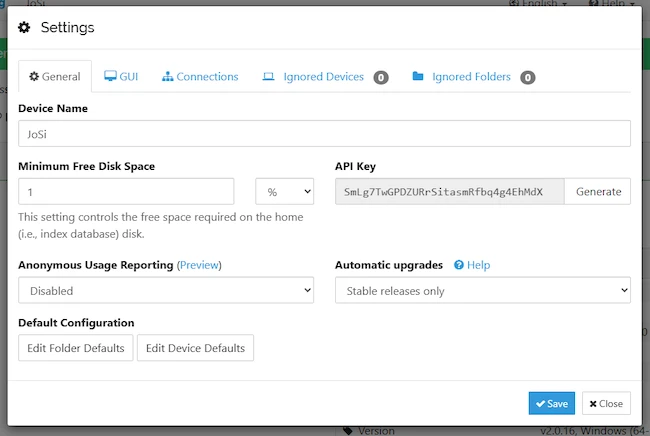
Syncthing is managed through a local web-based interface. The device ID generated at startup is used to add and authorize remote peers. The interface provides access to settings, folder management, and synchronization status.
Syncthing private file synchronization

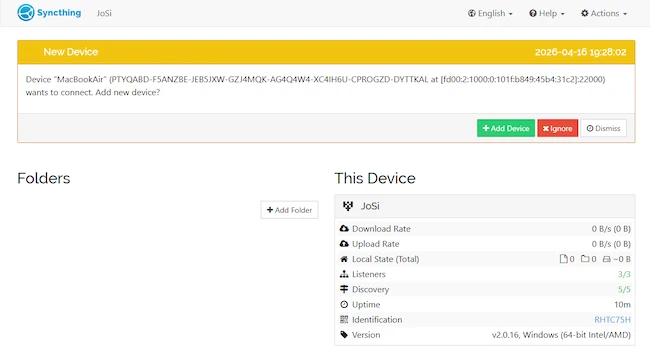
To establish a connection, a remote peer is added using its device ID. The request must be approved on both sides before becoming active. Once approved, the peers are ready to share data.
Syncthing private file synchronization

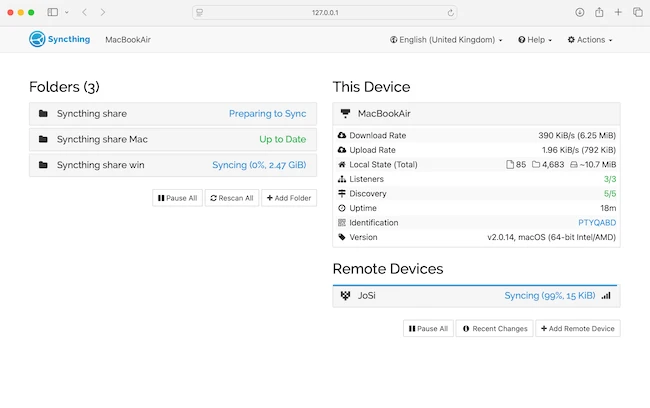
The synchronization process starts with indexing files, followed by comparing states between devices. Data is transferred directly, and the interface displays progress through stages such as scanning, preparing to sync, and active transfer. Once complete, the folder status indicates that it is up to date. The interface also shows transfer rates, file counts, and connection status.
Syncthing private file synchronization

Built-in security and privacy

All communication between devices is encrypted, and connections are established only after mutual approval. Syncthing uses secure protocols to protect data during transfer, and no third-party servers store user files. This ensures that data remains on user-controlled devices and is shared only with explicitly trusted peers.

Conclusion

Syncthing provides a straightforward way to keep files synchronized across devices without relying on external services. In testing across Windows and macOS, file transfers were consistent and required minimal intervention, making Syncthing a practical solution for maintaining local control over data while keeping it accessible on multiple systems.