惯性聚合 高效追踪和阅读你感兴趣的博客、新闻、科技资讯
阅读原文 在惯性聚合中打开

推荐订阅源

Forbes - Security
Forbes - Security
GbyAI
GbyAI
OSCHINA 社区最新新闻
OSCHINA 社区最新新闻
S
SegmentFault 最新的问题
Y
Y Combinator Blog
Recorded Future
Recorded Future
博客园 - Franky
I
InfoQ
T
The Blog of Author Tim Ferriss
Recent Announcements
Cyber Security Advisories - MS-ISAC
博客园_首页
阮一峰的网络日志
阮一峰的网络日志
T
Tailwind CSS Blog
Cyberwarzone
Cyberwarzone
The Register - Security
H
Hackread – Cybersecurity News, Data Breaches, AI and More
Threat Intelligence Blog | Flashpoint
雷峰网
雷峰网
P
Palo Alto Networks Blog
G
GRAHAM CLULEY
Cloudbric
Cloudbric
CTFtime.org: upcoming CTF events
MongoDB | Blog
MongoDB | Blog
F
Full Disclosure
Google DeepMind News
Recent Commits to openclaw:main
C
Check Point Blog
爱范儿
爱范儿
The GitHub Blog
The GitHub Blog
cs.AI updates on arXiv.org
W
WeLiveSecurity
T
Threat Research - Cisco Blogs
U
Unit 42
N
Netflix TechBlog - Medium
The Cloudflare Blog
Spread Privacy
Spread Privacy
Microsoft Azure Blog
美团技术团队
T
Troy Hunt's Blog
Engineering at Meta
Engineering at Meta
H
Heimdal Security Blog
TaoSecurity Blog
TaoSecurity Blog
C
Cybersecurity and Infrastructure Security Agency CISA
T
Tenable Blog
B
Blog
S
Securelist
H
Hacker News: Front Page
Google Online Security Blog
G
Google Developers Blog

王一石

十币称侯 松鼠的隐秘仓库 深入浅出 Ordinals 如何搭建 Bitcoin Core 比特币全节点 BTC NFT 铸造指南 安全上网指南 2 2021 flag 为什么不要劝你身边的人买比特币 Ledger 信息泄露后续
如何将 Siri 的生产力提高100倍
王一石 · 2023-03-17 · via 王一石

ChatGPT 早与我的工作流结合得紧密,而且通过搭配各种 Chrome 魔法插件(比如 ChatGPT for GoogleChatGPT WriterVoice Control for ChatGPT 等等 …),我们可以更进一步地释放其能力。

在我个人的使用中,ChatGPT 最常用的几种方式包括:

  • 翻译和编辑中英文内容。经过实测,与 DeepL、Quillbot 和 Grammarly 相比,ChatGPT的表现要强得多。
  • 解决工作问题。在65%的情况下,ChatGPT 可以代替 Google、Stack Overflow 和 Wikipedia。
  • 提供健康咨询,比大多数健康类 App 更加靠谱。

虽然我可以花很长篇幅来逐一解释 ChatGPT 的用法,但这不是本文的主要目的。

既然 ChatGPT 这么强,我们应该怎样将其与 Siri 结合,让 Siri 也能够“听懂人话”,从而转变为生产力工具,而不是吃灰?

答案是,当然可以。

前期准备

在进行以下步骤之前,你需要做好以下准备:

  • 有效的 ChatGPT 账号,普通版即可,不需要 Plus 版。
  • 有效的梯子,因为 ChatGPT 目前无法通过中国大陆 IP 访问。
  • 一部打开了 iCloud 的 iPhone。

设置 ChatGPT 账号

访问 ChatGPT 官网,获取你的 API 私钥。

注意,ChatGPT 不支持香港节点访问,确保你使用日本、新加坡或其他地区的节点,并开启梯子的全局模式。
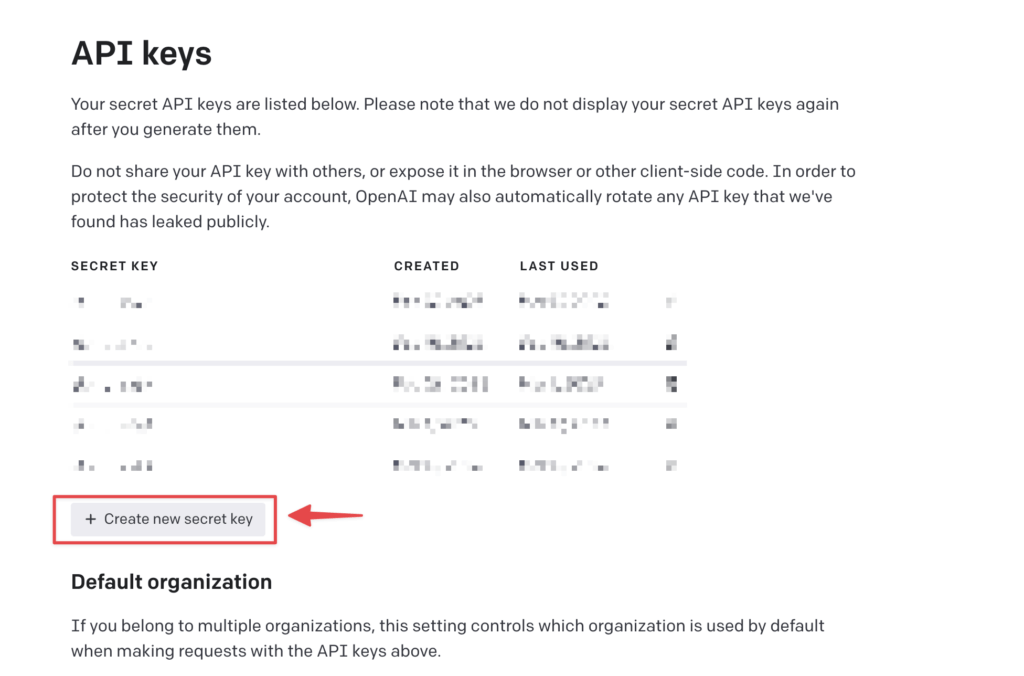
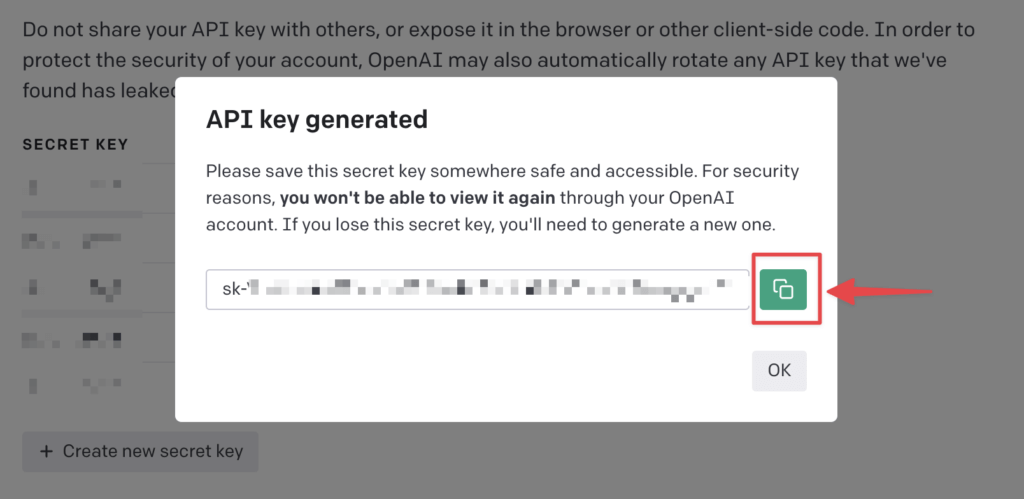
点击 “Create new secret key”,并在弹窗中复制这串以 sk 开头的私钥,粘贴并保存在一个安全的地方,比如 1Password 这样的密码管理器,或者保存在本地。
拿起你的 iPhone,访问这个网址

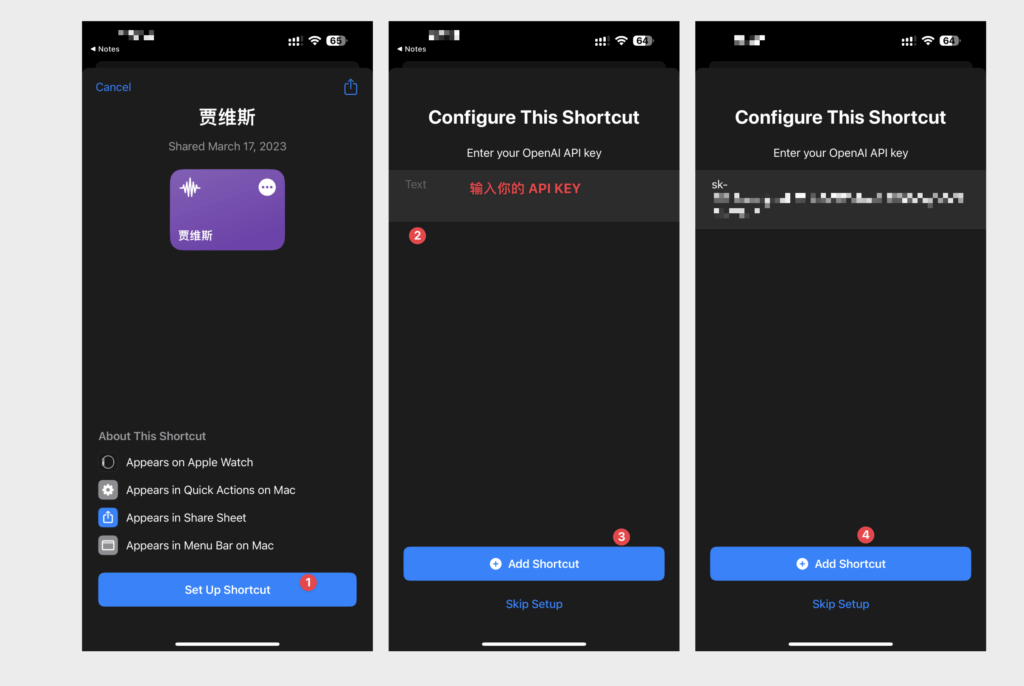
这是我配置好的一个 iOS 快捷指令,我们姑且叫它「贾维斯」。

你会看到如下界面。

  1. 添加这个快捷指令
  2. 输入你的 API Key(私钥,以 sk 开头)
  3. 完成添加

接下来,长按 iPhone Home 键或机身右侧的电源键,唤醒 Siri,并说出「贾维斯」这个快捷指令的名字。

Siri 会询问你,是否允许「贾维斯」连接 api.openai.com ,选允许。
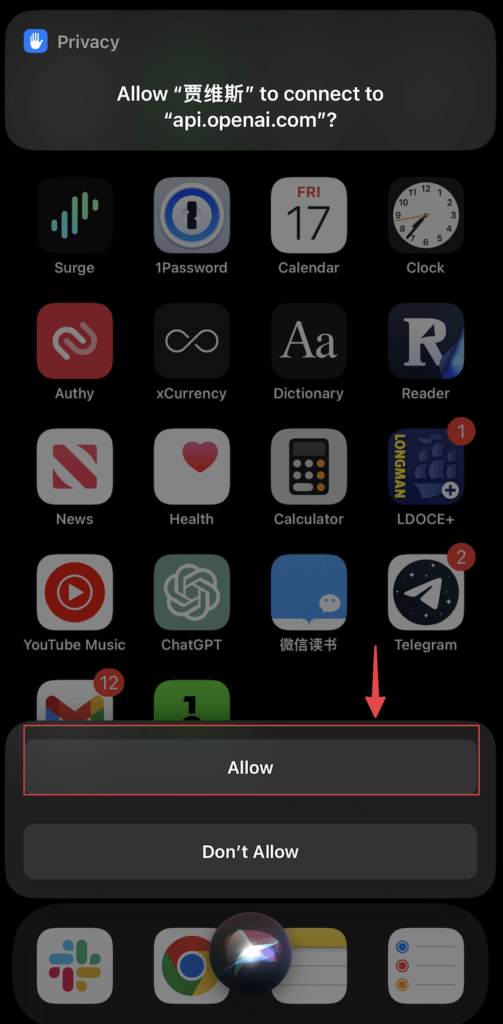
到这里就全部搞定了,非常简单。

请记住,以后每次要唤起 ChatGPT,都要先说出这个「贾维斯」这个指令,然后再继续,不然还是会调用原本的智障 Siri。

效果对比

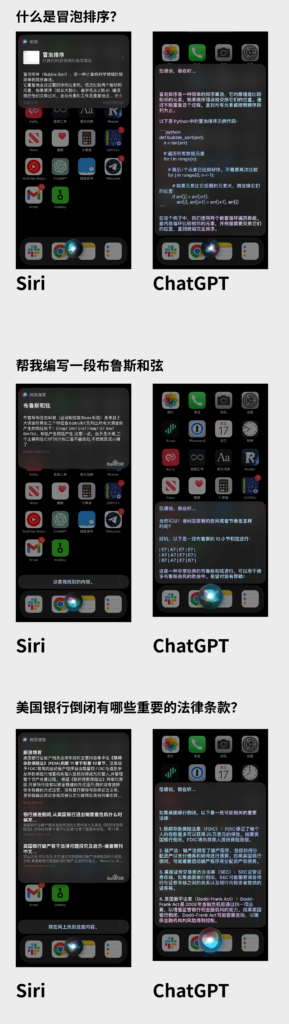
我分别问了 Siri 和 ChatGPT 相同的3个问题,你们感受下差距:

  • 什么是冒泡排序?
  • 帮我编写一段布鲁斯和弦
  • 美国银行倒闭有哪些重要的法律条款?

补充

  • 你可以修改这个快捷指令的名字,叫它「小辣椒」、「小爱同学」、「乔布斯」…  什么都行。
  • 将 iPhone 的 Siri 语言切换成英文,并让 ChatGPT 扮演雅思或托福考官,你就得到了一个24×7陪练的、母语水平的家教,它的能力和知识面完爆市面上绝大多数语言软件和培训班。
  • 保管好你的 API Key,不要泄露给其他人。
  • 如果你有 HomePod,通过软路由等方式搭好梯子后,你就可以在全屋范围内随时唤起 ChatGPT。

以上,慢慢享用。