惯性聚合 高效追踪和阅读你感兴趣的博客、新闻、科技资讯
阅读原文 在惯性聚合中打开

推荐订阅源

Help Net Security
Help Net Security
G
Google Developers Blog
雷峰网
雷峰网
WordPress大学
WordPress大学
Threat Intelligence Blog | Flashpoint
Engineering at Meta
Engineering at Meta
Security Latest
Security Latest
T
Threat Research - Cisco Blogs
AWS News Blog
AWS News Blog
F
Full Disclosure
C
Cybersecurity and Infrastructure Security Agency CISA
T
The Exploit Database - CXSecurity.com
J
Java Code Geeks
U
Unit 42
C
Cyber Attacks, Cyber Crime and Cyber Security
V
V2EX
C
Cisco Blogs
博客园 - 司徒正美
Project Zero
Project Zero
L
LINUX DO - 热门话题
阮一峰的网络日志
阮一峰的网络日志
Blog — PlanetScale
Blog — PlanetScale
Scott Helme
Scott Helme
A
About on SuperTechFans
Hugging Face - Blog
Hugging Face - Blog
S
Securelist
小众软件
小众软件
aimingoo的专栏
aimingoo的专栏
S
Schneier on Security
G
GRAHAM CLULEY
酷 壳 – CoolShell
酷 壳 – CoolShell
Cyberwarzone
Cyberwarzone
MongoDB | Blog
MongoDB | Blog
钛媒体:引领未来商业与生活新知
钛媒体:引领未来商业与生活新知
博客园 - 叶小钗
T
Threatpost
Recorded Future
Recorded Future
C
CXSECURITY Database RSS Feed - CXSecurity.com
宝玉的分享
宝玉的分享
N
News and Events Feed by Topic
人人都是产品经理
人人都是产品经理
The Register - Security
S
Security Archives - TechRepublic
博客园 - Franky
N
News | PayPal Newsroom
Simon Willison's Weblog
S
SegmentFault 最新的问题
W
WeLiveSecurity
A
Arctic Wolf
B
Blog

噜啦 - Linux笔记本

du和ls查看文件大小不同的原因 - 噜啦 服务管理工具 systemctl - 噜啦 进程的控制与进程之间的关系 - 噜啦 ps 和 top 命令查看进程 - 噜啦 Grub 配置文件介绍以及忘记root密码的解决方法 - 噜啦 CentOS 手动升级/安装内核 - 噜啦 网络管理和配置文件 - 噜啦 route 查看路由 - 噜啦 ifconfig 网络管理 - 噜啦
网络故障排除命令 - 噜啦
博主: 噜啦 · 2020-02-14 · via 噜啦 - Linux笔记本

网络故障排除命令

  • 发布时间:
  • 1565 次浏览
  • 1522字数
  • 分类: Linux笔记本
  1. 首页
  2. 正文  
  • ping
  • traceroute
  • mtr
  • nslookup
  • telnet
  • tcpdump
  • netstat
  • ss

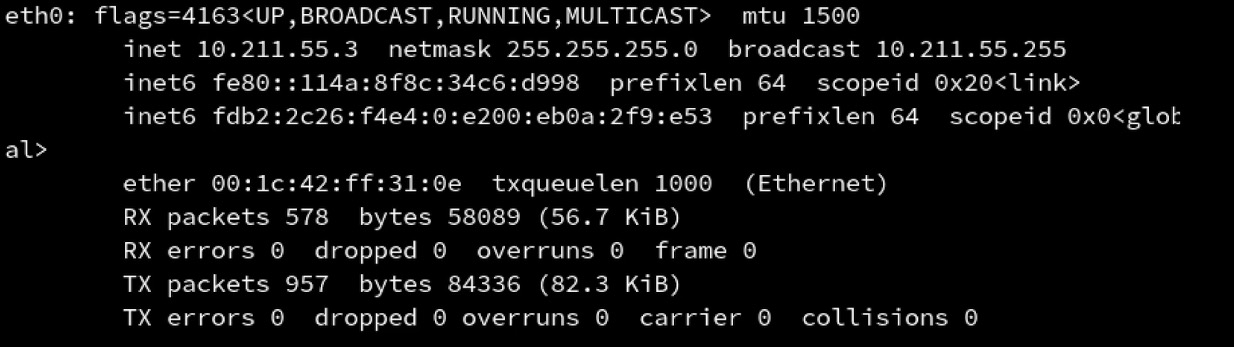
ifconfig 网卡信息

ifconfig <网卡名称>

traceroute 路由追踪

traceroute -w 1 coding.lula.fun

w: 超时时间

mtr 路由追踪

mtr <ip或者域名>

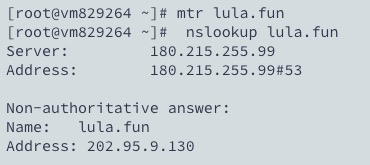
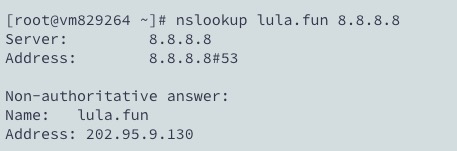
nslookup 查询IP

nslookup <域名> [dns服务器地址]

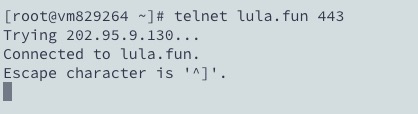
telnet 测试端口

telnet <domain> <port>
tcpdump 抓包

tcpdump -i any -n port 80
tcpdump -i any -n host 127.0.0.1
tcpdump -i any -n port 80 and host 127.0.0.1
tcpdump -i any -n port 80 and host 127.0.0.1 -w /tmp/afile

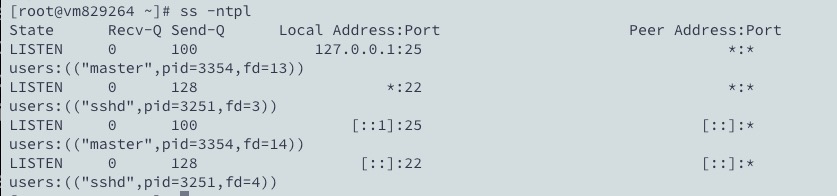
netstat/ss 查看端口占用

netstat -ntpl
ss -ntpl

赞赏作者

如果觉得我的文章对你有用,请随意赞赏

网络故障排除命令

 •