


惯性聚合 高效追踪和阅读你感兴趣的博客、新闻、科技资讯
阅读原文 在惯性聚合中打开

推荐订阅源

T
The Blog of Author Tim Ferriss
cs.CV updates on arXiv.org
云风的 BLOG
云风的 BLOG
Cyber Security Advisories - MS-ISAC
P
Palo Alto Networks Blog
D
Docker
H
Hackread – Cybersecurity News, Data Breaches, AI and More
S
Schneier on Security
Engineering at Meta
Engineering at Meta
I
InfoQ
L
LangChain Blog
Cyberwarzone
Cyberwarzone
T
Tenable Blog
WordPress大学
WordPress大学
P
Privacy & Cybersecurity Law Blog
罗磊的独立博客
Apple Machine Learning Research
Threat Intelligence Blog | Flashpoint
Jina AI
Jina AI
C
CERT Recently Published Vulnerability Notes
Scott Helme
Scott Helme
博客园 - 三生石上(FineUI控件)
酷 壳 – CoolShell
酷 壳 – CoolShell
Know Your Adversary
Know Your Adversary
D
Darknet – Hacking Tools, Hacker News & Cyber Security
The Last Watchdog
The Last Watchdog
Last Week in AI
Last Week in AI
Cloudbric
Cloudbric
S
SegmentFault 最新的问题
爱范儿
爱范儿
Application and Cybersecurity Blog
博客园 - 叶小钗
AI
AI
T
Tor Project blog
I
Intezer
T
Threatpost
www.infosecurity-magazine.com
V
Visual Studio Blog
N
News and Events Feed by Topic
Latest news
Latest news
S
Security Affairs
博客园 - Franky
Microsoft Security Blog
C
Cyber Attacks, Cyber Crime and Cyber Security
K
KPMG report finds enterprise disconnect between AI and its ROI | CIO
B
Blog RSS Feed
C
Cybersecurity and Infrastructure Security Agency CISA
Hugging Face - Blog
Hugging Face - Blog
小众软件
小众软件
S
Securelist

噜啦 - 折腾日记

博客启用全新域名 coding.lula.fun - 噜啦 小米降噪耳机 开箱|测评 - 噜啦 Handsome主题魔改 - 噜啦 CentOS 7 搭建私聊 Telegram Bot 运营商浏览器插入广告,如何解决? - 噜啦 Sublime配置C/C++ - 噜啦 NAT VPS配置DDNS - 噜啦
sublime 修改新标签页默认语法 - 噜啦
博主: 噜啦 · 2019-07-07 · via 噜啦 - 折腾日记
  1. 首页
  2. 正文  

本文方法来自 简书 @zhysv

sublime在新建标签页的时候,默认文件类型是plain text,每次需要手动更换的话确实有点麻烦,博主网上找了许久,终于发现了这篇可用教程,固自己详细写一下方法,以备后用

教程开始,以C++为例

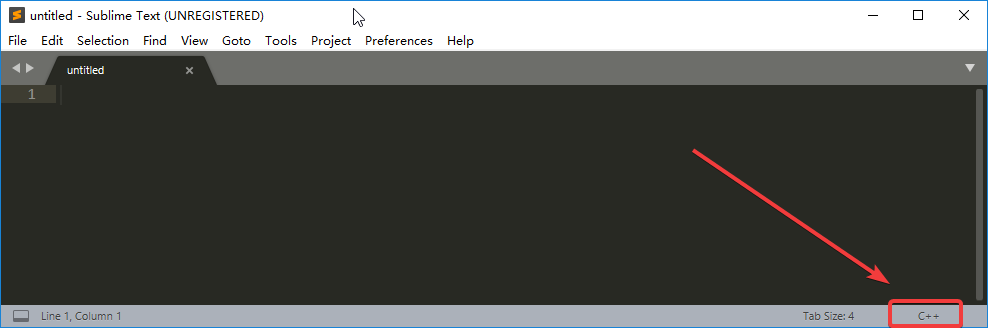
创建新标签页,选择语言类型,我的是C++
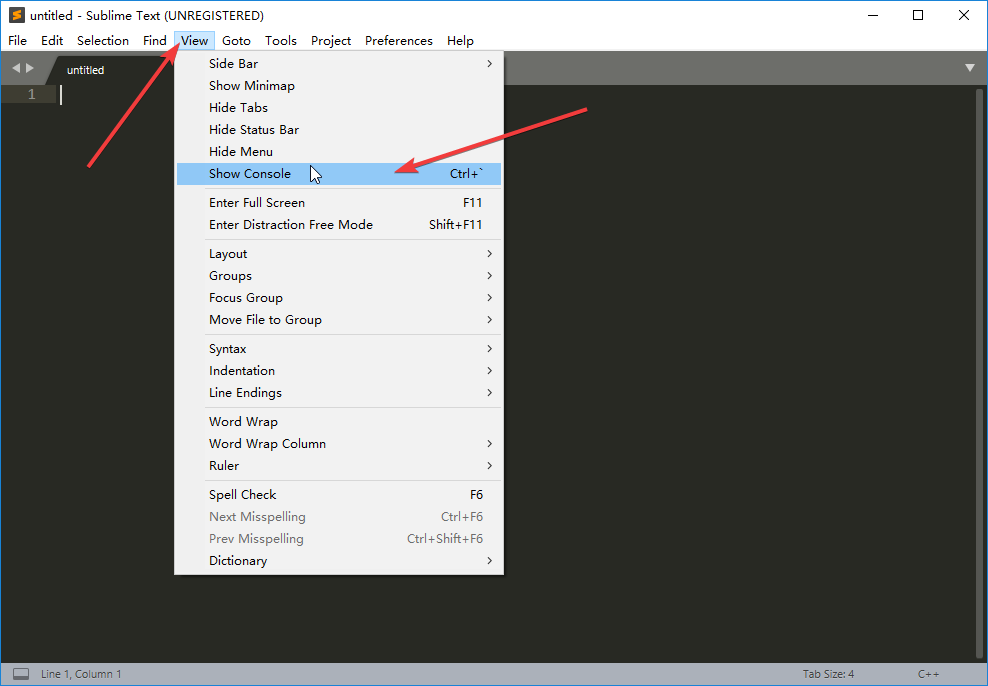
菜单栏 打开 View > Show Console 调出控制台

也可以使用 ctrl + `
8a1532d77f6c0d7b4cb8983afccf3602.png

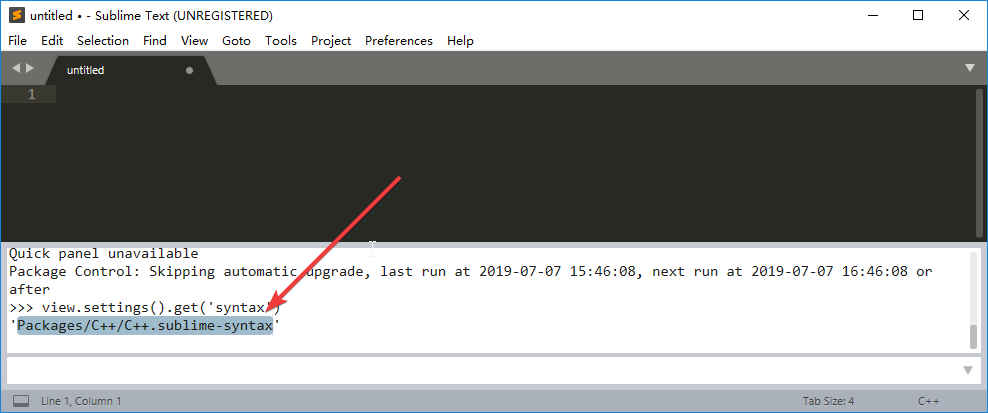
输入 view.settings().get('syntax'),回车

复制以Packages开头的Packages/C++/C++.sublime-syntax
8ca82c633fc49077b0a8f3c6c4e308d5.png

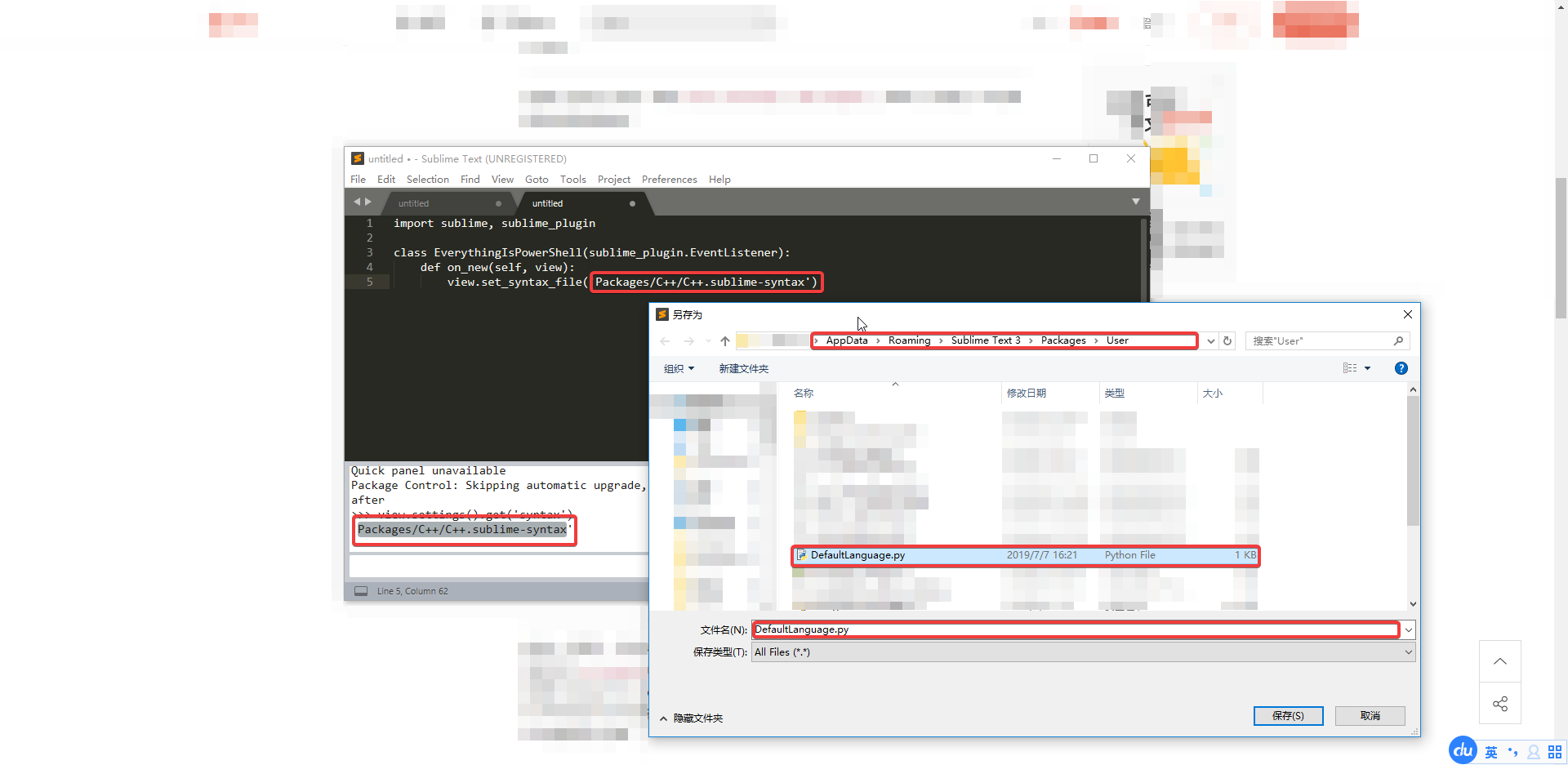
菜单栏 Tools > Developer > New Snippet...

输入以下代码

import sublime, sublime_plugin

class EverythingIsPowerShell(sublime_plugin.EventListener):
    def on_new(self, view):
        view.set_syntax_file('Packages/C++/C++.sublime-syntax')

其中Packages/C++/C++.sublime-syntax改为你刚才复制的内容,保存文件名为 DefaultLanguage.py

没错,是保存为python文件!

路径 插件文件夹/Packages/User/
7f27234079cb92d0aa9d97bc34d8d41f.png

重启Sublime,新建标签页时会发现默认的文件语言类型都是C++了,以后更换的时候只需要更换文件文件中步骤二中复制的内容即可


之前我写过sublime配置 C/C++ 环境的教程,想配置的同学可以参考这篇文章

赞赏作者

如果觉得我的文章对你有用,请随意赞赏

sublime 修改新标签页默认语法

 •