



惯性聚合 高效追踪和阅读你感兴趣的博客、新闻、科技资讯
阅读原文 在惯性聚合中打开

推荐订阅源

T
The Exploit Database - CXSecurity.com
A
Arctic Wolf
K
Kaspersky official blog
T
Threat Research - Cisco Blogs
PCI Perspectives
PCI Perspectives
www.infosecurity-magazine.com
P
Privacy International News Feed
K
KPMG report finds enterprise disconnect between AI and its ROI | CIO
U
Unit 42
cs.CL updates on arXiv.org
Simon Willison's Weblog
P
Privacy & Cybersecurity Law Blog
O
OpenAI News
量子位
奇客Solidot–传递最新科技情报
奇客Solidot–传递最新科技情报
C
Cisco Blogs
AWS News Blog
AWS News Blog
Vercel News
Vercel News
Microsoft Security Blog
Threat Intelligence Blog | Flashpoint
美团技术团队
T
Threatpost
S
Schneier on Security
Cyber Security Advisories - MS-ISAC
C
Cyber Attacks, Cyber Crime and Cyber Security
Last Week in AI
Last Week in AI
C
CERT Recently Published Vulnerability Notes
Blog — PlanetScale
Blog — PlanetScale
C
Cybersecurity and Infrastructure Security Agency CISA
F
Full Disclosure
博客园_首页
N
Netflix TechBlog - Medium
Security Latest
Security Latest
有赞技术团队
有赞技术团队
Google DeepMind News
钛媒体:引领未来商业与生活新知
钛媒体:引领未来商业与生活新知
The Register - Security
Application and Cybersecurity Blog
Recent Announcements
博客园 - Franky
P
Palo Alto Networks Blog
Project Zero
Project Zero
CTFtime.org: upcoming CTF events
H
Help Net Security
Hacker News: Ask HN
Hacker News: Ask HN
Cisco Talos Blog
Cisco Talos Blog
H
Heimdal Security Blog
The Hacker News
The Hacker News
博客园 - 【当耐特】
GbyAI
GbyAI

追剧生活网

前端代替iframe的方法 - 追剧生活网 写领券工具时,遇到的问题 - 追剧生活网 实例:php利用cURL传递post数据 - 追剧生活网 “无法启动程序,计算机丢失 MSVCP120.dll”终极解决办法 - 追剧生活网 利用jQuery实现绑定按钮变色写法 - 追剧生活网 今天什么也不做,好好哭一场。 - 追剧生活网 解决微信播放视频无法全屏 - 追剧生活网 2020年,愿你我安康 - 追剧生活网
html5的video标签播放m3u8视频 - 追剧生活网
mengkun · 2019-09-27 · via 追剧生活网

从每次开机时的广告弹窗,就可以看出flash大限将至了[aru_41]可能是想最后再捞一笔。谷歌浏览器对flash也是越来越不友好了。
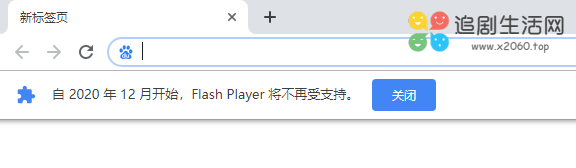
好了,不废话[aru_43]今天要说的是使用html5的video标签播放m3u8视频。但video标签支持的视频格式有

1、mp4

2、WebM

3、Ogg

没有包含m3u8格式,所以需要手动绑定解码。

需要用到的是:hls.min.js

可以引用远程的:

https://cdn.jsdelivr.net/hls.js/latest/hls.min.js

也可以自行下载到本地。

video标签中需要注意的是controls属性,不加这个属性播放器的进度条、音量、全屏按钮都不会显示。autoplay代表的是自动播放,另外建议宽度设置100%。

html代码如下,可点击[运行]查看效果:

<!--部分重要代码-->
<script src="https://cdn.jsdelivr.net/hls.js/latest/hls.min.js"></script>
 <video width="80%" id="videos" controls autoplay></video>

<!--手动绑定解码-->
<script>
        if(Hls.isSupported()) {
                  var video = document.getElementById('videos');
                  var hls = new Hls();
                  //下方放m3u8地址
                  hls.loadSource('https://vs1.baduziyuan.com/20171212/PMXDkWST/index.m3u8');
                  hls.attachMedia(video);
                  hls.on(Hls.Events.MANIFEST_PARSED,function() {
                    video.play();
                });
	}
</script>

好了,完工了。点此测试密码:666(刮刮乐)[aru_67]