惯性聚合 高效追踪和阅读你感兴趣的博客、新闻、科技资讯
阅读原文 在惯性聚合中打开

推荐订阅源

W
WeLiveSecurity
T
Tenable Blog
Project Zero
Project Zero
C
Cybersecurity and Infrastructure Security Agency CISA
T
The Exploit Database - CXSecurity.com
P
Palo Alto Networks Blog
S
Schneier on Security
Scott Helme
Scott Helme
S
Securelist
Know Your Adversary
Know Your Adversary
Vercel News
Vercel News
IT之家
IT之家
V
V2EX
F
Fortinet All Blogs
Simon Willison's Weblog
K
Kaspersky official blog
博客园_首页
T
Tailwind CSS Blog
The GitHub Blog
The GitHub Blog
Spread Privacy
Spread Privacy
Microsoft Security Blog
Cisco Talos Blog
Cisco Talos Blog
The Register - Security
有赞技术团队
有赞技术团队
cs.CL updates on arXiv.org
Cyberwarzone
Cyberwarzone
Google DeepMind News
The Hacker News
The Hacker News
L
LINUX DO - 热门话题
Hugging Face - Blog
Hugging Face - Blog
博客园 - 三生石上(FineUI控件)
A
Arctic Wolf
Cyber Security Advisories - MS-ISAC
C
CXSECURITY Database RSS Feed - CXSecurity.com
让小产品的独立变现更简单 - ezindie.com
T
Threat Research - Cisco Blogs
P
Proofpoint News Feed
钛媒体:引领未来商业与生活新知
钛媒体:引领未来商业与生活新知
P
Privacy & Cybersecurity Law Blog
D
Darknet – Hacking Tools, Hacker News & Cyber Security
C
CERT Recently Published Vulnerability Notes
S
SegmentFault 最新的问题
AWS News Blog
AWS News Blog
freeCodeCamp Programming Tutorials: Python, JavaScript, Git & More
罗磊的独立博客
Apple Machine Learning Research
P
Proofpoint News Feed
The Cloudflare Blog
OSCHINA 社区最新新闻
OSCHINA 社区最新新闻
V
Vulnerabilities – Threatpost

老D博客

记一次被PCDN刷网站流量记录(被刷了几千GB) 博客将清除用户自定义上传头像文件 GitHub hosts 非微信官方网页,请确认是否继续访问。简单解决办法 Mac QQ截图色值(色彩)不一致的问题 关闭Chrome浏览器的省内存模式(标签重新加载) 你好,再会! 网易mumu模拟器vt打开方法图解 echarts是什么?echarts官网地址
记一次Windows主机system占用CPU过高,电脑很卡解决办法。
老D · 2024-01-25 · via 老D博客

百科知识 阅读 2731

前几天我老家里的一台Windows 10 服务器发现突然很卡,远程连接都很困难,即使重启打开任务管理器发现system占用较高,整体CPU占用40%-60%,电脑很卡,基本卡成PPT,这就非常的不正常了,然后双击发现ntoskrnl.exe这个进程占用的CPU。

记一次Windows主机system占用CPU过高,电脑很卡解决办法。

于是网上找了很多的办法,什么任务计划程序库禁用 MemoryDiagnostic 都试了,还是不行。

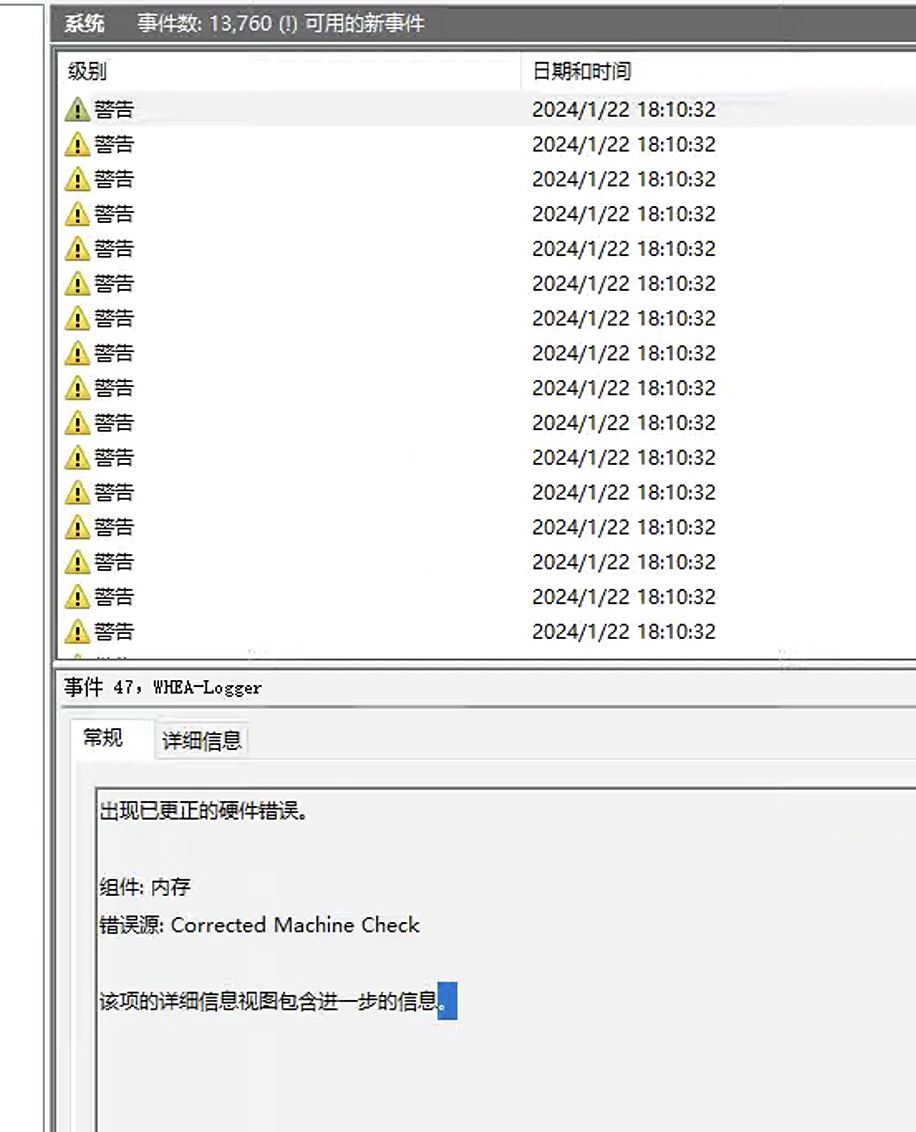
然后查看了系统日志,发现系统日志有很多错误警告,内存错误,Corrected Machine Check,于是将内存全拔下来,再一条条插上,发现有一条内存不兼容,换了一台内存后开机就正常了,CPU占用基本2%-5%左右。
记一次Windows主机system占用CPU过高,电脑很卡解决办法。

如果你也遇到类似的问题,那么可以用Windows自带的事件查看器,查看Windows系统的错误日志。

补充一下,电脑是Windows 10 专业版系统,硬件为:CPU双路E5 2696 v3,主板为X99,内存为:32G*8条=256G,系统盘:1T SSD nvme固态,数据盘:6块10T希捷企业盘,显卡为:四张4090,电源两个1250W。

原创文章,作者:老D,如若转载,请注明出处:https://laod.cn/7056.html