

惯性聚合 高效追踪和阅读你感兴趣的博客、新闻、科技资讯
阅读原文 在惯性聚合中打开

推荐订阅源

Google DeepMind News
Stack Overflow Blog
Stack Overflow Blog
Hugging Face - Blog
Hugging Face - Blog
博客园_首页
T
The Blog of Author Tim Ferriss
博客园 - 叶小钗
N
Netflix TechBlog - Medium
腾讯CDC
C
Check Point Blog
P
Proofpoint News Feed
Engineering at Meta
Engineering at Meta
GbyAI
GbyAI
S
SegmentFault 最新的问题
F
Fortinet All Blogs
美团技术团队
U
Unit 42
freeCodeCamp Programming Tutorials: Python, JavaScript, Git & More
博客园 - 司徒正美
F
Full Disclosure
Recorded Future
Recorded Future
D
DataBreaches.Net
博客园 - 【当耐特】
Martin Fowler
Martin Fowler
J
Java Code Geeks
I
InfoQ
Y
Y Combinator Blog
A
About on SuperTechFans
AI
AI
爱范儿
爱范儿
Exploit-DB.com RSS Feed
Forbes - Security
Forbes - Security
W
WeLiveSecurity
M
MIT News - Artificial intelligence
雷峰网
雷峰网
cs.CV updates on arXiv.org
Simon Willison's Weblog
Schneier on Security
The GitHub Blog
The GitHub Blog
Security Archives - TechRepublic
aimingoo的专栏
aimingoo的专栏
Cyber Security Advisories - MS-ISAC
G
GRAHAM CLULEY
Know Your Adversary
Know Your Adversary
Latest news
Latest news
Threat Intelligence Blog | Flashpoint
D
Docker
Recent Commits to openclaw:main
量子位
V2EX - 技术
V2EX - 技术
Project Zero
Project Zero

jax

微信AI生态要来了 WWDC26 观后感:苹果把AI塞进了每一个角落 我做了个 Coding Agent 用量统计 App DeepSeek-V4 技术解析:架构革新与 Coding Agent 后训练优化 在 Claude Code 中使用 Claude Opus 4.7 的最佳实践 我做了个 Chrome 插件,让 AI 编程时修改页面变得更容易 春节期间我做了个 Agent 客户端:TurboClaw 10分钟上手 Clawdbot/Moltbot/OpenClaw:需要给它配备个电脑的AI Agent 2025年的碎碎念 小白入门 Claude Code:从命令行到通用Agent 桌面级开源 AI Agent 的架构范式与未来趋势:Void、BrowserOS、CherryStudio 与 MineContext 观察 Gemini CLI系统提示词分享 Vibe Coding时代面向大模型沟通的奥秘 扣子空间Coze Space系统提示词分享 什么是Agent Loop
AI普惠!我用AI写了个免费提供大模型API的开放平台
2025-03-30 · via jax

Vibe Coding这个词火了,指挥AI干活的风潮席卷全球。为了验证当下的实际效果,最近正好想把多个模型供应商开放的免费模型放在一起,方便自己使用的同时,也能再降低独立开发者对接大模型API的门槛。

我用的工具:Trae国际版+Cursor(Claude3.5/3.7+DeepSeek-V3-0324)

技术架构:Next.js+Supabase+Vercel

如果你也想体验AI编程,推荐黄叔在WaytoAGI社区发布的Build on Trae系列教程,跟着实操很容易上手~

https://waytoagi.feishu.cn/wiki/O5V5wLC5Jiilpjk9j9RcAuACnZcWaytoAGI

直接进入正题:
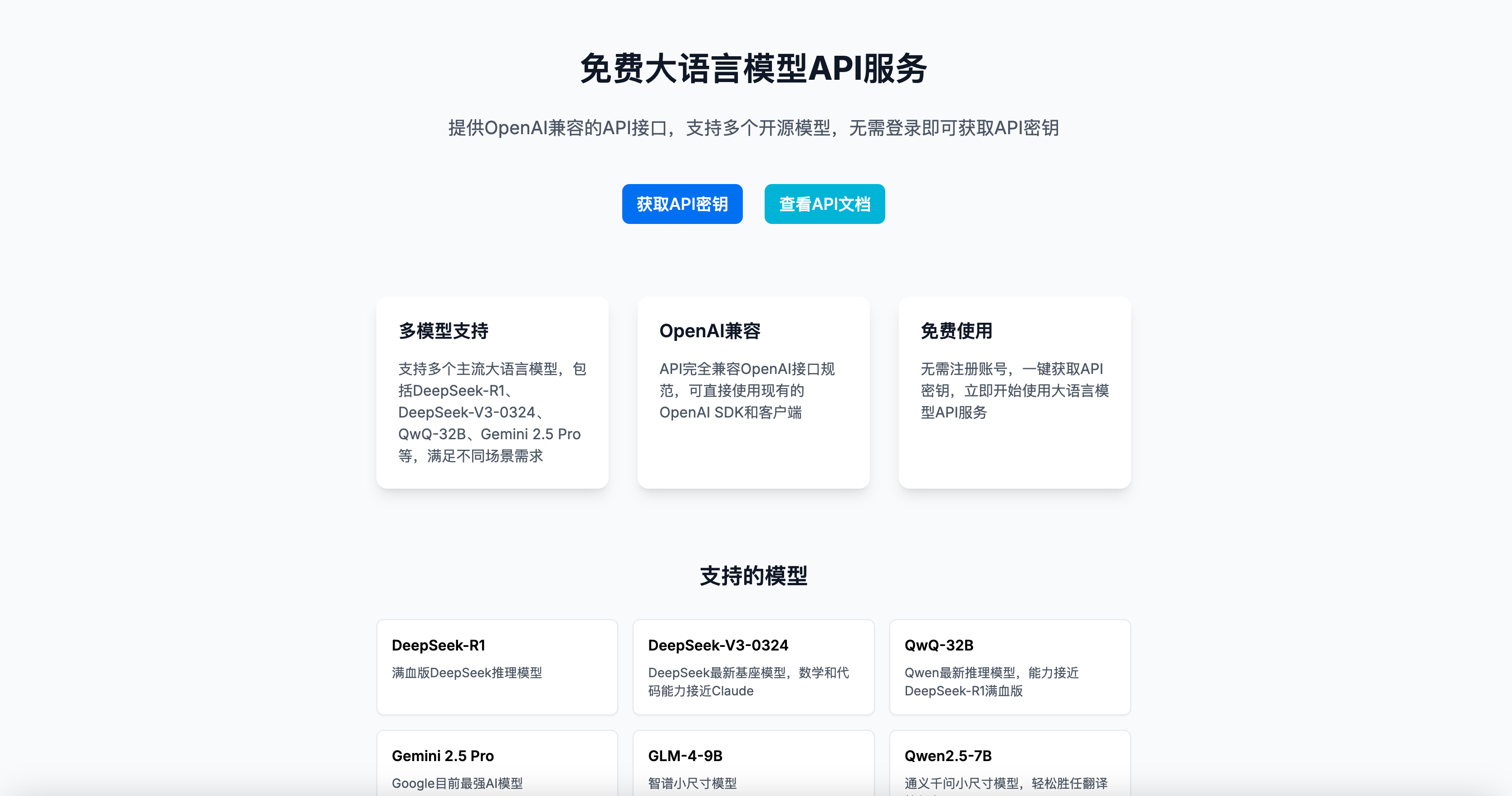
AI Tools开放平台

https://platform.aitools.cfd/

免注册登录,获取API密钥、接口地址、模型名称后直接使用,兼容OpenAI接口规范

目前支持多个最新主流模型(包括DeepSeek的满血版模型):

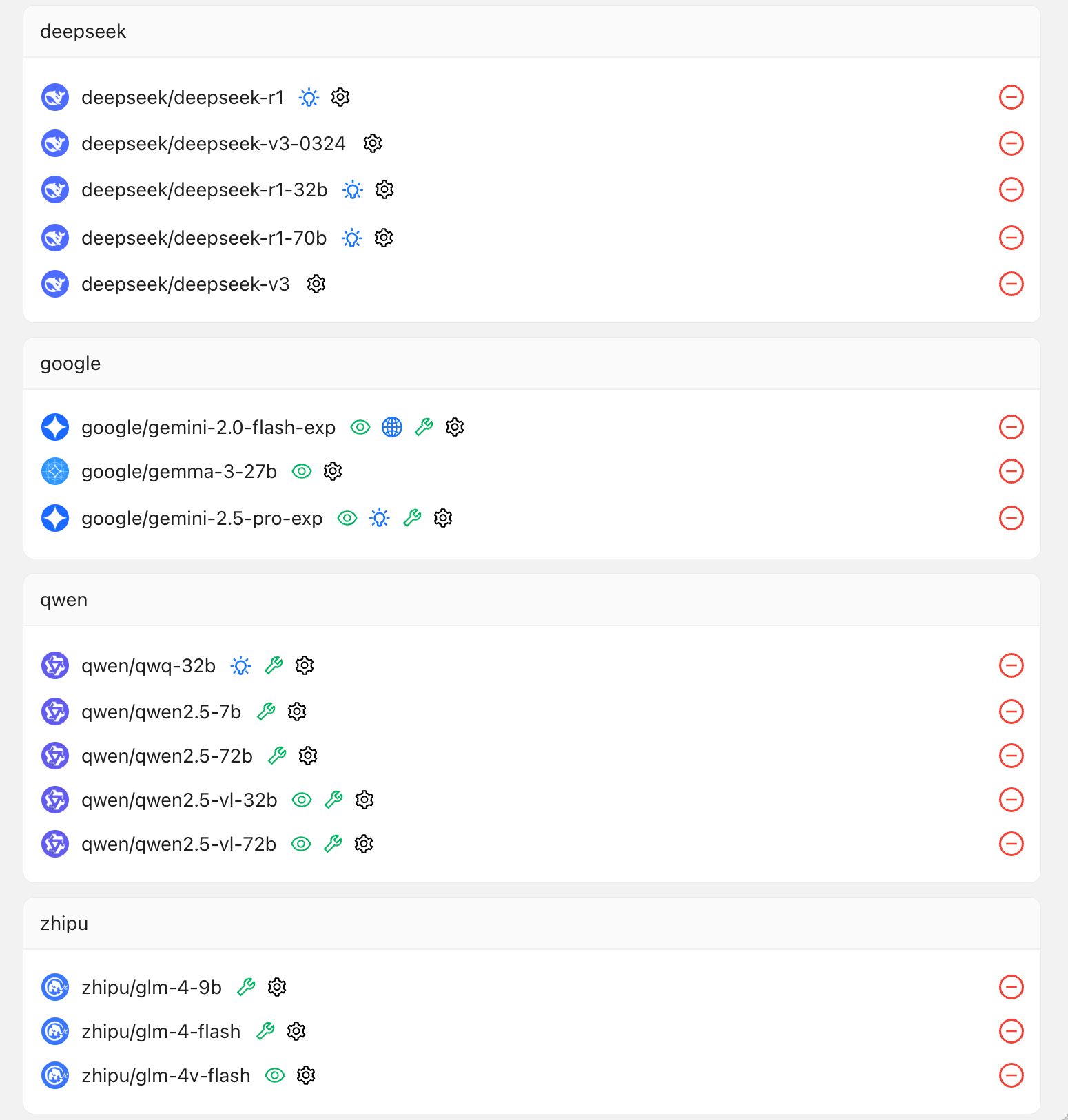
以开源模型为主,由OpenRouter、SiliconFlow等模型供应商提供,包括DeepSeek-R1、DeepSeek-V3-0324、Qwen2.5、QwQ、GLM-4-Flash、Gemini2.5Pro、Gemma3等,既有语言模型,也有多模态视觉模型,也有多个支持function call的模型。
以上是给开发者看的,那么普通用户如何使用呢:

1、下载安装CherryStudio:https://www.cherry-ai.com/download

官网如果无法访问,可用夸克网盘下载:https://pan.quark.cn/s/c8533a1ec63e

2、依次点击左下角“设置”图标、左侧“模型服务”菜单、点击“添加”,输入AI Tools

3、到这个页面获取API密钥:https://platform.aitools.cfd/key 粘贴到CherryStudio中

4、然后将这个地址https://platform.aitools.cfd/api 粘贴到“API地址”栏

5、点击添加模型,将以下模型id添加进来,你可以全部添加,也可以选择你想要使用的模型添加即可。

deepseek/deepseek-r1、deepseek/deepseek-v3、deepseek/deepseek-v3-0324、qwen/qwq-32b、google/gemini-2.5-pro-exp、zhipu/glm-4-9b、qwen/qwen2.5-7b、deepseek/deepseek-r1-32b、deepseek/deepseek-r1-70b、google/gemma-3-27b、google/gemini-2.0-flash-exp、qwen/qwen2.5-72b、qwen/qwen2.5-vl-72b、qwen/qwen2.5-vl-32b、zhipu/glm-4-flash、zhipu/glm-4v-flash

粘贴模型ID,下方的两项会自动填写,模型名称用于界面显示,可任意修改。

6、回到CherryStudio的首页,顶部选择好模型,就可以开始使用啦!