

惯性聚合 高效追踪和阅读你感兴趣的博客、新闻、科技资讯
阅读原文 在惯性聚合中打开

推荐订阅源

L
LINUX DO - 最新话题
云风的 BLOG
云风的 BLOG
博客园 - 三生石上(FineUI控件)
人人都是产品经理
人人都是产品经理
美团技术团队
V
Visual Studio Blog
有赞技术团队
有赞技术团队
WordPress大学
WordPress大学
Hugging Face - Blog
Hugging Face - Blog
博客园 - 司徒正美
D
Docker
宝玉的分享
宝玉的分享
小众软件
小众软件
U
Unit 42
A
About on SuperTechFans
I
InfoQ
CTFtime.org: upcoming CTF events
F
Fortinet All Blogs
Microsoft Security Blog
月光博客
月光博客
G
Google Developers Blog
The Cloudflare Blog
H
Help Net Security
B
Blog
The GitHub Blog
The GitHub Blog
T
The Blog of Author Tim Ferriss
I
Intezer
P
Privacy International News Feed
V
Vulnerabilities – Threatpost
奇客Solidot–传递最新科技情报
奇客Solidot–传递最新科技情报
Cyberwarzone
Cyberwarzone
C
Cyber Attacks, Cyber Crime and Cyber Security
Blog — PlanetScale
Blog — PlanetScale
C
Cisco Blogs
Project Zero
Project Zero
腾讯CDC
Help Net Security
Help Net Security
Latest news
Latest news
A
Arctic Wolf
T
The Exploit Database - CXSecurity.com
B
Blog RSS Feed
D
Darknet – Hacking Tools, Hacker News & Cyber Security
The Hacker News
The Hacker News
P
Palo Alto Networks Blog
AI
AI
Exploit-DB.com RSS Feed
让小产品的独立变现更简单 - ezindie.com
P
Proofpoint News Feed
J
Java Code Geeks
Cyber Security Advisories - MS-ISAC

CrazyWong

CrazyWong AI LOGO 🎧 Anson Seabra - Keep Your Head Up Princess 是的,我又更換了域名 1.5 萬字 CSS 基礎拾遺(核心知識、常見需求) JavaScript - 日期 Date JavaScript - 數組 Array 域名更換 前端 JavaScript 自測清單 2 前端 JavaScript 自測清單 1 通過travis-ci或者GitHub Actions自動化部署GitHub Pages和Coding Pages 添加Windows Terminal到鼠標右鍵菜單 調研實現高性能動畫 在瀏覽器輸入 URL 回車之後發生了什麼(超詳細版) hexo-theme-butterfly 安裝文檔(一)快速開始 設置Windows電腦自動關機 Windows必裝軟件推薦 關於字符編碼,你所需要知道的(ASCII,Unicode,Utf-8,GB2312…) 好用的新浪圖床工具推薦 - Weibo-Picture-Store Java知識點複習(二) Java知識點複習(一) Visual Studio Code 插件推薦-VSC Netease Music Windows上Java的環境變量配置 Adapter 9Patch 介紹 第一行代碼筆記-RecyclerView 為Blog添加版權説明 第一行代碼筆記-ListView 第一行代碼筆記-創建自定義控件 第一行代碼筆記-四大Layout Hexo和Next主題的相關設置(持續更新) 第一行代碼筆記-bulid.gradle 解析 第一行代碼筆記-Android Studio工程目錄結構介紹 第一行代碼筆記-工具日志log
重裝系統後重新部署恢復 Hexo blog
MYW · 2018-10-14 · via CrazyWong

以下方法只適用於沒有刪除 hexo blog 文件夾

因為重裝系統後,Hexo 相關依賴插件/軟件和在 C 盤的緩存資料都會被刪除,以至於 Hexo 的相關命令都無法運行。所有,在重裝系統後,都要重新部署 Hexo。但是重新部署並不難,只需要幾個步驟就行。
因為我的 hexo blog 文件夾不存儲於 C 盤,並沒有因為重裝系統被刪掉。所有重新部署很容易。

安裝 git 和 node

git for windows: https://git-scm.com/
Node.js: https://nodejs.org/en/

生成 ssh 密鑰

配置 git 個人信息和生成 ssh 密鑰
打開 git bash,輸入

1
2
3
git config --global user.name "xxxxx"
git config --global user.email "xxxxxx@xx.com"
ssh-keygen -t rsa -C "xxxxxx@xx.com"

把上面的 xxxx 換成自己的資料,然後一直 Enter 就行。

設置 Github 的 ssh 密鑰

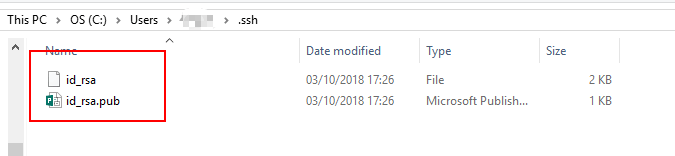
當上面的運行完成後,會在 C:\Users\主用户裏出現.ssh文件夾,裏面有 id_rsa 和 id_rsa.pub 兩個文件,複製 id_rsa.pub 的內容。
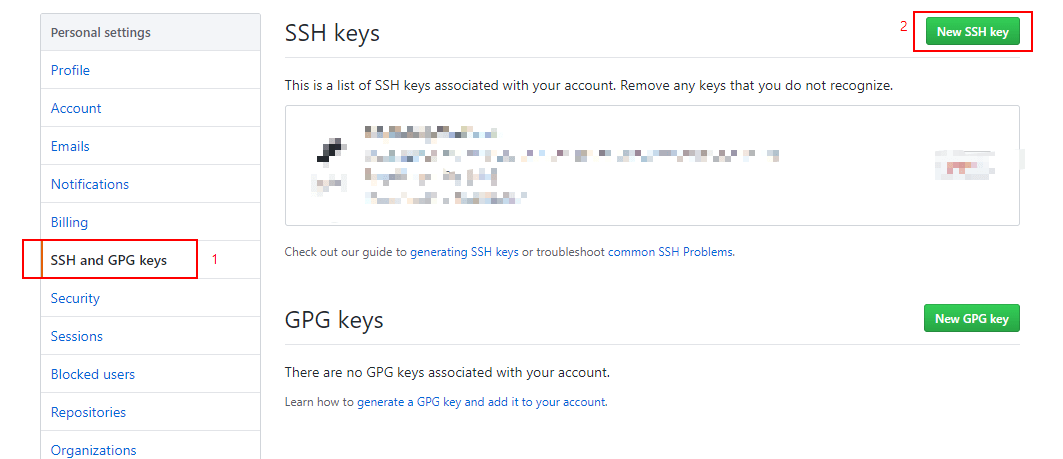
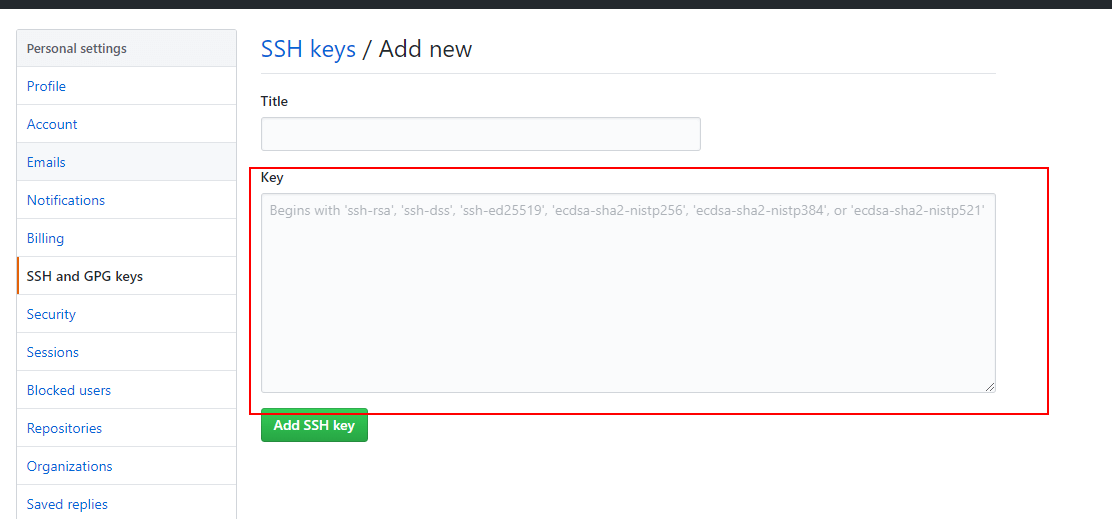
打開 Github 網頁,依次是 右上角Settings - SSH and GPG keys - New SSH key 把複製的內容粘貼到 Key欄,然後保存。
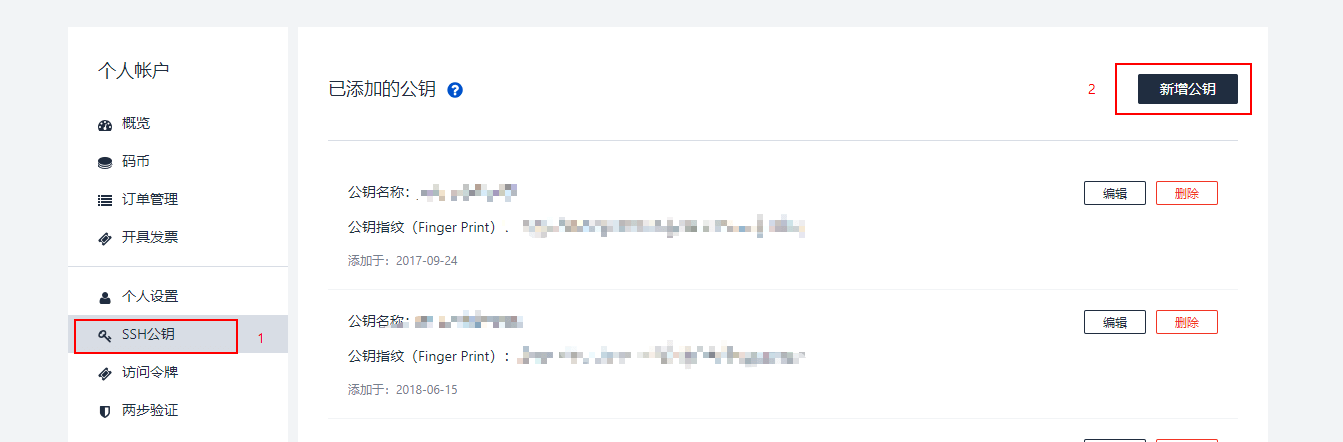
PS:如果你有把 blog 同步到 coding 的,記得同樣把 id_rsa.pub 的內容複製到 coding 的 ssh 公鑰去,具體為右上角個人設置 - SSH公鑰 - 新增公鑰
安裝 Hexo

git bash 上 輸入 npm install hexo-cli -g

刪掉原 blog 文件夾部分文件

打開你原有的 blog 文件夾,只需保留_config.yml,theme/,source/,scaffolds/,package.json,.gitignore 這些項目,刪除其他的文件。

安裝依賴文件

git bash 上 輸入 npm install

安裝部署插件

git bash 上 輸入 npm install hexo-deployer-git --save

最後 運行 hexo clean && hexo g && hexo d 看看是否成功。

本文章參考 https://helloqingfeng.github.io/2017/02/25/hexo-rebuilding/

版權聲明: 本部落格所有文章除特別聲明外,均採用CC BY-NC-SA 4.0 授權協議。轉載請註明來源 CrazyWong