






相關推薦
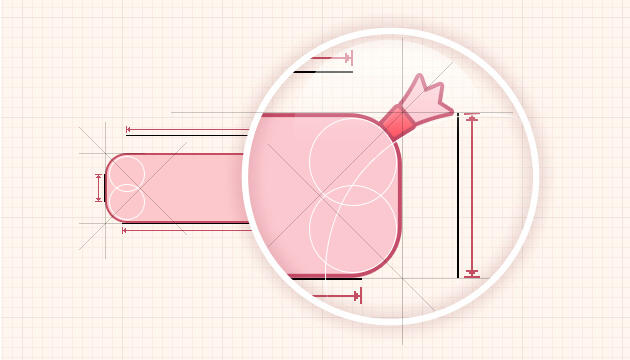
9Patch圖片介紹9Patch圖片是一種特殊的png圖片,以.9.png結尾,它在原始的圖片四周各添加一個寬度為1像素的像條,這4條線條決定了該圖片的縮放規則、內容顯示規則。 在Android Studio 上編輯.9.png,具體是在Android Studio上右鍵點擊你要編輯的照片,選擇Create 9-Patch file就可以進入編輯界面。 這就是9-Patch的編輯界面 Optional controls include: Zoom: Adjust the zoom level of the graphic in the drawing area. Patch scale: Adjust the scale of the images in the preview area. Show lock: Visualize the non-drawable area of the graphic on mouse-over. Show patches: Preview the stretchable patches in the drawing area (pink...
2018-07-05
第一行代碼筆記-創建自定義控件
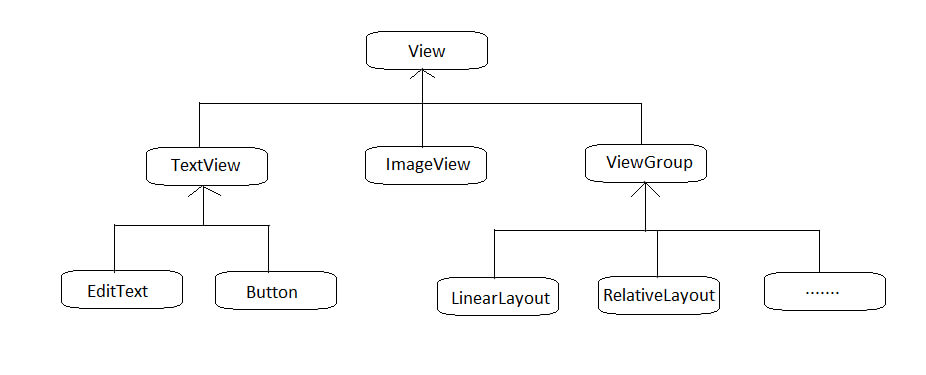
自定義控件 - 引入布局常見控件和布局的繼承結構所有的控件都是直接或者間接繼承於 View所有的布局都是直接或者間接繼承於 ViewGroupView 是 Android 中最基本的一種 UI 控件,它可以在屏幕上繪製一塊矩形區域,並能響應這塊區域的各種事件。ViewGroup 是特殊的一種 View,是一個用於放置控件和布局的容器 以添加 iPhone 風格的標題欄為例:當多個活動界面都要使用這個標題欄時,我們可以通過引入布局的方式,這樣可以避免每個活動界面都要寫一遍同樣的標題代碼,減少代碼重複。 創建布局文件新建一個 title.xml 12345678910111213141516171819202122232425262728293031323334353637<?xml version="1.0" encoding="utf-8"?><LinearLayout xmlns:android="http://schemas.android.com/apk/res/android" andro...

2018-07-05
第一行代碼筆記-ListView
手機屏幕空間有限,能顯示的內容不多。可以藉助ListView來顯示更多的內容。ListView允許用户通過上下滑動來將屏幕外的數據滾動到屏幕內,同時屏幕內原有的數據滾動出屏幕,從而顯示更多的數據內容。 ListView的簡單用法修改activity_main.xml1234567891011<LinearLayout xmlns:android="http://schemas.android.com/apk/res/android" xmlns:tools="http://schemas.android.com/tools" android:layout_width="match_parent" android:layout_height="match_parent" android:orientation="vertical" tools:context=".MainActivity"> <ListView...

2018-06-26
第一行代碼筆記-四大Layout
LinerLayout 線性布局LinerLayout, 中文名為線性布局。這個布局會將它所包含的控件在線性方向上依次排列。 我們可以通過android:orientation屬性來指定排列方向。 vertical為垂直方向,horizontal為水平方向 123456789101112131415161718192021<LinearLayout xmlns:android="http://schemas.android.com/apk/res/android" android:layout_width="match_parent" android:layout_height="match_parent" android:orientation="horizontal" > <Button android:layout_width="wrap_content" android:layout_heigh...
Adapter 只是一個接口,其派生了ListAdapter和SpinnerAdater兩個子接口。ListAdater為AbsListView提供列表項,SpinnerAdater為AbsSpinner提供列表項。以下是Adapter相關類的關係圖 Adapter常用的實現類: ArrayAdapter: 通常用於將數組或者List集合的多個值包裝成多個列表項。 SimpleAdapter: 用於將List集合的多個對象包裝成多個列表項。 SimpleCursorAdapter: 與SimpleAdapter基本相似,只是用於包裝Cursor提供的數據。 BaseAdapter: 通常用於被擴展。擴展BaseAdapter可以對各列表項進行最大限度地定製。 使用ArrayAdapter創建ListView修改activity_main.xml 123456789101112131415161718192021<LinearLayout xmlns:android="http://schemas.android.com/apk/res/android&quo...

2018-06-08
第一行代碼筆記-Android Studio工程目錄結構介紹
此内容由惯性聚合(RSS阅读器)自动聚合整理,仅供阅读参考。 原文来自 — 版权归原作者所有。