惯性聚合 高效追踪和阅读你感兴趣的博客、新闻、科技资讯
阅读原文 在惯性聚合中打开

推荐订阅源

钛媒体:引领未来商业与生活新知
钛媒体:引领未来商业与生活新知
T
Troy Hunt's Blog
P
Proofpoint News Feed
V
Vulnerabilities – Threatpost
C
Cybersecurity and Infrastructure Security Agency CISA
K
Kaspersky official blog
Cyberwarzone
Cyberwarzone
T
Tor Project blog
Cisco Talos Blog
Cisco Talos Blog
S
Securelist
L
Lohrmann on Cybersecurity
Security Latest
Security Latest
T
Threatpost
H
Heimdal Security Blog
W
WeLiveSecurity
A
Arctic Wolf
Cyber Security Advisories - MS-ISAC
奇客Solidot–传递最新科技情报
奇客Solidot–传递最新科技情报
G
GRAHAM CLULEY
IT之家
IT之家
freeCodeCamp Programming Tutorials: Python, JavaScript, Git & More
TaoSecurity Blog
TaoSecurity Blog
A
About on SuperTechFans
cs.CL updates on arXiv.org
N
News and Events Feed by Topic
Hacker News - Newest:
Hacker News - Newest: "LLM"
Last Week in AI
Last Week in AI
T
The Blog of Author Tim Ferriss
Threat Intelligence Blog | Flashpoint
Microsoft Azure Blog
Hugging Face - Blog
Hugging Face - Blog
Google DeepMind News
量子位
Stack Overflow Blog
Stack Overflow Blog
Know Your Adversary
Know Your Adversary
B
Blog RSS Feed
阮一峰的网络日志
阮一峰的网络日志
WordPress大学
WordPress大学
cs.CV updates on arXiv.org
AI
AI
OSCHINA 社区最新新闻
OSCHINA 社区最新新闻
博客园 - 司徒正美
Apple Machine Learning Research
GbyAI
GbyAI
Vercel News
Vercel News
C
Cyber Attacks, Cyber Crime and Cyber Security
Latest news
Latest news
D
Darknet – Hacking Tools, Hacker News & Cyber Security
大猫的无限游戏
大猫的无限游戏
Forbes - Security
Forbes - Security

CrazyWong

香港銀行開戶推薦 (附邀請碼) CrazyWong AI LOGO 🎧 Anson Seabra - Keep Your Head Up Princess 是的,我又更換了域名 1.5 萬字 CSS 基礎拾遺(核心知識、常見需求) JavaScript - 日期 Date JavaScript - 數組 Array 域名更換 前端 JavaScript 自測清單 2 前端 JavaScript 自測清單 1 通過travis-ci或者GitHub Actions自動化部署GitHub Pages和Coding Pages 添加Windows Terminal到鼠標右鍵菜單 調研實現高性能動畫 在瀏覽器輸入 URL 回車之後發生了什麼(超詳細版) hexo-theme-butterfly 安裝文檔(一)快速開始 設置Windows電腦自動關機 Windows必裝軟件推薦 關於字符編碼,你所需要知道的(ASCII,Unicode,Utf-8,GB2312…) 好用的新浪圖床工具推薦 - Weibo-Picture-Store Java知識點複習(二) Java知識點複習(一) Visual Studio Code 插件推薦-VSC Netease Music 重裝系統後重新部署恢復 Hexo blog Windows上Java的環境變量配置 Adapter 9Patch 介紹 第一行代碼筆記-RecyclerView 第一行代碼筆記-ListView 第一行代碼筆記-創建自定義控件 第一行代碼筆記-四大Layout Hexo和Next主題的相關設置(持續更新) 第一行代碼筆記-bulid.gradle 解析 第一行代碼筆記-Android Studio工程目錄結構介紹 第一行代碼筆記-工具日志log
為Blog添加版權説明
MYW · 2018-07-10 · via CrazyWong

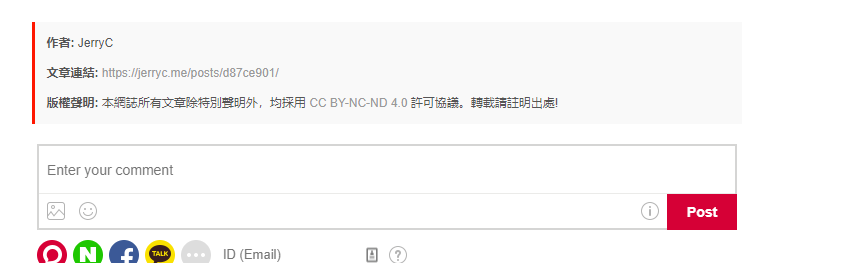
最近更換了新的Hexo主題hexo-theme-hiker,覺得挺好看的。文章底部沒有版權説明,自己動手加上。

themes\hiker\layout\_partial新建文件copyright.ejs

打開copyright.ejs,添加一下內容。

1
2
3
4
5
6
7
8
9
10
11
12
13
14
15
16
<div>
<ul class="post-copyright">
<li class="post-copyright-author">
<strong><%= __('copyright.author') %> </strong><%= config.author%></a>
</li>
<li class="post-copyright-link">
<strong><%= __('copyright.link') %> </strong>
<a href="<%- config.root %><%- post.path %>" target="_blank" title="<%= post.title %>"><%- config.url %>/<%- post.path %></a>
</li>
<li class="post-copyright-license">
<strong><%= __('copyright.license_title') %> </strong>
<%= __('copyright.left_license_content') %><a rel="license" href="https://creativecommons.org/licenses/by-nc-nd/4.0/" target="_blank" title="Attribution-NonCommercial-NoDerivatives 4.0 International (CC BY-NC-ND 4.0)">CC BY-NC-ND 4.0</a>
<%= __('copyright.right_license_content') %>
</li>
</ul>
<div>

修改article.ejs文件

打開themes\hiker\layout\_partial\article.ejs添加一下內容,位置介於donate和comment之間

1
2
3
4
5
6
7
8
9
10
11
<% if (!index && theme.donate.enable){ %>
<%- partial('donate') %>
<% } %>
<!-- 要添加的內容 -->
<% if (!index && theme.copyright.enable){ %>
<%- partial('copyright') %>
<% } %>
<!---->
<% if (!index && post.comments && (theme.gentie_productKey || theme.duoshuo_shortname || theme.disqus_shortname || theme.uyan_uid || theme.wumii || theme.livere_shortname)){ %>
<%- partial('comment') %>
<% } %>

修改 article.styl

修改themes\hiker\source\css\_partial\article.styl,在末端添加以下內容。

1
2
3
4
5
6
7
8
9
10
11
.post-copyright {
margin: 2em 0 0;
padding: 0.5em 1em;
border-left: 3px solid #FF1700;
background-color: #F9F9F9;
list-style: none;
}

.post-copyright li {
line-height: 30px;
}

修改語言文件

在themes\hiker\languages中,找到你應用的語言文件,例如zh-TW,打開並添加以下內容。

1
2
3
4
5
6
copyright:
author: "作者: "
link: "文章連結: "
license_title: "版權聲明: "
left_license_content: "本網誌所有文章除特別聲明外,均採用 "
right_license_content: "許可協議。轉載請註明出處!"

修改主題設置文件

打開themes\hiker\_config.yml,添加以下內容。

1
2
3

copyright:
enable: true

最後當然是 hexo clean && hexo g && hexo d 就可以看到結果了
資料參考

為Hexo icarus添加版權説明

版權聲明: 本部落格所有文章除特別聲明外,均採用CC BY-NC-SA 4.0 授權協議。轉載請註明來源 CrazyWong

